
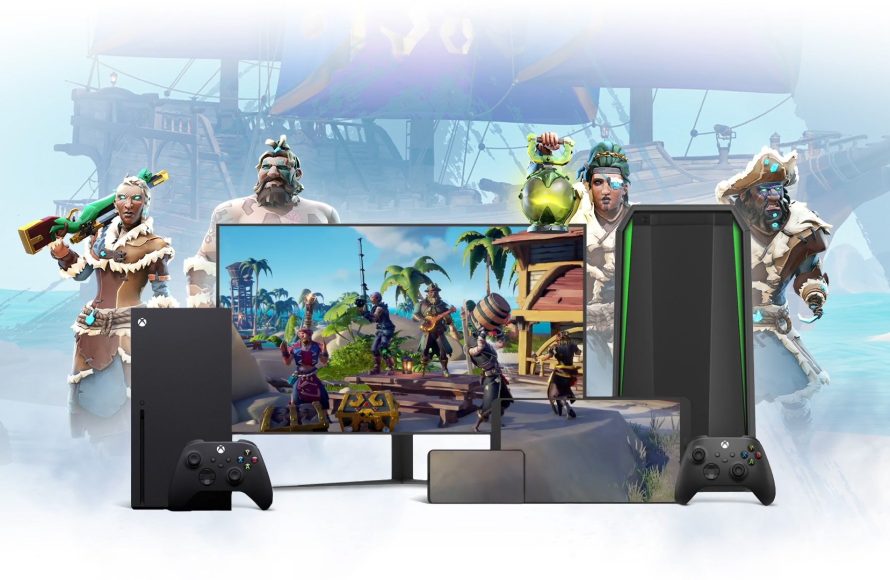
Xbox cloud computing services allow you to play games on various devices without needing a console, using remote servers for processing and rendering.
Imagine playing the latest Xbox games on your phone or tablet. That’s the power of Xbox cloud computing services, bringing console-quality gaming to almost any screen.
This technology removes the need for expensive hardware; the heavy lifting happens in the cloud. You simply need a good internet connection to jump into your favorite titles.

Xbox Cloud Computing Services: Gaming Anywhere, Anytime
Imagine playing your favorite Xbox games on your phone, tablet, or even a low-powered laptop, without needing a fancy console. That’s the magic of Xbox cloud computing services, often called Xbox Cloud Gaming. It’s like having a super-powered Xbox that lives in the internet, sending games straight to your screen. Let’s dive deep into how this works and what it means for you as a gamer.
What is Xbox Cloud Gaming?
Xbox Cloud Gaming is a service from Microsoft that lets you play Xbox games on different devices using the internet. Instead of your device doing all the heavy lifting to run the game, powerful servers in Microsoft’s data centers do all the work. These servers run the games and then send the video and audio to your device. Your device simply sends your controller inputs back to the server. This way, you don’t need to buy the newest and most expensive hardware to enjoy console-quality games. It’s like watching a movie, but instead of just watching, you’re playing!
How Xbox Cloud Gaming Actually Works
Think of it like this: you have a powerful friend (the server) who owns all the games and has the best gaming computer. You ask your friend to play a game, and your friend shows you the game on your screen. You control the game by sending signals (button presses) to your friend, who then does the action. All of this happens very fast over the internet, so it feels like you are playing directly on your own device.
The Role of Servers
Microsoft uses lots of powerful computers, called servers, in huge data centers all around the world. These servers are set up like Xbox consoles, but they’re much stronger. They run the games, record the images and sounds, and send them to you. When you press a button on your controller, that information goes back to the server, telling the game what to do. This constant back-and-forth happens very quickly so that you can have a smooth gaming experience. These servers are the backbone of Xbox cloud gaming. They are what makes it possible for you to play high-quality games without needing a powerful machine.
Data Transmission: The Internet’s Role
The internet is like the highway between you and the server. It carries all the game data to your screen and all your controller inputs back to the server. A good and stable internet connection is essential for a smooth cloud gaming experience. Think of it like trying to watch a movie that keeps stopping and starting – that’s what happens if your internet isn’t fast enough or stable. The better your internet connection, the smoother and more responsive the games will be. Faster speeds allow for clearer pictures and less lag, making the gameplay experience more enjoyable and immersive.
Input Lag and Latency
One thing that can sometimes happen is input lag. This is when there’s a slight delay between pressing a button and seeing the action happen on the screen. This delay is because the information has to travel over the internet. Microsoft is always working to make this lag as small as possible, by using faster servers and improving data transmission. A faster and more stable connection will always help in minimizing this input lag. So while cloud gaming may not be as instantly responsive as playing directly on an Xbox, improvements are continuously being made to bridge this gap, making it more competitive and user-friendly.
Devices That Support Xbox Cloud Gaming
One of the best things about Xbox Cloud Gaming is that you can use it on so many devices. This makes it easy to play games wherever you are.
- Smartphones and Tablets: Whether you have an Android phone or an Apple iPad, you can play Xbox games on the go. You just need the Xbox app and a good internet connection. Touch controls are available for many games, but you can also use a Bluetooth controller for a more console-like experience.
- PCs and Laptops: You don’t need a super-powered gaming computer to play Xbox games. If you have a Windows PC or laptop, you can use the Xbox app or play directly through a web browser. This is great for people who don’t want to spend a lot of money on gaming hardware.
- Xbox Consoles: Even if you have an Xbox One, you can play next-gen games via the cloud. This gives you access to games you may not have been able to play previously. This lets you try games that might be too demanding for your older hardware.
- Smart TVs: Some newer smart TVs now have the Xbox app built in. This means you can play Xbox games directly on your TV without needing a separate console or streaming device. This simplifies gaming and lets you play directly on a large screen.
Benefits of Using Xbox Cloud Gaming
Xbox Cloud Gaming offers many great advantages for gamers:
Playing Games on a Budget
The most obvious benefit is that you don’t need to buy an expensive Xbox console or a high-end gaming PC. You can play games on devices you likely already own, like your phone or laptop. This saves you a lot of money, and makes gaming accessible to more people. All you need is a subscription to Xbox Game Pass Ultimate, and you can access a library of games on your existing hardware. This can save you hundreds or even thousands of dollars on buying expensive hardware.
Access to a Huge Library of Games
With Xbox Game Pass Ultimate, you get access to a huge collection of games that you can play through the cloud. This includes many popular Xbox titles, new releases, and classic favorites. You don’t have to buy each game separately. This is a great way to explore a variety of games without spending a fortune. Xbox continues to update the games that are available through Game Pass Ultimate, giving gamers a continuous supply of new content.
Play Anywhere, Anytime
Because cloud gaming works on so many devices, you can play your games wherever you have an internet connection. You can play on the bus, in a coffee shop, or while traveling. You are not tied to one location. This portability and ease of access mean you can fit gaming into your busy life, whenever and wherever the opportunity presents itself. Whether you have five minutes or five hours, you can pick up your game and play.
No More Waiting for Downloads or Installs
Another amazing benefit is that you don’t have to wait for games to download or install. You can start playing immediately. This saves you time and also saves space on your device. If you have limited storage space on your phone or computer, this is a big deal. It lets you dive right into the action without any time-consuming waiting, a feature many gamers appreciate.
Xbox Game Pass Ultimate: The Key to Cloud Gaming
To really make the most of Xbox Cloud Gaming, you’ll need an Xbox Game Pass Ultimate subscription. This subscription gives you access to all the cloud gaming features, as well as a library of games to download and play on your Xbox console or PC. It also includes Xbox Live Gold, allowing you to play online with other players. Think of it as an all-in-one package for all your Xbox gaming needs.
What’s Included in Game Pass Ultimate?
- Access to Hundreds of Games: A huge library of games to play on your Xbox, PC, and through the cloud.
- Xbox Cloud Gaming: Ability to play games on various devices without needing downloads.
- Xbox Live Gold: Allows you to play online with other players and get extra benefits.
- New Games Added Regularly: The library is updated frequently with new games.
- Exclusive Member Perks: You receive extra perks like in game contents, discounts and more.
Internet Connection Requirements for Xbox Cloud Gaming
A solid internet connection is important for a good experience with Xbox Cloud Gaming. If your internet is slow or unstable, you might experience lag, buffering, or disconnections. Microsoft recommends a minimum download speed of 20 Mbps (Megabits per second). A faster connection, such as 50 Mbps or higher, provides a more stable and smooth experience. Also, look at your latency, which is the time it takes data to travel to the server and back. Lower latency is better for gaming. Think of latency as the delay between pushing a button and seeing the reaction on screen. Here are some additional tips:
- Use a Wired Connection: If possible, use an ethernet cable instead of Wi-Fi. A wired connection is generally more stable and faster than Wi-Fi.
- Minimize Network Usage: Make sure other devices on your network aren’t using too much internet while you’re gaming. This can slow down your connection and cause lag. Streaming videos, downloading large files, or other data intensive activities can interfere with your cloud gaming session.
- Check Your Router: Make sure your router is working well and has the latest software updates. A good router can improve your connection and reduce lag. Try restarting your router periodically to refresh the connection and resolve any technical issues.
Controlling Games in the Cloud
You have a few options when it comes to controlling your games on Xbox Cloud Gaming. The best choice depends on your device and preference. Here are the most common control methods:
Using a Controller
For the most console-like experience, a controller is highly recommended. You can use an Xbox wireless controller or another Bluetooth controller that works with your device. This gives you precise controls and makes it easy to play complex games. Most players will find using a controller more natural, as this is the standard method for console gaming. You can connect a controller via Bluetooth or a USB cable, depending on your device and controller.
Touch Controls
On smartphones and tablets, many games offer touch controls that are displayed on the screen. These controls might take some getting used to, but they’re convenient when you don’t have a controller available. They are a good option for casual gaming, especially when you’re on the go. Touch controls may not provide the same level of precision as a physical controller, especially for fast-paced games that require quick and accurate inputs.
Keyboard and Mouse
If you’re playing on a PC or laptop, you can often use a keyboard and mouse. Some games will work better with this type of control. However, not all games support keyboard and mouse input in the cloud, so it is not a universal option. When using a keyboard and mouse, consider the type of game you’re playing, some games have more natural controller experiences, while others, such as strategy games, may work better with keyboard and mouse controls.
The Future of Xbox Cloud Gaming
Xbox Cloud Gaming is constantly improving. Microsoft is working to make the experience even smoother and more seamless by expanding their server locations and enhancing their infrastructure. They’re also working on improving the technology so that input lag is minimized. We should see more and more games added to the Game Pass library, and also more devices will be supported in the future. It’s a developing area that looks very promising. As technology advances, cloud gaming will likely become an even more appealing way to experience games.
Advancements in Technology
One of the areas of improvement is the continued upgrading of data centers and servers. As technology improves and newer hardware is released, cloud gaming will become more responsive and efficient. Microsoft is also investing heavily in AI and other technologies to predict player behavior and adjust server performance, reducing latency and making for a smoother gaming experience. The use of more powerful and specialized servers will also allow for the cloud gaming service to increase the resolution of games and improve graphics quality.
Expanding Game Availability
Microsoft plans on increasing the number of games that are available through the cloud. This will include a wider range of titles and game genres. This will also include expanding availability to more areas and making the cloud service compatible with new types of devices. The company is also working with more game developers to make sure new titles are cloud compatible. The aim is to make almost any Xbox game available to play from the cloud, expanding the game library dramatically.
More Device Compatibility
The goal is to make Xbox cloud gaming available on an even wider range of devices. This includes more smart TVs, and even handheld gaming devices. As tech improves, cloud gaming will become even more integrated with different ecosystems. Microsoft also aims to expand compatibility with more web browsers and operating systems, making it more accessible to all gamers.
Troubleshooting Common Xbox Cloud Gaming Issues
Even with a good connection, you might occasionally run into some problems with Xbox Cloud Gaming. Here’s a look at some common issues and how to fix them:
- Lag or Stuttering: If your game is lagging, try restarting your router. Make sure other devices aren’t using your internet connection. Check your internet speed. Try moving closer to your Wi-Fi router or try an Ethernet cable to see if that improves your connection. Close any background applications that might be using your internet bandwidth, and restart the Xbox app or web browser.
- Input Lag: If there’s a delay between pressing a button and seeing it happen in the game, try a wired controller connection. Close out of any other applications and ensure your system has the latest software updates. You can also try switching servers to see if that provides a better connection.
- Connection Problems: If you’re losing connection, make sure your Wi-Fi signal is strong. Restart your modem and router. Ensure that the Xbox app or your web browser is updated to the latest version. Check if there are any maintenance periods scheduled that might be affecting the connection.
- Audio Problems: If you’re not hearing the audio in the game, try restarting the game and the device you’re using. Also make sure your device’s audio settings are configured correctly. Check the volume on your device and the app. Ensure you do not have headphones muted or disconnected.
- Controller Issues: If your controller isn’t working, try reconnecting it. Make sure it’s charged and compatible with your device. Update the firmware of your controller. If you still have issues, try a different controller to rule out hardware related issues.
Xbox Cloud Gaming is a game changer that is making gaming more accessible to more people. This innovative technology makes gaming more fun and convenient for everyone.
Next Gen Xbox One Console – Cloud Based Computing Services & Pre Owned & Always Online Info
Final Thoughts
Xbox cloud computing services offer convenient gaming across devices. Players enjoy access to a wide library without large downloads. This technology improves accessibility and provides flexible gaming options.
Ultimately, Xbox cloud computing services bring gamers more convenience and choices, providing play on various devices. These offerings push gaming boundaries. This technology shapes the future of accessible gaming.

