
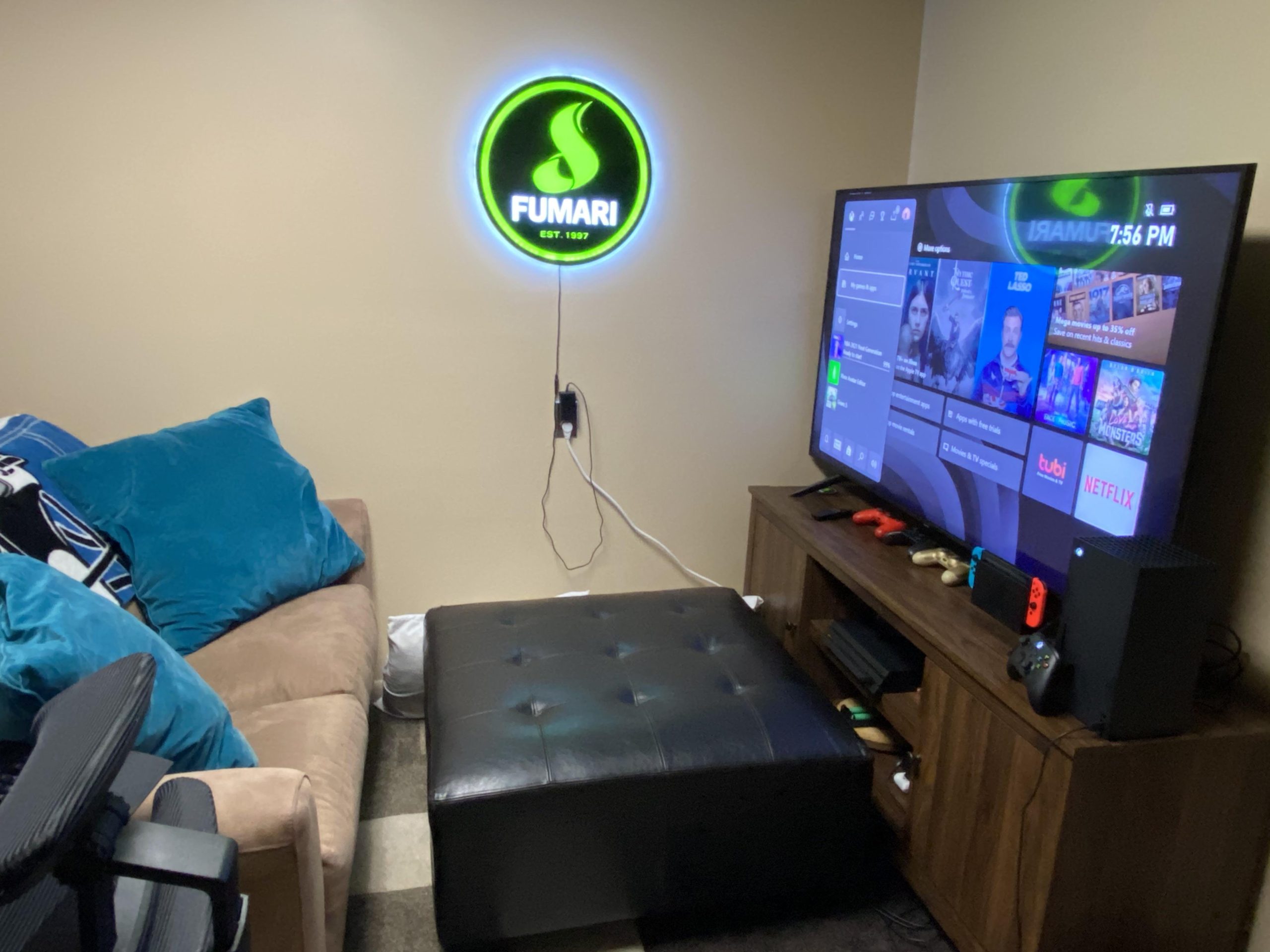
Creating Xbox comfortable gaming setups involves choosing ergonomic chairs, using a supportive headset, and positioning your screen at eye level to prevent strain.
Tired of that nagging back pain after a long gaming session? You’re not alone. Many players struggle to find the perfect setup. Finding a good way to enjoy playing while being comfortable can make a huge difference.
We explore ways to create Xbox comfortable gaming setups that feel great and also lets you play better. You can improve your gaming experience by focusing on your environment. This will not only improve comfort but your skills too.

Xbox Comfortable Gaming Setups
Let’s be real, gaming on your Xbox is awesome, but sometimes, it can get uncomfortable, right? We’ve all been there, hunched over, eyes strained, and maybe even a little sore after a long session. The good news is, it doesn’t have to be like that! Creating a comfortable gaming setup isn’t just about looking cool; it’s about making sure you can enjoy your games for longer without feeling like you’ve been through a workout. In this article, we’ll walk you through everything you need to make your Xbox gaming spot the most relaxing place in your house.
Finding the Right Seat: Your Gaming Throne
Your chair is like the captain’s seat of your gaming ship. It’s super important to pick one that feels good. Think about it – you’re going to be spending a lot of time in it! A bad chair can lead to back pain, neck aches, and all sorts of other problems that make gaming less fun. So, what should you look for?
Types of Gaming Chairs
- Standard Gaming Chairs: These are like the race car seats you see online. They often have high backs, adjustable armrests, and sometimes even built-in speakers. They’re great for a serious gaming vibe but can be a bit pricey.
- Office Chairs: Don’t count out a good office chair! Many offer great lumbar support and adjustability, which is what you need for longer playing sessions. Look for ones with mesh backs, they’re good for keeping you cool.
- Bean Bag Chairs: If you are looking for something more casual, a bean bag chair can be surprisingly comfortable, especially for just hanging out and playing. Just remember, they don’t offer back support.
Key Features to Look For
- Adjustable Height: Your feet should be flat on the floor, and your knees should be at about a 90-degree angle. This is super important for good posture.
- Lumbar Support: This is support for your lower back. It helps keep your spine in a good position and prevents aches.
- Adjustable Armrests: These should allow your arms to rest comfortably, reducing shoulder strain.
- Breathable Material: Choose fabrics like mesh or breathable leather to keep cool during intense gaming.
- Wheels or Casters: If you need to move around your setup easily.
Pro Tip: Test out different chairs if you can, before making your purchase. What feels great for one person might not work for another.
Setting Up Your Screen: Where Should It Be?
Having your monitor or TV in the right spot is another vital part of making your Xbox gaming space comfortable. It’s not just about getting a big screen; you need to make sure that it won’t strain your eyes or neck. So, here is the breakdown:
Ideal Distance and Height
- Distance: A good rule of thumb is to sit about an arm’s length away from your screen. This helps prevent eye strain. For larger TVs, you may need to sit a bit further back.
- Height: The top of your screen should be level with your eyes, or slightly below. If it’s too high or too low, you’ll be looking up or down, which will cause neck strain over time.
Types of Displays
- Monitors: These are often smaller and have lower input lag (which is good for online gaming). They are meant to be used on desks.
- TVs: These come in many sizes, and work well for larger spaces and groups of players. Make sure to consider the refresh rate for smoother gameplay.
Mounting Options
- Desk Mounts: Good for smaller monitors. They can move your monitor around easily.
- Wall Mounts: Saves space and lets you position your screen at the perfect height.
- Stands: They are the easiest to set up, but they offer less flexibility than the mounts.
Pro Tip: Try moving your screen to different positions to see what works best. A small adjustment can make a big difference!
Sound Advice: Audio for a Better Gaming Experience
Sound is a really important part of gaming. Good audio can make a world of difference to how much you enjoy your games. It can be the difference between hearing footsteps sneaking up behind you and getting surprised by an enemy. There are many options for audio, and we will explore those now.
Headphones vs. Speakers
- Headphones: Great for immersive gaming. They block out external sounds, and are good for online communication with friends. They can also prevent others around you from being disturbed.
- Speakers: Good for playing with a group. They can create a room filling sound, and can be set up to make good surround sound.
Types of Headphones
- Over-Ear Headphones: These cover your entire ear and give you great sound quality.
- On-Ear Headphones: These are smaller and rest on your ear. They are usually lighter, but sometimes they let more outside noise in.
- Earbuds: These are the smallest and easiest to carry around. However, they may not offer the same quality sound as larger headphones.
Surround Sound Systems
- 5.1 Surround Sound: Uses five speakers and a subwoofer to give you sounds from all around.
- 7.1 Surround Sound: Uses seven speakers and a subwoofer for even more precise audio.
Pro Tip: Consider a headset with a good microphone if you play online with friends or do game streaming.
Controlling the Chaos: Cable Management
Cables everywhere! It is a common sight in any gaming setup. It looks messy and can even become a safety problem. Proper cable management not only makes your setup look cleaner, but it also prevents you from tripping over wires and tangling them up. Here are some simple ways to get your cables organized:
Cable Management Solutions
- Cable Ties: These are simple and cheap way to bundle your cables together.
- Cable Sleeves: These cover multiple cables to make them look like one neat cord.
- Cable Clips: These stick to the back of your desk or walls, and keep cables from hanging everywhere.
- Cable Boxes: These hide your power strips and excess cables.
Tips for Good Cable Management
- Plan Ahead: Before you start setting up, plan where all of your cables will go.
- Use Velcro Ties: They are easier to reuse than zip ties.
- Keep it tidy: Route your cables along the back of your desk, or underneath.
- Label your cables: It can be helpful for unplugging or rearranging the setup later.
Pro Tip: Don’t try to do it all at once. Take it in small steps and tidy as you go.
Lighting It Up: Setting the Right Mood
Lighting can make a huge difference in your gaming experience. Good lighting can prevent eye strain, and it can make your gaming area feel more immersive. Here’s how to get your lighting just right.
Ambient Lighting
- Light Placement: Position the lamps so they don’t create glare on your screen.
- Soft Light: Avoid harsh lights, that will strain your eyes.
- Color Temperature: Warm light (yellowish) is generally better for your eyes and relaxing.
Accent Lighting
- LED Strips: These can go behind your monitor or along your desk and provide a cool glow.
- Smart Lights: You can change their colors and brightness with your phone, and set them to match the game.
- Desk Lamps: Can be used to highlight specific areas of your setup or desk.
Tips for Great Lighting
- Minimize Glare: Make sure your light source is not reflected on your screen.
- Use Dimming Options: If you play at night, turn your lights down to minimize the difference with your screen brightness.
- Personalize It: Choose lights and colors you like, to make the space feel yours.
Pro Tip: Try out different light combinations to find what you like best and find a setting that matches the mood of your game.
The Ergonomic Edge: Taking Care of Your Body
It’s not just about the equipment you use, it’s also about how you use it. Ergonomics is all about setting things up to work with your body, not against it. Doing things ergonomically can keep you comfortable and prevent aches and pains. Here’s what you need to know.
Proper Posture
- Sit Upright: Avoid slouching or hunching.
- Feet Flat: Make sure your feet are firmly on the floor.
- Relaxed Shoulders: Keep your shoulders down and relaxed.
- Head Neutral: Your head should be in line with your spine.
Taking Breaks
- Regular Breaks: Get up and stretch or walk around every 30-60 minutes.
- Eye Breaks: Look away from your screen every 20 minutes for 20 seconds to avoid eye strain.
Stretches and Exercises
- Neck Stretches: Gently tilt your head from side to side and forward and backward.
- Wrist Stretches: Rotate your wrists and gently move them up and down.
- Back Stretches: Stand up and reach for the sky, or do some gentle twists.
Pro Tip: Get in the habit of setting timers to remind yourself to take breaks.
Personalizing Your Space: Make It Your Own
Making your gaming space your own is important. It should be a place that reflects you, and makes you feel relaxed and happy. Here’s how you can add some personal touches.
Wall Art
- Posters: Show off your favorite games and characters.
- Framed Art: Display art that you love.
- Shelving: Display collectibles or other gaming items.
Comfort Items
- Blankets: Keep warm and cozy with your favorite blanket.
- Pillows: Add some comfortable pillows to your gaming chair.
Plants and Nature
- Small Plants: Bring a little bit of nature into your space.
- Natural Wood: Use natural wood to give a warm, comfortable feel to your setup.
Pro Tip: Don’t be afraid to add items that are not traditionally “gaming” focused. It’s about creating a space that you enjoy.
Budget-Friendly Tips: Creating Comfort Without Breaking the Bank
Creating a comfortable gaming setup doesn’t have to be crazy expensive. There are many things you can do to improve your gaming experience without spending a lot of money. Let’s look at some ideas on how to get comfortable on a budget.
Repurposing Items
- Use what you have: Start with the chair and desk that you already own.
- DIY projects: Build your own cable management tools or monitor stand.
Shopping Smart
- Buy Secondhand: Check websites and stores that sell used equipment for cheaper prices.
- Sales and Deals: Wait for sales or discounts on gaming equipment.
- Compare Prices: Look at the price of items from different vendors.
Affordable Comfort Options
- Comfortable Cushion: Add a cheap cushion to your existing chair.
- Low-Cost Lighting: Use cheaper LED lights for ambience.
- DIY Cable Management: Make your own cable ties or clips from everyday items.
Pro Tip: Don’t be afraid to get creative with materials you already have around the house.
Setting up a comfortable gaming space is all about making it enjoyable for you. From choosing the right chair and screen placement to managing cables and having the right lighting, it’s the little things that come together to improve your experience. Remember, it is your gaming space, so take the time to adjust it in a way that makes you happy. Make sure to adjust your settings and setup until it works for you, so that you can game comfortably for hours at a time, without straining your body or eyes. Now get back to gaming!
Turning my Xbox Series S into a Gaming PC! 😱
Final Thoughts
Optimizing your space for enjoyable play sessions makes a significant impact. Consider chair ergonomics, proper monitor placement, and the ideal distance for viewing. Good lighting helps reduce eye strain during gameplay.
These simple adjustments provide a more pleasant and focused gaming environment. You can easily create a setup that suits your personal preferences. Focus on key aspects for better Xbox comfortable gaming setups.
Ultimately, achieving an ideal setup enhances the gaming experience. Experiment with different layouts and equipment to find what works best for you. Prioritize comfort when building Xbox comfortable gaming setups.

