
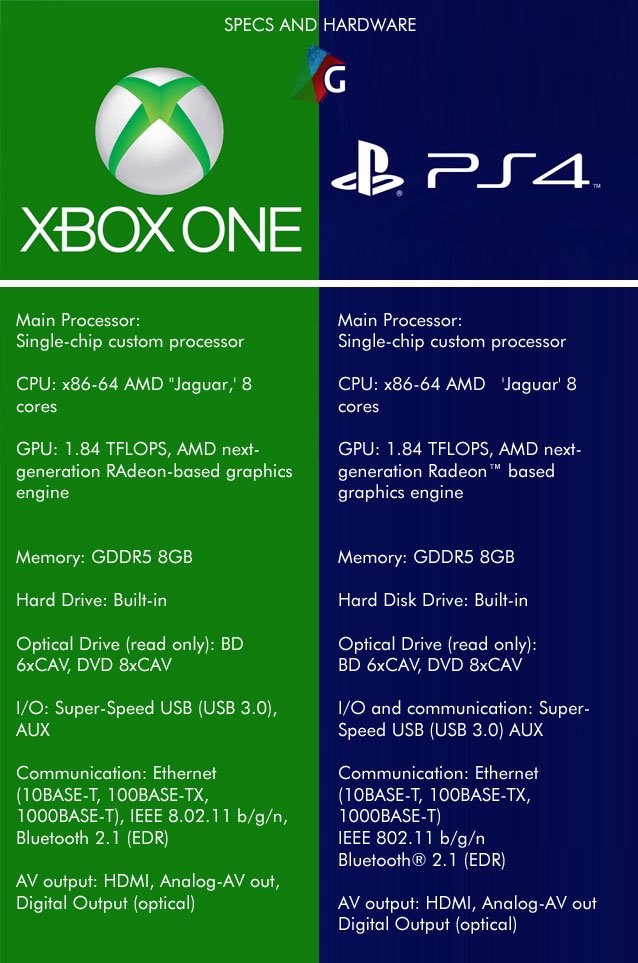
The Xbox console hardware specifications include components like custom AMD processors, varying amounts of RAM, and fast SSD storage solutions, directly impacting game performance and loading times.
Curious about what makes your favorite Xbox games run so smoothly? We often discuss the games themselves, but the real power comes from inside the console. Understanding the Xbox console hardware specifications is crucial for knowing what enables that incredible gaming experience. Let’s dig into the components responsible for fast gameplay.
These specifications not only dictate performance but also influence graphical fidelity and the overall feel of the gaming session. Knowing about the processors, RAM, and storage really allows you to appreciate the engineering involved.

Xbox Console Hardware Specifications
Okay, gamers! Let’s dive deep into the super cool stuff that makes your Xbox games run so smoothly. We’re talking about the real nuts and bolts – the actual parts inside the Xbox that make the magic happen. You know, like the brain (CPU), the memory, and the graphics card. This is where we explore the power that’s packed into those sleek consoles.
Understanding the Core Components
Think of your Xbox like a super-powered computer built just for gaming. It has all the same basic parts, but they are designed to work together to create the best game experience. Let’s look at some of the key pieces that make up an Xbox.
The Central Processing Unit (CPU)
The CPU is the brain of the Xbox. It’s responsible for doing all the calculations that make your games work. It’s like the conductor of an orchestra, telling all the other parts what to do. A faster CPU means games can run more smoothly, and can handle more complicated things happening on the screen at the same time. The more complex the game, the more the CPU has to work. Both the Xbox Series X and Series S use custom CPUs built by AMD. These aren’t just ordinary computer CPUs; they are specifically made for gaming.
- Xbox Series X: Has a custom 8-core AMD Zen 2 processor. That’s like having eight brains working together! This allows it to handle very complex games at high speeds.
- Xbox Series S: Also has a custom 8-core AMD Zen 2 processor, but with a slightly lower clock speed. This means it can still handle games well but might not run at the absolute highest speeds like the Series X.
The “Zen 2” architecture is a type of design that allows the processor to do more work for every clock cycle. Imagine it as having a faster set of gears that allows the Xbox to quickly process the calculations that create the game. The core counts (how many “brains” it has) and the clock speed (how fast it operates) are different between the Xbox Series X and S, impacting gaming capabilities and performance.
The Graphics Processing Unit (GPU)
The GPU is like the artist of your Xbox. It’s in charge of creating all the images you see on your TV or monitor. It draws the characters, the backgrounds, and all the cool special effects. A powerful GPU means you get sharper images, more detailed environments, and smoother movements. Just like the CPU, the GPU is also made by AMD, customized just for the Xbox. The GPU is what handles the graphic processing and ensures that all the visuals appear exactly as the game developers intended.
- Xbox Series X: Has a much more powerful GPU with a higher teraflop rating. Teraflops are like a measure of how many math calculations the GPU can perform per second, and the Series X GPU can process way more than the Series S. This translates to beautiful 4K graphics and the highest detail levels.
- Xbox Series S: Has a less powerful GPU than the Series X. It’s designed to target 1440p resolution, which is still very good, but not quite as detailed as 4K. This allows the Series S to be more affordable while still giving you a good-looking gaming experience.
The difference in the GPU power is one of the biggest differences between the two consoles. This is why the games often look sharper and smoother on the Xbox Series X, especially on a 4K screen. When you see things like ray tracing and very high frame rates, it’s mostly thanks to the power of the GPU.
Random Access Memory (RAM)
RAM is like the short-term memory of your Xbox. It is where the console stores all the information it needs right now to run your game. The more RAM your Xbox has, the more information it can hold, and the faster it can switch between different tasks within a game. When we say ‘multitasking’ in context of game, ram is used for fast loading and smooth gameplay experience. Think of it as a workbench where the Xbox can keep all its tools and game parts, so it can quickly access what it needs to keep running the game.
- Xbox Series X: Has 16 GB of GDDR6 RAM. This is fast memory designed for graphics and high-performance tasks. Having more RAM helps it quickly load big game areas.
- Xbox Series S: Has 10 GB of GDDR6 RAM. Although it has less than the Series X, it’s still enough to run games well for its targeted resolution. This is because the Series S does not need to use as much RAM to manage 1440p graphics.
GDDR6 is a faster type of RAM than what was in previous consoles. This makes a huge difference in how quickly games load and run, particularly for open world and larger games. You could compare it to a student having a very fast set of hands and can quickly grab items needed to complete their work faster.
Storage
The storage drive is where your Xbox keeps all your games, save files, and apps. This is like your Xbox’s filing cabinet. Games are getting bigger, so having enough storage space is very important. Both Xbox Series consoles use a type of storage called NVMe SSD, which is super fast compared to older hard drives. It allows for much quicker game loading times and faster transitions within the games.
- Xbox Series X: Comes with a 1 TB NVMe SSD. That’s a lot of space to store multiple big games.
- Xbox Series S: Has a 512 GB NVMe SSD. That’s less space than the Series X, so you will need to manage your games more carefully. It may require deleting games you don’t play much to install new ones.
Because the SSDs are so fast, games now load almost instantly and the overall game experience is far more fluid and responsive. This fast storage means that when you go to a new area, you don’t have to wait long and can start playing almost right away. The storage on both Xbox consoles can be expanded with external storage devices, which is very important for those with extensive game libraries.
Diving Deeper: Specific Technology
Now let’s look at some of the specific technologies used in the Xbox Series consoles that make them special.
Velocity Architecture
This is a special system design that works with the CPU, GPU, and storage together to quickly load game data and make gameplay very responsive. It includes special hardware features and software techniques to manage memory and storage, allowing the Xbox to quickly load and switch between different parts of the game.
Think of it like having a well-coordinated team: the CPU gives instructions, the GPU creates images, the RAM remembers what’s needed, and the storage provides the game data, all working quickly and efficiently together to give you the best gaming experience. Velocity Architecture allows your console to read all the game assets from storage with very high speed, enabling faster load times.
Ray Tracing
Ray tracing is a technology that creates realistic light and shadow effects in games. It simulates how light bounces off surfaces, making everything look much more lifelike. If you notice the way light reflects from a shiny surface, like a car, or how shadows move realistically in game, you are seeing ray tracing in action. Not all games use ray tracing, but when a game does, it can make a big difference in the graphics quality.
- Xbox Series X: Can handle ray tracing at a high level, allowing for very realistic lighting and reflections.
- Xbox Series S: Supports ray tracing, but may not be as detailed as on the Series X due to less powerful GPU. It may sometimes have fewer or less detailed ray tracing effects compared to Series X.
Ray tracing can make a big difference, especially in games with highly detailed environments. It makes games more visually immersive and enjoyable. For example, the reflection of the light in a pool of water will look much more natural with ray tracing enabled.
Variable Refresh Rate (VRR)
VRR is a cool feature that helps make your games run more smoothly on screens that support it. It means your TV or monitor’s refresh rate (how many times the image changes per second) can adjust to the frame rate of the game. This helps reduce screen tearing, which are visual glitches that appear when game frames are rendered out of sync with the display rate. With VRR, there will be less tearing and the game will look smoother.
It’s like a perfect dance between your Xbox and your screen, where they both are communicating with each other in a perfect manner. Without VRR, you might sometimes notice that there are visual lines appearing when there is too much action on the screen. VRR keeps the game looking smooth and removes those distracting lines.
Audio Technology
Both Xbox Series consoles use advanced audio technology to make sounds more immersive. They use technologies that support 3D spatial audio which enables players to precisely identify sound directions, therefore improving the overall game experience. It helps make the game world sound more real, whether you are hearing the roar of an engine or the rustling of leaves. It’s as if the sounds are coming from different places around you, not just from your speakers. This provides a richer and more convincing game world experience.
This is a big jump from older consoles where sound felt more basic and less directional. The better the audio, the more you are engaged with the game world, whether that is listening to the footsteps in the dark or hearing distant explosions.
A Side-by-Side Comparison of Xbox Series X and Series S
Let’s put the Xbox Series X and Series S side by side, so you can see how they are different. It’s good to know this when you are deciding which console is the right one for you. These differences result in different price points.
| Feature | Xbox Series X | Xbox Series S |
|---|---|---|
| CPU | Custom 8-Core AMD Zen 2 | Custom 8-Core AMD Zen 2 (Lower clock speed) |
| GPU | Custom AMD RDNA 2 (12 TFLOPs) | Custom AMD RDNA 2 (4 TFLOPs) |
| RAM | 16 GB GDDR6 | 10 GB GDDR6 |
| Storage | 1 TB NVMe SSD | 512 GB NVMe SSD |
| Target Resolution | 4K | 1440p |
| Disc Drive | Yes (4K UHD Blu-ray) | No (Digital Only) |
| Typical Price | Higher | Lower |
As you can see, the Xbox Series X is more powerful, with a faster CPU, a much more powerful GPU, more RAM, and more storage. This allows it to run games at a higher resolution with better graphics and faster loading times. The Xbox Series S is a more affordable option designed to run games at 1440p. Both consoles use the same architecture, but the hardware differences lead to different gaming experiences. The Series S is a great option for gamers who are okay with lower resolution and don’t need a disc drive.
So, that is a deep dive into the hardware of the Xbox consoles. Whether you’re using the powerful Series X or the more compact Series S, they are both fantastic pieces of technology that bring amazing gaming experiences. Understanding what’s inside helps you appreciate just how much goes into your favorite games. Now you know exactly what is doing all that work behind the scenes!
Xbox One Hardware Overview
Final Thoughts
Xbox console hardware specifications show a clear progression over generations. The latest models offer powerful CPUs and GPUs for enhanced gaming. This results in detailed graphics and smooth gameplay.
These specifications include varying amounts of RAM and storage space. Faster storage solutions significantly improve game loading times. The core hardware components define the capabilities of each console.
Ultimately, understanding Xbox console hardware specifications allows players to choose the best fit for their gaming needs.

