
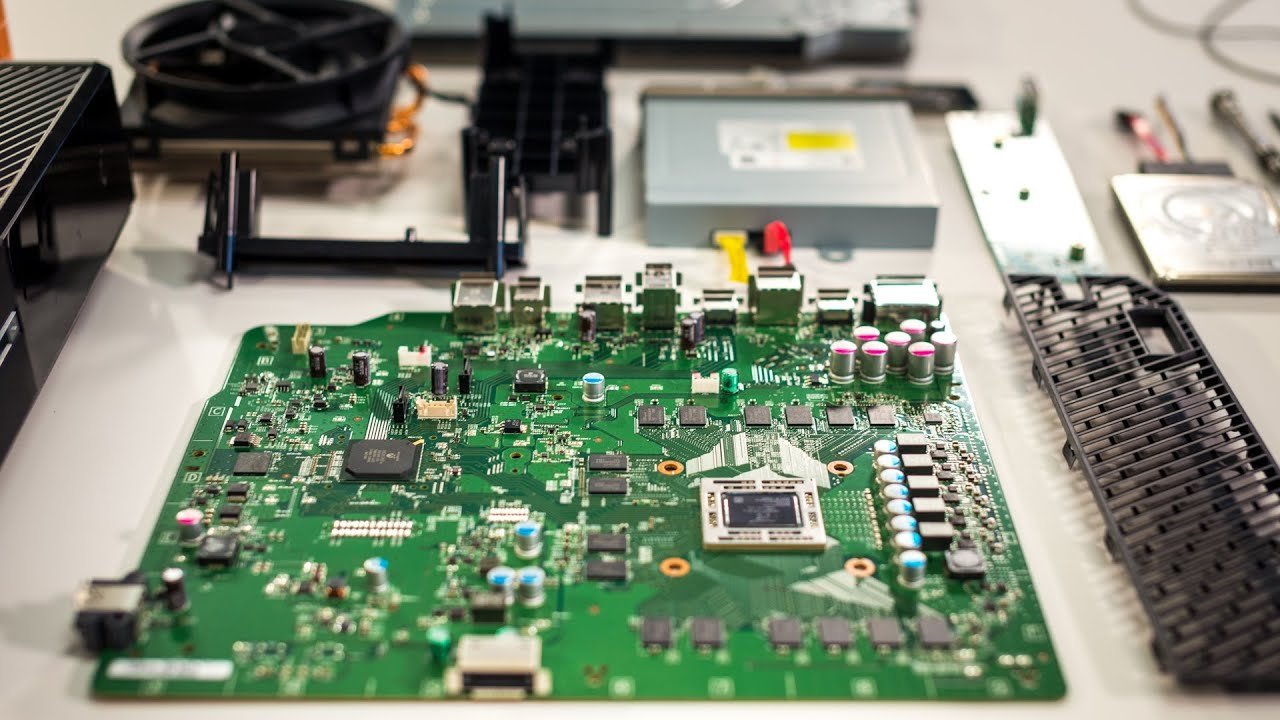
Xbox console internal components include a CPU, GPU, RAM, storage (SSD or HDD), a cooling system, and a power supply.
Ever wondered what makes your Xbox tick? It’s more than just a plastic box; it’s a carefully constructed machine. We delve into the heart of the matter to explore the key elements that power your gaming experience.
This article will give a quick overview of the Xbox console internal components. We’ll touch on the vital parts, each performing a crucial role. From processing power to visual rendering, every aspect contributes to the magic of gaming.

Xbox Console Internal Components
Have you ever wondered what makes your Xbox games run so smoothly? It’s not just magic! Inside that sleek box, there are many different parts working together. These parts are called internal components. Let’s take a peek inside and learn about what each one does.
The Brain: Central Processing Unit (CPU)
Just like your brain helps you think and do things, the CPU is the brain of the Xbox. It’s a tiny chip, but it’s super powerful! The CPU follows instructions from the game you’re playing. It does all the calculations needed to make the game work properly, like how fast characters move or how many enemies appear. The CPU is important for the overall speed and performance of the Xbox. Think of it as the main manager, making sure all the other parts know what to do.
CPU Cores and Threads
CPUs have something called cores. Think of cores like individual workers inside the CPU. More cores mean the CPU can do more work at once. Many modern CPUs, like those in Xbox Series X|S, have multiple cores, allowing them to handle complex games with ease. Each core can also run multiple threads. Threads are like small tasks that the core can do at the same time, making the CPU even more efficient. It is this clever use of cores and threads that allow your Xbox to run demanding games without slowing down. For example, an eight-core processor with sixteen threads can handle many different aspects of a game all at once.
CPU Clock Speed
Another important feature of a CPU is its clock speed. This is how fast the CPU works, measured in gigahertz (GHz). A higher clock speed usually means the CPU can do things faster. The CPU’s clock speed allows your games to react quickly to your controller inputs, so if you press a button to jump your character jumps instantly.
The Artist: Graphics Processing Unit (GPU)
The GPU is like the artist of the Xbox. It’s another chip that focuses on making all the pictures you see on the screen. It handles the graphics, such as the characters, backgrounds, and special effects. It takes all of the information the CPU provides, and turns it into the images you enjoy when playing a game. The GPU is responsible for the realistic graphics, detailed textures, and stunning visuals that make games look so good. Without a capable GPU, games wouldn’t look very impressive. It’s a crucial component for the modern gaming experience.
GPU Memory
The GPU also has its own special memory, separate from the system memory (RAM). This memory allows it to store all the necessary textures, models and visual data it needs for games. Having its own memory lets the GPU access information quickly, and this is important for smooth gameplay and great visuals. The more memory a GPU has, generally the higher quality textures can be used. If a GPU is running out of its memory the visuals will look choppy and slow.
GPU Processing Power
The power of a GPU is measured in TFLOPS (teraflops) which is a way of calculating how many calculations it can do per second. The higher the number the more powerful the GPU. This is why you see large differences in the graphics and smooth performance of different games and different generations of Xbox. A higher TFLOP rating means a GPU can create more detailed and complex visuals.
The Memory: Random Access Memory (RAM)
RAM is the short-term memory for your Xbox. It’s where the console stores all the data it needs to use right now, like the game you’re playing, where you are in the game, and what characters are on screen. RAM is important for multitasking. It also lets your Xbox switch between games or apps quickly. Unlike the hard drive, RAM forgets everything when you turn the console off. So it is only used for the actively running programs and games. Think of it as a desk, everything you need for your current task is kept at your desk for quick access.
Speed and Capacity
RAM speed is important because how fast the RAM can access data effects the overall speed of the console. The more RAM available the more apps and larger games you can have running at the same time. This means your Xbox can run games that have very large and detailed worlds without having to load as often. Modern consoles have large amounts of fast RAM, allowing them to run demanding titles with ease.
RAM Types
There are also different types of RAM like DDR4 and DDR5. DDR5 is a newer and faster type than DDR4. Consoles that use DDR5 can generally load games and respond to user inputs a little faster. This all contributes to the smooth gameplay we all enjoy.
The Storage: Hard Drive or Solid-State Drive (SSD)
The hard drive or solid-state drive (SSD) is like the long-term memory for your Xbox. It stores all your games, apps, and save data even when the console is off. Unlike RAM, the data remains on the storage drive until you delete it. There are two types of storage: Hard Drives (HDD) which use spinning disks, and Solid State Drives (SSD) which use electronic chips. SSDs are much faster than HDDs.
Storage Capacity
The amount of storage on a console is the number of games you can store on it. Modern games are becoming larger, so having more storage capacity is important. Luckily, most consoles also let you use external storage devices, such as USB hard drives or SSDs, to increase the available storage space.
Read and Write Speeds
How fast a console can read data from storage and write data to storage is also important. This is how fast your games can load, and how quickly your progress is saved. SSDs provide the fastest read and write speeds making them ideal for the newest consoles. This is why modern consoles have migrated to SSDs over HDDs.
Here’s a table summarizing the main differences between Hard Drives and SSDs:
| Feature | Hard Drive (HDD) | Solid-State Drive (SSD) |
|---|---|---|
| Speed | Slower | Faster |
| Mechanism | Spinning disks | Electronic chips |
| Durability | Less durable | More durable |
| Noise | Can make noise | Silent |
The Power Plant: Power Supply Unit (PSU)
The power supply unit (PSU) provides electricity to all the components of your Xbox. It converts the power from your wall outlet into the proper power for all internal parts of the console. Without a power supply, your console wouldn’t work, it’s a core part of the system. The PSU has to be able to provide consistent and reliable power to prevent damage to any of the other components in the console.
Wattage
The wattage of a PSU is how much power it can provide. A more powerful system requires more wattage. If your PSU cannot supply enough power, your console will not run properly. Modern consoles can have different power supplies depending on their model, with more powerful models requiring PSUs that have higher wattages.
Protection
PSUs usually have safety features to protect your console in case of a power surge. These protections can help keep your Xbox safe if a power surge occurs. This helps to ensure your console will continue to operate and protect it from possible damage.
The Communication System: Motherboard
The motherboard is like the central hub of the Xbox. It’s a large circuit board that connects all the different parts of the console. The CPU, GPU, RAM, and other components all plug into the motherboard. It lets all the components talk to each other. Without the motherboard, all the parts wouldn’t be able to work together to run your games. The motherboard is the foundation of the console’s operation.
Connectors and Sockets
The motherboard has many connectors and sockets. These are where different parts connect to the board. Each connection is designed for a specific component ensuring everything is installed correctly and works together.
The Cooling System
Modern consoles can generate a lot of heat when they are being used. This heat needs to be removed to prevent damage to the internal parts. So consoles need a cooling system. This system usually uses a combination of heat sinks, fans, and sometimes even liquid cooling to move the heat away from the parts that make the most heat.
Heat Sinks
Heat sinks are metal components that are designed to absorb the heat. They are often attached directly to the CPU and GPU to pull away heat and help cool them. They have a large surface area that helps distribute and release heat effectively. By moving the heat away from the components the cooling system keeps everything working at the right temperature.
Fans
Fans are used to move air around inside the console to blow away the heat absorbed by the heat sinks. They pull in cooler air and push out the hot air. This process of constant air flow, keeps the internal components at a safe temperature, and this helps prevent any performance issues. The fans work in combination with the heatsinks to effectively cool the entire system. Some more advanced systems may even use liquid cooling.
Other Important Components
Besides these main components, there are other smaller but important parts inside the Xbox such as:
- Blu-ray Drive: This reads game discs. (Though many new consoles now omit this).
- Wireless Adapter: This lets your Xbox connect to the internet and use wireless controllers.
- Audio Chip: This handles all the sound in your games.
- Input/Output Ports: These are the plugs for your controller, monitor or TV, and power cable.
All of these parts work together to bring you the amazing world of Xbox gaming. They all have an important job to do, to allow games to run smoothly and effectively. Even though each part is different, they work in harmony to deliver amazing game play.
Understanding the parts inside your Xbox can give you a greater appreciation for all the work and technology that goes into game design. These components make up a complex machine, and the constant evolution of these components lets consoles improve with each generation. So, the next time you are playing a game, take a moment to think of all of these components working hard inside your console.
Xbox Series X Teardown: Totally Modular, Not As Repairable
Final Thoughts
Xbox consoles utilize a complex architecture. The central processing unit handles game logic, while the graphics processing unit renders visuals. The system memory provides fast data access. Storage devices hold games and saved data. Understanding these Xbox console internal components reveals the intricate technology within.
Power supplies deliver necessary energy. Cooling solutions prevent overheating during gameplay. Input/output ports enable controller and display connections. These elements all contribute to the gaming experience.

