
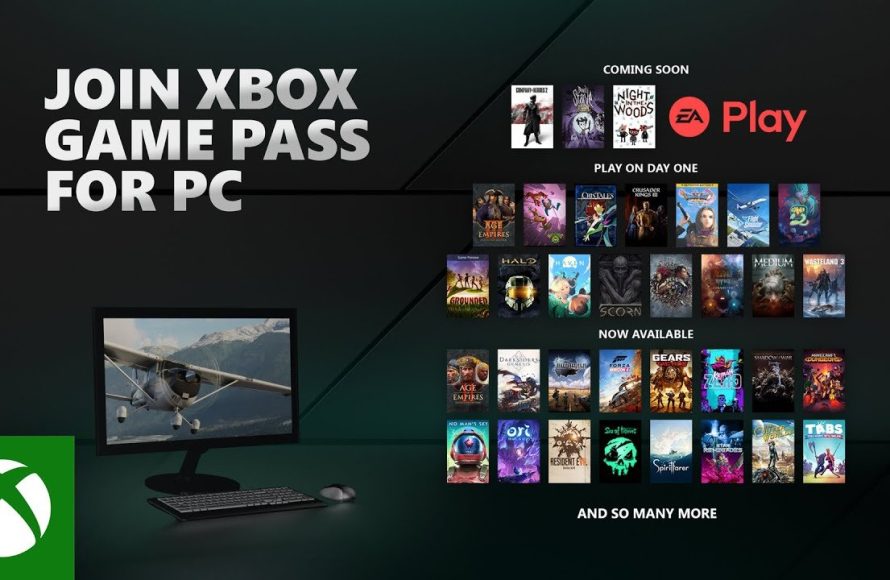
Xbox game pass PC provides access to a library of games for your Windows computer, requiring a subscription.
Tired of buying games individually? Imagine a vast collection of titles available at your fingertips. Xbox game pass PC offers this experience, providing a rotating selection of games for your computer. It’s a great way to explore various genres and titles without breaking the bank.
With a subscription, you can download and play games as long as they are available on the service.

Xbox Game Pass PC: Your Gateway to PC Gaming Adventures
Okay, let’s talk about something super cool: Xbox Game Pass for PC. Imagine having a giant library of amazing video games, all ready for you to play on your computer. That’s what Game Pass is all about. It’s like a Netflix, but for games. Instead of watching movies, you get to dive into fantastic worlds and control the action yourself!
What Exactly is Xbox Game Pass PC?
So, what is this Xbox Game Pass PC we’re talking about? It’s a subscription service from Microsoft. You pay a small fee each month, and in return, you get access to a huge collection of games that you can download and play on your Windows PC. Think of it as a constantly growing toy box, filled with all kinds of exciting adventures. It’s a super way to explore lots of games without having to buy each one separately.
A World of Games at Your Fingertips
The games available on Game Pass PC come from different creators. You will see big games, the ones everyone is talking about, and smaller, super interesting games from indie developers. There’s something for everyone. You might be into fast-paced racing, epic fantasy quests, building your own cities, or solving clever puzzles. Game Pass has you covered!
How Does It Work?
It’s pretty easy to get started with Game Pass for PC. First, you need to have a PC that meets the game requirements. Then, you’ll get the Xbox app and you’ll be asked to subscribe to the game pass. And, now you can browse the game library, find games that you like, and download them to your computer. It’s as easy as that! You’ll see new games get added often, and sometimes some games leave the collection to make room for new ones. That means there’s always something new and exciting to check out.
Getting the Xbox App
The Xbox app is your key to everything in the game pass world. You can get it free from the Microsoft Store, and it’s what you use to search for games, download them, and see what your friends are playing. Think of the app as the control center for your game library.
Finding Your Next Favorite Game
The Xbox app makes it easy to see what games are available and find ones that you’ll want to play. You can check out the newest titles, look for different game genres, or just browse by what is popular. The app is there to help you find games that you’ll enjoy.
Why Should You Get Xbox Game Pass PC?
There are lots of reasons why people love Xbox Game Pass on PC. Here are some of the top reasons:
- It’s Great Value: Instead of buying many different games, a Game Pass subscription gives you access to many games for one low price. It is a good way to get lots of entertainment without spending too much money.
- Try Before You Buy: Not sure if you’ll like a game? Game Pass lets you try it out without spending money to buy it. If you like it, great! If not, you can just try another one.
- A Huge Variety: There are many types of games available, from adventure and action to puzzles and building. You will surely find a game you enjoy.
- New Games Often: New games are always getting added, so you never run out of things to play. It keeps the game pass experience fresh and exciting.
- Play with Friends: Many games on Game Pass let you play with friends online. This makes it more fun to try new games together!
- Cloud Gaming: you can start playing on your PC and continue playing on a different device such as your phone.
Different Game Pass Tiers
Xbox Game Pass has different levels or “tiers”. These different options offer you different ways to experience Game Pass. They all give you access to a large game library, but the higher levels provide additional extras.
Game Pass PC
This tier is the basic game pass and is made for PC gamers. It provides you with access to the games library on your PC. It’s a good option if you want a lot of games without the extra features. This gives you access to a great set of games and lets you enjoy all sorts of different gaming experiences.
Game Pass Ultimate
This is the top-level game pass and includes everything from both the Game Pass for PC and the Game Pass for Xbox consoles, along with a few other perks. With Ultimate, you can play the PC games, access games on your Xbox, and play games through the cloud. You also get access to exclusive discounts and extra content for some games.
Cloud Gaming with Game Pass Ultimate
Cloud Gaming is a special feature with Game Pass Ultimate. It allows you to play some games on other devices such as your phone, tablet, or even smart TVs, even without having to download them. This is great because it lets you play games on the go without needing a powerful PC or console.
Games You Can Find on Xbox Game Pass PC
The types of games you will find on Game Pass are pretty varied. This is just a small glimpse of the sort of things you might find:
- Big Adventures: These are games with cool stories and lots of exploration like in games such as “The Elder Scrolls” and “Fallout.”
- Action-Packed Games: Fast-paced games that get your heart racing, such as “Doom” and “Halo.”
- Creative Games: Games where you can build or create your own worlds, like “Minecraft” and “Cities: Skylines.”
- Strategy Games: Games where you need to think ahead and make smart plans, such as “Civilization” and “Age of Empires.”
- Puzzle Games: Games that test your brain with fun and tricky challenges like “Portal” and “The Witness”.
- Indie Gems: Smaller games that often have a unique look or story that can be very interesting, like “Hollow Knight” and “Stardew Valley.”
New Games Coming to Game Pass
Microsoft often announces new games coming to Game Pass. This is exciting news for those who have a subscription. It’s worth keeping an eye on the news, so you’ll know what new games will be available to try. Sometimes, they add big, well-known games, and sometimes they add smaller, lesser-known ones. This keeps the library fresh and fun.
Games That Might Leave Game Pass
Just as new games are always coming to Game Pass, sometimes games might leave the collection. This doesn’t mean you can’t play them anymore, but you might need to buy them if you want to keep playing. They usually tell you before a game is going to leave so you know.
How to Get the Most Out of Game Pass PC
To get the most out of your Game Pass PC, it is best to explore a lot of different kinds of games. Don’t just stick to what you know. Trying new genres and smaller games that you’ve never heard of can lead to you finding amazing games that you might otherwise have missed. Here are a few ideas to maximize your gaming experience:
- Explore the Library: Spend some time browsing the games. Look at the different categories and try a few that catch your eye.
- Join the Community: Chat with other gamers online to find out what games they’re enjoying. You can ask for advice or try some games that your friends are playing.
- Try Before You Commit: Take advantage of being able to try a game before buying it. If you do not like a game, move on to the next one until you find one you like.
- Keep an Eye on New Releases: Always keep an eye out for new games that come to the game pass. You could find your next favorite game.
- Adjust Settings: You can sometimes change settings in the games that will make them perform better on your computer. If a game is running slow, try lowering the graphics settings.
Technical Considerations for Game Pass PC
Before you start playing, it’s important to make sure your computer can handle the games. Games sometimes require a powerful computer to run smoothly.
System Requirements
Every game on Game Pass will have its own system requirements. That means you’ll need to make sure that your PC is powerful enough to run the game properly. The system requirements will usually specify the type of processor, how much memory (RAM), and the graphics card your computer needs. It is a good idea to check the minimum and recommended system requirements, if you can reach the recommended then you should be good to go.
Optimizing Performance
Sometimes games don’t run smoothly. If a game is slow or choppy, you might need to change the settings to make it run better. Usually the graphics and effects settings can be turned down if you need to make a game run more smoothly. There are many resources online that can teach you how to optimize your settings for the best gameplay.
Game Pass PC vs. Buying Games
So, how does getting Game Pass for PC compare to just buying the games you want to play? Here are some things to think about:
Cost
The main benefit of game pass is cost. It is a lot cheaper than buying several video games. If you play a lot of games, then the cost of Game Pass can save you a lot of money. Buying individual games is more expensive. If you only play a couple of games per year, it may be cheaper to buy them. Game pass is great for people who want a large variety of options.
Variety
With Game Pass you can try games that you may not have thought of buying. This makes it a lot easier to discover new types of games that you might like. The subscription model also allows you to try out games you are not sure you would like without wasting your money. You can try it and if you don’t like it, just move on to the next one.
Ownership
With game pass you do not own the games. You are just borrowing them. However, if you buy a game, you own it, and you can play it anytime, even when the subscription ends. There are benefits to both approaches. If you just want to play lots of different games without spending too much money then game pass is great. If you would rather own the games you play then buying is still the way to go.
Is Game Pass PC Right for You?
Deciding whether or not to get Xbox Game Pass for PC depends on what kind of gamer you are. It’s a good fit if:
- You like to play many different games.
- You enjoy trying out new games.
- You want to save money on buying games.
- You are happy to not own the games.
Game Pass PC might not be the best option if:
- You only play a few games each year.
- You prefer to own the games you play.
- Your PC doesn’t meet the minimum game requirements.
Staying Up-to-Date with Game Pass News
Microsoft regularly updates Game Pass with new games, and sometimes games will leave the service to make space for others. So it’s good to know how to stay in the loop. Here are some ideas to stay informed:
- Xbox App: The Xbox app is where you will find updates on what is being added or removed from Game Pass.
- Xbox Website: Check the official Xbox website. This is where they post all the news.
- Gaming News Websites: You can find news from other game news websites to see what is trending.
- Social Media: Follow Xbox or other gaming news on social media. It’s an easy way to get news.
Staying informed will mean that you’ll always know about what’s new and exciting on Game Pass and you won’t miss out on anything.
In simple terms, Xbox Game Pass PC gives you a ticket to a big world of games. It lets you try lots of adventures without having to spend a lot of money to buy each game separately. If you love playing games and want to explore new worlds, then it is worth checking out.
I finally tried out Xbox Game Pass for PC!
Final Thoughts
In short, Xbox Game Pass PC provides great value. The diverse game library caters to different tastes. It offers many options at an affordable cost.
This subscription service is an easy entry point. It allows quick access to numerous titles. Xbox Game Pass PC constantly adds new games, making it exciting to see what is next.

