
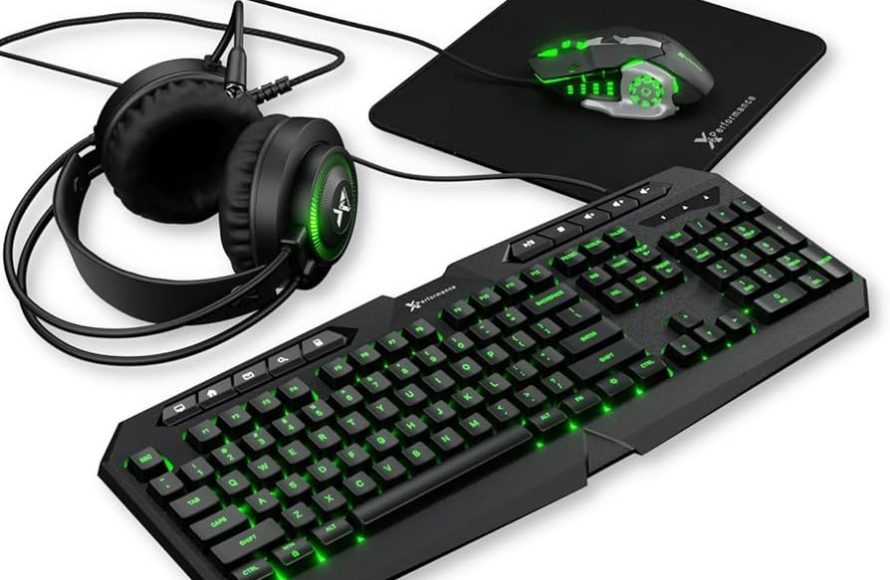
An Xbox gaming keyboard connects to your console, offering precise control and faster inputs for a better gaming experience compared to a controller.
Tired of clunky controller movements holding you back? Many players are switching to an Xbox gaming keyboard for a competitive edge. It’s a game changer for those craving precision and speed. We will see how this can enhance your gameplay.
Imagine navigating menus and executing complex commands with ease. An Xbox gaming keyboard gives you that advantage. We’ll explore why so many gamers now prefer this setup.

Xbox Gaming Keyboard: Leveling Up Your Console Experience
Why Use a Keyboard for Your Xbox?
Okay, let’s be real. You’ve been using that controller since forever, right? You know all the buttons by heart, can probably play with your eyes closed (maybe not that well, haha). But have you ever thought about using a keyboard with your Xbox? It might seem a little weird at first, like using a spoon to eat soup, but hear me out! Using an Xbox gaming keyboard can actually make a big difference in how you play. It’s not about replacing your controller for every game; it’s about having another awesome tool in your gaming arsenal for the games where it shines. Imagine trying to type out a quick message in a fast-paced game using a controller. It takes forever! With a keyboard, you can chat quickly and get back to the action. Plus, for some games, a keyboard and mouse combo can give you way better accuracy, especially for shooting and strategy titles.
Games That Benefit From a Keyboard
So, which games are we talking about here? You wouldn’t want to use a keyboard and mouse to play a platformer, for example. But for other games it can make all the difference. Let’s take a look at some of the types of games that are much better with a keyboard:
- First-Person Shooters (FPS): Games like Call of Duty, Halo, and Battlefield often benefit greatly from the precision of a mouse. Moving your character with WASD keys and aiming with a mouse can feel more natural for many players, and they usually perform better in these types of games using a keyboard and mouse combo.
- Real-Time Strategy (RTS): Think Age of Empires, StarCraft, or similar titles. These games usually have many different units, resources, and buildings to manage. A keyboard and mouse make navigating menus and giving commands much quicker and easier. Trying to do all of that with a controller is a bit of a mess.
- Massively Multiplayer Online Games (MMOs): Games like Final Fantasy XIV or The Elder Scrolls Online often have huge worlds, lots of players, and tons of hotkeys for abilities and spells. Using a keyboard for these games makes navigating the world, communicating with other players, and quickly using your abilities much easier and more efficient.
- Simulation Games: Games like Microsoft Flight Simulator or Cities: Skylines involve complex controls and navigating various menus. Using a keyboard makes the experience feel less cumbersome and more precise.
Keep in mind that not all Xbox games support keyboard and mouse input, but the number is growing. So, it’s always good to double-check before getting started. The game description or online forums often tell you if keyboard and mouse play is supported.
Choosing the Right Xbox Gaming Keyboard
Okay, so you’re convinced! You want to try out a gaming keyboard on your Xbox. But wait! There are so many different keyboards out there. How do you pick the right one? Let’s break it down.
Wired vs. Wireless Keyboards
First, you need to decide if you want a wired or wireless keyboard. Both have their pros and cons.
Wired Keyboards:
- Pros:
- Reliable connection: Wired keyboards have a very stable connection. You don’t have to worry about lag or the signal dropping out, which is super important in fast-paced games.
- No batteries needed: You never have to worry about replacing batteries or charging a wired keyboard. Just plug it in, and you’re good to go.
- Usually more affordable: Wired keyboards often cost less than wireless keyboards.
- Cons:
- Less freedom: The wire limits where you can put your keyboard. It’s not as flexible as a wireless keyboard.
- Clutter: Wires can make your gaming setup look messy.
Wireless Keyboards:
- Pros:
- Freedom and flexibility: You can put a wireless keyboard pretty much anywhere you want. You are not tethered to your console, giving you more options for your setup.
- Cleaner setup: No wires to make things look messy.
- Cons:
- Potential lag: Wireless connections can sometimes have a small amount of lag, which could be a problem for some fast-paced games. Make sure you are getting a wireless keyboard that is responsive with the latest technology.
- Battery life: You need to charge or replace batteries. This can be annoying, especially in the middle of a gaming session.
- Can be more expensive: Wireless keyboards usually cost more than wired options.
Key Types: Mechanical vs. Membrane
Next up, let’s talk about the type of keys a keyboard uses. There are two main types: mechanical and membrane.
Mechanical Keyboards:
Mechanical keyboards have individual switches for each key. This means each key is more responsive, has a more satisfying feel, and offers what’s called tactile feedback. Basically, it means you know when a key has been activated. It is perfect for gaming because they are more durable and responsive.
- Pros:
- Tactile and satisfying feel: The keys feel and sound great when pressed, giving you a more enjoyable experience.
- Faster and more responsive: Mechanical keys usually activate faster than membrane keys, which can give you an edge in competitive games.
- Highly durable: Mechanical keyboards can last a really long time, even with heavy use.
- Cons:
- Louder: Mechanical keyboards can be quite noisy, which some people might not like.
- More expensive: They usually cost more than membrane keyboards.
Membrane Keyboards:
Membrane keyboards use a pressure pad under the keys. When you press a key, it pushes down on the pressure pad which makes the key signal on screen. They are often quieter and more budget-friendly.
- Pros:
- Quiet: Membrane keyboards are typically much quieter than mechanical keyboards.
- More affordable: They tend to be less expensive than mechanical keyboards.
- Lighter: They are usually lighter and easier to move around.
- Cons:
- Less tactile: They don’t have as much tactile feedback as mechanical keys.
- Not as responsive: Membrane keys might not activate as quickly or accurately as mechanical keys.
- Less durable: They might not last as long as mechanical keyboards, especially with heavy use.
Size and Layout
Keyboards come in different sizes and layouts. Here are the most common ones to consider:
- Full-size keyboards: These have all the standard keys, including the number pad on the right side. They’re the most complete and familiar layout.
- Tenkeyless (TKL) keyboards: These don’t have the number pad, making them smaller and more compact. They are great if you don’t need the number pad, like the majority of games do not.
- 60% keyboards: These are super compact and don’t have the number keys, function keys, or arrow keys. They are super compact but can be a little difficult to adjust to if you are used to having all those keys.
Special Features
Some keyboards come with extra features. These features may include:
- Backlighting (RGB): This lets you customize the colors of the keys. It can be fun and stylish, but it doesn’t really impact your performance.
- Programmable keys: Some keyboards have keys you can program to do specific actions, which can be helpful in games.
- Dedicated media controls: These let you control your volume or skip tracks without having to go into the Xbox menu.
- Wrist rests: These can help reduce strain on your wrists during long gaming sessions.
Setting Up Your Xbox Gaming Keyboard
Okay, you have your keyboard, you know what it can do, and you are ready to play. Now it’s time to connect it to your Xbox and configure it. Here’s how to get started:
Connecting Your Keyboard
- Wired Keyboards: For wired keyboards, connecting is easy. Just plug the USB cable into one of the USB ports on your Xbox. It should work right away.
- Wireless Keyboards: For wireless keyboards, you might need to plug in a USB receiver, or connect via Bluetooth. The process will be similar to connecting a controller, and every keyboard may have slightly different steps to do so. Always follow the keyboard’s specific instructions.
Configuring Your Keyboard
Once your keyboard is connected, your Xbox should recognize it automatically. You may also be able to configure some aspects of it through the Xbox menu. Here’s how to find those settings:
- Go to Settings on your Xbox.
- Select Devices & connections.
- Choose Mouse and you may find additional keyboard specific settings.
If your game has specific keyboard and mouse options, make sure you configure them to your liking as well.
Troubleshooting Common Issues
Sometimes things go wrong, but there are usually some quick fixes. Here are some troubleshooting steps:
- Keyboard isn’t recognized: Make sure the keyboard is securely connected to your Xbox, that batteries are properly charged or the keyboard has power. Also try restarting both the console and keyboard.
- Keys aren’t working: Sometimes dust or debris gets under the keys, which you can try to clean. Double check if the specific game you are playing supports keyboard controls, or if there is a specific setting within the game you need to change.
- Lag or disconnects: If you’re using a wireless keyboard, make sure it is fully charged and within range of the console. You can also try using a different port or try updating the keyboard software.
Top Xbox Gaming Keyboard Recommendations
Alright, let’s get to some specific recommendations. Here are some of the most popular keyboards that work well with Xbox:
Budget-Friendly Options:
- Razer Cynosa Lite: A great membrane keyboard that provides a good experience for gamers. It’s a step up from your basic keyboard and is often affordable.
- Corsair K55 RGB: Another great membrane option that has good responsiveness and plenty of features for the price.
Mid-Range Options:
- Logitech G Pro X: This is a TKL mechanical keyboard, and is perfect for gamers who don’t need a number pad and value the response of mechanical switches.
- Razer BlackWidow V3: A very popular mechanical gaming keyboard that features some of Razer’s best technology and plenty of customizability.
Premium Options:
- SteelSeries Apex Pro: A truly premium mechanical keyboard that has adjustable actuation points. This basically means you can customize the sensitivity and responsiveness of the keys for a unique gaming experience.
- Corsair K100 RGB: A top-of-the-line keyboard with advanced features like dedicated macro keys and a very comfortable design.
Taking Your Game To The Next Level
Using a keyboard for your Xbox isn’t just about having the latest and greatest tech; it’s about making your gaming experience more enjoyable. By using the right gaming keyboard, you can communicate faster, move around your games with better precision, and feel like you have more control. Once you try it you will see it takes your console gaming to a brand new level. So, give it a try and have fun! Remember to do your research, find the keyboard that feels right for you, and then go enjoy your favorite Xbox games in a whole new way.
This retro 8BitDo Gaming Keyboard collab with Xbox is 🔥 #keyboard #nostalgia
Final Thoughts
Ultimately, choosing the right Xbox gaming keyboard improves gameplay. A responsive keyboard lets you execute commands precisely. Consider features like key travel and customization.
This enhances your overall gaming experience significantly. Finding the perfect Xbox gaming keyboard can make a real difference.

