
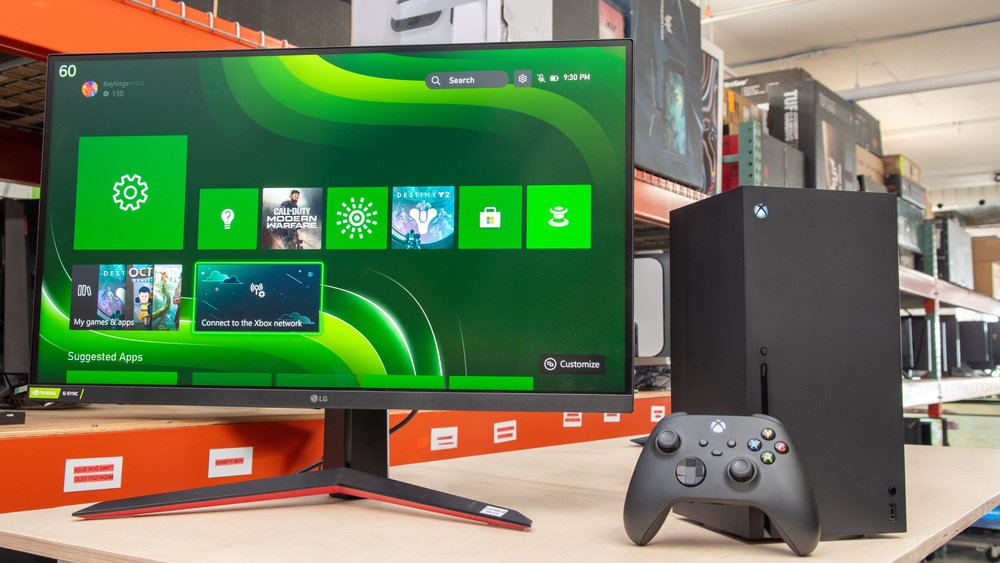
An Xbox gaming monitor enhances your gameplay with features like high refresh rates, low response times, and often includes variable refresh rate technology for smoother visuals.
Want to get the most out of your Xbox? A key piece of equipment you need to think about is your display. The right Xbox gaming monitor can make a world of difference.
It’s not just about seeing the game, it’s about feeling it. This means you get a visual experience that keeps up with the speed of the action.

Choosing the Perfect Xbox Gaming Monitor
Okay, so you’ve got your awesome Xbox, and you’re ready to dive into some serious gaming. But wait! Are you playing on just any old screen? If you want the best experience, you need a gaming monitor designed specifically for your Xbox. It’s like having the right shoes for a marathon – they just make everything better. Let’s explore what makes a great Xbox gaming monitor and how to pick the right one for you.
Why a Gaming Monitor Matters for Your Xbox
You might be thinking, “Why not just use my regular TV?” Well, while TVs are great for watching movies, gaming monitors are built for something different: speed and clarity. They have features that make games look and feel way more responsive. Here’s why a gaming monitor is a big deal for Xbox gamers:
Faster Response Time
Imagine you’re playing a fast-paced racing game, and you hit the gas, but your car doesn’t move right away on the screen. That delay is due to a slow response time. Gaming monitors have much quicker response times than TVs. This means that what you do on your controller instantly happens on the screen. You will be more accurate with your shots, your movements will feel smooth, and you’ll see the action unfold in real-time. This is very important in competitive games, where every millisecond counts.
Think of it like this: if you’re playing a fighting game, a slow response time could mean the difference between blocking an attack and getting knocked out. A fast response time makes you faster, more reactive, and more in control. We measure response time in milliseconds (ms), and you’ll want to look for monitors with response times of 5ms or less. Ideally, 1ms is the sweet spot.
Higher Refresh Rate
Have you ever seen a movie that looks blurry when there’s a lot of action? That’s because the images are not updating fast enough. Refresh rate is how many times per second your screen updates the image. It’s measured in Hertz (Hz). A regular TV might have a 60Hz refresh rate, which means the screen updates 60 times per second. That’s fine for movies, but it’s not great for gaming. Gaming monitors typically have higher refresh rates, like 120Hz or even 144Hz. Some even go up to 240Hz!
What does that mean for you? It means much smoother motion, less blur, and a better overall image, especially during fast-moving scenes. It’s like switching from a flipbook to a smooth animation. It helps you track moving objects, makes the games look sharper, and helps to reduce eye strain during long gaming sessions. Higher refresh rates can give you a competitive edge too, as you will see the action quicker than players using a screen with a lower rate.
Lower Input Lag
Input lag is the delay between when you press a button on your controller and when that action appears on the screen. It’s similar to response time but focuses specifically on the controller input. High input lag can feel like you’re controlling your character through a thick fog, and it can be frustrating. Gaming monitors usually have much lower input lag than TVs. The low input lag will give you a more direct connection to your game. This is beneficial for action games, shooter games, and anything that involves quick reactions and precise controls.
Key Features to Look for in an Xbox Gaming Monitor
Now that you know why a gaming monitor is so important, let’s look at what features you should pay attention to:
Resolution
Resolution is the number of pixels that make up the image on your screen. The more pixels, the clearer and sharper the picture will be. Common resolutions for gaming monitors include:
- 1080p (Full HD): A good starting point for gaming, 1080p is still very popular and great for budget gamers. Games will look clear, but it might not be as sharp as higher resolutions.
- 1440p (Quad HD or 2K): This is a big step up in clarity from 1080p. If you want to see more detail in your games, 1440p is the way to go. It’s an excellent middle ground between 1080p and 4K and works great on most screen sizes.
- 4K (Ultra HD): 4K resolution is the highest level of sharpness you can get right now. Everything will look amazing, with incredible detail. But it requires more powerful hardware, so make sure your Xbox and your monitor can handle it.
For most Xbox gamers, a 1440p monitor is the best balance of visuals and performance. If you have a high-end Xbox and a top-tier monitor, 4K gaming is stunning if your monitor and console can handle it. If you’re on a budget, 1080p is still a great option.
Panel Type
The panel type of your monitor affects how the colors look and how quickly the screen can update. There are three main types:
- TN (Twisted Nematic): TN panels are the fastest and have the best response times, which makes them very popular with competitive gamers. However, the colors and viewing angles aren’t as good as other types. If speed is your top priority, a TN panel might be for you.
- IPS (In-Plane Switching): IPS panels are known for their great color accuracy, wide viewing angles, and overall excellent picture quality. The response times are usually a bit slower than TN panels, but they are still very fast on many modern IPS monitors. If you want the best balance of performance and image quality, choose IPS.
- VA (Vertical Alignment): VA panels have very high contrast ratios, meaning that black colors are very deep, and white colors are very bright. The color accuracy is great, but their response time can sometimes be a bit slower than other panels. They are a good option for someone who wants a strong image with vibrant colors.
For most Xbox gamers, IPS is a great choice because it offers fantastic image quality with good enough response time for fast gaming. If you are a competitive player who needs the fastest response time possible, then TN would be the preferred choice.
Size and Aspect Ratio
The size of your gaming monitor is a very important part of the setup. Monitors come in different sizes, from about 24 inches to 34 inches or larger. The right size for you will depend on how much space you have, how close you will sit from the monitor, and how much screen you need to feel comfortable.
Here are a few size considerations:
- 24-27 inches: These are good for a single player who is sitting close to the monitor. They’re easier to fit on a desk and have good pixel density for 1080p and 1440p gaming.
- 27-32 inches: This is a popular size for gaming and a great balance between screen real estate and desk space. This size can be used comfortably for 1440p and even 4k gaming.
- 32 inches and above: These are larger screens that offer an immersive experience and are often used in the 4k resolution range, making games feel more expansive. They require more desk space and might feel too big for some gamers.
The aspect ratio of a monitor is the shape of the screen. Most gaming monitors use a 16:9 widescreen ratio, which is standard for most games and content. Ultrawide monitors, with a 21:9 ratio, are also available. They make games look more cinematic, providing a wider field of view. However, it is worth noting that some console games do not fully support ultrawide resolutions, so the 16:9 ratio is usually the best and safest bet for your console.
Connectivity
Make sure your gaming monitor has the right ports to connect to your Xbox. The most important ones include:
- HDMI: This is the standard port for connecting your Xbox to a monitor. Make sure your monitor has an HDMI 2.1 port to get the best visuals and refresh rates out of modern Xbox consoles, such as the Xbox Series X.
- DisplayPort: This is another port to connect to a graphics card on a PC, but you likely will not need it for your Xbox gaming, since Xbox consoles do not have it.
- USB Ports: Some monitors include USB ports, allowing you to connect accessories like controllers or headphones.
Always confirm that your chosen monitor has the correct and updated ports for your Xbox and check which HDMI port version it uses. For example, a monitor with HDMI 2.1 ports will allow you to get the best possible graphics and refresh rate that your Xbox Series X console can provide.
Adaptive Sync Technology
Adaptive Sync technology helps reduce screen tearing and stuttering. These are visual issues that can occur when your graphics card and monitor are not working together correctly. There are two main types of adaptive sync:
- AMD FreeSync: This technology is used for AMD graphics cards and is widely supported. Many Xbox monitors feature FreeSync capabilities, which will make the image smoother.
- NVIDIA G-Sync: This is the version of adaptive sync used by NVIDIA graphics cards. Some monitors can support both FreeSync and G-Sync. This technology is not as important for Xbox consoles, but some monitors support it for more compatibility with a PC.
Adaptive Sync technology helps ensure that your game will run smoothly and eliminates the visual issues. Look for a monitor that supports FreeSync (the one that’s important for Xbox consoles) to get the best possible gaming experience.
Ergonomics
If you plan to spend many hours in front of your monitor, you need to ensure that it’s comfortable. Look for monitors that allow you to change the height, tilt, and swivel of the screen. This allows you to adjust the monitor to your sitting position, which can help reduce neck and back pain. A monitor that has a VESA mount option is also a big bonus if you ever want to mount it on an arm for more flexibility.
Putting it All Together: Finding Your Perfect Monitor
Choosing the perfect gaming monitor can seem complex but break it down into the key features. Here’s a step-by-step to help you in your monitor selection process:
- Set your budget: Gaming monitors can range from affordable to very expensive, so setting your budget first will narrow down your options.
- Consider your needs: Think about the games you play most often. Are you into fast-paced competitive shooters, or do you prefer single-player adventures?
- Decide on resolution and refresh rate: Aim for at least 1440p resolution and a 120Hz refresh rate for a balanced experience, if possible.
- Choose a panel type: IPS is often the most recommended panel type for most Xbox gamers, offering a great balance of color and performance.
- Select your size: Choose a monitor size based on your available space, preferred viewing distance, and how much screen space you need.
- Check connectivity: Make sure your monitor has the correct HDMI ports that are compatible with your Xbox.
- Look for adaptive sync: Select a monitor that supports FreeSync for smoother, less screen tearing gameplay.
- Read reviews: Check out reviews from other gamers to see how the monitor performs in the real world.
Take the time to do your research and choose wisely. The correct gaming monitor can make all of your gaming experiences so much better, and once you have that great monitor you can just enjoy your gaming time.
Selecting the ideal Xbox gaming monitor is a worthwhile effort that will dramatically improve your gaming sessions. Consider the aspects discussed in this guide, such as refresh rate, response time, panel type, resolution and size, and be sure you invest in one that fits both your preferences and your gaming demands. With the perfect monitor, you’re ready to go!
Transform your Xbox into a portable gaming station!
Final Thoughts
Ultimately, selecting the right Xbox gaming monitor significantly improves your gaming experience. A quality display with fast response times and high refresh rates offers smooth, detailed visuals.
Consider features like HDMI 2.1 for optimal performance with newer consoles. This will enhance your gameplay. Choosing wisely ensures you get the most out of your Xbox.

