
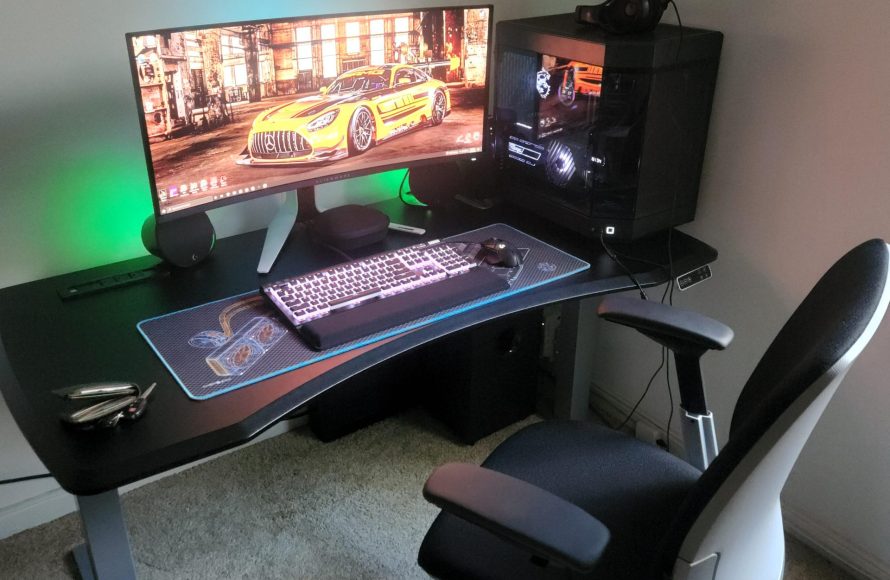
Creating an effective Xbox gaming setup involves choosing the right monitor, comfortable seating, and optimized audio equipment, alongside personalized lighting and decor.
Want to create the perfect gaming haven for your Xbox? We’re diving into some great Xbox gaming setup ideas that will give you the edge you are seeking. From the basics to those extra touches, we’ve got tips to improve your experience.
A comfortable chair is important for those long gaming nights. Consider good sound with high-quality headphones or speakers. These elements greatly contribute to gameplay immersion.
Don’t underestimate the power of a well-lit gaming space. Personalized lighting and a unique decoration can express your style. These suggestions will help you design a space that you love.

Xbox Gaming Setup Ideas
Ready to make your Xbox gaming space super awesome? It’s more than just plugging in your console; it’s about creating a place where you can dive into your favorite games and feel totally immersed. Let’s explore some fantastic ideas to build the ultimate Xbox gaming setup. We will look at everything, from choosing the best spot to picking out cool accessories.
Choosing the Perfect Space
First things first, you need to find the right spot for your gaming haven. Think about where you can play comfortably without getting disturbed. Here are some things to consider:
Room Size and Layout
Do you have a big room or a cozy corner? The space you have will affect your setup. A larger room gives you more space for a big screen, comfy seating, and maybe even a cool themed area. Smaller spaces might need you to be more creative with how you organize things.
- Large rooms: Perfect for multiple setups, big screens, and more freedom with your layout.
- Small rooms: Require more thought, maybe using wall mounts or compact furniture.
Lighting Considerations
Good lighting is very important for gaming. You want to be able to see the game clearly without any glare. Think about both natural light and artificial lighting.
- Natural Light: Avoid placing your screen where the sun shines directly on it, as this can cause glare and make it hard to see the game. Curtains or blinds can help control the sunlight.
- Artificial Light: Use lamps with adjustable brightness. You could add LED strip lights behind your monitor for cool ambient lighting that doesn’t make it hard to see the screen.
Ventilation Matters
Xbox consoles can get warm, especially when you play for a long time. Good ventilation keeps your console cool and helps it work its best. Make sure your Xbox has some open space around it, and the area isn’t closed or stuffy.
- Ensure your Xbox is not in a closed cabinet.
- Consider using a small fan for extra cooling if needed.
Essential Gaming Gear
Now that you’ve picked your spot, let’s talk about the most important things you need for a fantastic Xbox gaming experience.
Choosing the Right Monitor or TV
The screen you use makes a big difference in how you see your games. You need to pick one that fits your space and has the features you need.
Monitor vs. TV
Monitors are usually smaller and have faster response times, which makes games look sharper and smoother. TVs are often larger and are great for playing with friends.
Here’s a quick table to show some key differences:
| Feature | Monitor | TV |
|---|---|---|
| Size | Smaller, typically 24-32 inches | Larger, 40 inches and up |
| Response Time | Faster, usually 1-5 ms | Slower, usually 5ms or higher |
| Refresh Rate | Higher, often 120Hz or 144Hz | Lower, usually 60Hz |
| Features | Designed for gaming | Designed for general viewing |
Key Specs
- Resolution: 1080p (Full HD), 1440p (Quad HD), or 4K (Ultra HD) – higher resolution means sharper visuals.
- Refresh Rate: 60Hz, 120Hz, or 144Hz – higher refresh rates make motion look smoother.
- Response Time: Lower response time reduces blur and ghosting.
- HDR: High Dynamic Range provides a more vibrant and realistic picture.
Picking the Perfect Headset
Good sound is super important for gaming. It helps you hear everything in the game, from footsteps to important conversations. A quality headset can help you enjoy gaming to its fullest.
- Wired Headsets: Give consistent sound with no worries about batteries, and they usually cost less.
- Wireless Headsets: Offer freedom to move around without wires and can help to not make your space messy.
- Microphone: A good microphone lets you talk to your friends and teammates clearly.
- Comfort: Pick a headset that feels comfortable, especially if you play for long time.
Controller Options
Xbox controllers are already great, but having extra ones or different styles can improve your gaming.
- Standard Xbox Wireless Controller: The one that comes with the console, it is very dependable.
- Xbox Elite Wireless Controller: It has added features that let you customize buttons and sticks.
- Special Edition Controllers: These can look cool and unique and make your setup more fun.
- Controller Charging Station: Keeping your controllers ready to go without the need for cables.
Comfort and Ergonomics
Playing for long time means comfort is very important. Here are a few ideas to make sure you are comfy and not getting tired while you play.
Choosing the Right Gaming Chair
A good gaming chair gives you support for your back and helps you sit correctly. Here’s what to think about:
- Adjustable Height: Make sure you can change the chair’s height so your feet sit comfortably on the floor.
- Lumbar Support: This helps support your lower back and stops it from hurting.
- Headrest: A headrest helps you relax your neck.
- Armrests: Adjustable armrests let you position your arms at a comfy height.
- Comfort Material: Choose a material that’s comfy and doesn’t make you get hot while you play.
Desk and Surface Options
Your desk is where you set everything, so you want a good one. Here are some things to think about.
- Size: Make sure it’s big enough for your monitor, console, keyboard, and other items.
- Height: Pick a desk that lets you sit comfortably without needing to bend or stretch too much.
- Material: Strong wood or metal are great choices as they are sturdy and long lasting.
- Cable Management: Consider desks with built-in cable management to help keep things tidy.
Keyboard and Mouse (For Compatible Games)
Some games on Xbox work with a keyboard and mouse. If you use these, you want them to be comfortable too.
- Mechanical Keyboards: Feel better and respond better than normal keyboards.
- Gaming Mice: They have extra buttons and good sensors to help you play better.
- Ergonomic Design: Pick a keyboard and mouse that feel good in your hand to prevent wrist pain.
Personalizing Your Space
Now for the fun part! Personalizing your setup makes it unique and your own. Let’s look at some ideas to make your setup special.
Color Schemes and Themes
Picking colors and a theme makes your gaming area cohesive and fun. You can match colors with your favorite games or pick colors that make you feel good.
- Matching Your Favorite Games: If you love Halo, use blues and greens. If you are into Minecraft, try earthy tones.
- Color Psychology: Some colors make you feel calm, while others make you feel energetic. Pick colors that match how you want to feel when you play.
- Ambient Lighting: LED strip lights are a cool way to add color and set the mood.
Wall Art and Decorations
Posters, figures, and other decorations are a fun way to show what you like.
- Game Posters: Display your favorite game posters, artwork, or prints.
- Collectibles: Place game figures, models, or unique items on shelves.
- Wall Decals: Use them to add designs or themes to your wall that can be removed.
Cable Management Solutions
Messy cables can make your gaming space look untidy. Here are some ways to hide those cables.
- Cable Sleeves: Use these to bundle your cables together.
- Cable Clips: Use these to stick cables to the back of your desk or wall.
- Zip Ties: Good for bunching cables that are together.
- Cable Management Boxes: Hide power strips and lots of cables together.
Advanced Setup Ideas
Ready to take your gaming to the next level? Here are some more ideas for a truly immersive experience.
Surround Sound Systems
Surround sound makes games sound even better and more realistic.
- 5.1 or 7.1 Systems: These systems have multiple speakers that surround you with sound.
- Soundbars: Some soundbars give great sound and are easy to set up.
- Placement Matters: Make sure your speakers are placed in the right places to get the best sound.
Capture Cards and Streaming Gear
Do you want to stream your games online? You will need some special equipment.
- Capture Cards: These record your game play.
- Microphones: You will need a good microphone for your voice.
- Webcams: This will let people see you while you game.
- Lighting: Good lighting makes your video look better.
Multiple Monitor Setups
Multiple monitors give you more room and can help you multitask.
- Dual Monitors: This set up can allow you to play on one screen and use the other for chats or other apps.
- Ultra-wide Monitors: These give you lots of space on one screen.
- Adjustable Arms: Use these to keep your monitors at the perfect height.
VR Gaming Options
Virtual reality lets you dive into games in a totally new way.
- Compatible Headsets: Make sure you have a headset that works with your Xbox or PC.
- Gaming Area: Make sure you have a good space to move around without hitting anything.
- Comfort: VR gaming can be tiring at first, so take short breaks.
Organizing Your Game Collection
Keep your games tidy using these ideas:
- Shelves: Use shelves to display your game boxes.
- Storage Bins: Place game cases or other accessories in boxes.
- Digital Libraries: Download digital games to help free up space.
Creating the perfect Xbox gaming setup can seem like a lot, but breaking it down into smaller parts makes it easy to manage. Whether you are looking for simple changes or a total overhaul, this is your journey to creating a gaming space where you can play all of your favorite games and have lots of fun. Just remember, it’s all about creating a space that you love and that makes gaming even more enjoyable.
The PERFECT Console Streaming Desk Setup!
Final Thoughts
Ultimately, creating an awesome gaming space is about personal preference. Experiment with different monitor setups and comfortable seating. Consider adding ambient lighting to set the mood.
Remember to manage cables for a clean look. The right accessories also enhance gameplay. These Xbox gaming setup ideas offer a starting point.
Think about incorporating your favorite games’ colors into the setup. Having the right sound system definitely creates a more immersive experience.

