
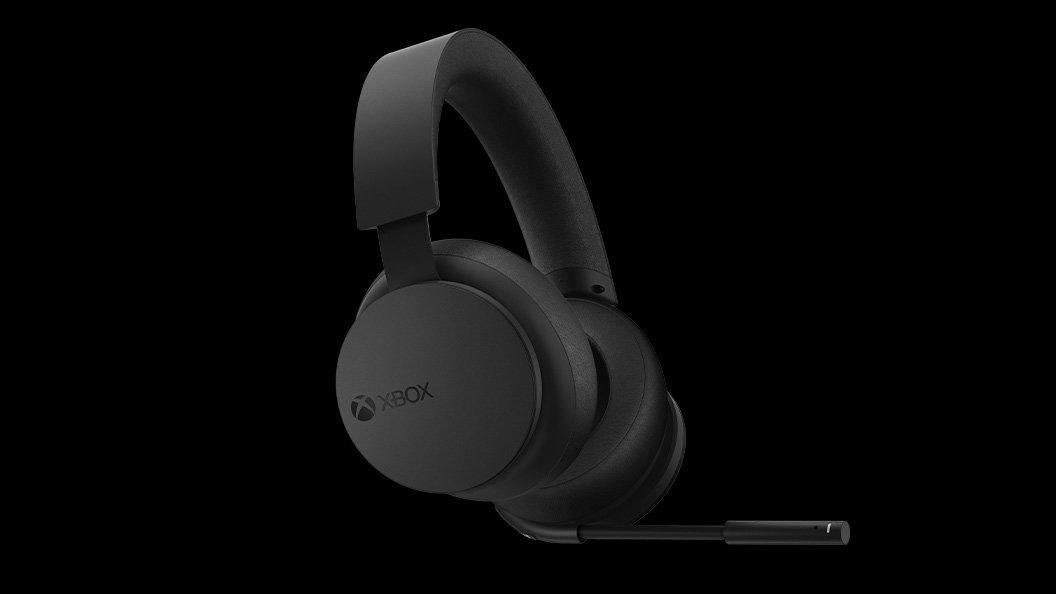
Xbox headset technology focuses on delivering clear audio and comfortable communication during gameplay, incorporating features like spatial sound and noise cancellation.
Ever wondered how you get so immersed in your Xbox games? A big part of that is down to advancements in Xbox headset technology. These devices are not just simple headphones. They’re designed to make you feel like you’re right there in the game, talking to your friends with clarity.
Good headset tech uses things like spatial sound. This helps you hear where noises are coming from within the game. Noise cancellation is another key element, blocking out unwanted distractions from around you, allowing you to focus more on gaming.

Xbox Headset Technology: Diving Deep
Ever wondered what makes your Xbox gaming sound so amazing? It’s not just the game – a big part of it comes from the tech inside your Xbox headset! These aren’t just regular headphones; they’re designed to make you feel like you’re right inside the game. Let’s take a closer look at all the cool stuff that makes Xbox headsets special. We’ll talk about how they work, what makes them great, and even some of the different types you can find.
The Basics: How Headsets Work
Before we get into the fancy features, let’s cover the basics. A headset, whether it’s for gaming or just listening to music, is made up of a few key parts:
- Speakers: These are the tiny things that make the sounds you hear. They turn electrical signals into vibrations that your ears pick up as sound.
- Microphone: This is what picks up your voice so you can chat with your friends online. It turns your voice into electrical signals that can be sent over the internet.
- Headband and Earcups: These parts hold everything together and make the headset comfortable to wear. Earcups also help block out noises from your surroundings, allowing you to focus on the game.
For Xbox headsets, these parts work together to provide clear game sounds and allow you to talk with other players. The better the quality of each part, the better your experience will be. Now, let’s talk about what makes Xbox headsets unique.
Wired vs. Wireless: Which is Right for You?
One of the first choices you’ll make when picking an Xbox headset is whether you want a wired or wireless version. Both have their pros and cons, so it’s important to understand the differences.
Wired Headsets
Wired headsets connect directly to your Xbox controller or console using a cable. Here are some things to keep in mind:
- No Batteries Needed: Wired headsets don’t need batteries, which means you can play as long as you want without worrying about them dying.
- Reliable Connection: Since they’re plugged in, you’ll always have a stable connection without any dropouts or interruptions.
- Generally More Affordable: Wired headsets are often less expensive than their wireless counterparts, making them a good option if you’re on a budget.
- Potential for Tangled Wires: The main downside of wired headsets is the cable. It can get tangled, restrict your movement, and sometimes be annoying.
Wireless Headsets
Wireless headsets connect to your Xbox using Bluetooth or a special wireless adapter. Here’s a breakdown:
- Freedom of Movement: The biggest benefit is that you can move around without being tied to your console. This can be great if you like to get up and stretch during game sessions.
- No Tangled Wires: Say goodbye to the mess of cables. Wireless headsets keep things clean and tidy.
- Battery Life: Wireless headsets need to be charged, and their battery life can vary. Make sure to check the battery life before buying one.
- Possible Connection Issues: Although rare, wireless headsets can sometimes experience connection issues, especially if there’s interference from other electronic devices.
- Price: Wireless headsets are typically more expensive than wired ones due to the extra technology they use.
The choice between wired and wireless really depends on your preferences and budget. If you want a simple, reliable, and affordable option, go wired. If you value freedom of movement and don’t mind charging your headset, go wireless.
Sound Quality: What to Look For
Sound quality is crucial for a good gaming experience. You want to hear every footstep, explosion, and whisper clearly. Here are some important factors that contribute to sound quality in an Xbox headset:
Driver Size
The drivers are the little speakers inside your headset. Generally, bigger drivers (measured in millimeters) can produce more powerful and detailed sounds. A driver size of 40mm or more is usually good for gaming.
Frequency Response
This tells you the range of frequencies your headset can produce. A wider range means you’ll hear a wider range of sounds, from deep bass to high treble. A good frequency response range for gaming headsets is typically from 20 Hz to 20,000 Hz.
Surround Sound
Surround sound makes it feel like sounds are coming from all around you, not just from the left and right. This helps you pinpoint where sounds are coming from in the game, giving you a competitive edge. There are different kinds of surround sound, including:
- Dolby Atmos: A popular choice that creates a very immersive and precise sound environment.
- Windows Sonic: A free surround sound option that works well with Xbox.
- DTS Headphone:X: Another popular surround sound format that provides excellent sound clarity.
Many Xbox headsets now include some form of virtual surround sound, so you might want to explore what each type sounds like to choose your personal favorite.
Impedance
Impedance is a measure of how much a headset resists electrical current. It’s measured in ohms, and a lower impedance (e.g. 32 ohms) usually means a headset will be louder and can work well with portable devices like controllers. Higher impedance headsets often require more power to drive them well and are typically better suited for higher-end audio equipment.
Sensitivity
Sensitivity describes how loud a headset will be for a given amount of power input. It is typically measured in decibels per milliwatt (dB/mW). Higher sensitivity means the headphones will be louder with less power, which is advantageous for devices with limited power output like game controllers.
Microphone Quality: Clear Communication is Key
A good microphone is essential for online gaming. You need to be able to communicate with your teammates clearly without any static or distortion. Here’s what to consider when looking at microphone quality:
Microphone Type
There are two main types of microphones used in gaming headsets:
- Omnidirectional Microphones: These pick up sound from all directions. They can be useful if you move around a lot, but they may also pick up background noise.
- Unidirectional Microphones: These pick up sound from one direction (usually in front of the microphone), making them good at isolating your voice and reducing background noise.
Most gaming headsets use unidirectional mics, as they often provide cleaner audio during intense gaming sessions.
Noise Canceling
Many Xbox headsets come with noise-canceling technology. This helps reduce background noise, like keyboard clicks or fan noise, so your voice comes through clearer. It’s a useful feature if you often play in noisy environments.
Microphone Sensitivity
Like headset speakers, microphone sensitivity matters too. A more sensitive microphone will be able to pick up quiet sounds better and will often be preferred when one is in a quiet place as it will be able to pick up every minute sounds.
Mute Function
A quick mute function is useful when you need to stop transmitting sound right away for privacy reasons or when background noise becomes too intrusive. Many headsets provide this, either by a physical button or by a flip-up mic.
Comfort and Fit: Hours of Gaming
Comfort is key, especially if you like to play for long periods. A poorly designed headset can cause discomfort and headaches. Here are some factors to consider when assessing a headset’s comfort:
Headband
The headband should be adjustable and have padding to distribute the weight evenly. It should fit snugly but not be too tight. Some headbands use materials like memory foam for extra comfort.
Earcups
The earcups should fully cover your ears without pressing too hard. There are two main types of earcups:
- Over-Ear (Circumaural): These earcups completely surround your ears, providing better isolation and comfort.
- On-Ear (Supra-aural): These earcups sit on top of your ears. They are often lighter but might not be as comfortable for long gaming sessions.
The material of the earcup padding is also important. Leather or pleather can be durable but can sometimes get warm. Fabric pads are often more breathable.
Weight
A lightweight headset is generally more comfortable for long gaming sessions. Heavier headsets can cause strain on your neck and head over time.
Adjustability
A good headset must be adjustable in multiple ways including head band length, and earcup orientation to maximize comfort regardless of head shape and size.
Special Features: Going the Extra Mile
Beyond the basic features, many Xbox headsets have extra bells and whistles that can enhance your gaming experience. Here are a few of them:
Customizable EQ
Some headsets allow you to adjust the sound settings using an equalizer (EQ). This lets you tweak the bass, mids, and treble to your liking, creating the perfect sound profile for different games.
Wireless Charging
Some wireless headsets come with charging docks, making it easy to keep them charged and ready to go. This can be more convenient than plugging them in with a cable.
Chat Mix
A chat mix function allows you to independently adjust the game and chat audio levels. This is essential when one needs to hear their teammates more clearly than the game or vice versa.
Programmable Buttons
Some headsets feature programmable buttons on the headset itself to quickly mute the microphone or adjust volume without interrupting the gaming session.
RGB Lighting
While not affecting the sound or mic quality, RGB lighting can add a touch of style to your headset. If you love customizing your gaming setup, this feature might appeal to you.
Xbox Official Headsets
Xbox also offers its own official headsets which can be categorized into wired or wireless. These headsets are especially made for Xbox consoles and often have tight integration with the Xbox ecosystem.
Xbox Wireless Headset
This headset is fully integrated with the Xbox ecosystem offering direct wireless connectivity without the need of a dongle. It offers features such as auto-mute, customizable EQ and a chat-mix dial.
Xbox Stereo Headset
The wired version offers great sound quality and a reliable connection. It is often a more affordable option from the official Xbox series.
Third-Party Headsets
Many third-party manufacturers offer headsets that are compatible with the Xbox series and boast special features, for example:
- SteelSeries: Known for their high quality and comfortable headsets.
- Razer: Well known for their focus on gaming with many innovative headset features.
- Turtle Beach: They offer many budget friendly as well as high end models.
- HyperX: Known for their focus on great mic quality.
- Astro: Famous for their great design and premium sound.
Choosing a third-party headset often allows for more selection of different features and designs.
Caring for Your Xbox Headset
To make your headset last longer, here are some simple care tips:
- Store Properly: When not using your headset, store it in a safe place away from dust and direct sunlight.
- Clean Regularly: Use a soft, dry cloth to clean your headset. Avoid using liquids or harsh chemicals.
- Handle with Care: Be careful when plugging and unplugging your headset. Don’t pull on the cable or bend the microphone.
- Charge Correctly: If you have a wireless headset, follow the manufacturer’s instructions for charging. Don’t overcharge it.
Choosing the right Xbox headset is all about knowing what features are important to you. By understanding the different types of headsets, the technologies they use, and how to care for them, you can make a well informed decision that helps you enjoy your gaming experience to the max. No matter what your choice is make sure to have fun and immerse yourself in your favorite gaming adventures.
The number one budget wireless headset!🟢 #xbox #gaming
Final Thoughts
In conclusion, current Xbox headsets provide excellent sound and clear communication. They offer comfortable designs for lengthy gaming sessions. Xbox headset technology enhances the overall gaming experience with its immersive audio. Gamers should consider these headsets for better in-game interaction.

