
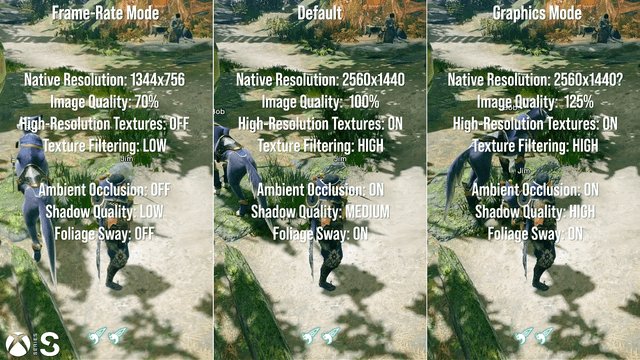
Xbox high resolution graphics refer to the enhanced visual clarity and detail achievable on Xbox consoles, typically through 4K or even 8K resolutions, offering sharper textures, finer details, and a more immersive gaming experience.
Have you noticed how some games just pop off the screen with incredible detail? It’s all thanks to the impressive Xbox high resolution graphics capabilities. These advanced visuals bring your favorite worlds to life with stunning clarity. They allow you to see every single detail, enhancing the overall experience of each game.
This level of graphical fidelity adds a new dimension to gameplay, making everything look more realistic and engaging. The difference is undeniable, truly enhancing the visual quality.

Xbox High Resolution Graphics: A Deep Dive
Alright, gamers! Let’s talk about something that makes our favorite Xbox games look absolutely amazing: high resolution graphics. You know how some games just seem to pop off the screen? That’s often because of the power of high resolution! We’re going to explore exactly what this means for your gaming experience, the technology behind it, and why it’s such a big deal for Xbox.
What Does High Resolution Really Mean?
Imagine a picture, like a photo of your favorite pet. If that picture has low resolution, it might look blurry or pixelated, like you’re looking at it through a screen door. But if that same picture has high resolution, it looks super clear and sharp, like you can see every little detail. That’s basically what resolution is all about! It’s how many tiny dots, called pixels, are packed into the image. More pixels mean a sharper, clearer picture. When we talk about “high resolution” in gaming, we’re talking about having lots and lots of those tiny dots making up the game images. This results in much smoother visuals, sharper textures, and more immersive gaming environments.
Understanding Pixels: The Building Blocks of Images
Let’s dive a little deeper into these pixels. Think of them as tiny little squares, each with its own color. They arrange themselves on your screen to create the images you see in your games. The more pixels your screen has and your Xbox can display, the more detail you’ll see. It’s like building with smaller Lego bricks – you can make much more detailed and realistic things! Common resolutions for Xbox include:
- 720p (1280 x 720 pixels): This is considered low definition (HD), and you will not see this resolution for new games.
- 1080p (1920 x 1080 pixels): This is Full High Definition (FHD), and is a very popular choice for gaming.
- 1440p (2560 x 1440 pixels): Often called Quad HD (QHD) or 2K, this resolution is a big step up from 1080p and provides a sharper image.
- 4K (3840 x 2160 pixels): This is Ultra High Definition (UHD), and is the current top-of-the-line resolution for most TVs and monitors.
Higher number of these little pixel squares, means more clear and detail will be presented on screen. Xbox consoles are capable of providing gameplay at various resolution.
Why is High Resolution Important for Xbox?
Okay, so we know what high resolution is, but why should you care about it? Well, for a few awesome reasons:
- More Immersive Gameplay: When you can see every tiny detail, from the texture of a character’s clothing to the leaves on a tree, it pulls you into the game world more effectively. It feels more real and exciting!
- Sharper Images: High resolution makes everything look sharper. This means you can see more details, textures, and objects clearly, which is very helpful in games. For example, you can easily see enemy hiding in bushes or a important item lying on the floor.
- Better Visuals: Colors appear more vibrant and true to life with high resolution, bringing a new level of richness to the gaming experience.
- Future-Proofing Your Setup: With game graphics constantly improving, having a console and display that can handle high resolution means you’ll be ready for the latest and greatest games.
High resolution is not only for making the game look more nice, but it also helps you to have a better gaming experience. The quality, the details all contribute to more enjoyable gameplay.
The Role of Xbox Hardware in Achieving High Resolution
Now, let’s get a little technical! The Xbox console itself has to have the power to create and display high-resolution images. Think of your Xbox as the artist and your TV as the canvas. The Xbox is doing all the heavy lifting creating the beautiful image. Here’s how it works:
Processing Power: The Engine Behind the Graphics
Inside every Xbox, there is a powerful processor, like a super-smart computer brain. This processor works together with the console’s graphics processing unit (GPU) to handle all the game’s complex calculations. These processors use very complex algorithms and calculations to generate the high resolution images for the games you play. Without these processors, games would look blurry and not as enjoyable.
Graphics Processing Unit (GPU): The Visual Artist
The GPU is another important piece of hardware. Think of it as the visual artist within your Xbox. It takes all the game data and turns it into the images you see on your screen. The GPU is very important for providing the high definition images because they have to render every individual pixels. A powerful GPU is a must for high resolution gaming.
Memory (RAM): Keeping Everything Running Smoothly
Memory or RAM is like a short term storage for the console. RAM allows the console to store the data for the game when playing. It helps the processor access the required data very fast so there is no delay or lagging when you are playing a game. If your Xbox did not have enough memory the game would not run smoothly and the quality of the game would decrease.
High Resolution and Xbox Series X|S: A Powerful Combination
Microsoft’s latest Xbox consoles, the Xbox Series X and Xbox Series S, are specifically designed for high resolution gaming. Here’s a look at each console:
Xbox Series X: The Flagship of High Resolution Gaming
The Xbox Series X is the most powerful Xbox console to date. It has a very powerful processor and GPU, along with lots of fast memory. It’s designed to play games in 4K resolution at up to 120 frames per second (FPS), which means super smooth and very detailed visuals. Imagine that picture of your pet, but moving and in ultra-high definition – that’s what the Series X offers.
Xbox Series S: High Resolution on a Budget
The Xbox Series S is a more affordable option that still provides excellent high-resolution gaming. While it doesn’t have the same raw power as the Series X, it can still run games in 1440p, and even upscale some games to 4K. It focuses on fast loading times, which can enhance overall gameplay. If you’re looking for high resolution gaming without the huge price tag, the Series S is a great choice.
The Importance of Refresh Rate for Smooth Gaming
High resolution is only part of the equation. Refresh rate is also super important for creating the smoothest gameplay. You know how when you watch a movie, it’s not actually one picture that is displayed on the screen but a number of pictures per second that makes the movement? Well, the refresh rate refers to how many times the image on your screen updates each second, and it’s measured in Hertz (Hz). Here’s why it matters:
What is Refresh Rate?
Imagine a flipbook with several images in sequence. The faster you flip, the smoother the animation appears. A higher refresh rate is like flipping through that book faster. A 60Hz display updates the image 60 times per second, a 120Hz display updates the image 120 times per second and so on. Higher the refresh rate, smoother the video appears.
Why is Refresh Rate Important?
- Smoother Movement: A higher refresh rate makes movements in your games appear much more fluid and natural, which is especially important for fast-paced action games.
- Less Blur: A higher refresh rate can reduce motion blur, which makes the image more clear and sharp when the camera is moving or your character is running.
- More Responsive Gameplay: With a higher refresh rate, your inputs feel more responsive, which means your actions on screen match your controller commands more quickly.
Many high resolution TVs and monitors now support high refresh rates, often 120Hz or even higher. These screens, combined with the power of the Xbox Series X, will take your gaming to another level.
High Resolution Settings in Games
Many games on Xbox offer various settings to customize your graphics, giving you some control over the balance between visual quality and performance. Let’s take a look at some common graphics settings:
Resolution Options
As we’ve discussed, games offer various resolution options like 1080p, 1440p, or 4K. Higher resolution means more detail, but it might take a bit more power from the console, potentially leading to lower frame rates on older TVs/monitors. Some games also support dynamic resolution scaling, which means the game adjusts the resolution on the fly to maintain consistent frame rates.
Texture Quality
Textures are the details and artwork that cover surfaces within the game environment. Think of the intricate patterns on a character’s armor, or the detailed bark on a tree. Games offer different texture quality settings, from low to high. High texture settings bring in finer details and sharper visuals, but again, can be more demanding for your Xbox.
Anti-Aliasing
Anti-aliasing is a technique that smooths out the jagged edges on objects and models. Without anti-aliasing, lines and curves in games can look a bit pixelated and rough. Different anti-aliasing options are often available, each with different performance impacts.
Effects and Lighting
Effects settings control visual effects like shadows, lighting, reflections, and particles (like smoke and explosions). Higher settings here make the game look much more visually impressive, but can also take a toll on the performance. Adjusting these will definitely impact the game’s look and performance on your TV.
Frame Rate or Performance Mode
Games often let you choose between a graphics mode (prioritizing visual quality) and a performance mode (prioritizing higher frame rates). If you want the smoothest visuals, go with performance mode. If you want the best look and you have a capable TV/monitor, go with graphics mode. This option allows you to play the game the way you want.
Tips for Getting the Best High Resolution Experience on Your Xbox
Here are a few practical tips to ensure you’re getting the most out of your high resolution gaming experience:
- Make sure your TV or monitor supports the resolution of the game you are playing: check the specifications of your TV/Monitor so they match the resolution of the game you are playing.
- Use a high speed HDMI cable: Make sure your console is connected to the screen using a high speed HDMI cable. The older HDMI cables might not be able to support the high bandwidth required for high resolution gaming.
- Adjust the in-game graphics settings: experiment with the different setting options to find the right balance between visual quality and performance that suits your needs.
- Keep your Xbox updated: always keep your Xbox updated to receive the latest performance patches. Sometimes the game developers and Microsoft release updates which optimizes the game for better resolution and performance.
- Clean your console and ventilation areas: to ensure optimal performance, keep your console and ventilation areas clean from dust to keep everything cool.
The Future of High Resolution Graphics on Xbox
The technology behind high resolution gaming is always changing and getting better. We can expect future Xbox consoles and games to continue pushing the boundaries of visual fidelity. We might see even higher resolutions like 8K, more realistic textures, and even more immersive visual effects that can blur the line between virtual and real. As technology advances, the future looks super bright for gaming visuals on Xbox.
High resolution is a vital part of modern gaming. It can turn an okay game into an extraordinary one. With Xbox consoles offering high resolution graphics, you can truly enjoy all of the games’ graphics, fine textures, smooth movements, and immersive gameplay. So take advantage of high resolution and enjoy your favorite Xbox games.
Xbox Series X/S: How to Improve Graphics & Resolution Tutorial! (Easy Method) (2023 NEW)
Final Thoughts
In conclusion, Xbox delivers stunning visual experiences through high pixel counts. Developers continue pushing the boundaries of what’s graphically possible, creating incredibly detailed game worlds. Xbox high resolution graphics enhances gameplay immersion. These advancements offer a great benefit to players who appreciate crisp visuals.

