
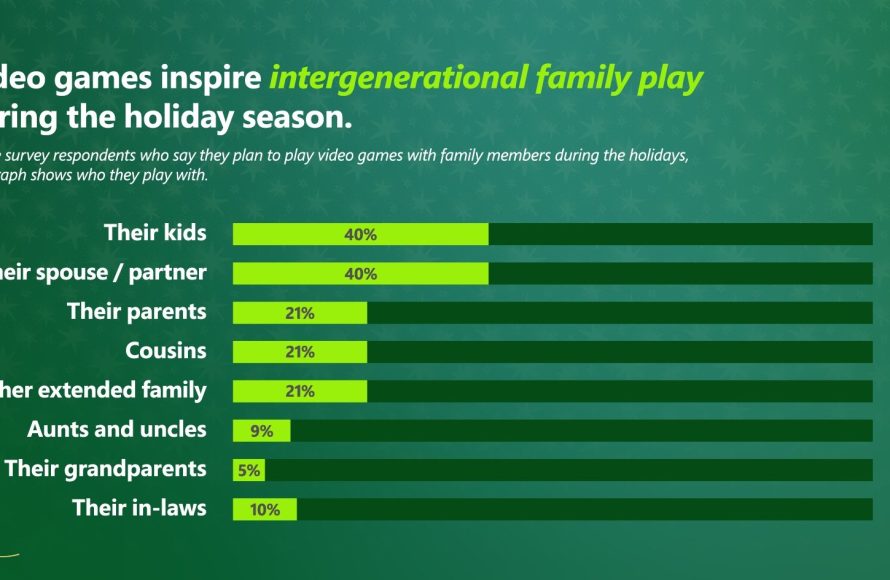
Xbox intergenerational gaming allows players on different generations of Xbox consoles, such as the Xbox One and Xbox Series X/S, to play games together online.
Imagine bonding with family across different homes, all through a shared love of video games. Xbox intergenerational gaming makes this simple. It bridges the gap between console generations. This allows friends and family on varied systems to enjoy the same titles together.
Picture your uncle on his older Xbox One playing with your cousins on their newer Xbox Series X. This is the magic of cross-generation play. It broadens the gaming experience. It allows more people to join in the fun.

Xbox Intergenerational Gaming: Bridging Generations Through Play
Video games are more than just entertainment; they are a way to connect with people, and that connection can span across generations. Xbox, with its focus on inclusivity and backwards compatibility, has become a fantastic platform for intergenerational gaming. This means families – grandparents, parents, and kids – can play together, creating shared experiences and lasting memories. It’s not just about playing games; it’s about building relationships, teaching new skills, and having fun together. Let’s jump in and see how Xbox is making this happen.
The Power of Backwards Compatibility
One of the coolest things about Xbox is its commitment to backwards compatibility. This fancy term simply means you can play older Xbox games on your newer Xbox console. Think about it: your grandma might have loved playing a particular Xbox game years ago, and now you can play it together on your Xbox Series X or S. This feature bridges the gap between different gaming eras, allowing multiple generations to experience the same titles. It’s a treasure trove of fun waiting to be explored together!
How Backwards Compatibility Works
It might seem like magic, but there’s actually a lot of work involved in making backwards compatibility happen. Here’s a simple breakdown:
- Emulation: The Xbox uses special software that mimics older Xbox consoles. This lets your newer Xbox think it’s playing on an older console.
- Digital Downloads: Many older games are available for digital purchase. These can be downloaded straight to your console.
- Physical Discs: If you still have your old Xbox games on discs, many of these will also work in the newer consoles. Just pop them in and get ready to play! (Check the compatibility list for each game though, as not all discs work).
Benefits of Backwards Compatibility for Intergenerational Play
This feature brings a lot to the table for families gaming together:
- Shared Nostalgia: Grandparents can share the games they grew up with, sparking stories and memories.
- Discovering Classics: Kids get a chance to see the games that paved the way for modern titles, understanding gaming history.
- Affordable Fun: Older games are often cheaper, making it easier for families to try out new titles without breaking the bank.
- Variety of Games: This means there’s a wider range of genres and styles to choose from, appealing to various tastes and preferences of the multiple generations.
Finding Games That Everyone Can Enjoy
Not all games are created equal when it comes to intergenerational play. Some might be too complex, while others might be too fast-paced. The key is to find games that are simple to understand and fun for players of different ages and skill levels. Here are some great game genres to explore with your family:
Family-Friendly Games and Their Appeal
- Platformers: Games like Minecraft, Rayman Legends, and the Super Lucky’s Tale are great because they often have simple controls and charming visuals. These games also tend to be very cooperative, encouraging teamwork.
- Racing Games: Titles like Mario Kart 8 Deluxe (which is on Nintendo Switch but similar options exist on Xbox) and Forza Horizon are fantastic for some friendly competition. You can adjust the difficulty and settings so everyone can have a chance to win.
- Party Games: Games like Overcooked! and Jackbox Party Pack are all about silly fun. They are easy to pick up and can lead to lots of laughter.
- Puzzle Games: Games like Portal 2 and Unravel Two can be a great brain challenge, requiring teamwork and communication, which are key skills for intergenerational gaming.
- Adventure Games: Games like Sea of Thieves (with its cooperative elements) or LEGO games provide compelling stories and worlds to explore, and often allow players to work together toward a common goal.
Tips for Choosing the Right Games
- Consider Skill Levels: Choose games that are either easy to pick up or have adjustable difficulty settings.
- Look for Cooperative Play: Games that encourage teamwork are great for bonding.
- Think about Interests: What kinds of stories or activities do different family members enjoy? Choose games that align with those interests.
- Don’t Be Afraid to Try New Things: Sometimes the most unexpected games become family favorites.
Setting Up Your Xbox for Intergenerational Play
Before you dive into gaming, it’s a good idea to get your Xbox set up so that everyone can play together comfortably. This means considering things like account management and accessibility features.
Creating Family Accounts
Xbox lets you create family accounts so that each member has their own profile. This is handy for a few reasons:
- Individual Progress: Everyone can save their game progress separately, preventing any accidental overwrites.
- Parental Controls: You can set limits on how long kids play and what games they can access. This ensures they’re playing age-appropriate content.
- Personalized Experiences: Each account can have its own settings and preferences, from avatar customization to game settings.
Using the Xbox Family Settings App
The Xbox Family Settings app is a great tool for parents. It lets you manage family accounts and controls from your phone. You can do things like:
- Set Screen Time Limits: Make sure kids get their homework and chores done before playing.
- Manage Spending: Control how much money kids can spend on games and add-ons.
- Filter Content: Block access to games that aren’t age-appropriate.
- Communicate with Family Members: Send messages through the Xbox network.
Accessibility Options
Xbox also has accessibility features that can make gaming easier and more enjoyable for everyone. For example:
- Controller Customization: You can remap buttons and adjust sensitivity to fit different needs.
- Narrator: The narrator can read on-screen text aloud for people who have trouble seeing.
- High Contrast: This mode can make it easier for people with visual impairments to see the game.
- Closed Captions: These are helpful for players who are deaf or hard of hearing.
The Benefits of Intergenerational Gaming
Playing video games together across generations isn’t just about having fun; it offers many benefits that can strengthen family bonds and improve well-being. Here are a few key ways it helps:
Building Stronger Family Bonds
- Shared Experiences: Gaming creates moments for everyone to come together, laugh, and create memories. These shared experiences become stories that the family can cherish for years to come.
- Improved Communication: As families play together, communication often becomes more open and frequent. Players are forced to work together in cooperative games and communicate strategies and tactics in competitive games.
- Understanding Different Perspectives: By seeing how others play, we gain insight into their thought processes and motivations, fostering empathy and respect.
- Reduced Generation Gap: Playing video games together helps break down barriers between generations, creating a common ground for understanding and connection.
Learning New Skills and Knowledge
- Problem-Solving: Many games require thinking strategically and finding creative solutions. This can improve problem-solving skills for everyone in the family.
- Teamwork and Cooperation: Multiplayer games teach collaboration and the importance of working together toward a shared goal.
- Tech Literacy: For some family members, playing video games might improve their tech proficiency and their comfort level with technology in general.
- Strategy and Planning: Games often require planning and strategic thinking, helping players develop these important skills.
Promoting Positive Interaction
- Active Engagement: Playing video games is an active rather than passive activity, which encourages participants to stay engaged.
- Positive Competition: Friendly competition can be a fun way to bond, especially if everyone plays within their comfort zone.
- Stress Relief: Video games can be a great way to relax and destress after a long day. Shared gaming can make it even more effective.
- Improved Mood: Successfully completing a game can boost mood and self-confidence.
Addressing Common Concerns
Some parents and grandparents might have a few concerns about intergenerational gaming. Let’s address a few of the common questions:
“Won’t Video Games Make Kids Lazy?”
Like any activity, moderation is key. When balanced with other activities, video games can provide many benefits. The problem isn’t the games themselves, but when they take up too much time or are the sole activity a child partakes in. By setting time limits and encouraging other interests, you can ensure that video games are a part of a healthy, well-rounded lifestyle. For instance, you can set a rule that all homework must be finished before gaming. You can also encourage your kids to play other games that involve more physical activities.
“Are Violent Games Bad for Kids?”
It’s essential to be aware of the content of the games your kids are playing. The Xbox system has parental controls that allow you to restrict access to games with mature content. Focus on games that are age-appropriate and align with your family values. Remember, there are tons of fun games out there that are suitable for all ages, so there’s no need to get bogged down in only playing violent games if you don’t want to.
“I Don’t Know How to Play Video Games!”
That’s okay! The great thing about intergenerational gaming is that it is a learning experience for everyone involved. Don’t be afraid to ask your grandkids (or kids) for help. They can show you the ropes and teach you how to play. You might be surprised at how quickly you pick it up, and they’ll feel good about helping you. The main thing is to have fun and be willing to learn!
“Can Intergenerational Gaming Really Bring Families Closer?”
Absolutely! Shared experiences create bonds and memories. Intergenerational gaming is simply another tool that can help families connect and have fun together. The key is to go into each session with an open mind and a willingness to engage with each other. That’s what counts most of all.
Intergenerational gaming on Xbox is more than just entertainment, it is an opportunity for families to connect, learn, and create memories that will last a lifetime. By taking advantage of features like backwards compatibility, family accounts, and accessibility options, families can create fun gaming experiences that everyone can enjoy. The key is to pick the right games, set appropriate guidelines, and have fun. Remember, it’s all about the time you spend together, not just about winning the game. So, grab your controller, gather your family, and start playing!
What Is Next-Gen Xbox's 'Biggest Generational Leap' – And Will It Cost A Fortune?
Final Thoughts
Xbox intergenerational gaming provides a fantastic way for families and friends to connect, irrespective of console generation. Players on older Xbox One systems can enjoy games with those on the newest Xbox Series consoles. This fosters shared experiences and keeps everyone involved.
This capability greatly extends the lifespan of older hardware and reduces costs for families wanting to play together. It makes gaming more accessible. Xbox intergenerational gaming shows how technology can enhance social interaction and fun.

