
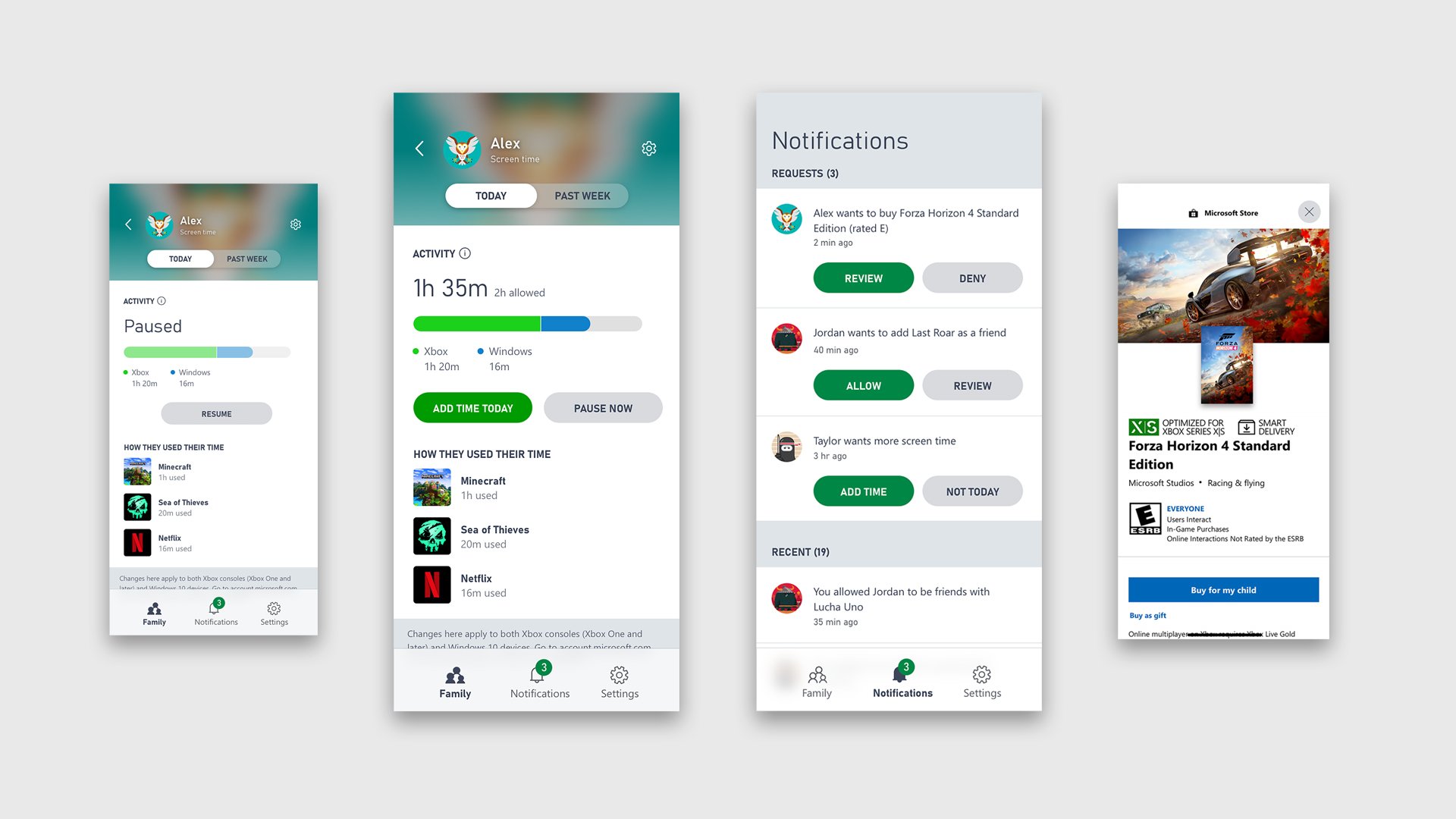
Xbox manages gaming time through built-in family settings, allowing parents to set limits, schedule play sessions, and receive activity reports.
Is gaming becoming a bit too consuming in your household? It’s a common concern, and thankfully, Xbox offers tools for Xbox managing gaming time. You can take control with features designed to help you achieve a healthy balance between screen time and other activities.
These settings give you the power to create time limits, establish schedules, and monitor your child’s gaming habits. This helps you stay informed and make appropriate adjustments as needed.

Xbox Managing Gaming Time: Taking Control of Your Play
Hey gamers! Let’s talk about something really important: managing your gaming time on Xbox. We all love playing our favorite games, but sometimes it can be tricky to know when to stop. It’s like getting lost in a really good book, but instead of pages, we have awesome adventures and challenges. Finding the right balance is important, and the good news is, your Xbox has some really cool tools to help you do just that. Let’s dive in and see how we can become the masters of our gaming schedule.
Understanding Why Time Management Matters
Before we get into the how-to, let’s think about the why. Why is managing your gaming time so important? Well, think of it like this: if you only ate cake all day, every day, you wouldn’t feel so good, right? It’s the same with gaming. Too much of anything isn’t good for you.
School and Homework: School is where we learn lots of exciting things, and homework helps us practice. If we spend all day gaming, we might not have enough time for homework, and then we might not do as well in class.
Sleeping Well: Our bodies and brains need sleep to recharge, just like your Xbox needs to plug into the power. If we stay up late gaming, we might feel tired and grumpy the next day.
Spending Time with Family and Friends: Playing with our friends and family is also super important. It’s fun to go outside, play games, or just hang out and talk. If we are always gaming, we might miss out on these fun times.
Health: Sitting down for a long time isn’t the best for our bodies. It’s good to get up and move around, do some exercises and get fresh air and sunshine! Balancing our gaming with other fun activities helps us stay healthy and happy.
So, managing our gaming time isn’t about stopping gaming altogether, it’s about making sure we have time for all the other awesome things in our lives too! It’s about finding that sweet spot where we can have our gaming fun and still be healthy and do well in school.
Xbox Family Settings: Your Secret Weapon
Okay, now for the good stuff – how to actually manage our gaming time. Your Xbox has a fantastic set of tools called Family Settings. This is where you, with the help of your parents or guardians, can set up limits and keep an eye on how much time is spent gaming.
Setting Up Your Xbox Family
First things first, you need to set up your Xbox family. This usually involves your parents or guardians making a Microsoft account and adding your account to the family group. They become the organizers, and you are a member. Think of it like setting up a team before the big game!
Parental Account: Your parent or guardian will use their Microsoft account to manage the family settings.
Adding Your Account: They will add your Xbox account to the family group. This is how they can keep track of your gaming time.
Xbox Console Settings: The settings are found on your Xbox console, usually under “Settings”, then “Account”, and then “Family Settings”.
Time Limits: Creating Your Gaming Schedule
Now, here comes the part where you get to set up your schedule. This is where you and your parents can talk about how much time is good for you to play games each day. Xbox offers different ways to set those time limits.
Daily Limits: You can set a certain amount of time you can play each day. For example, maybe you get two hours of gaming time on weekdays, and three hours on weekends. This is a great way to make sure you’re not gaming all day long.
Weekly Limits: You can also set a limit on the overall time you can play during the entire week. This can be good if you have some days that you might want to play a little more than others.
Content Restrictions: Xbox allows you to set age restrictions on games, so you only play age-appropriate games.
Specific App Limits: You can limit the amount of time spent on specific apps, like games or entertainment apps.
Using the Xbox Family App
The Xbox Family Settings app is like the control center for your gaming schedule. Your parents or guardians can use this app on their phones to:
View Activity Reports: They can see how much time you’ve spent gaming each day.
Adjust Time Limits: They can change your time limits whenever needed.
Give Extra Time: If you’ve been super good and finished your homework, they might give you some extra gaming time as a reward.
See what games you have been playing: The family app allows parents to check what games the child is playing.
Understanding Time Management Tools
Let’s take a closer look at the specific tools available to help you and your family manage gaming time. These are some really practical features that are designed to make the whole process easy and understandable.
Game Time Notifications
Imagine you’re in the middle of a really intense game, and suddenly a notification pops up on your screen. It tells you that your gaming time is almost up. This is a handy tool that gives you a warning to wrap things up.
Alerts on Screen: When your time limit is approaching, a pop-up message will appear on your TV screen.
Planning Ahead: These warnings help you finish your game or level without getting cut off too suddenly.
Time to Switch Activities: When the time is up, it’s a reminder that you can move on to something different.
Setting Custom Game Time Schedules
Sometimes, a general daily limit might not fit with what you’re doing. Maybe you have a big test on Friday so you need to study more but you have more free time on Saturday. That’s where custom schedules come in!
Weekday and Weekend Variations: You can set different limits for weekdays and weekends.
Specific Time Blocks: You might even be able to set specific time blocks for play. Like only playing between 4pm to 6pm.
Requesting Extra Time
Sometimes, you might want a little more gaming time, maybe for a special occasion or if you’re close to finishing a game. In this case, you can make a request to your parents using the Xbox Family app.
Request Feature: You send a message to your parents through the app asking for more game time.
Parental Approval: They will then decide whether to give you that extra time, considering if all your other tasks are done.
Communication: This is a good way to learn to communicate and ask for what you want in a polite way.
Tips and Tricks for Effective Time Management
It’s not just about setting time limits – it’s about making those limits work for you. Here are some tips and tricks to help you manage your gaming time effectively and build positive habits.
Creating a Schedule that Works For You
The key to success is creating a schedule that fits with all your activities, not just gaming.
Balance your Time: Plan out your day including homework, chores, and other fun activities, as well as gaming.
Make it Visual: You can create a timetable or calendar to help you see how your week is organized.
Stick to it: Try your best to stick to the schedule. It will be harder at first, but you will see that you enjoy your time better.
Using a Timer Outside of Xbox
Sometimes it can be helpful to set a timer that you can see instead of relying only on the Xbox notifications.
Set a Kitchen Timer: You can use a timer in the kitchen, so that it reminds you that it is almost gaming time or time to finish gaming.
Phone Timer: You can also use the timer on your phone, if your parents allow it.
Visual Reminders: These can be helpful as you can see the timer ticking away in real-time.
Being Open to Adjustments
Sometimes our plans might not go as we expect, so it is important to stay flexible.
Talk to Your Parents: If something comes up, like a big school project, talk to your parents about adjusting your gaming schedule.
Don’t be Stubborn: There may be days when you might not be able to get all your game time in. It is ok, just try to stick to your schedule as much as possible.
Finding Balance: It’s about balancing gaming with all the other great things in your life.
Taking Breaks While Gaming
It’s super important to take breaks during gaming. Even just small breaks can make a big difference.
Get Up and Move: Get up from your seat every hour and move around, stretch, or do a quick activity.
Hydrate and Eat: Don’t forget to drink water and eat snacks.
Eye Rest: Look at something far away every now and then, to give your eyes a rest.
Potential Challenges and How to Overcome Them
Sometimes things might not go as smoothly as we planned, and you might find some difficulties when trying to manage your game time. It is important to know how to recognize and address these challenges.
The Urge to Keep Playing
Sometimes we might find it difficult to stop playing a game when the timer goes off. This is very normal as most games are very exciting and they keep us engaged.
Have a Back up Plan: Think of an activity that you can move into straight away after your game time finishes.
Set Goals: Set some goals in the game, so that you know when is a natural stopping point.
Remind Yourself: Remind yourself about why you set your time limits. Think about how much fun you are having in other activities.
Arguing with Parents Over Time Limits
Sometimes, disagreements may arise with your parents regarding the gaming limits. It is important to discuss this openly and constructively.
Talk it Out: Sit with your parents and calmly talk about your gaming schedule, and why certain limits are set.
Come to an Agreement: Try to work with them to create a schedule that everyone agrees on.
Be Respectful: Be respectful, even if you might not agree at first, it is important to be respectful.
The Temptation of Friends Who Game a Lot
Sometimes your friends might game all day, and that might make you want to do the same.
It’s Your Decision: Remember it is your decision what you do with your time.
Suggest other activities: Try to engage your friends in different activities that don’t involve games.
Stick to your Plan: Stay true to the plan that you created with your parents.
Staying Committed to Time Management
It takes a bit of time to get used to managing your game time. It might be challenging at first but consistency is very important.
Track Your Progress: Look at how you are sticking to your plan. This will encourage you.
Reward Yourself: Set small rewards for when you are doing well at keeping up with your schedule.
Be Patient: Give yourself time, and don’t give up.
Managing gaming time on Xbox is not about not having fun, it’s about learning to balance our gaming passion with all other important things in our lives. By understanding why time management matters and using the tools available on your Xbox, you can create a gaming schedule that works for you. With a little planning and some help from your family, you can have a healthy and balanced relationship with gaming. You have all that you need to become a gaming schedule superstar. Now go have fun and enjoy!
This is a HIDDEN Feature on EVERY Xbox! 😱
Final Thoughts
Xbox provides excellent tools to control playtime. Parents can easily set limits and schedule breaks. These features promote healthier gaming habits for everyone.
Ultimately, Xbox managing gaming time helps create balance. It empowers users to enjoy games responsibly. By using these options, families and individuals can find time for other activities.

