
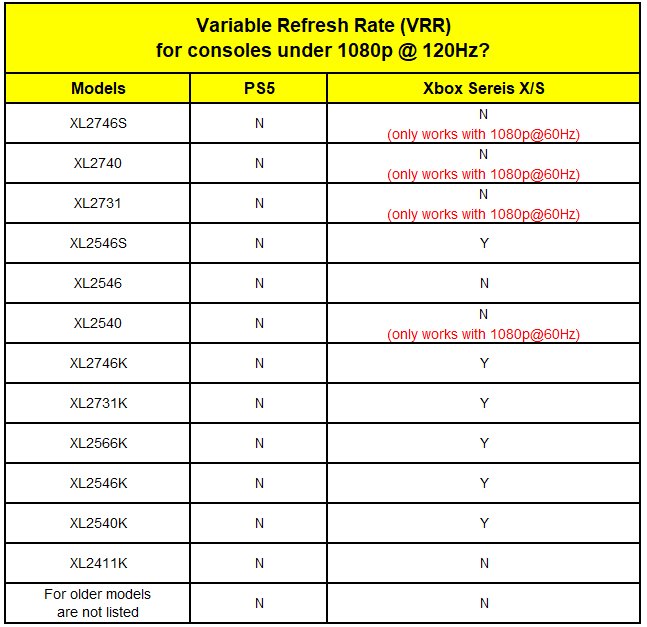
Xbox variable refresh rate support synchronizes your display’s refresh rate with the game’s frame rate, reducing screen tearing and stuttering for a smoother gaming experience.
Ever noticed those distracting visual glitches while gaming? It can certainly pull you out of the immersion, right? Xbox variable refresh rate support directly addresses this common issue.
This technology allows your monitor to adjust its refresh rate dynamically, matching it to the fluctuating frame rates of your games. The result is a noticeably cleaner and more fluid visual experience.

Xbox Variable Refresh Rate Support: Smoother Gameplay for Everyone
Have you ever been playing an awesome Xbox game, and suddenly it feels like the screen is stuttering or tearing? It’s like watching a movie with a bad connection – not fun! This is often caused by a mismatch between how fast your Xbox is making the pictures (frames) and how fast your TV is showing them. That’s where Variable Refresh Rate (VRR) comes in. It’s a special feature that helps your Xbox and TV work together to make the game look super smooth.
What Exactly is Variable Refresh Rate (VRR)?
Imagine you’re watching a cartoon. The artists draw each picture of the cartoon, and then they flip through them really quickly to make it look like the characters are moving. These pictures are called frames. Your Xbox creates these frames when you play a game. Now, TVs have a refresh rate, which is how many times a second they can show a new frame. This is often measured in Hertz (Hz). A 60Hz TV shows 60 frames per second. If your Xbox is sending 70 frames per second but your TV is only showing 60, some frames get lost. This causes screen tearing – that annoying line that sometimes flashes across your screen. Similarly, if the Xbox is only sending 40 frames, there might be repeated frames, causing the game to stutter.
VRR fixes this by letting the TV change its refresh rate to match the number of frames the Xbox is making. So, if the Xbox is sending 70 frames, the TV can refresh at 70Hz. If the Xbox drops to 40 frames per second due to a demanding part of the game, the TV can refresh at 40Hz, always perfectly matching the output of the Xbox. This matching creates a much smoother and more pleasant gaming experience, free from tearing and stuttering.
How VRR Makes a Difference for Xbox Gamers
Think about your favorite fast-paced action game on Xbox. Maybe it’s a racing game or a shooter. In those kinds of games, there’s a lot of movement and changing scenes. Without VRR, you might notice the screen tearing or stuttering, especially when things get very intense. It can be distracting and it can even make it harder to play. VRR eliminates these visual problems. Here’s how VRR improves your gaming experience:
- Eliminates Screen Tearing: Tearing is that jagged line that appears when the TV and Xbox aren’t in sync. VRR stops the tearing completely.
- Reduces Stuttering: When the game struggles to keep up with the refresh rate of the TV, you will feel like the game is choppy. VRR gets rid of stuttering by making sure the TV only shows completed frames.
- Smoother Gameplay: Because the Xbox and TV are working together seamlessly, the game feels smoother and more responsive. This lets you react quicker and play better.
- Improves Visual Quality: A smoother picture also just looks nicer. Everything seems more clear and less fuzzy. This means you get to enjoy your games to the fullest, exactly as the game developers intended.
Basically, with VRR, you get to enjoy a cleaner, sharper and more responsive game. It’s like the game just became more alive and a more comfortable experience.
Types of VRR: FreeSync, G-Sync, and HDMI 2.1 VRR
When we talk about VRR, you might hear some different names like FreeSync, G-Sync, and HDMI 2.1 VRR. These are different kinds of technologies that do the same thing – sync the refresh rate of your display to the output of your device.
FreeSync
FreeSync is a type of VRR made by AMD. It’s an open standard, which means lots of different displays can use it. Many Xbox consoles support FreeSync. If you have a TV or monitor that also has FreeSync, you can use VRR on your Xbox.
G-Sync
G-Sync is similar to FreeSync, but it’s made by NVIDIA. It is more commonly seen on PC monitors. While some newer G-Sync compatible monitors might support VRR on Xbox, FreeSync is generally the better option for Xbox consoles because of wider compatibility.
HDMI 2.1 VRR
HDMI 2.1 is the latest version of the cable that connects your Xbox to your TV. It supports a newer and better version of VRR that works across multiple platforms. Many newer TVs have HDMI 2.1, and if your TV and Xbox both support HDMI 2.1 VRR, you will get the best performance from VRR.
While FreeSync and G-Sync are technologies specific to certain manufacturers, HDMI 2.1 VRR is the broader industry standard for variable refresh rate. It doesn’t matter which company made your display – if it has HDMI 2.1 and supports VRR, you can use it with your Xbox.
Which Xbox Consoles Support VRR?
All Xbox consoles in the current generation support VRR – that means the Xbox Series X and the Xbox Series S. However, the older Xbox One consoles, like the Xbox One S and Xbox One X do not have the ability to support Variable Refresh Rate. If you have one of the newer consoles, you can take advantage of the smoother visuals that VRR provides.
Here is a quick breakdown:
- Xbox Series X: Yes, it supports VRR.
- Xbox Series S: Yes, it also supports VRR.
- Xbox One X: No, it does not support VRR.
- Xbox One S: No, it also does not support VRR.
- Original Xbox One: No, the original Xbox One does not support VRR.
If you want to use VRR, it’s really important to have a newer console. Also, you will need a TV or monitor that is also capable of supporting VRR, either with FreeSync or HDMI 2.1 VRR.
Which TVs and Monitors Support VRR for Xbox?
Not all TVs and monitors support VRR. To use VRR on your Xbox, your display needs to support FreeSync or HDMI 2.1 VRR. The technology needed is not available in every TV and Monitor. Here’s how to check if your TV or monitor is compatible and things to keep in mind while buying a new TV or monitor:
- Check the Specifications: Look at the TV’s or monitor’s specifications on the manufacturer’s website. Look for FreeSync or HDMI 2.1 VRR. If you are unsure, you can check the user manual. If the product has one of these, you’re good to go!
- FreeSync vs. HDMI 2.1 VRR: FreeSync is older, so some older TVs or monitors might have it. HDMI 2.1 VRR is newer and is becoming more common on newer models. Both can give you VRR, but HDMI 2.1 VRR usually gives better results.
- Ask the Store Staff: If you’re in a store, ask the staff if a specific TV or monitor supports VRR for gaming. They can help you figure it out.
- Look for Gaming Features: TVs and monitors that are made for gaming often have VRR. If the box or description mentions “gaming monitor” or “gaming TV”, it’s more likely to have VRR.
How to Enable VRR on your Xbox
Enabling VRR on your Xbox is pretty simple. There are just a few steps you need to follow. Here’s what you need to do:
- Make Sure Your TV Supports VRR: As mentioned before, first check that your TV or monitor actually has FreeSync or HDMI 2.1 VRR. If it doesn’t, you won’t be able to use VRR.
- Go to Xbox Settings: Turn on your Xbox and go to the “Settings” menu. You can do this by pressing the Xbox button on your controller, and then navigating to the settings icon.
- Navigate to Display Settings: In “Settings”, find the section that says “General”, then click on “TV & display options”.
- Enable VRR: Look for the “Variable Refresh Rate” option. It should be there if your display is capable of using it. Simply turn it “on”.
Once you turn VRR on in the settings, your Xbox should automatically use it whenever it can. This means that as long as your game supports it, and your monitor or TV is compatible, you will experience smoother gameplay.
What are the Potential Issues with VRR?
While VRR is great, there are a few small things to watch out for. These are not huge problems, but it’s good to be aware of them:
- Black Screen Flickering: Sometimes, if the VRR signal changes very quickly, your TV might flicker black for a split second. This is a rare issue and only occurs if you have a very poorly-made TV.
- VRR Range Limits: VRR has a certain range it can operate in. If your game runs at a frame rate outside this range, VRR might not work, or it might not work correctly. This is rarely a big problem, as most games have frame rates that fit inside the range. For example if the VRR range is between 40 to 120Hz, the games have to operate inside these framerates to avoid this problem.
- Compatibility Issues: In very rare cases, some combinations of TV and Xbox may not work well with VRR. If you see problems after turning VRR on, you might want to turn it off and see if that helps. Usually, this isn’t an issue, but it’s still good to be aware of.
VRR: Not Just for Xbox Consoles
The good news is that VRR is not something that is only used on Xbox consoles. If you play games on a PC or on PlayStation 5, you’ll find that they also support variable refresh rate. The technologies used may be called something a little different (like G-Sync), but the idea is the same – to make gaming smoother. So, the principles behind VRR are important for any kind of gaming platform.
The Future of VRR in Gaming
VRR is going to continue to become a very important part of gaming in the future. As displays and consoles get even more powerful, VRR will be needed to make games look and feel great. As technology keeps developing, we’ll most likely see even better VRR systems that are more stable and work with even more displays. So, if you have a display that doesn’t support it now, maybe your next TV will have this vital gaming feature.
In short, Variable Refresh Rate (VRR) is a must-have if you want to enjoy the best visual gaming experience. It makes the game look smoother and more responsive. If you have an Xbox Series X or S and a compatible TV or monitor, enabling VRR can make all the difference, improving your gameplay. Don’t hesitate to dive into the settings and turn it on. Your eyes will thank you!
What is Variable Refresh Rate?
Final Thoughts
In summary, Xbox variable refresh rate support provides smoother gameplay. It eliminates screen tearing and reduces stuttering. This technology dynamically adjusts the display refresh rate to match the console’s output. Users experience visually improved and more responsive gaming sessions due to Xbox variable refresh rate support.

