
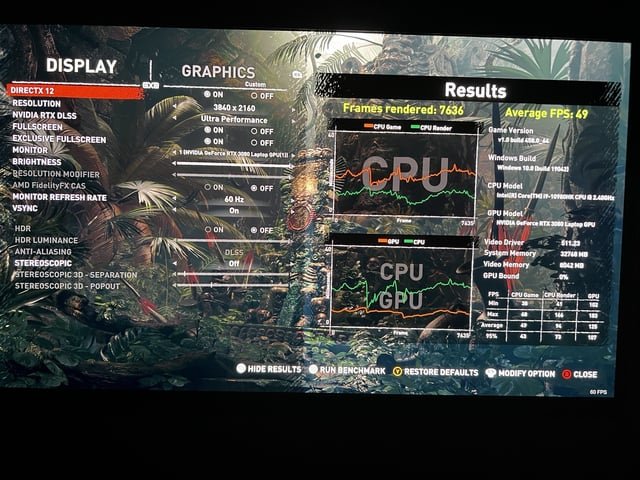
Most games are indeed GPU bound, meaning the graphics card is typically the performance bottleneck.
Wondering why your shiny new gaming PC sometimes struggles to hit those desired frame rates? Are most games gpu bound? That’s a question many gamers grapple with when trying to optimize their experience.
It’s important to understand how the different components of your computer work together. The graphics processing unit is often the component that dictates how well a game performs.

Are Most Games GPU Bound?
Let’s dive into a question that many gamers wonder about: Are most games actually limited by the graphics card, or GPU? It’s a bit like asking if a car is limited by its engine or its tires. Both are important, but sometimes one is working harder than the other. Understanding this “bottleneck” is key to getting the best performance from your gaming computer. We will talk about all the things that relate to how games run and what limits them. It’s not always as straightforward as you might think!
Understanding CPU and GPU Roles
Before we get deep into whether games are GPU bound, it’s important to know what a CPU and GPU do. Think of your computer as a team working together to run a game.
The CPU: The Brains of the Operation
The CPU, or Central Processing Unit, is like the brain of your computer. It handles all the important thinking tasks. When you’re playing a game, the CPU does things like:
- Figuring out what the characters in the game should do.
- Managing the game’s logic, such as how the rules of the game work.
- Working out the calculations for the game’s world physics.
- Handling input from your keyboard or controller.
The CPU is very good at doing a variety of tasks. It’s a generalist, which means it can handle many different things at the same time. However, it isn’t optimized to draw images quickly.
The GPU: The Artist of the Operation
The GPU, or Graphics Processing Unit, is like the artist of your computer. It is especially good at a very specific job: drawing images. When you’re playing a game, the GPU does things like:
- Rendering (or drawing) all of the images you see on your screen.
- Making sure the graphics look good with all the effects, like shadows and reflections.
- Moving those images to your screen so you can see them.
The GPU is extremely good at this particular task. It can perform the same calculation over and over again on many different pieces of data at the same time, which makes it a lot faster at drawing images than a CPU.
What Does “GPU Bound” Mean?
When we say a game is “GPU bound,” it means the graphics card is working at its maximum capacity. Think of it like running a race. If you’re GPU bound, your graphics card is sprinting as fast as it can, and it can’t go any faster. It’s the component that is holding back the game from running at a higher frame rate (frames per second or FPS). The frame rate is how many pictures per second your computer is making to show in the game. The higher the FPS, the smoother the game feels. If you’re GPU bound, upgrading your graphics card is probably going to be the best way to improve performance.
Identifying if a Game is GPU Bound
How do you tell if a game is GPU bound? It’s not like your computer has a flashing sign that says “GPU MAXED OUT!” But, there are clues.
Monitoring Tools
The best way to check is to use monitoring tools. These are like little gauges that show you how hard your CPU and GPU are working. Here are a few popular options:
- MSI Afterburner with RivaTuner Statistics Server (RTSS): This is a very popular tool used by many gamers. It shows you CPU and GPU usage, temperature, and more.
- NVIDIA Performance Overlay (for NVIDIA GPUs): NVIDIA has its own tool built into its drivers that shows this kind of info. You can enable it through the NVIDIA GeForce Experience app.
- AMD Radeon Overlay (for AMD GPUs): AMD has its own tool for its graphics cards to shows detailed performance statistics.
- Task Manager: Windows has a built-in Task Manager that shows CPU and GPU usage, although it’s not as detailed as some other options. Open it by pressing Ctrl+Shift+Esc.
Here’s what you look for when using these tools:
- High GPU Usage: If your GPU usage is consistently at or close to 100% while playing a game, and your CPU usage is lower, you’re probably GPU bound.
- Low CPU Usage: While the GPU is maxed out, if the CPU usage is much lower (let’s say 50% or lower), your CPU has more work it could do, and the GPU is the bottleneck.
Think of it like this: if you’re painting a wall, and you’re running out of paint (your GPU is at 100%), your helper (your CPU) isn’t going to do much more than stand there and watch. If you get more paint, you can paint faster. It’s that simple.
Observing In-Game Performance
Besides tools, you can also get an idea if you are GPU bound just by watching your games performance. Pay attention to the following:
- Frame Rate (FPS) Fluctuations: If your game’s frame rate drops when there are a lot of things happening on the screen, especially big explosions or when moving through areas with lots of detail, it could be a sign of a GPU bottleneck. This is because those situations demand more from your graphics card.
- Lowering Graphics Settings Improves FPS: If turning down graphics settings, like shadows, resolution, or effects, makes the game run a lot faster, you are almost certainly GPU bound. This is because these settings directly affect how much work your graphics card needs to do.
The Role of Game Resolution
The resolution of a game affects the number of pixels your graphics card has to push to your screen. It’s like painting on a canvas – the bigger the canvas (higher the resolution), the more work the artist (GPU) has to do.
Common Resolutions
Here are some common resolutions you might see:
- 720p (1280×720): This is considered low-definition. Not many gamers use this anymore. It’s like painting a smaller picture.
- 1080p (1920×1080): Also known as Full HD, this is the most common resolution. It’s a good balance of detail and performance.
- 1440p (2560×1440): Also known as Quad HD (QHD), this provides better detail than 1080p. It’s like painting a bigger, more detailed picture.
- 4K (3840×2160): This is extremely high resolution, providing incredibly detailed images. It’s like painting a huge, ultra-detailed picture, and requires a lot of GPU power.
If you are playing at higher resolutions like 1440p or 4K, your GPU is likely to be working harder compared to playing at 1080p. If your GPU is already working hard at 1080p, then increasing resolution will definitely make it more GPU bound.
Game Settings and GPU Load
Game settings impact how much your GPU works too. Think of them like the kinds of brushes and paints you’re giving the artist.
Graphics Settings that Impact GPU Load
- Texture Quality: This setting affects the level of detail in game objects. Higher quality means more work for the GPU. It’s like using finer paint brushes and more complex colors.
- Shadow Quality: Shadows can be computationally expensive to render. Higher quality shadows will make your GPU work harder.
- Anti-Aliasing: This smooths out the jagged edges of objects, but it takes a lot of power from the GPU.
- Ambient Occlusion: This adds depth and realism to shadows, and it uses a lot of GPU power too.
- Effects (like Bloom and Depth of Field): Special visual effects can put a big load on the graphics card.
Turning these graphics settings up will load the GPU a lot more, so if you’re seeing low FPS, start by lowering these to improve performance.
When a Game Might NOT Be GPU Bound
While most games are indeed GPU bound, there are times when the CPU might be the bottleneck. Think of it like having a very fast painter (GPU), but the materials (like brushes and paint) are not being given fast enough. In that case, the painter has to wait.
CPU-Intensive Games
Some games rely more on the CPU. These games have things like:
- Large Open Worlds: Games with big worlds where many characters and objects can move around at the same time tend to rely more on the CPU.
- Complex Physics Simulations: Games that use very detailed physics, such as games with lots of objects interacting in complex ways, can also be more CPU intensive.
- Strategy Games: Games where you control many units that need to make a lot of calculations tend to be CPU dependent.
Other Bottlenecks
Other things can bottleneck a system besides just the CPU and GPU.
- RAM: If you don’t have enough RAM (system memory), your computer will have to use your hard drive or SSD, which can slow down the entire process.
- Storage: Loading a game from an older hard drive (HDD) can be slower compared to loading it from a Solid State Drive (SSD).
How to Fix Performance Issues
If you find that you’re experiencing a GPU or CPU bottleneck, don’t worry! There are some things you can do to improve performance.
Fixing a GPU Bottleneck
- Lower Graphics Settings: Start by turning down the settings that impact GPU performance, like texture quality, shadows, and anti-aliasing.
- Lower Resolution: If lowering the graphics settings doesn’t make a big difference, try lowering the resolution to 1080p, or even 720p if necessary.
- Upgrade Your GPU: If you’ve done everything else, and your GPU is still maxed out at 100%, an upgrade is probably the best option to get more FPS.
Fixing a CPU Bottleneck
- Close Background Apps: Close any unnecessary programs that are running in the background, as these can take up CPU resources.
- Overclock Your CPU: If you feel comfortable, you can try overclocking your CPU, which can make it run faster. However, be very careful when doing this, and make sure your CPU can handle the heat generated.
- Upgrade Your CPU: If your CPU is outdated, and you are seeing consistent CPU bottlenecks, you may have to upgrade it. This can be a bigger job, and you might even need a new motherboard and RAM as well.
Other Potential Solutions
- Increase RAM: If your game seems to be stuttering, especially in larger or more complex areas, increasing your RAM might help. 16GB is a good starting point for most games today.
- Use an SSD: If you’re still using a hard drive to run your games, upgrading to an SSD will greatly reduce load times.
- Update your Drivers: Make sure that your CPU and GPU drivers are up to date. Newer drivers often have optimizations that can improve performance.
The Future of Gaming and Bottlenecks
As games get more and more detailed and complex, the importance of good hardware will increase. The lines between what is CPU and GPU bound may shift, but optimizing your system is always a good idea to have the best gaming experience.
Understanding what limits your system’s performance is important to get the most out of your gaming PC. By monitoring your system and adjusting settings, you can find the balance that will make your games run smoothly. Knowing if your game is GPU or CPU bound will help you target what hardware to upgrade if needed.
CPU VS GPU: How Do They Affect Video Games?
Final Thoughts
Ultimately, the answer hinges on game settings and hardware. Games often demand significant graphical processing power. Therefore, are most games gpu bound in many scenarios especially at high resolutions and settings.
However, CPU intensive games and situations can exist. The balance between CPU and GPU load is not fixed. The optimal configuration depends on specific game.

