
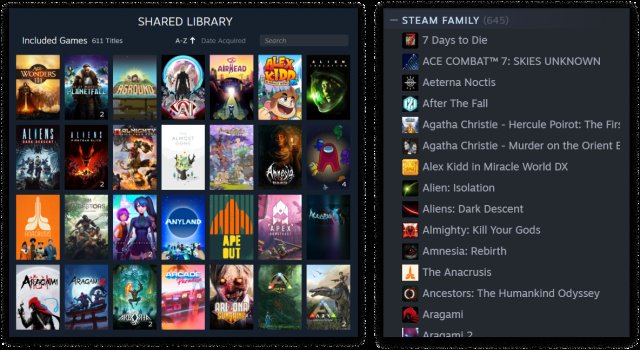
No, two people cannot play the same game simultaneously from one Steam family library, unless the game is specifically designed for multiple players to use one copy at a time.
Ever wondered if you can play your favorite Steam game with a family member at the same time? This is a common question for families and friends using Steam’s family sharing feature. The question “can 2 people play the same game on steam family” often pops up.
It’s a great concept: share your game library so others can enjoy your collection. However, Steam puts some limitations on this system to avoid issues.
This means that while you can share your games, playing the same game at the same time is restricted.

Can 2 People Play the Same Game on Steam Family?
So, you’ve got a Steam library packed with awesome games, and you’re itching to play with your family or friends. But then the big question pops up: can two people play the same game at the same time using Steam Family Sharing? It’s a really common question, and the answer is a little bit ‘yes’ and a little bit ‘no.’ It’s not as simple as just hitting ‘play’ for everyone. Let’s get into the details and break down how Steam Family Sharing really works when it comes to playing the same game simultaneously.
Understanding Steam Family Sharing Basics
Steam Family Sharing is a feature that allows you to share your game library with a maximum of five other accounts on up to 10 authorized computers. It’s a super cool way to let others enjoy the games you own without them having to buy them individually. The concept is straightforward – you allow other Steam accounts to borrow your games. However, there are some key rules about how this sharing operates, particularly when multiple people want to play the same game at the same time.
How to Authorize Devices and Accounts
Before anyone can get in on the action, you need to authorize their devices and accounts. Here’s how you do it:
- Log into your Steam account on the computer your family member will use.
- Go to ‘Steam’ in the top left corner, then click on ‘Settings’.
- Choose the ‘Family’ tab.
- Click the “Authorize Library Sharing on this Computer.”
- Select the Steam accounts that you want to be able to access your library.
After that, the authorized user will be able to access your library from that specific computer using their account. It’s important to remember that devices need to be authorized individually.
The Crucial Limitation: One Player Per Game
Here’s the main hurdle: only one person can play a game from your library at a time. It doesn’t matter if you have multiple copies of a game. If you, the primary owner, are playing a game, nobody else using your shared library can play any games at the same time. Think of it like borrowing a physical book from a library – only one person can use the book at once.
The limitation is tied to the specific game license. Steam manages game access at the account level. When someone plays a game from a shared library, Steam treats it as if that user is using the actual license for that specific game. Because only one license is available in a family library, only one user can use that particular game license at the given moment.
Even if you have a game that supports multiplayer, only one person can play at any one time through shared library.
What Happens When Someone Tries to Play While You’re Playing?
If someone tries to play a game from your shared library while you’re already playing, they’ll get a notification that the game is currently in use. They’ll be given a short amount of time (usually a few minutes) to quit the game if they’re the one playing on the shared library or to ask you to exit if you are the primary account owner.
If the primary account owner chooses to play at any point, the person playing through shared library will receive notice that they will be kicked out after a short grace period. It’s a helpful, albeit sometimes frustrating, system that keeps everything fair.
Exceptions to the Rule: Games with Multiple Licenses
There’s one notable exception: some games come with multiple licenses. This is less common but still relevant to consider. Certain games, particularly those bundled as multiplayer packs or where the single purchase provides a server license, might allow multiple people to play simultaneously without conflicting with your shared library’s constraints.
Games that come with multiple activation keys that can be redeemed separately, don’t fall under steam family library. These keys are added to multiple individual accounts to use and play separately and simultaneously. Such games can be shared with family members or friends.
For example, some games might offer a “four-pack” deal where buying one copy gives you four separate keys. Each key could then be used on individual accounts, and they wouldn’t fall under the same sharing limitations. Always check the game’s description or purchase options on Steam to see if it comes with multiple licenses or if it’s a bundle with individual activation keys.
How Can You Play Together?
So, if sharing isn’t going to let you and your family play the same game simultaneously, what can you do? Here are a few solutions:
- Purchase Separate Copies: The most straightforward solution is to buy a separate copy of the game for each person who wants to play it at the same time. This lets everyone play independently without any conflicts from Steam Family Sharing restrictions.
- Family Members Buy Their Own: Instead of you buying everything, have family members purchase the games they want to play. This can reduce costs for you and lets them enjoy their games anytime.
- Play Different Games: If you have a large game library, find games that each of you enjoy playing separately. This allows everyone to have game time simultaneously but doesn’t require buying extra copies of the same game.
- Use Multiple Accounts on the Same Computer: Although less convenient, and not feasible for multiplayer scenarios, you can each use a different Steam account on the same computer to play separate games, and do it one after another.
Important Considerations When Using Steam Family Sharing
Steam Family Sharing comes with some additional things to keep in mind:
- Borrowed Games are Not Permanently Yours: Remember that the shared games are still owned by the primary account. The owner can revoke access at any time. If they choose to start playing, the borrower will be notified and their session will end.
- Certain Games Cannot Be Shared: Not all games can be shared through the Steam Family Sharing system. Some might not have been developed with this sharing system in mind and will be labeled as unavailable to borrow.
- Restrictions on VAC Banned Accounts: If the owner’s account has been banned by VAC (Valve Anti-Cheat) for any reason, sharing will be suspended for that account on the specific games they’ve received the ban.
- DLC Restrictions: Downloadable content (DLC) sharing isn’t always straightforward. Sometimes you may need to buy it separately for each account, even if the main game is being shared.
Use Cases and Scenarios
Let’s look at a few typical scenarios and how Steam Family Sharing would work:
Scenario 1: Siblings Want to Play the Same Game Together
If two siblings both want to play the same game, such as a cooperative adventure game or a competitive game, at the same time from your shared library, it isn’t possible. Only one of them could play at a time using that shared copy. The solution here would be for each of them to have their own copy to play simultaneously.
Scenario 2: Parent and Child Want to Play Separate Games
A parent and their child want to play different games from the family library at the same time. This setup is totally doable. The parent can play one game while the child plays a different game. Remember, this is the most efficient way to utilize the steam family library.
Scenario 3: One Person Plays While Another Watches
One person can play a game while the other watches, since only one of them is playing the game. This type of situation works without issues as only one license from the library is in use.
Troubleshooting Common Sharing Issues
Sometimes, things might not work exactly as planned. Here are a few tips for troubleshooting common Steam Family Sharing issues:
- Check the Steam Server Status: If you are having problems with Steam Family Sharing, it may be down or under maintenance. Always check the steam server status.
- Double-Check Authorizations: If someone can’t access your library, make sure you’ve authorized their account and computer properly through your Steam settings.
- Reboot Steam and Your Computer: Sometimes a simple restart can solve a lot of issues.
- Update Steam: Make sure your Steam client and your family members’ Steam clients are both up to date.
Alternatives to Steam Family Sharing for Simultaneous Play
If you need to have more than one person playing the same games, consider these options outside of the family sharing feature:
- Gifting Games: Purchase games as gifts to other accounts so that they have full ownership and can play at any time. This means the game license is owned by the receiver of the gift, making it accessible whenever.
- Game Bundles: Sometimes purchasing game bundles that come with additional codes is a good way to save money on multiple copies. Always check the description to see if they come as bundles with additional codes.
These solutions will give everyone independent access, allowing for simultaneous play of the same game.
In summary, Steam Family Sharing is an amazing tool for sharing your game library, but it’s not designed for simultaneous play of the same game. The best approach is to buy separate copies of the game or to find different games to enjoy together. This ensures everyone can enjoy their gaming experience without any restrictions. Understanding its limitations is crucial to avoid frustration, so consider your specific needs and the best way to get the whole family gaming! Remember, one game at a time from the same library, unless multiple copies exist on independent accounts. Plan ahead, check the steam store for multiple license games and enjoy your gaming!
How to Share Games on Steam 2024 – Steam Family
Final Thoughts
So, can 2 people play the same game on steam family? The simple answer is generally no. Steam’s family sharing only allows one user at a time to access a game. This means simultaneous play isn’t possible for the same title.
You can share your library, but not play together using the same copy of a game. Consider purchasing a second copy of the game to achieve that concurrent multiplayer experience. This is the main limitation of family sharing on Steam.

