
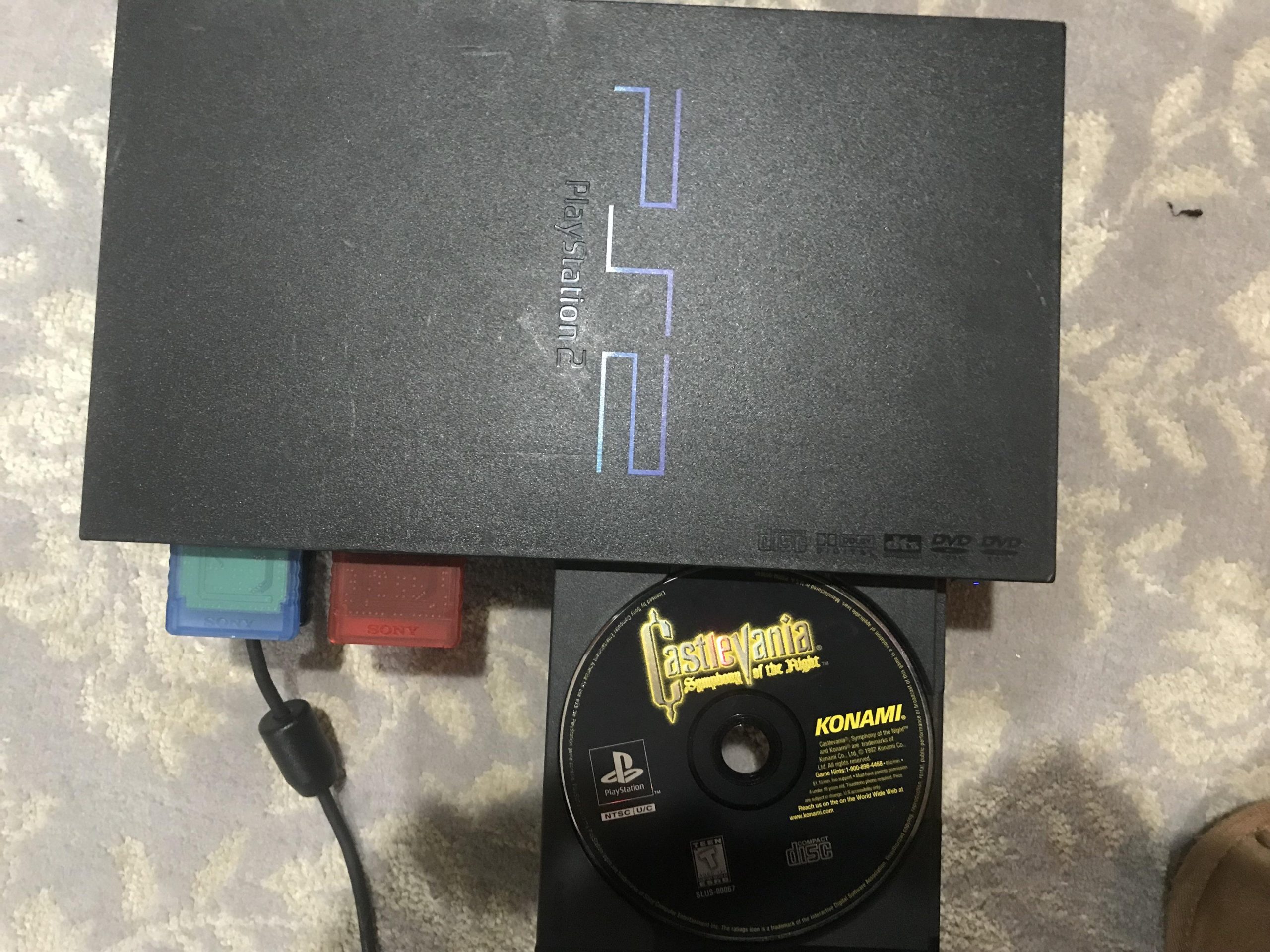
Yes, a PlayStation 2 can play PlayStation 1 games.
Have you ever wondered about backwards compatibility in gaming? Perhaps you own a classic PS2 and have a pile of old PS1 games gathering dust. The question on many minds is: can a PlayStation 2 play PlayStation 1 games? It’s a valid question, especially if you’re looking to revisit some nostalgic titles.
Good news awaits you. The PlayStation 2 was designed with this in mind, making it a great way to enjoy games from both eras. You can pop in your favourite PS1 disc, and the PS2 will handle it perfectly fine.

Can a PlayStation 2 Play PlayStation 1 Games?
Alright, let’s get right to the heart of it! You’ve probably got a stack of those awesome old PlayStation 1 (PS1) games collecting dust, and you’re wondering if your PlayStation 2 (PS2) can bring them back to life. The simple answer is: YES! The PlayStation 2 is designed to play most PlayStation 1 games. It’s a fantastic feature that made the PS2 such a popular console. But, like most things, there are some things you need to know. Let’s explore this in more detail and understand exactly how it works and if there are any catches.
The Magic of Backward Compatibility
The ability of the PS2 to play PS1 games is called “backward compatibility.” This means a newer console can play games made for an older console. This is really great for gamers because you don’t need to keep two different consoles hooked up to play your old favorite games. Instead of having to dust off your old PS1, you can simply pop your PS1 game into your PS2 and start playing! This feature was a big deal when the PS2 came out. It wasn’t always a standard feature for consoles at the time. People were excited that they could still enjoy all their PlayStation games on the newest system.
Why Did Sony Include This Feature?
Sony included backward compatibility in the PS2 for a few very smart reasons. First off, it helped people who were thinking of buying a PS2. Knowing they wouldn’t lose all their PlayStation 1 games made it much easier to decide to upgrade. They didn’t have to throw away their collection. Second, the PlayStation had a giant library of incredible games. Letting people play those games on the PS2 gave the system a massive catalog of titles right away. It was a great way to attract new customers who had never owned a PlayStation 1.
How Does the PS2 Play PS1 Games?
The PlayStation 2 has specific parts inside that allow it to understand and play PS1 games. It’s like having a tiny PS1 built into the PS2. While the PS2’s main processor and graphics chips are much more advanced, it includes a special processor dedicated to running PS1 games. This dedicated chip ensures that the old games run smoothly and correctly. So, when you insert a PlayStation 1 disc, the PS2 switches to this special mode, which is pretty cool when you think about it.
Are All PS1 Games Compatible with the PS2?
While the PS2 does a great job playing PS1 games, there are a few exceptions. The vast majority of PlayStation 1 games work perfectly on the PlayStation 2. However, a small number of games might have minor glitches or not work at all. These compatibility issues are usually rare but it is something you should consider. Usually, these issues stem from the very early days of PS1 game development, or sometimes have a complex format that doesn’t transfer well. These are quite rare cases though and you most likely would not have to face it.
Identifying Compatibility Issues
It can be frustrating to encounter a game that does not work correctly, here’s what to look out for:
- Game Won’t Load: Sometimes the game might not start at all. You might just get a black screen or the PS2 will not recognize the disc.
- Graphics Glitches: The game might have weird graphics problems. You might see flickering images, textures that don’t look right, or characters that seem broken.
- Sound Problems: The sound might be missing, distorted, or have strange noises.
- Freezing: The game might stop working completely and you will be required to restart the PS2 console.
Where Can You Check if a Game Has Issues?
If you are ever unsure of whether a game would be compatible, there are a few ways to find out:
- Online Game Forums: Check online forums where gamers talk about specific games. A quick search may reveal if others have reported problems with a game on the PS2.
- Compatibility Lists: Some websites have made lists of PS1 games known to have issues on the PS2. Try searching for “PS2 backward compatibility list”.
- Try it Out: The best way is to simply try the game in your PS2. If you encounter any issue it’s good to check online to see if others have had similar issues.
Setting Up Your PS2 to Play PS1 Games
Getting your PS2 ready to play PS1 games is really easy. You do not need to change any settings or install anything special. Just follow these simple steps:
- Power on your PlayStation 2: Make sure your PS2 is plugged in and turned on. The power light should be green.
- Insert the PS1 Game Disc: Open the disc tray by pressing the “open” button on your console. Place your PS1 game disc into the tray with the label side facing up.
- Close the Disc Tray: Gently close the disc tray and wait a few seconds. The PS2 will usually read the disc and start the game automatically.
- Play: Start playing as normal. If all goes well the game will boot up to its start menu.
Troubleshooting Common Issues
If you encounter problems when trying to play a PS1 game on your PS2, try these tips:
- Check the Disc: Make sure the disc is clean and free of scratches. You can gently wipe the disc with a soft cloth to remove any dust or fingerprints. Do not use anything abrasive or wet to clean the disc.
- Restart the PS2: Sometimes simply turning the PS2 off and on again can fix the problem. Let the system sit for a minute before turning it back on.
- Try Another Game: Try a different PS1 game to see if the problem is with the game or the PS2 system. If other games work, the problem is most likely with the first disc itself.
- Check Your PS2 Model: Early PS2 models had a slightly higher rate of compatibility issues. While it’s usually not an issue, it can be good to check if your console has any known issue, especially if you have an older model.
Visual Differences Between PS1 and PS2
It is important to note that playing a PS1 game on your PS2 does not make it look like a PS2 game. The graphics are the same as you would see on the PS1. This means that a PS1 game will still have its low-resolution textures, and blocky character models. The PS2’s hardware is not used to make the PS1 games look better. It is simply using the special PS1 chip to emulate the console. You’re just able to play the game from the convenience of your PS2. But what are the visual differences between both consoles?
PS1 Graphics
- Lower Resolution: PS1 games typically ran at lower resolutions than PS2 games. This means they often appear less sharp, with a bit of blurriness when played on a modern screen.
- Simple Textures: The textures in PS1 games are simpler, often without much detail, and sometimes appear pixelated.
- Blocky Models: Character models and objects often look angular and blocky due to the limited polygon count. This is because the hardware could not process as many shapes.
PS2 Graphics
- Higher Resolution: PS2 games run at a higher resolution, making images and characters appear clearer and sharper.
- More Detailed Textures: Textures have much more detail, meaning they appear smoother and more realistic.
- Smoother Models: Character and object models have a higher polygon count, making them appear rounder and more detailed.
It is important to keep this in mind when you are playing PS1 games on a PS2. While it’s convenient, there’s no visual upgrading or smoothing that will make a PS1 game look better than it was designed to look.
Why Backwards Compatibility is Important
Backwards compatibility was a very important feature for the PlayStation 2, and is still considered a highly sought-after feature in new gaming consoles. Here is why:
Preservation of Gaming History
Backward compatibility ensures that we can enjoy classic games for years to come. Without it, old games might become unplayable on newer systems. This allows us to easily experience the games that shaped the industry, and share those experiences with others.
Convenience for Players
Players can enjoy their old games without having to purchase and set up older consoles. This makes it easier to access a library of titles, and avoids the extra hassle of dealing with old wires, controllers and consoles. The benefit of having one system capable of playing all of your favorite games can not be overstated.
Value for Gamers
Backward compatibility can be a big advantage, as players do not have to throw away their game library when upgrading to a new console. This also increases the value of game collections, and can even make older consoles more desirable in the second hand market.
A Great Feature
Ultimately, the PS2’s ability to play PS1 games was a big win for gamers and for Sony. It made the console an attractive upgrade, provided instant access to a massive library of titles, and helped cement the PS2 as one of the best selling video game consoles of all time.
In short, yes, your PlayStation 2 can play most PlayStation 1 games, and that’s a fantastic thing. It’s an awesome way to revisit old favorites and experience classic games on a still-capable system.
Does PS2 play PS1 games
Final Thoughts
Yes, a PlayStation 2 can play PlayStation 1 games. This backward compatibility was a key feature. Players enjoyed their PS1 library on the newer console.
The feature allowed seamless enjoyment. Many people got a lot of mileage out of this. So if you wondered, ‘can a playstation 2 play playstation 1 games’ the answer is yes.

