
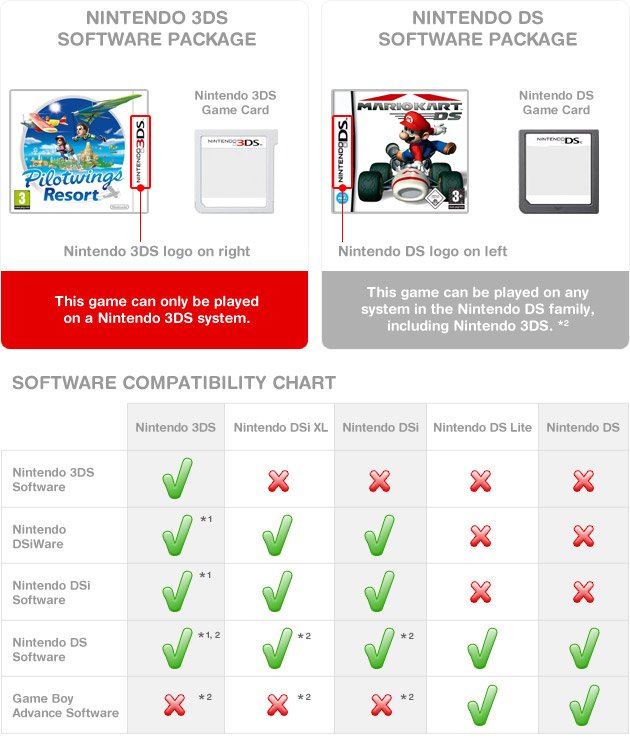
Yes, the 3DS can play almost all DS games.
Thinking about dusting off your old DS games but wondering if they’ll work on your newer 3DS? It’s a common question, especially since many people have both consoles. Fortunately, the answer to ‘can ds games be played on 3ds’ is good news for retro gamers.
The 3DS was designed with backwards compatibility in mind. This means you can enjoy your favourite DS titles on the newer handheld. The only exception to this is a small handful of specific titles that used additional hardware that isn’t present on the 3DS.

Can DS Games Be Played on 3DS?
So, you’ve got a shiny Nintendo 3DS, maybe even an older one, and you’re looking at your stack of Nintendo DS games. You’re probably wondering, “Will these even work?” The short answer is a big, exciting YES! The Nintendo 3DS is designed to play almost all Nintendo DS games. That’s right; your favorites like New Super Mario Bros., Pokemon Diamond and Pearl, and The Legend of Zelda: Phantom Hourglass are ready to go on your 3DS. Let’s dive into why this is the case and explore everything you need to know about playing DS games on your 3DS.
Why the 3DS Plays DS Games
Nintendo designed the 3DS with backward compatibility in mind. This means that the 3DS has all the hardware inside that is needed to read and play Nintendo DS cartridges. Imagine it like this: your 3DS has a built-in translator that can understand both 3DS game languages and the older DS game languages. It’s like having two game systems in one. This is great news for gamers as it means you do not need to keep both systems, making travel easier and saves space. You can easily switch between playing the newest 3DS games and your old-time DS classics.
Understanding the Hardware
The key to the 3DS’s ability to play DS games lies in its dual screen setup and the slot for game cartridges. Both the Nintendo DS and the 3DS use a similar cartridge format, although the 3DS game cartridges are slightly different. The 3DS cartridge slot was designed to accept the slightly smaller Nintendo DS cartridges without any problems. The 3DS screen setup with the top and bottom screens also helps because the DS was also designed with this dual screen. The 3DS’s powerful processors are perfectly capable of running the older DS games smoothly. The 3DS can play all your DS games because it is, internally, capable of acting exactly like a Nintendo DS.
How to Play DS Games on Your 3DS
Playing DS games on your 3DS is very simple. Here’s a step-by-step guide:
- Make sure your 3DS is turned off: Always turn off your 3DS before inserting or removing game cartridges.
- Locate the game cartridge slot: On most 3DS models, this slot is located at the top, right side of the console.
- Insert the DS game cartridge: Gently insert the DS game cartridge into the slot. The label on the cartridge should face towards the back of the console. Don’t force the cartridge in, it should slide in easily.
- Turn on your 3DS: Power on your 3DS after inserting the game.
- Select the game: The DS game will appear on the 3DS home menu. Tap it or use your stylus and select start.
- Start playing: Enjoy your DS game!
Important Considerations
While it’s easy to play DS games on your 3DS, there are some key things to keep in mind:
- Screen Size: DS games were designed for the smaller screens of the DS. When played on a 3DS, the image will not fill the entire screen, particularly when playing on a new 3DS XL screen. You will see black bars around the game display, on both the top and bottom screens. This is normal. The original size of the DS game is maintained.
- Resolution: DS games have a lower resolution compared to 3DS games. This means the graphics might not look as sharp or clear on the 3DS’s higher-resolution screen. However, the gameplay experience will remain the same.
- Game Compatibility: While the vast majority of DS games will work on a 3DS, there are a few very rare exceptions. These are mostly peripherals or certain specialized cartridges that are not compatible. The good news is, these are extremely rare and the games themselves are usually compatible.
- No 3D Effects: Obviously, DS games do not utilize the 3D screen feature of the 3DS. They play in 2D just like they did on the original DS.
- Online Features: DS games used a type of online connection called ‘Nintendo Wi-Fi Connection’. This service has been discontinued. Some DS games had features tied to the ‘Nintendo Wi-Fi Connection’, and you won’t be able to use these features. The main game and single-player modes are still fully accessible.
Benefits of Playing DS Games on 3DS
Playing DS games on your 3DS is not just convenient, it has a lot of advantages too:
- Convenience: Carry just one console for both DS and 3DS games. This is super useful for saving space when you’re traveling or just don’t want to lug around different consoles.
- Extended Game Library: Access a massive back catalog of amazing games. You get access to hundreds of additional games you can play.
- Cost-Effective: There’s no need to buy a separate DS system to play older titles. You can save money by enjoying all your old DS games on your 3DS.
- Improved Features: The 3DS has some quality of life improvements over the original DS, such as a more ergonomic design and better screen quality. Even though the games do not use these features, they still provide a better platform for playing DS games.
- Preservation: Your old DS games will still function on the 3DS platform. This will help you preserve these memories for years to come.
Troubleshooting Common Issues
Sometimes you might encounter small issues while playing DS games on your 3DS. Here are some simple solutions for some common problems:
- Game not recognized: If your 3DS doesn’t recognize the game, first check if the cartridge is clean and free of debris. Try taking the cartridge out and reinserting it. Make sure it is firmly placed into the slot. If that doesn’t work, try another DS game to make sure it is the game and not your console. If no DS game is working, you may have an issue with your cartridge reader.
- Screen display issues: As previously mentioned, you will see black bars on the side of the screens as the DS game is being played. This is normal and not a problem. It will still play correctly within this aspect ratio.
- Game freezes: If a game freezes, try restarting the 3DS and loading the game again. If the freezing continues, there could be a problem with the game cartridge itself. It could also be due to dust or dirt on the cartridge itself, so try cleaning it carefully.
- Sound issues: If you have sound issues, try turning the volume up and down, then restarting the game. Make sure your 3DS console sound is working by using a different game.
Cleaning Your Game Cartridges
Keeping your game cartridges clean is important to avoid issues. To clean them:
- Use a soft, dry cloth to gently wipe the gold connectors on the back of the game card.
- Avoid using liquids or anything that might damage the game.
- Do not touch the gold connectors with your fingers to avoid transferring oils to the game cart.
Are All DS Games Compatible?
While almost all DS games will work on a 3DS, there are a few exceptions. Here’s a breakdown:
- Most standard DS games: All standard game cartridges for the Nintendo DS are almost always compatible with the 3DS.
- Peripherals: Some DS games used peripherals like the Guitar Hero Grip. These add-ons will not work with the 3DS, so games that require them may not be playable.
- GBA Games: The 3DS does not have a slot to support game boy advance game cartridges. The original Nintendo DS and Nintendo DS Lite did feature a game boy advance port. As a result, GBA games will not work with the 3DS.
- Specialized cartridges: There are some rare, specialized DS cartridges, such as ones used for development or rare applications, that might not function correctly on a 3DS. However, these are very uncommon and will not be encountered by the general user.
New Nintendo 3DS and DS Games
The New Nintendo 3DS, the New 3DS XL, and the 2DS XL also support the playing of Nintendo DS games, using the same hardware. There are no significant differences in the way the games will function on any of these models of the 3DS.
The Appeal of Retro Gaming
Playing DS games on your 3DS is more than just a convenience; it’s also about experiencing the joy of retro gaming. It’s a way to revisit classic titles that you might have played when you were younger, or to enjoy hidden gems that you’ve never played before. It’s also a great way to show these classics to younger generations who may not have had access to these games when they were originally released. The DS era of games is still incredibly fun and has a large library of popular titles. They are a great supplement to the library of 3DS titles. This makes owning a 3DS the best way to access classic DS games without having to own an additional system.
The ability to play DS games on the 3DS is a huge advantage for anyone who owns the system. It allows you to enjoy both your current favorite 3DS games and the huge back library of great DS games. The system is capable of doing this without any issues. So grab that old DS game off the shelf and start playing it on your 3DS. You will be surprised at how great these games still are.
Do THIS when playing DS Games on 3DS
Final Thoughts
Yes, the 3DS can play almost all DS games. The 3DS console has backwards compatibility. This feature allows it to play original DS cartridges.
Therefore, if you have a library of DS titles, the 3DS is a great option. You do not need to keep your old DS. So, the answer to “can ds games be played on 3ds” is a resounding yes. The 3DS provides a great experience for DS games.

