
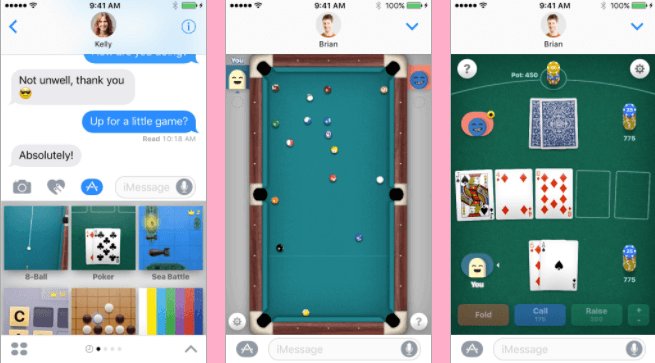
Unfortunately, you cannot directly play iMessage games on Android devices. iMessage games are exclusive to Apple’s iMessage platform.
Ever found yourself wanting to join in on a game with an iPhone friend, but you’re stuck on your Android? The question “can i play imessage games on android” pops up frequently. It’s a common frustration for those who use different mobile operating systems.
While iMessage games aren’t directly supported, there are alternative ways to play games with friends. Many cross-platform gaming apps exist. This allows users on Android to play together with iPhone users.

Can I Play iMessage Games on Android?
Okay, let’s get right to it. You’ve probably seen your friends with iPhones having a blast playing cool games right inside their messages. Maybe they’re battling it out in a mini-golf match, or drawing pictures for each other. You’re on an Android phone, and you’re wondering if you can join the fun. The short answer, sadly, is no, you can’t directly play iMessage games on your Android device. But don’t worry! There’s a lot more to this story, and we’ll explore some cool alternatives that might just scratch that gaming itch. Let’s figure out why this is the case, and what options you have.
Why iMessage Games Are Exclusive to Apple Devices
So, why the big divide? It all comes down to how iMessage works. iMessage is Apple’s own messaging service, designed specifically for Apple devices like iPhones, iPads, and Macs. The games you see within iMessage use special technology that Apple built into its operating system, iOS. Think of it like a secret club. Only Apple devices get the key to enter. These games use something called the “iMessage Extensions API.” This fancy-sounding term means that game developers can create mini-games that work directly inside the iMessage app. These extensions are not built to work on other operating systems, especially Android.
The Role of iMessage Extensions API
Let’s dive a little deeper into why the “iMessage Extensions API” is so important. This API acts as a bridge between the iMessage app and the games. It allows the games to share data and work smoothly within the iMessage window. This seamless experience is why these iMessage games feel so integrated. It’s not just a link to another app; it’s all happening right there in your conversation. Android doesn’t have a similar framework, making it impossible for these iMessage extensions to function correctly.
Technical Differences Between iOS and Android
Another key reason is the fundamental difference between iOS and Android. iOS, the operating system on iPhones, is designed to work specifically with Apple’s hardware. This gives Apple a great deal of control and allows for very specific and unique features, like iMessage games. Android, on the other hand, is used by a huge range of different phone makers, like Samsung, Google, and Xiaomi. This means that Android phones can be very different from each other. This huge variety makes it much harder to build a system as specific as the iMessage extensions. It’s like trying to fit a puzzle piece in a space it was never designed for. The pieces simply don’t match.
What Happens When an Android User Tries to Interact with iMessage Games?
So, let’s say your iPhone-using friend sends you an iMessage game invitation. What do you see on your Android phone? Instead of seeing a playable game, you’ll likely see one of two things:
- A link: The game will appear as a simple web link or a placeholder message. Clicking this link will probably take you to a webpage or an app store page, not the game itself.
- A generic message: You might see a simple message saying something like “Game” or “Tap to View”. Tapping on this doesn’t do anything useful either; the game simply won’t work.
Essentially, your Android phone won’t understand the special code that makes iMessage games work, so it just displays the message as something it can understand, like a regular text message. It’s like trying to listen to a radio station that your radio can’t tune in to – you get static, not music.
Can you trick the System Using Emulators?
You may have heard of ’emulators’, computer programs that pretend to be a different kind of device. Could an emulator trick an Android into running iMessage games? While emulators do exist that can run parts of iOS, they are very complicated to set up. Also, these emulators don’t usually run iMessage games perfectly, or at all. In most cases, the performance is poor. It can be very slow, buggy, and not user-friendly. It would be like trying to play a high-energy video game on a very old computer. It won’t be a good experience, and most likely, it will not work. It’s not a practical solution for anyone who wants to quickly join a game of iMessage mini-golf.
The Risks of Using iOS Emulators
Even if you manage to get an emulator working, there are some dangers to consider. Some emulators can be unsafe. They might contain viruses or malware that could harm your device. This can put your personal information at risk. It’s also not officially supported by Apple, so you could have problems with how the emulator works and your phone’s security. It is much better to avoid the risks and explore some safe and fun alternatives.
iMessage Alternatives for Android Users
So, the bad news is that you can’t play iMessage games directly on Android. The good news is that there are lots of similar things you can do! Instead of focusing on iMessage specifically, we’ll explore some apps and other ways to have fun with your friends.
Exploring Cross-Platform Gaming Apps
Many game developers have created awesome games that work on both Android and iPhone. These games don’t need iMessage to function, instead, they use their own systems to allow players to join up and play together. This is great because it means you and your friends can game together, regardless of what kind of phone you have. Here are a few different ways you can find these cross-platform games:
- App Stores: Both the Google Play Store and Apple App Store are packed with games. Look for ones that say they have “multiplayer” or “cross-platform” support.
- Game-Specific Apps: Some games have their own dedicated app where you can connect with friends and play together. You don’t need a separate messaging app at all!
- Searching Online: Use websites that review games and find titles that allow cross-platform play. Just type “cross-platform games” in any search engine to start discovering fun titles.
Popular Cross-Platform Game Examples
Here are some specific games to get you started. These games are popular, and you can easily find them on both Android and Apple app stores.
- Among Us: Work with your friends to figure out who the impostor is! This is a party game that became hugely popular!
- Minecraft: Create your own world and adventure together in this hugely popular open-world game.
- PUBG Mobile: Team up and compete in exciting online battles with this popular action game.
- Fortnite: Join your friends in this exciting battle royale with a lot of creative elements.
- Words With Friends: Play a social twist on a classic word game with your friends across devices.
Using Third-Party Messaging Apps with Built-in Games
You can also try using different messaging apps that have their own built-in games. This avoids the limitations of iMessage. These apps are often available on both Android and Apple devices.
- Facebook Messenger: Messenger has a variety of simple games you can play right in the chat window. Games like simple basketball and word games.
- Telegram: Telegram, another popular messaging app, also provides options for in-chat gaming. Explore their bot section to find fun games.
- Discord: Discord is a popular app for gamers. It lets you chat with friends and sometimes play games together too using bots and other tools.
Using Social Games and Other Alternatives
Finally, there are many fun social games you can play online that aren’t necessarily inside a messaging app. These are often web-based, meaning you can access them via a web browser on any device. There are many social game websites that provide options to play with friends through any device.
- Jackbox Games: Jackbox games offer many fun party games that you can play using your smartphone or computer as a controller. You don’t need a fancy game console to play these.
- Skribbl.io: A simple drawing game where players try to guess what you’re drawing, it’s a classic example of a simple and fun web-based game that works well across platforms.
- Tabletop Simulator: If you love board games, this might be for you. It allows you to play many different board games online with friends, and it works on both PCs and Macs.
Making the Most of Your Android Gaming Experience
While you might not be able to jump into iMessage games on your Android, there’s a world of fun gaming options out there waiting to be enjoyed. Don’t feel left out, embrace the games that are available to you. Here are some tips to help you to get the most out of your mobile gaming experience:
- Explore the Google Play Store: Take time to browse the game selection in the Google Play Store. Look for games in your favorite categories. Don’t just stick to the popular titles, try some indie games as well.
- Stay Updated: Keep your apps updated to get the latest features and bug fixes. New games come out often, too, so stay tuned!
- Get Your Friends Involved: Encourage your friends to try out some cross-platform games together. This way you can all play, no matter what type of device they use.
- Experiment with Different Games: Don’t be afraid to try out new game types. You might just discover your new favorite!
- Join Online Communities: Find online groups dedicated to gaming. You can discover new titles and connect with fellow players.
It might feel like you’re missing out, but the world of mobile gaming is incredibly diverse. You’ll find loads of amazing experiences tailored for your Android phone. By finding the right app and games for you, you can have as much, or even more, fun than your iPhone using friends!
The bottom line is this: iMessage games are exclusive to Apple devices. But that doesn’t mean Android users have to miss out on the fun. Many fantastic cross-platform and messaging apps include gaming options. Instead of lamenting the lack of iMessage game access, explore the many options available. With a little searching, you’ll find tons of fun games to enjoy with friends regardless of your phone type. Happy gaming!
How To Play iMessage Games on Android (Easy!)
Final Thoughts
Unfortunately, you cannot directly play iMessage games on Android devices. Apple’s iMessage platform and its game feature are exclusive to their ecosystem.
You’ll need an Apple device to access iMessage games and related functionalities. The cross-platform compatibility isn’t there currently, so “can i play imessage games on android” is still a no.

