
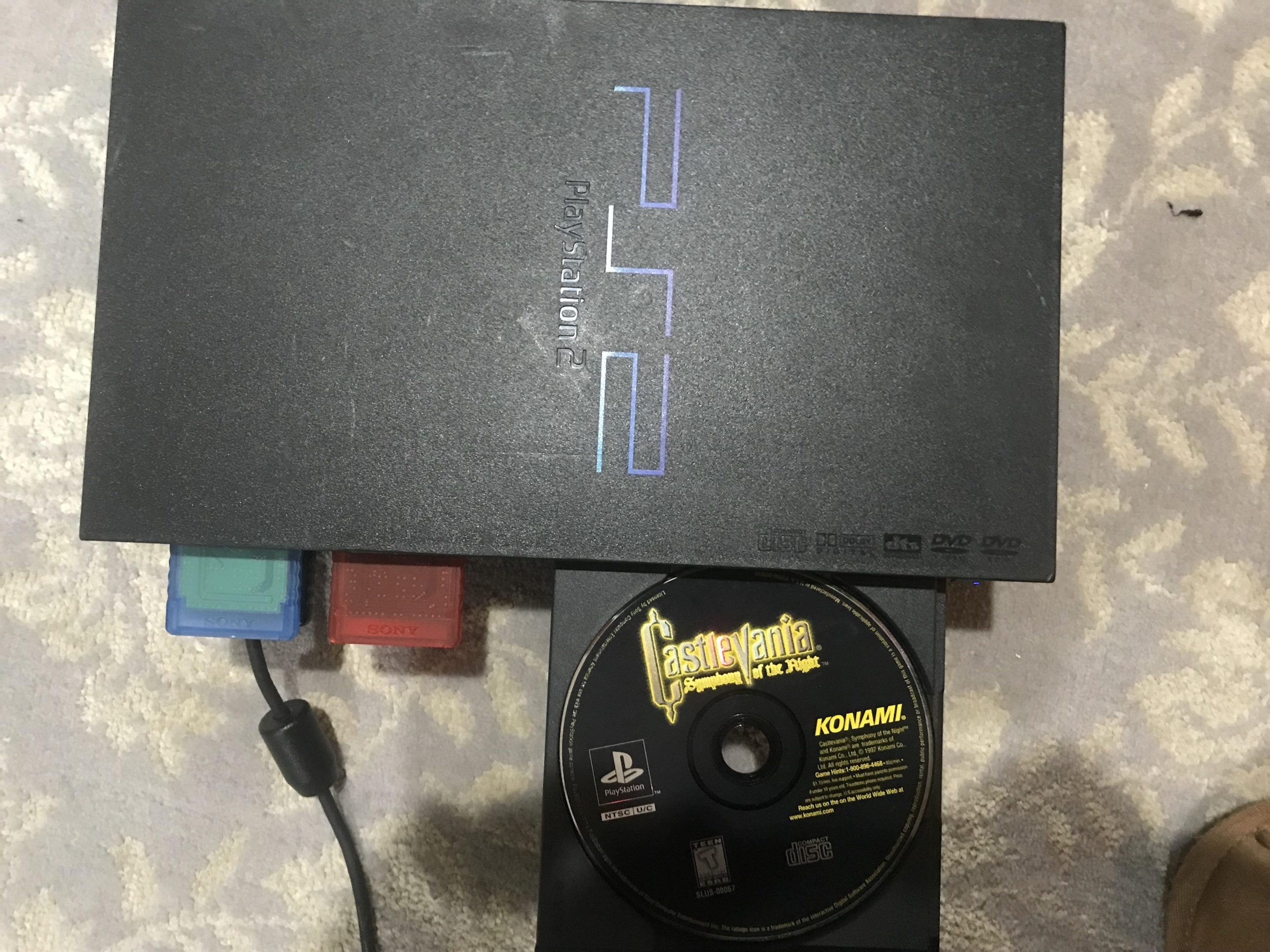
Yes, you can play PlayStation 1 games on PlayStation 2 consoles.
Ever found yourself dusting off your old PlayStation 2, perhaps thinking about the good old days of gaming? You might be wondering, “can i play playstation 1 games on playstation 2?”. The simple answer is yes, the PlayStation 2 has backward compatibility.
This feature allows you to enjoy a large library of classic PlayStation 1 titles on your PS2 console. It’s a great way to revisit some classic games. You also don’t need to buy another console for the classics.

Can I Play PlayStation 1 Games on PlayStation 2?
So, you’ve got a stack of awesome PlayStation 1 (PS1) games gathering dust, and a PlayStation 2 (PS2) sitting nearby, humming with possibility. The big question is, can you dive back into those retro classics on your newer console? The short answer is a resounding yes! The PlayStation 2 was designed with backward compatibility in mind, which means it can play almost all the games made for its older brother, the PS1. This feature is fantastic news for anyone looking to relive gaming memories or experience classic titles for the first time. Let’s dig into the details of how this works, and what you should expect when playing PS1 games on your PS2.
The Magic of Backwards Compatibility
Backwards compatibility is a fancy term that simply means a newer piece of technology can also use older technology. In the case of the PS2, Sony engineered it to be able to read and run the same types of discs that PS1 games used. This was a pretty big deal back in the early 2000s. Instead of needing to keep both consoles hooked up, you could keep playing your old favorites on your PS2. This made the PS2 a great value, because you weren’t just buying a new console but also an enhanced way to enjoy your old games too.
How the PlayStation 2 Plays PS1 Games
The PlayStation 2 has a special chip inside that is capable of acting just like the PlayStation 1. When you put a PS1 game into the PS2, the console detects that it’s not a PS2 game and switches over to its PS1 emulation mode. It’s as if the PS2 is transforming into a PS1 for the time being, allowing the game to run as intended. It essentially mimics the PS1’s hardware, giving the PS1 game the right environment to operate.
Here’s a breakdown of what’s happening under the hood:
- Disc Reading: The PS2’s disc drive is designed to read both PS2 and PS1 game discs, ensuring that it doesn’t matter which you insert.
- Emulation: The PS2’s hardware includes components that can act like the original PS1 console’s hardware, allowing PS1 games to run almost perfectly.
- Controller Compatibility: The PS2 controller works just fine for most PS1 games. You plug your DualShock 2 controller into the PS2 console, just like usual.
Are there any exceptions? – games that don’t work
While the PS2 is excellent at playing PS1 games, there are a few games that may not work correctly. This could be due to how those specific games were programmed or because they require special hardware that the PS2 doesn’t fully replicate. However, the list of games that don’t work correctly on PS2 is very small. In most situations, you won’t have any issue playing your favorite PS1 games on a PS2. However, it’s a good idea to be aware of some general things that might cause problems:
- Very Early PS1 Games: Some of the earliest PS1 games might experience minor issues, though this is not common.
- Imported Games: If you have PlayStation 1 games that were made for different regions (like Japan or Europe), there could be minor problems depending on your console’s region too.
- Rare, obscure games: Some really rare or strange games were made using unusual hardware techniques, and the PS2 emulation might not be able to play them right.
In these rare cases, problems might include:
- Game Freezing: The game may sometimes freeze or stop working completely while playing.
- Graphics glitches: The game might not display the graphics correctly, showing visual errors.
- Audio issues: The sound may be distorted or have no sound at all.
It’s important to remember that these issues are very rare, and generally, most PS1 games play flawlessly on the PS2.
Benefits of Playing PS1 Games on PS2
Playing PS1 games on your PS2 offers some cool advantages. Let’s explore some of them:
Convenience: One Console, Two Libraries
Perhaps the biggest benefit is simply the space and convenience of having one console that plays both PS2 and PS1 games. Instead of keeping two separate systems hooked up to your TV, you only need one. This makes switching between libraries of games simple and easy. You save space and keep your entertainment center tidy.
Better Visuals on Some TVs
While the PS2 doesn’t actually improve the graphics of PS1 games, it can often output them through more modern connections, leading to a slightly better display on some newer TVs. For instance, you might be using a composite (yellow, red, white) connection on your original PS1. The PS2 supports better connection types like component or even HDMI through adapters, which can give you a clearer picture on your screen.
Easier Access to Games
For many people, hooking up an original PS1 might involve a bit of a treasure hunt through old boxes to find the cables and controllers. With the PS2, you can just plug in your controller and get straight to gaming as most of the connections would be same. It’s a much more hassle-free way to play your old PS1 games.
The DualShock 2 Advantage
While the original DualShock controller from the PS1 does work on a PS2, using the DualShock 2 controller will feel more ergonomic for many players. The DualShock 2 controller improved some features compared to original DualShock such as analog stick and trigger functionality, which gives you a more modern feel while still enjoying retro games. This can greatly improve your experience and make gameplay more intuitive.
Memory Card Compatibility
The PS2 also reads the original PS1 memory cards, which means you don’t need to worry about losing your game saves! You can keep your old data and continue right where you left off. Just pop the memory card into a slot on the PS2, and you are good to go!
Setting Up Your PS1 Games on a PS2
Getting ready to play your PS1 games on a PS2 is easy. Here are the basic steps you need to follow:
- Turn on your PS2: Make sure your PS2 is properly connected to your TV and power source, and turn it on.
- Insert the PS1 Game Disc: Find your PS1 game, and put the game disc into the PS2’s disc tray.
- Close the Disc Tray: Close the tray carefully, ensuring the disc is sitting securely.
- Navigate the Menu (if needed): On the PS2 start up, it might show the PS2 logo. Give it some time to read the disc. If you happen to have a memory card in the PS2, that screen will appear first. Usually the game will load automatically. But in some cases you might have to navigate the menu if the game doesn’t start immediately. It might appear in disc tray menu. Just go the the disc menu and press X button on the game.
- Play and Enjoy: Once you start the game, it will run just like you remember on a regular PS1. Use the DualShock 2 controller to navigate the menus and play the game.
Tips for Optimal Play
Here are a few helpful tips to enhance your experience of playing PS1 games on your PS2:
- Clean Your Discs: Just like any old disc, PS1 games can get dusty and dirty. Give your game discs a gentle cleaning with a soft, lint-free cloth before playing them, to make sure the laser has no trouble reading the disc.
- Check Your Connections: Make sure the connections from your PS2 to your TV are good, for the best audio and visual quality.
- Check for Compatibility: If you’re unsure whether a particular PS1 game works on a PS2, you can do a quick search online to see if anyone else has experienced issues with it. It’s usually not a problem though, as we discussed before.
- Save Often: It’s a good habit to save your games often as sometimes issues can happen when running old games. Don’t rely on auto saves or forget about saving your progress in case of any rare glitches.
- Try Different Screens: Try a different television to see if that makes a difference to your game.
By following these simple steps and tips, you will have an enjoyable time revisiting your old PS1 favorites on your PS2.
Troubleshooting common issues
Though playing PS1 games on the PS2 is usually trouble-free, you may run into some issues from time to time. Here are some common problems and how you might resolve them:
Game Not Reading
If your PS2 is not reading the PS1 game, it could be due to a dirty disc, a malfunctioning laser, or some compatibility issue. First, clean the disc as we discussed above. Then try another PS1 game to see if that reads. If that works, there is a problem with the first disc. However, if none of your PS1 games are being read, the laser in your PS2 might be having issues, or there may be other hardware problems with the console itself. You may have to take your PS2 to a technician to fix the laser issue.
Game Freezing
If your game freezes while playing, it might be caused by a scratched disc or a rare incompatibility problem. Check the disc surface for damage. If your game keeps freezing try to see if it’s a specific place or part in the game that causes it and avoid that area. If this problem persists in several games, then the PS2 itself might be having internal issues or other issues with laser or hardware which requires professional help.
Graphics or Audio Problems
Sometimes, you may see weird graphic glitches, or hear distorted audio. This could be because the PS2 is struggling to emulate something in the game perfectly. Try different ways to connect your console to the television, or test your console on a different TV. Usually, if the game plays, and no other issues are there, these glitches do not make it unplayable. And it might be a good idea to ignore them and continue playing your games.
Controller Problems
The DualShock 2 controllers usually work very well with PS1 games. However if you are having controller problems, such as unresponsive buttons, try cleaning the analog sticks and buttons. If you have a spare controller, then try playing with it to isolate the issue. Check the controller cable to ensure it’s not damaged, and that the pins are fine. Sometimes the problem is with the controller itself.
If you keep facing problems that you cannot resolve yourself, there are many online communities and forums where you can get advice from other players.
The Legacy of PlayStation
The ability to play PS1 games on the PS2 is more than just a convenient feature; it shows how well-designed the consoles were. It’s a testament to Sony’s dedication to gamers, allowing players to revisit games that helped shape the landscape of video gaming. The backwards compatibility of the PS2 allowed it to become a powerhouse, giving you access to an amazing library of games. This was an idea that was not present in all the gaming consoles, which made the PS2 an instant success and popular gaming console ever.
Final thoughts
In conclusion, the PlayStation 2 can play almost every PlayStation 1 game you can find. It offers a fantastic way to relive old memories or play those classic titles for the first time. The added convenience, improved output on some modern TVs, and a more comfortable controller makes the experience even better. While there can be very rare instances of issues with some games, overall, the PS2 is an excellent way to play your PS1 games. So, dust off those old PS1 discs, plug them into your PS2, and enjoy the trip down memory lane!
Does PS2 play PS1 games
Final Thoughts
Yes, you absolutely can play PlayStation 1 games on PlayStation 2 consoles. This feature was a key selling point. The PS2 offers backward compatibility for most PS1 titles.
You can insert your PlayStation 1 game disc directly into the PlayStation 2. The system will recognize and play it. This compatibility is a great advantage for PlayStation fans. Therefore, ‘can i play playstation 1 games on playstation 2’ is a resounding yes.

