
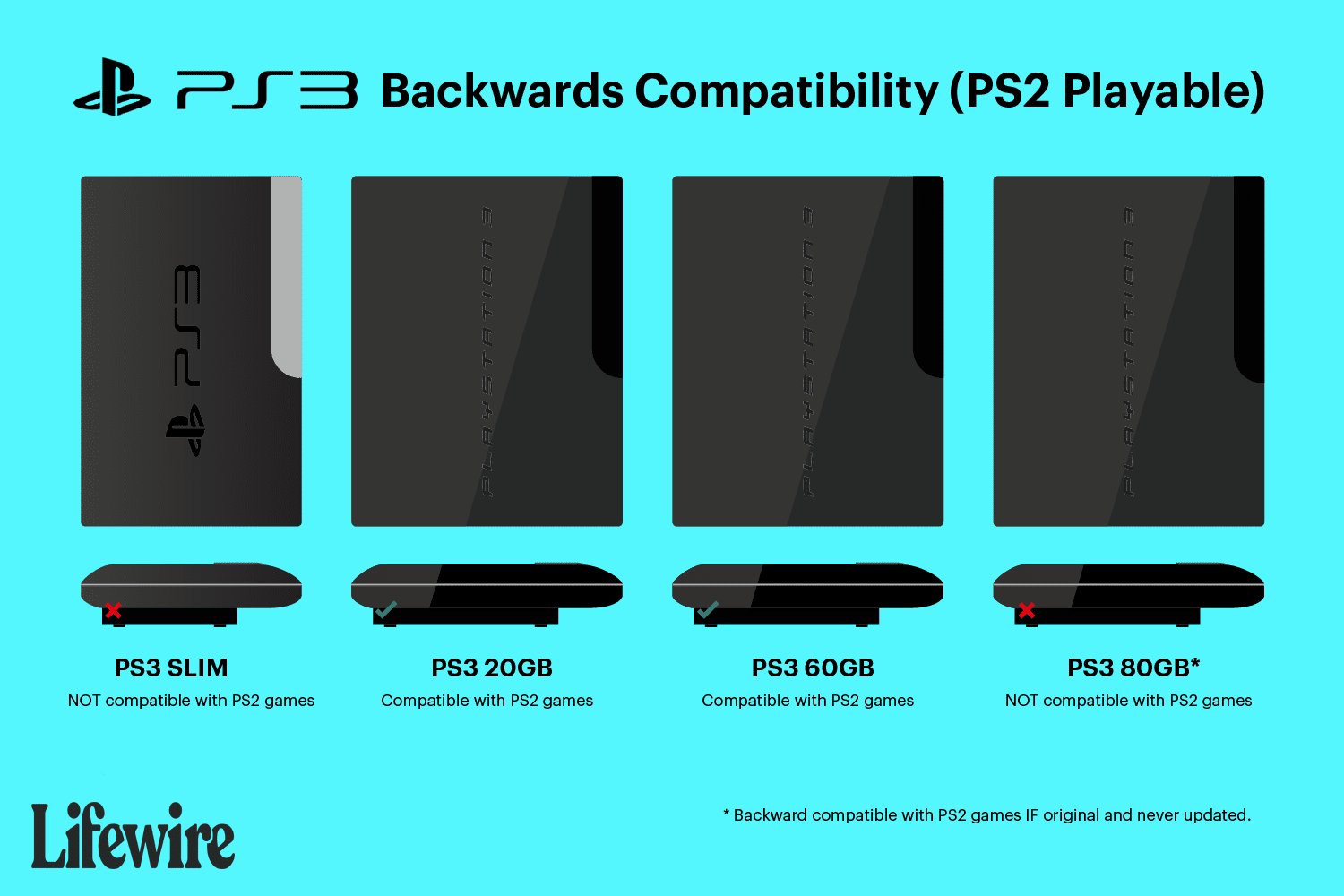
No, the PlayStation 3 Slim does not have the hardware to play PlayStation 2 games.
Wondering “can i play ps2 games on ps3 slim?” It’s a common question for gamers who cherish their classic titles. The PS3 Slim, a popular iteration, unfortunately dropped the backwards compatibility feature found in some older PS3 models.
This change means you cannot directly insert and play your old PS2 discs on this particular console. So, while the PS3 slim is great for PS3 games, you’ll need a dedicated PS2 or an earlier compatible PS3 to enjoy those titles.

Can I Play PS2 Games on PS3 Slim? The Truth About Backwards Compatibility
Okay, so you’ve got a cool PS3 Slim and a bunch of awesome PlayStation 2 games collecting dust. You’re probably wondering, “Can I actually play these old games on my PS3 Slim?”. It’s a fair question! The answer is a bit more complicated than a simple yes or no, and we’re going to break it all down for you so you know exactly what to expect. Get ready for a journey into the world of PlayStation history and compatibility! Let’s dive in and see exactly how this all works.
The PS3 Slim and Backwards Compatibility: The Missing Link
When the original PlayStation 3 came out, it had a special feature called “backwards compatibility”. This meant it could play not only PS3 games, but also your older PS2 games! It was like having two consoles in one. Sadly, this feature didn’t stick around for all the PS3 models. When the PS3 Slim arrived, things changed, and not for the better if you’re a PS2 fan.
Why the PS3 Slim Doesn’t Have Built-In PS2 Compatibility
The reason the PS3 Slim lost PS2 compatibility is mostly about cost and making the console better, and a bit simpler to manufacture. To play PS2 games, the original PS3 models had special hardware inside of them— a whole PS2 system crammed inside! This made the original PS3 much more expensive to build. Sony wanted to make the PS3 Slim smaller, cheaper, and more reliable. Removing the extra hardware for PS2 games helped them achieve this. It also reduced the amount of heat the console generated, and overall made for a slightly more modern console. While it was good news for the price of the new PS3, it definitely wasn’t good news if you wanted to play old PS2 games on it. So in a nutshell, the PS3 slim simply does not have that extra PS2 hardware included, which made it cheaper and smaller.
What About Digital PS2 Classics on PS3?
Even though you can’t pop a PS2 disc into your PS3 Slim, there is a little bit of good news. Sony offers some PlayStation 2 games digitally, which you can purchase and play through the PlayStation Store on your PS3. These are called “PS2 Classics”. Let’s explore this further.
How to Find and Purchase PS2 Classics
Here’s how you can check out and download these games:
Turn on your PS3 Slim and go to the PlayStation Store. It’s the icon that looks like a shopping bag.
Use the search function or browse the store. Look for a section labeled “PS2 Classics” or “PlayStation 2 Games.”
Browse through the games available. Not every PS2 game is available in the store, but there’s a decent selection of classics to enjoy.
Select the game you want and add it to your cart. Make sure you have enough funds in your PSN wallet or use a credit card.
Download and install the game. Once it’s done, the game will be ready to play from your PS3’s game menu.
The Ups and Downs of PS2 Classics
Pros:
Convenient access to digital versions of classic PS2 games.
Games are usually optimized to work properly on PS3.
No need to deal with dusty game discs.
Cons:
Limited selection of games – not all PS2 games are available.
Games cost money and might be more expensive than a used PS2 disc.
You are dependent on the PlayStation store and if the store goes offline in the future.
Exploring Other Options to Play PS2 Games
If you can’t play PS2 discs on your PS3 Slim, and not all the games you are looking for are on the PlayStation Store, what else can you do? There are a few other options. Let’s look at them:
Playing on an Actual PS2 Console
This may sound too obvious, but it is worth mentioning! The original PlayStation 2 console is still available and can be picked up relatively cheap on sites like eBay, or your local second-hand game store. Playing your games on the original hardware is a great way to play the games as they were originally intended.
The benefits of this option:
Play all of your existing PS2 games.
Experience the games on their original hardware.
Can be a cheap option in the second hand market.
Downsides of this option:
Requires purchasing another console if you don’t already have one.
Takes up more space, and adds an extra console to your setup.
May not have as nice graphic output as a PC or a PS3.
Emulation on a PC
Another possibility is playing PS2 games on your PC using special software called an emulator. This is a more technical option but it can be very effective.
What You Need:
A computer that meets the emulator’s requirements
An emulator program like PCSX2.
Game files, usually taken from your own physical copies.
Benefits of this option:
Often improved graphics and resolution.
Compatibility with a lot of PS2 games.
Ability to save and load game states at any time.
Downsides of this option:
Can be tricky to set up, especially for those who are not too familiar with computers.
Requires a decent PC to run smoothly.
Can be a bit of a legal gray area if you don’t own the games you are emulating.
A Quick Comparison: PS3 Slim vs. Other Options
To help you see everything in a clear picture, here’s a table comparing your choices for playing PS2 games:
| Option | PS2 Disc Playback | Cost | Setup Difficulty | Convenience | Game Selection |
| :—————————- | :—————: | :——–: | :—————: | :———-: | :————: |
| PS3 Slim | No | N/A | N/A | Limited | Limited |
| Original PS3 (Fat Model) | Yes | Medium to High | Easy | High | Full |
| PS2 Console | Yes | Low to Medium | Easy | High | Full |
| PC Emulation | No | Variable | Medium to High | Variable | Very High |
Why Backwards Compatibility Matters
Backwards compatibility is a super neat feature! It’s not just about having the option to play old games. It also helps in:
Preserving gaming history: It ensures that older games, which are important parts of video game history, are not forgotten and are still playable.
Saving money: Instead of buying multiple consoles, gamers can often play games from different generations on the same hardware.
Nostalgia: It allows older gamers to revisit their favorite games from childhood, and for newer gamers to experience these classics for the first time.
Final Thoughts on Playing PS2 Games on PS3 Slim
While the PS3 Slim is a great console, it’s just not built to handle PS2 discs. You can still play some PS2 games if you buy them from the PlayStation Store, but you might want to consider alternatives like getting an original PS2 or using PC emulation if you want to play your original disc based games. Each option has its own perks and downsides. The important thing is that there are still ways to enjoy the amazing library of PS2 games!
Even without the physical disc play, the digital options available can provide a great alternative for enjoying some of your favorite games.
How to Backup & Play PS2 Games on PS3HEN! – No PKG Conversion Required
Final Thoughts
Unfortunately, the PlayStation 3 Slim does not have built-in hardware to play PlayStation 2 games. This is a common question because early PS3 models offered this feature.
However, the PS3 Slim removed that compatibility. It’s a significant difference many people must know when considering older games.
Therefore, the simple answer to ‘can i play ps2 games on ps3 slim’ is no. You cannot play PS2 discs directly on this console model.

