
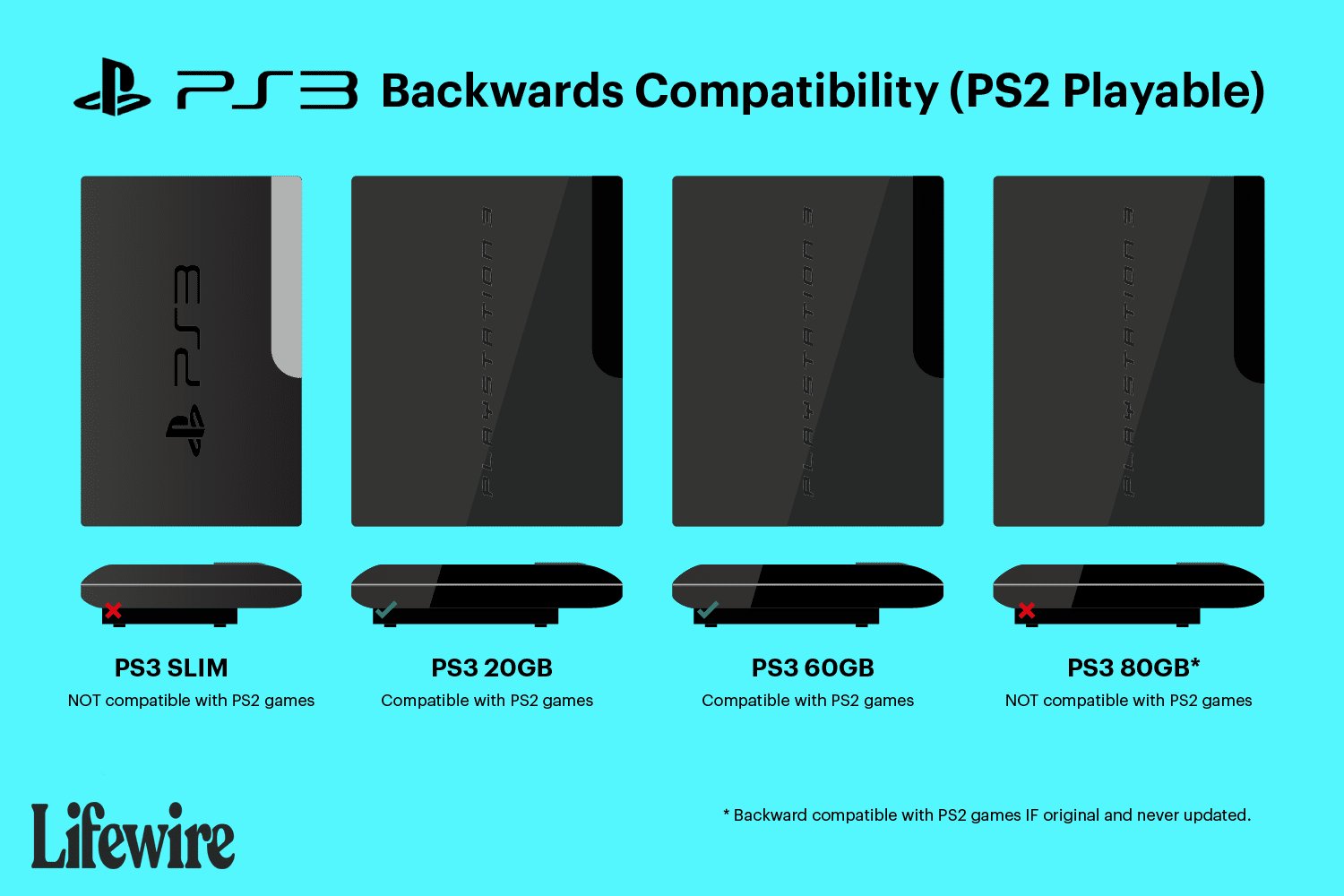
Unfortunately, not all PlayStation 3 consoles can play PS2 games. Only specific early models of the PS3 are backwards compatible and can play PS2 games.
Ever wondered if you could revisit some old classics on your Playstation 3? The question, “can i play ps2 games on the ps3” is quite common. It’s a simple question that often leads to some complicated answers.
The truth is that backward compatibility for PS2 games wasn’t a standard feature across all PS3 models. Sony removed it from later versions of the console to cut costs, making it important to know what you’ve got. This means your PS3’s specific model is essential to determine whether or not you can enjoy your old PS2 collection on it.

Can I Play PS2 Games on the PS3?
Alright, let’s talk about playing those awesome PlayStation 2 games on your PlayStation 3! It’s a question many of us have asked, and the answer isn’t as straightforward as you might hope. Some PS3 consoles can play PS2 games, but not all of them. It’s a bit like a treasure hunt, so let’s dive deep and figure out if your PS3 is one of the lucky ones.
The PS3 Models: Not All Created Equal
The main reason why you can’t just pop any PS2 disc into any PS3 is because Sony made different versions of the PS3. Think of it like different cars – they all drive, but some have extra features that others don’t. These PS3 versions have a major impact on whether you can enjoy your old PS2 favorites. To figure out if your console can handle those classic titles, we need to look at the specific models of the PlayStation 3. There were a few different types of PS3 and they have different functionalities, especially when we talk about backward compatibility.
The “Fat” PS3 Models: The Backward Compatible Heroes
The first models of the PlayStation 3, often called the “fat” PS3 because of their larger size, were the ones that came with built-in PlayStation 2 hardware. These consoles are the golden ticket if you want to play your old PS2 games directly from the disc. If you have one of these first generation PlayStation 3’s, you’re in luck! These models have the actual PS2 processing chips inside, which allows them to play PS2 games just like the original console. That means no need for emulation, which is great! Think of them as having a whole PS2 tucked inside. There are a couple of ways that this backward compatibility was achieved.
Full Hardware Emulation
Some of the very first “fat” PS3 models came equipped with the actual PS2 CPU and GPU chips right inside the console. This allowed for perfect playback of PS2 games. It’s the equivalent of having a complete PS2 built into your PS3! These early consoles are sometimes called ‘true’ backward compatible. When you have this type of emulation, you’ll find that most of your game library works flawlessly, just as if you were playing on your old PS2 hardware.
Partial Hardware Emulation
Other “fat” PS3 models used a slightly different approach which was less expensive to manufacture. They included some of the PS2 hardware but relied on software emulation for some parts. This meant that some games might have experienced very slight differences in performance compared to the “true” backward compatible models. However, this was generally very close, and the vast majority of games still ran great. This version is not as good as the first version but is much better than none at all, because with software emulation there are a lot of issues that can arise.
Here’s a table to help clarify which models had backward compatibility:
| PS3 Model Type | PS2 Backward Compatibility |
|---|---|
| Early “Fat” PS3 (20GB, 60GB) | Full Hardware Emulation |
| “Fat” PS3 (20 GB, 60 GB, 80 GB models) PAL Version | Partial Hardware Emulation |
| Later “Fat” PS3 (40GB, 80GB) | No Backward Compatibility |
| PS3 Slim | No Backward Compatibility |
| PS3 Super Slim | No Backward Compatibility |
So, if you have an older, bigger PS3, there’s a good chance it plays PS2 discs. But check the model number to be absolutely certain.
The Slim and Super Slim Models: The End of Native PS2 Play
Sadly, the later “slim” and “super slim” versions of the PS3, which came after the original “fat” models, do not have this ability. Sony removed the PS2 hardware to cut costs and make the consoles smaller. This was a big disappointment for many gamers who wanted to play their PS2 game libraries. These newer PS3 consoles cannot physically read the PS2 games. The slim and super slim PS3 models do not have any backward compatibility so no need to waste your time, trying it out.
How to Identify Your PS3 Model
Knowing your PS3 model is key to figuring out if you can play PS2 games. It’s not as hard as it sounds! The model number will always be on the console itself, usually on a sticker on the back or bottom. Here’s how to spot it:
- Look for the sticker: Flip your PS3 over or look at the back. You should see a sticker with a bunch of numbers and letters.
- The model number: The model number starts with “CECH” followed by four numbers and sometimes a letter. Examples include CECHA01, CECHB01, CECHC01, CECHE01 for backward compatible models, and CECH-2001A, CECH-3001A, CECH-4001C for non-backward compatible models.
- Check online: If you’re still unsure, you can type your model number into a search engine. Many websites have lists that show which PS3 models have backward compatibility.
Once you know your model number, you can easily determine if it’s a model that supports PS2 games.
The Software Emulation Option: PS2 Classics
If you have a PS3 that isn’t backward compatible, all hope is not lost! While you can’t pop in a PS2 disc and play, there’s still a way to enjoy some PS2 titles. Sony made several PS2 games available digitally through the PlayStation Network (PSN). These are called “PS2 Classics.”
What are PS2 Classics?
PS2 Classics are digital versions of PlayStation 2 games that have been made available for download from the PlayStation Store. These games are specially coded so that they can work on the PS3 using emulation software. These downloads aren’t the same as playing from the original disc, but they let you enjoy many great PS2 titles on your PS3. These are usually cheaper as well, so you can have some good classic games without spending much.
How to get PS2 Classics
To get PS2 Classics, you need to connect your PS3 to the internet and have a PlayStation Network account. Then follow these simple steps:
- Access the PlayStation Store: Go to the PlayStation Store on your PS3.
- Search for PS2 Games: Look for the PS2 Classics section or type the name of the PS2 game you want.
- Buy and download: Purchase the game and download it to your PS3 hard drive.
- Play: Once the download is done, the game will appear in your game library, and you can play it.
Things to Keep in Mind About PS2 Classics
- Not all games are available: Unfortunately, not every PS2 game is available as a PS2 Classic. You may find that some of your personal favorites are not on the PSN store.
- Digital purchase only: You cannot use your old PS2 game discs. You need to buy the digital version, so you have to pay to play a game you might already own on disc.
- Save data: The PS3 may not recognize save data from your original PS2 games. You might need to start fresh, but with some clever workarounds like using a USB drive, you can transfer your old save data to use with the PS2 Classic games.
- Emulation Issues: While they work well, these emulated games can sometimes have minor glitches or performance differences compared to playing on an original PS2 or on one of the backwards compatible fat PS3 consoles.
Other Options to Explore
Beyond directly playing discs or purchasing digital versions, you have a few other paths you could take, though they come with their own set of caveats.
PlayStation Now (Now PlayStation Plus Premium)
PlayStation Now, now included in the PlayStation Plus Premium tier, offered the ability to stream many PS2 games. Instead of playing games directly on your console, the game runs on a Sony server and gets streamed to your PS3. This means you don’t need a backward compatible PS3 or the physical disc, but requires a fast internet connection.
Things to Note
- Subscription Required: You must pay a monthly subscription to use this service.
- Streaming quality: Streaming is heavily dependent on internet speed and connection stability, so you may encounter lags and other problems.
- Game Selection: Not every PS2 game is available on PlayStation Now, and its collection is always rotating.
Emulators on PC
Another way to play PS2 games is by using a PC emulator. This involves using a program on your computer that acts like a PS2 console. You’ll need to have a computer with good specs for this option to run properly. This method is a bit complex but is the preferred method for some, as it allows them to play any game they desire.
Things to Note
- Technical Knowledge Needed: Setting up emulators can be tricky for non-technical users. It will likely involve a lot of setting up, downloading, and troubleshooting.
- Legal issues: Downloading ROMs of games that you do not own can be illegal and lead to fines or other issues with the law.
- Performance Issues: Even if your PC is powerful, there is a chance that some games will not run well due to emulation limitations.
Checking Your Console’s Compatibility: A Summary
So, to recap everything we’ve covered, here’s a simple checklist to see if your PS3 can play PS2 games:
- Look at the model number: Check the back or bottom of your PS3 for the model number, which starts with “CECH.”
- Compare to the list: If your model is CECHAxx, CECHBxx, or CECHCxx, CECHExx then it’s an original “fat” model and should have backward compatibility for most models. (Check the chart above to confirm specifically). If you have a slim or a super slim model, it is not compatible with PS2 discs.
- Check the model number online: If you’re still uncertain, type your model number into a search engine to find out if it has backward compatibility.
If your PS3 can’t play discs, you still have options to enjoy some titles, including PS2 Classics on the PlayStation Store or through a streaming service.
Hopefully, this guide has helped you clear up any confusion about whether you can play your old PS2 games on your PS3 console. Have fun playing!
The PS3 Had a Hard Time Playing PS2 Games Because of…..Emotions?
Final Thoughts
Only specific PlayStation 3 models play PS2 games directly. Early PS3 consoles, particularly the 20GB and 60GB versions, have the necessary hardware. These are backwards compatible.
Later, slimmer PS3 consoles removed this feature. Therefore, they cannot play PS2 discs natively. ‘can i play ps2 games on the ps3’ depends on your specific console version.
The most straightforward answer is: if you have one of the original, thicker PS3s, then you can play them. Otherwise, you will need other solutions.

