
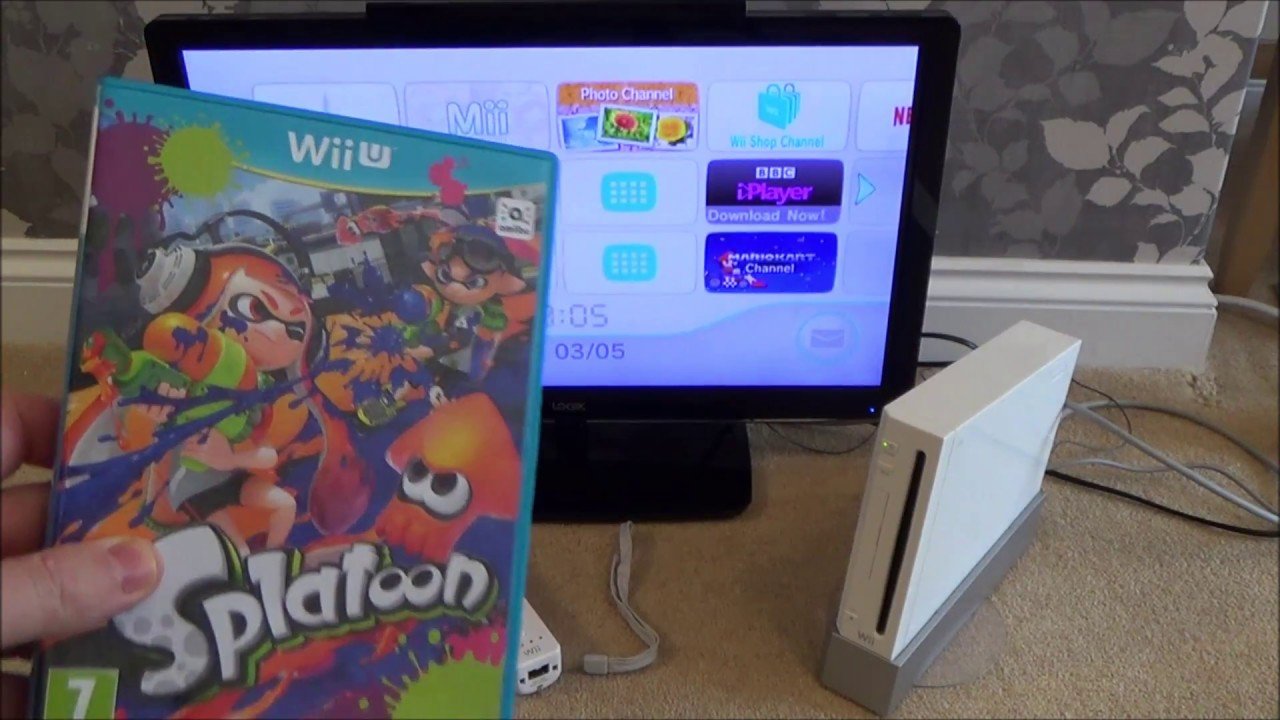
No, you cannot use Wii U games on Wii.
Ever wondered if you could play your newer Wii U titles on your old Wii console? Many gamers ask this very question: “can i use wii u games on wii?”. Sadly, the answer is a simple no.
The two consoles use different disc formats and hardware architecture. Therefore, Wii games work on the Wii U, but not the other way around.

Can I Use Wii U Games on Wii?
It’s a question many gamers have asked, especially if you have an older Wii console collecting dust. You’ve got all those fun Wii games, and now you’re wondering if you can play the newer games from the Wii U on your trusty old console. The simple answer is: no, you cannot play Wii U games on a standard Wii. Let’s dive into why that is and what makes these two consoles so different.
Why Wii U Games Don’t Work on Wii
The Wii U and the Wii are different consoles with different hardware. Think of it like trying to put a puzzle piece from one puzzle into a completely different puzzle – it just won’t fit. Here’s a breakdown of the key differences:
Hardware Differences
The Wii U is more powerful than the Wii. It has a different processor, more memory, and it can display games in high definition (HD), while the Wii can only display games in standard definition (SD). These changes in the inner workings of the consoles are very important for the games to function correctly.
- Processor: The Wii U uses a completely different type of processor that is more advanced. This means it can handle more complicated game graphics and calculations than the Wii.
- Memory (RAM): The Wii U has significantly more RAM than the Wii. RAM is like the console’s short-term memory, and having more of it lets the console run more complex programs and game data.
- Graphics: The Wii U’s graphics processing unit is much more capable, allowing for detailed, HD graphics. The Wii’s graphics are comparatively simple, designed for SD output.
Disc Format Differences
The Wii U uses a different disc format than the Wii. Wii games are stored on standard DVDs, while Wii U games are stored on higher-capacity proprietary discs, much like Blu-rays. The Wii’s disc drive isn’t capable of reading the Wii U’s disc format. It’s like trying to play a DVD in a CD player – it simply isn’t compatible.
Software and Architecture
The way the operating systems and game software are built on each console are also different. Wii U games are coded to take advantage of the Wii U’s specific hardware, and they won’t run on the Wii’s older software and architecture.
Wii Compatibility on Wii U
Interestingly, the Wii U has a little trick up its sleeve. While you can’t play Wii U games on the Wii, the Wii U can play Wii games. The Wii U has the built-in capability to run the software for the original Wii and play all of your old Wii games. This gives you a great way to revisit your old favorites on your newer console.
How to Play Wii Games on Wii U
When you turn on your Wii U, you’ll see the Wii U menu. But there is also a hidden part of the menu, the Wii Menu. You need to go into this special Wii Menu to play your Wii Games. Once you are in the Wii Menu, you can use your old Wii remotes, nunchucks and Wii game discs to play.
Steps to Access Wii Menu on Wii U
- Turn on your Wii U console.
- On the Wii U main menu, locate and select the Wii Menu icon. It looks like a disc or the original Wii’s home screen icon.
- Once in the Wii Menu, you’ll see a screen that looks very similar to your original Wii.
- Insert your Wii game disc.
- Your Wii game will be shown on screen. Choose game icon and you can now play your game.
Important Considerations for Wii Games on Wii U
- Wii Remotes: You need your original Wii Remotes and Nunchuks to play Wii games on the Wii U. The Wii U gamepad is not compatible with Wii games.
- Wii Accessories: You can use all of your existing Wii accessories like the Balance Board, Guitar Hero guitars, and steering wheels when playing Wii games on the Wii U.
- Saved Data: Your old Wii save data will be on the SD card that you used with the Wii. You can transfer the old save data to the Wii U through the Wii menu. This lets you pick up your Wii games right where you left off.
- Graphics: Even though the Wii U can output in HD, Wii games will still run in SD resolution. However, some Wii games may look slightly better than on an older Wii.
What If I want to Play Wii U Games?
If you want to play those fun Wii U games, you’ll need to use the Wii U console. It’s the only console that can play these newer games. Here are a few things to keep in mind when using the Wii U:
Getting a Wii U
- Finding a Wii U: If you don’t have a Wii U, they may not be widely available in retail stores as Nintendo has stopped making them. You may need to find a used one online or from a friend.
- Checking the condition: If you’re buying a used Wii U, make sure it works, and comes with the gamepad and cables.
Exploring Wii U Games
- Game Library: The Wii U had a great selection of games, including some really cool titles from Nintendo. Games like Super Mario 3D World, Mario Kart 8, Splatoon, and The Legend of Zelda: Breath of the Wild are all available on the Wii U.
- eShop: The Wii U had an online store where you could buy and download games called the eShop. However, the eShop is now closed, so purchasing games through digital means is no longer an option.
The Nintendo Switch and Wii U Games
Many of the best Wii U games have been ported to the Nintendo Switch, Nintendo’s newer console. If you’re looking for a way to play many of the beloved Wii U games, then the Switch is a great option. Games like Mario Kart 8 Deluxe and The Legend of Zelda: Breath of the Wild are available on the Switch. These games have been updated for the Switch’s capabilities. However, there are still some exclusive games that are only available on the Wii U.
Emulation: An Alternative (But Not Recommended for Beginners)
There’s a more complex option that some gamers explore called emulation. Emulation involves using a software program to make your computer act like a game console. With the correct emulation program, it is possible to play Wii and even some Wii U games on your computer. However, there are some important things to know before you try this:
Legality and Ethics of Emulation
- Legal Considerations: Downloading game ROMs (the files that contain game data) from sources other than your own physical game copies is often illegal. Copyright law protects video games, and downloading them from other sources is considered piracy.
- Ethical Concerns: Supporting game developers by purchasing their games is important. Downloading ROMs from third-party websites is not a good way of supporting these developers.
Technical Challenges of Emulation
- Setup Complexity: Setting up emulators can be tricky and may need some good computer knowledge. It can involve navigating complex settings and using command lines, which can be challenging for beginner gamers.
- Hardware Requirements: Running emulators, especially for Wii U games, requires a powerful computer. Not all computers have the power to run games smoothly, which means the games might run slower or may have graphic issues.
- Potential Issues: Emulators can have issues with games. Some games may not run well or may have glitches. You also run the risk of your computer getting infected with viruses from untrustworthy software.
Why Emulation Might Not Be the Best Choice
For most casual gamers, emulation is likely not the best choice for a few reasons. There are legal and ethical concerns. It can be hard to set up, and it can be unreliable. The best way to enjoy your games and support the game creators is by using the right consoles, the way they were designed to be played.
Summary: Understanding Console Compatibility
To sum it up, you can’t play Wii U games on a Wii, but you can enjoy your older Wii games on your Wii U. It’s all about understanding the hardware and software differences between the two consoles. While emulation is a complex option, it might not be a good choice for beginner gamers. The most important thing is that you play the games that you enjoy on the appropriate systems, and make sure you support game developers by buying their games legally.
Remember, the world of gaming can be confusing at times. If you are not sure, it is always a good idea to do some research or ask a knowledgeable person for advice. Happy gaming!
Wii U's a Downgrade for Playing Wii Games
Final Thoughts
Wii U games will not work on the original Wii console. This is due to different hardware and software architectures between the two systems. The Wii is simply not capable of processing the data or running the code from Wii U discs.
Therefore, directly, ‘can i use wii u games on wii’ is a question with a firm no answer. You must use a Wii U console to play Wii U specific titles. Each console has it’s own library, and they are not compatible.

