
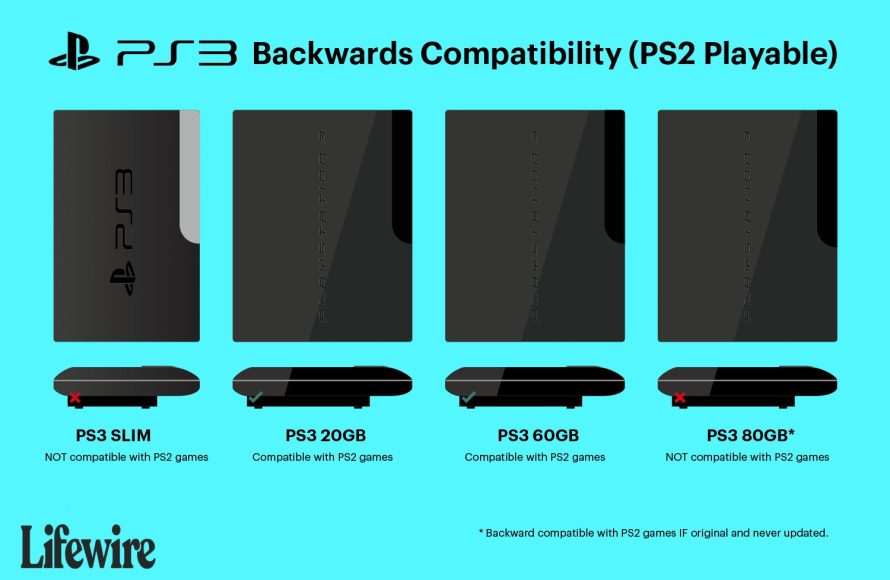
Yes, some PlayStation 3 models can play PlayStation 2 games, while others cannot.
Did you ever wonder if you could revisit your old PlayStation 2 favorites on a newer console? Many gamers have asked the same question: can PlayStation 2 games be played on PlayStation 3?
It’s a common inquiry because not all PS3 consoles have backwards compatibility. The early “fat” PS3 models were designed to play PS2 discs, using hardware for emulation.
Later, slimmer PS3 consoles removed this feature. Therefore, playing PS2 games directly on PS3 depends on which model you own.

Can PlayStation 2 Games Be Played on PlayStation 3?
The question of whether you can enjoy your old PlayStation 2 (PS2) games on a PlayStation 3 (PS3) is a common one for gamers. It’s understandable – who wouldn’t want to revisit those classic titles without having to dust off an older console? The answer isn’t as simple as a straightforward “yes” or “no.” It depends a lot on which version of the PlayStation 3 you own. Let’s explore the ins and outs of PS2 compatibility on the PS3.
The Original PlayStation 3 Models and Backward Compatibility
When the PlayStation 3 first hit shelves, Sony included a very special feature: backwards compatibility. This meant that certain early PS3 models could actually play both PS3 games and PS2 games! These models were like a bridge between the two generations. Think of it like a super-powered console that could handle two different types of games. This made them incredibly popular among players who still loved their PS2 library.
Which PS3 Models Had PS2 Backward Compatibility?
Not every original PS3 could play PS2 games. Only the very first few models, released in 2006 and 2007, offered this feature. These models have specific model numbers, so it’s helpful to know what to look for. Here’s a breakdown:
- 20GB Model (CECHBxx): This was one of the initial models that could play PS2 games. It had a shiny, glossy black finish.
- 60GB Model (CECHAxx): This model is the other one with full PlayStation 2 hardware inside. This means the playstation 3 was physically built to run Playstation 2 games perfectly.
- Note: The “xx” in the model numbers represent the region code. Don’t worry about these. Just focus on the “CECHB” or “CECHA” part.
These models used physical hardware from the PlayStation 2 inside the PS3. This is what made them able to play PS2 games so well. It wasn’t just software emulation; it was the real deal, resulting in very accurate gameplay.
How to Check Your PS3 Model
Finding your model number is pretty easy. Look at the back of your PS3. You’ll see a sticker with important information. Find the section that says “Model No.” and you’ll see something like “CECHB01” or “CECHA01”. If your model number starts with CECHA or CECHB, congratulations – you have a PS3 that plays PS2 games!
The Shift to Software Emulation
Unfortunately, the fully backwards compatible PS3 models didn’t last forever. As Sony aimed to reduce costs, they removed the PS2 hardware from later models. They wanted to make the consoles cheaper to produce, but this came at the cost of true PS2 compatibility.
The 80GB Models and Partial Emulation
After the full hardware versions, Sony introduced an 80GB model (CECHE and CECHG). This was when things got a little more complicated. These specific PS3 models still have some backward compatibility but it is not perfect and has some limitations. They relied on software emulation for some of the PS2 hardware. This means that it wasn’t exactly the original PS2 chips running the games; instead, the PS3’s processor was trying to mimic the PS2’s behavior. These models offer backward compatibility using partial emulation for PS2 games.
Because it was not the hardware level compatibility, a good chunk of PS2 games were not able to be played smoothly or even run at all. This emulation could sometimes cause issues like graphical glitches, sound problems, or slowdowns. It was not the same perfect experience as the original, full hardware models.
What About Later PS3 Models?
After the 80 GB models, all further versions of the PlayStation 3, such as Slim models (CECH-2000, CECH-2100, CECH-2500, CECH-3000 series) and Super Slim models (CECH-4000 series), lost all PS2 backward compatibility. Sony completely removed the PS2 hardware and emulation for these later PlayStation 3 versions. These models can only play PlayStation 3 games. So, if you have a Slim or Super Slim PS3, you won’t be able to play your PS2 games on it directly.
Sony did offer a few downloadable PS2 games on the PlayStation Network. But, these were not all of the PS2 library and they needed to be purchased again. So, if you had a physical copy of game, you still had to rebuy the digital version if you had any of the newer PS3 models.
The Challenge of Emulation
Emulating a console is complex. It’s like trying to teach your computer to think and act exactly like a totally different machine. Here are some of the challenges involved:
Differences in Hardware Architecture
The PS2 and PS3 have very different internal designs. They have different processors, graphics chips, and ways of handling memory. To make a PS2 game work properly, the PS3 has to translate all the PS2’s instructions into a language it can understand, and it is not simple. It requires many calculations and adjustments to get games working properly.
Compatibility Issues
Not every PS2 game was easy to emulate. Some games used the PS2’s hardware in unique ways, which could cause major issues during the emulation process. Some games might load and have graphical issues, while others may not load at all. These compatibility issues were one of the reasons Sony stopped supporting PS2 emulation on PS3 consoles.
Performance Challenges
Even if the emulation worked, it didn’t always perform perfectly. Some PS2 games were very demanding, and the PS3 sometimes struggled to keep up. You might see slowdowns, frame rate drops, or glitches. The emulation process consumes processing power, meaning the PS3 has to work hard to run PS2 games. This means it can sometimes have trouble running PS2 games as smoothly as they ran on the original PlayStation 2.
The Benefits of Full Backward Compatibility
Now you might be thinking, “Why was full hardware backward compatibility so good?” Well, there are a few reasons:
- Accuracy: Because the early PS3s had actual PS2 hardware, they could play games with greater accuracy. The games looked and played just like they did on the PS2, with no emulation issues.
- Compatibility: There was very high compatibility. You could insert just about any PlayStation 2 game and it would usually work perfectly.
- Performance: The performance was near identical to the PlayStation 2. Games ran smoothly without lags, glitches or other problems caused by the emulation process.
A Summary of PS2 Compatibility on PS3
To make things clear, let’s do a quick recap:
| PS3 Model | PS2 Compatibility |
|---|---|
| Original 20GB (CECHBxx) & 60GB (CECHAxx) models | Full hardware backward compatibility. Plays PS2 games flawlessly. |
| 80GB (CECHE and CECHG) models | Partial software emulation. Some PS2 games work but may have issues. |
| Slim (CECH-2000, CECH-2100, CECH-2500, CECH-3000 series) and Super Slim (CECH-4000 series) models | No PS2 backward compatibility. Cannot play PS2 games directly. |
If you are a serious retro gamer who really wants to play PS2 games on a PS3, your best bet is to find one of the original 20GB or 60GB PS3 models. They are the only ones that offer true hardware-based backward compatibility. However, these older models may be harder to find and may cost more than later models due to their desirable features.
Other Options for Playing PS2 Games
If you don’t have a backwards compatible PS3, don’t worry – you still have other options for playing your PS2 favorites:
Playing on the original PlayStation 2
The most straightforward way to play your old PS2 games is to use a working PlayStation 2 console. This is how all of the games were intended to be played. It offers the most authentic experience and eliminates any compatibility issues. However, this may not be a solution for everyone due to the space and setup for having an extra console for old games.
PlayStation Store Purchases
Some PS2 games have been digitally remastered and made available on the PlayStation Store for the PS4 and PS5. However, this is not a comprehensive selection, and you may not be able to play all the older games through the PlayStation Store. Also, it is possible that these digital versions might not play as well as the original physical disc-based games.
Emulation on PCs
You can play a lot of PS2 games on your PC using emulators. This is a free method but requires some technical skill to set up and configure it properly. Also, you need to make sure you are obtaining legally ripped ROM files and not pirated copies of games. Emulation of console games on your PC can also be demanding for computer resources. The level of performance you get will depend on how powerful your computer is.
Things to Consider
Before you make a decision about playing PS2 games on a PS3 (or exploring other options), here are some things to think about:
Condition of older consoles
If you buy an original, fully backward compatible PS3, remember these consoles are quite old now. They might have problems, like disc drive issues or overheating problems. Buying a used console, you have no idea how it was handled or how many hours it has been used. If you are buying a PS2, the same thing applies. It might be better to get a digital version of a game.
Game Availability
Some PS2 games are not easy to find or cost a lot of money these days. Digital remasters are also limited to certain game titles. So, before you invest a lot of time or money, make sure the game you want to play is readily available.
Personal Preference
Ultimately, the best way to play PS2 games is the method that you find most convenient and enjoyable. Some gamers prefer the authentic feel of playing on original hardware, while others are happy to play through digital or emulated versions.
In short, the ability to play PlayStation 2 games on your PlayStation 3 depends on which version of the PS3 you own. The original launch models provided full hardware backward compatibility. Later PS3 versions removed this feature. While emulation can help, it is not the same as the original experience. So choose the way that is the best fit for you.
How To Identify A Backwards Compatible PS3 (2021)
Final Thoughts
The ability to play PlayStation 2 games on a PlayStation 3 depends heavily on the specific PS3 model. Not all versions of the console offer backwards compatibility; the initial models possess this feature.
If you own a later, slimmer PlayStation 3, it must be understood that it will not play PlayStation 2 games. Therefore, can playstation 2 games be played on playstation 3 is a matter of your specific console type. The original console is necessary for compatibility.

