
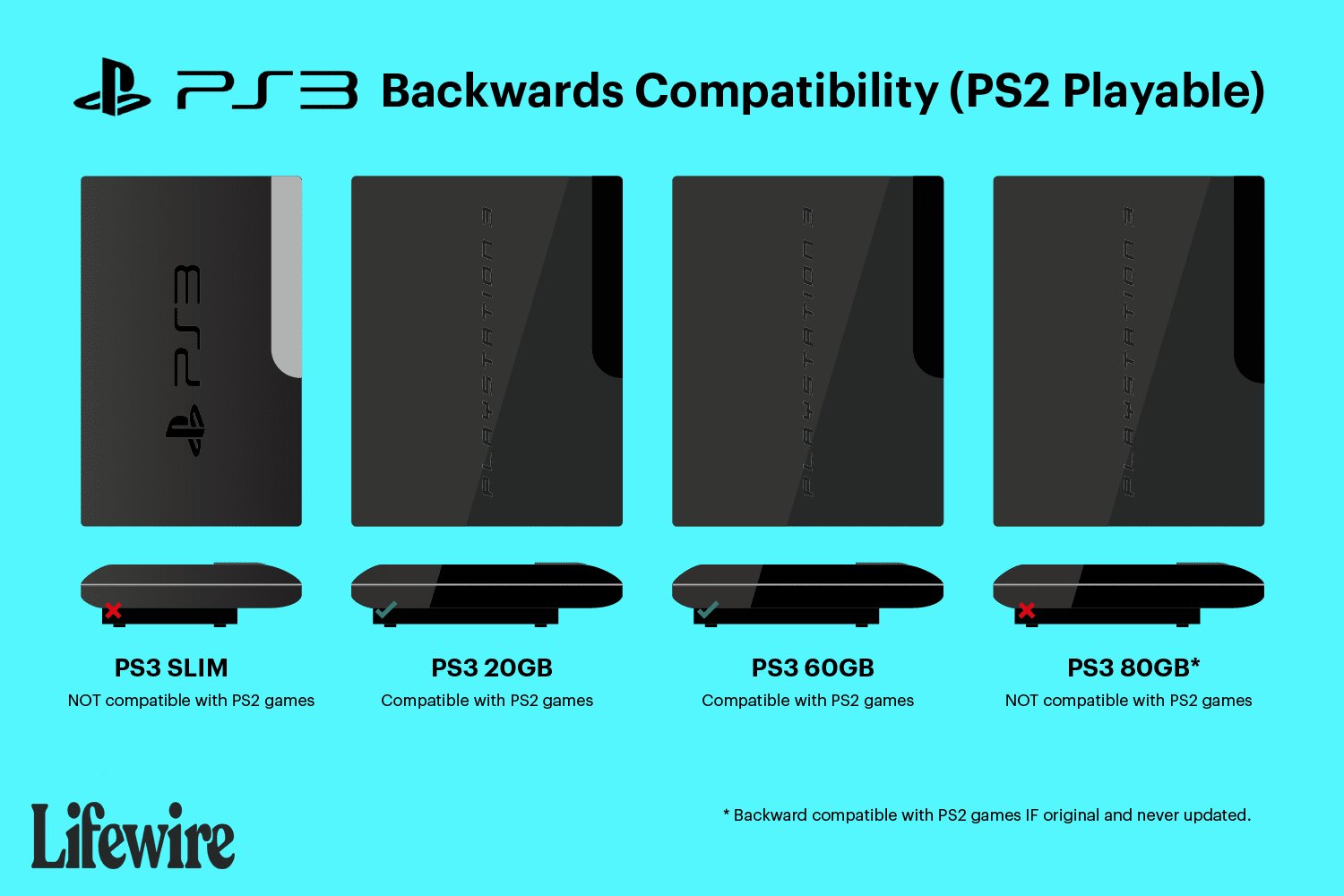
Only some PlayStation 3 models can play PS2 games. Specifically, the original “fat” PS3 models, with model numbers CECHAxx, CECHBxx, CECHCxx, and CECHExx, have the hardware to play PS2 games natively.
The question of whether you can play old favorites always pops up when new tech hits the market. Many players wonder, can PS2 games be played on a PS3? It’s a valid point, given the vast library of classics on the PlayStation 2.
While the PS3 had some backward compatibility features initially, not all models support playing PS2 games. So before you dust off those old discs, it’s best to know what to expect.

Can PS2 Games Be Played on a PS3?
The question of playing PlayStation 2 (PS2) games on a PlayStation 3 (PS3) is a common one for gamers. It brings back memories of classic titles and sparks curiosity about backward compatibility. The answer, while not a straightforward “yes” for all PS3 models, is interesting and depends on the specific PS3 console you own. Let’s dive into the details.
Understanding PS3 Backward Compatibility
Backward compatibility, in simple terms, means a newer console can play games from an older console. Not every PS3 has this feature. The ability to play PS2 games on a PS3 was available on some early models. Sony, the company that made both consoles, included hardware that could run PS2 games without needing any extra software. This is like having the parts of a PS2 inside the PS3. This special feature was a big deal for many people at that time. However, things changed as newer PS3 versions came out.
The Original PS3’s Unique Ability
The very first PS3 models that hit store shelves were the only ones that could play almost all of the PS2 games. If you were lucky enough to get your hands on one of these early models, you were golden. These systems were the “holy grail” for people who loved both PS2 and PS3 gaming, because these PS3 models, could play PS2 and PS3 games.
- Hardware Emulation: These early PS3s had actual PS2 components inside. This meant the games could run exactly like they did on a PS2.
- Almost Full Compatibility: Most PS2 games worked perfectly, with only a very small percentage having minor issues.
- A Big Advantage: For gamers with large PS2 libraries, this was a huge benefit. They could play their old games without keeping an old console around.
The Shift Away from Full Hardware Compatibility
As Sony made newer PS3 models to lower the cost and make them more energy efficient, they removed the PS2 hardware from the console. This meant that these newer models could not play PS2 games as easily as the older ones. The change came with several new models that were made after original model.
- Cost Reduction: Removing the PS2 hardware helped lower the cost of manufacturing the PS3.
- Software Emulation Attempts: Some later PS3 models tried to use software to make PS2 games work. But this didn’t work as well as the hardware approach.
- Limited Compatibility: These software-based attempts meant fewer games were compatible. Even those that did work, often had graphical and performance issues.
Identifying a PS3’s Compatibility
Figuring out if your PS3 can play PS2 games is not difficult if you know where to look. There are certain telltale signs and you can do a quick check based on the model number. Here’s how you can determine if your system has PS2 compatibility.
Checking the Model Number
The easiest way to know is by checking the model number printed on the back of your PS3 console. The specific model numbers that have the full PS2 compatibility are CECHAxx and CECHBxx which were the first models of the ps3 that were launched. Here’s a breakdown:
- CECHAxx and CECHBxx: These are the original 20GB and 60GB models and have full hardware-based PS2 backwards compatibility. These are the models that have the ability to read the ps2 disc as well as run the ps2 games like native ps2.
- CECHCxx and CECHExx: These later models have some software emulation, but only play some PS2 games, it is important to note that these models don’t have the full PS2 hardware like the models CECHAxx and CECHBxx.
- Other PS3 Models (CECHGxx onwards): These models do not have the hardware or software to play PS2 games at all. This means they can’t play any of the PS2 disc games.
Look for that model number, which is usually on the back of the system, or sometimes on the bottom. It is a sticker and includes letters and numbers like “CECHA01” or “CECHB03”. These letters will let you know whether your system can handle PS2 games or not.
Physical Differences in Consoles
Besides model numbers, there were physical differences in the original PS3 models that offered full PS2 compatibility. They include:
- Chrome Trim: The original 20GB and 60GB PS3s had a chrome trim around the system. These models were the only one to have this chrome trim, as later models did not have the chrome trim around the system.
- Card Reader: These systems had a Memory Stick and SD card reader on the front. It was a way to make the system more attractive and user friendly. But later models did not have this.
- Multiple USB Ports: These original models had four USB ports, which is more than what later models had.
These physical features are visual clues that can quickly tell you if the PS3 system is one of the original models.
Software Emulation and Its Limitations
When Sony removed the PS2 hardware from the later PS3 models, it didn’t completely give up on PS2 game compatibility. Instead, they tried to use software to do the work. This method is called emulation. Software emulation is a way for a computer or a game system to pretend to be another device, that is to say it tries to mimic the PS2 system, so it can play the games for which it was not designed.
How Software Emulation Works
Software emulation is like having a translator for your PS3. It converts the instructions from the PS2 game into something the PS3 can understand. However, this method isn’t perfect, and faces a lot of hurdles which is why not all of the PS2 games can work with emulation.
- Translating Code: The PS3 has to translate all of the game’s instructions in real time. This process can take a lot of processing power.
- Not Always Accurate: Because the translation is not perfect, some game functions may not work correctly or at all.
- Performance Issues: You might see slower game speeds or graphical glitches because the PS3 is working very hard. This is because its not natural for the ps3 to run PS2 games like they are made for it, because of absence of hardware support.
Impact on Game Compatibility
Due to the limitations of software emulation, only a select number of PS2 games were officially supported on PS3 models that used software emulation. This meant not all ps2 games were supported, and even those games that were supported might not have run perfectly. You can think of it like a puzzle, not all the pieces fit, and that is how the software emulation is.
- Limited Game Library: Many PS2 games simply wouldn’t work at all. Only games approved by Sony would run on these models.
- Inconsistencies: Some games might work fine, while others would freeze or crash. This inconsistency made it very frustrating for the users who wished to play PS2 games on the PS3 systems that don’t have hardware to run them, hence were running in software emulation.
- Disappointment: Gamers often wished their favorite PS2 games were compatible, but sadly it wasn’t possible with software emulation.
PS2 Classics on the PlayStation Store
Even though the later PS3 models did not have hardware or software backward compatibility for PS2 games, Sony did offer another way to play some PS2 games. They released a bunch of PS2 games as digital downloads through the PlayStation store. This provided a way to experience some of the ps2 games.
What are PS2 Classics?
PS2 Classics are PS2 games that have been re-released as digital downloads, and that can be purchased directly from the PlayStation Store. These games can be downloaded, and played on ps3 systems with no problem as they are emulated by Sony, so they are optimized to work on PS3s that don’t have hardware compatibility for ps2.
- Digital Downloads: Instead of using a disc, you download the games directly to your PS3’s hard drive.
- Pre-Optimized Games: Sony worked to make these games work well on the PS3 using software emulation.
- Selected Titles: Only certain PS2 games were made available as PS2 classics, so you might not find all of your favorite ps2 games.
Advantages of PS2 Classics
Even if your PS3 doesn’t have backward compatibility, PS2 Classics offer some benefits. It was another chance to play a lot of great ps2 games that were not playable otherwise on later ps3 models. Sony decided to make them downloadable so that users who bought the ps3 that did not have the hardware compatibility, can still play them.
- Easy Access: The games are readily available from the PlayStation Store, so you don’t have to look for ps2 discs.
- Reliable Performance: These games run smoother and are more stable compared to trying to run a physical copy on an incompatible system.
- Cost-Effective: Buying the digital download was cheaper than buying old ps2 discs from the used market.
Limitations of PS2 Classics
While PS2 Classics offered a solution for some, it is not a complete solution as there are a lot of limitations to it. The biggest limitation is that it didn’t have the complete library of ps2, only a selected games were made available, and also sometimes it is more expensive than getting a used ps2 game disc.
- Limited Selection: Only a select few ps2 games were available, not every game was made into a PS2 classic.
- Not Every Game is Available: You may find that your favorite game is not available as a PS2 Classic, and you will be disappointed.
- Digital Only: You need to have access to a working internet, and PlayStation network access in order to buy them, this can be a problem for some.
Emulation Through Other Means
Apart from Sony’s official solutions, some other ways exist to try and play PS2 games on a PS3. However, these methods are not supported by Sony and can cause issues to your PS3. These methods are mostly used by people who have enough technical knowledge.
Homebrew and Custom Firmware
Some enthusiasts have developed their own software (often called homebrew) and custom firmware for the PS3. These alterations to the system can allow for more games to be played, but they are not supported by Sony. There are many risks to it, so people should think twice before doing it.
- Not Official: These methods are not approved by Sony and can void your PS3 warranty.
- Risk of Damage: Tampering with the system’s firmware can damage your PS3.
- Potential Issues: You may experience glitches, freezes, or even brick your system if you use it incorrectly.
Emulation Software on PC
Another option for those who are curious about PS2 games but don’t have a compatible PS3 is using an emulator on a computer. These emulators are programs that make a computer mimic a PS2, allowing you to play PS2 games on your computer. There are risks involved in it.
- Legality: Downloading ROMs (copies of game discs) can be illegal, if you don’t have the original game.
- Computer Specs: You’ll need a powerful computer to run PS2 games smoothly.
- Setup Process: Getting the emulator and games to work correctly can be complex for some people.
The Resale Market
Because not all PS3s are compatible with PS2 games, there is a used market for the PS2. Some gamers still prefer to use the original hardware when playing these games. The value of those consoles also increased significantly, as they have that hardware level support, so it’s good for collectors.
Increased Value of Backward Compatible PS3s
The original PS3 models (CECHAxx and CECHBxx) that support PS2 games have become popular with collectors and gamers. Because of the hardware support, it is the only ps3 that can play PS2 and PS3 games.
- Rare Find: These original models are harder to find in good condition. This also causes their resale value to increase.
- Collector Items: Many consider these models to be collector’s items due to their uniqueness.
- Higher Prices: Due to their unique features, and the ability to play PS2 games, these models often sell for a much higher price than other PS3 consoles.
PS2 System and Game Market
The market for PS2 games and consoles is still active. People who love classic gaming still purchase PS2s and their games. PS2 systems still have a good demand, and those who missed out, and wish to play these amazing games go to the used market to buy these consoles.
- Classic Gaming: The PS2 era was a special time for many gamers, and the games that were released during this time are still loved.
- Affordable Retro: PS2 games are much cheaper than the newer game, so they provide an inexpensive way for a lot of gamers to enjoy gaming.
- Community Support: A lot of communities exist that are dedicated to the PlayStation 2, and they often provide ways to keep the ps2 community strong, and help the new users.
In summary, while not all PS3 consoles can play PS2 games, the possibility depends on the specific model. The original PS3s were able to play PS2 games because of their built-in PS2 hardware. Later models relied on software emulation, which was less effective and supported fewer games. If you are looking to play PS2 games on your PS3, check your model number to see if it is compatible. If it is not compatible, you could still use the official PS2 classics store, or go to used market and get yourself a working PS2, to experience those nostalgic games.
These PS2 Games Shouldn't Work Right On PS3's With Full Backwards Compatibility… But…
Final Thoughts
So, can ps2 games be played on a ps3? The answer isn’t straightforward. Some early PlayStation 3 models offered backward compatibility, allowing you to play PlayStation 2 discs. However, Sony removed this feature in later revisions of the console.
Thus, most PS3s cannot play PS2 games. If backward compatibility is essential, you need a specific older PS3 model. You must research your console carefully if playing PS2 games on a PS3 is your goal.

