
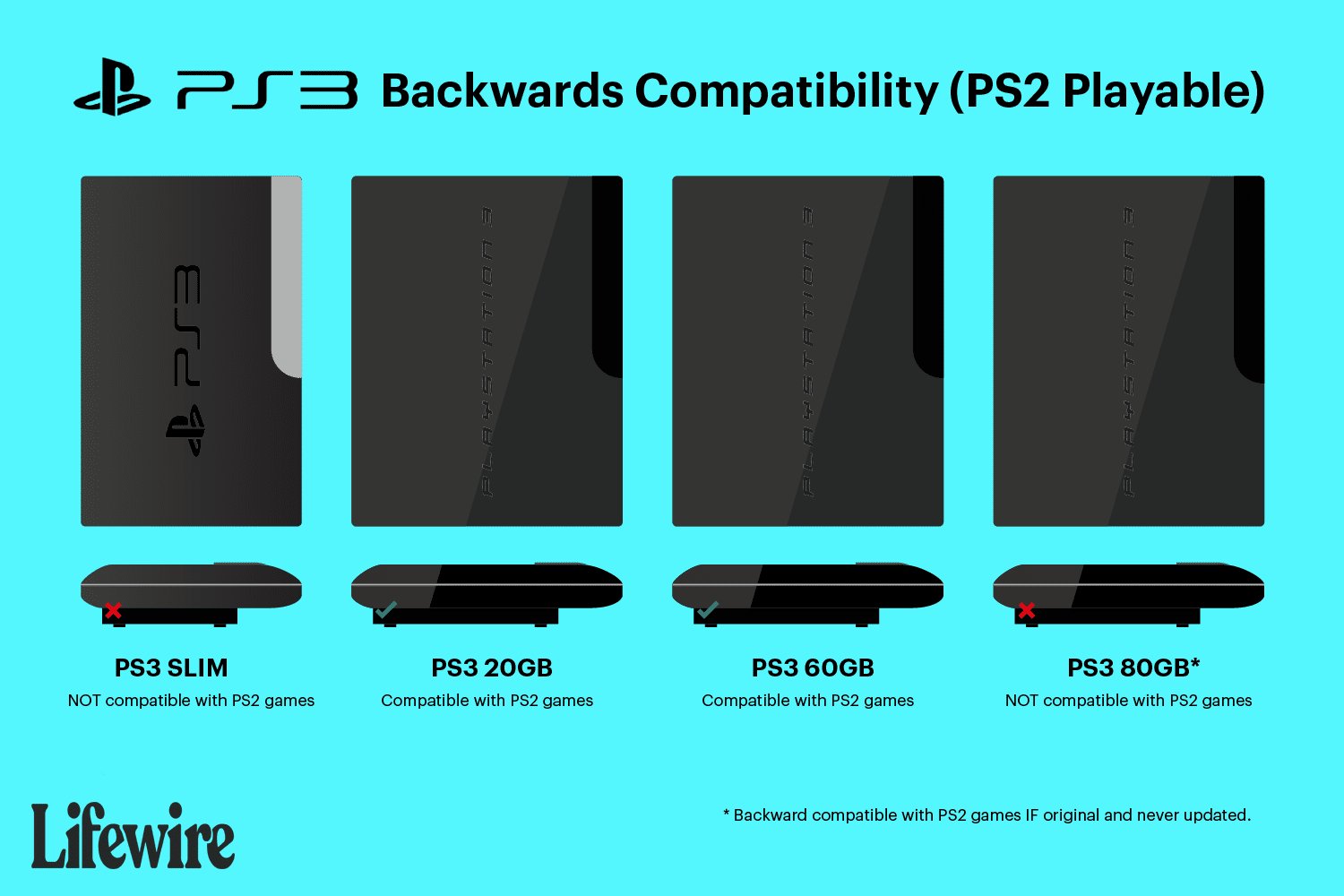
No, the PS3 Slim cannot play PS2 games.
The question lingers for many retro gamers: can PS3 slim play ps2 games? Unfortunately, the PS3 Slim model removed the hardware necessary for backwards compatibility. Sony made this change to reduce production costs. Consequently, PS2 games are not supported on the PS3 Slim.

Can PS3 Slim Play PS2 Games? The Truth About Backwards Compatibility
So, you’ve got a PS3 Slim and a pile of awesome PS2 games gathering dust? You’re probably wondering if you can jump back into those classic adventures. The answer, unfortunately, isn’t a simple yes or no. Let’s dive deep into the world of PS3 Slim and its ability (or lack thereof) to play PS2 games. We’ll explore what made some PS3s play PS2 games, why the Slim is different, and what options you have if you’re itching for some retro gaming.
The Original PS3: A Look Back at Full Backwards Compatibility
When the PlayStation 3 first came out, some models had something truly special: full backwards compatibility with PlayStation 2 games. This meant you could simply pop in a PS2 disc, and the system would run it just like your old PS2. This was a big deal! It let gamers keep playing their favorites without needing multiple consoles. Sony achieved this by including actual PlayStation 2 hardware inside these early PS3 models. Think of it like having a mini-PS2 built right in.
What Made These Early PS3s Special?
These initial PS3 models, often called “fat” models or launch models, included the Emotion Engine and Graphics Synthesizer chips – the very same processors that powered the PlayStation 2. Because they had this hardware, they were able to play PS2 games using their original architecture. It wasn’t software emulation; it was the actual PS2 hardware working inside the PS3. This gave those early PS3s a big advantage, letting them play PS2 titles smoothly and with full compatibility.
- Hardware Emulation: The key here was that the PS2 chips were physically present within the console.
- Near-Perfect Compatibility: This hardware approach meant that most PS2 games ran flawlessly on these PS3 consoles.
- Higher Cost: The inclusion of this extra hardware made these early PS3 models more expensive to manufacture.
These models were usually the 20GB and 60GB versions, though some 80GB models also had this feature, depending on region and date of manufacture. Identifying them required a little detective work.
The PS3 Slim’s Design Change: Saying Goodbye to Hardware Backwards Compatibility
As time went on, Sony decided to make the PS3 cheaper to manufacture. One of the biggest changes involved removing the PS2 hardware from the system. This was a cost-cutting measure, but it also meant the end of hardware-based backwards compatibility for all future PS3 models, including the PS3 Slim.
Why the PS3 Slim Doesn’t Have the PS2 Hardware
The main reason was to reduce the cost of production. The Emotion Engine and Graphics Synthesizer were expensive to incorporate into the PS3. By removing them, Sony could produce the PS3 Slim at a lower price, making it more accessible to more people. This change was part of a larger shift in the industry, where the focus moved away from hardware emulation and towards software solutions, when possible. Also, as the PS3 was further in its life cycle, it’s own games library grew and that made the backward compatibility less of an immediate need for consumers.
- Cost Reduction: Removing the PS2 hardware made the PS3 cheaper to produce.
- New System Architecture: The PS3 Slim used a streamlined design which did not include the previous PS2 architecture.
- Smaller Size: Without the extra hardware, the PS3 Slim was noticeably smaller and lighter than the original “fat” models.
So, the short answer is no, your PS3 Slim does not have the internal hardware to play PlayStation 2 discs. It’s a different beast altogether when compared to the original PS3 models.
Understanding Software Emulation: The PS3’s Limited PS2 Game Support
Even though the PS3 Slim lacks the actual PS2 hardware, some PS3 consoles (including the Slim to a limited degree) had some support for PS2 games through software emulation. Software emulation is very different from hardware emulation. Instead of the actual chips of the original console working inside, the newer console uses its processor to “pretend” to be the old console.
How Software Emulation Works
Software emulation is like using a translator to understand another language. The PS3’s processor works to translate the instructions of the PS2 game into instructions the PS3 can understand and execute. It’s a complex process that requires a significant amount of processing power. The results, however, aren’t always perfect. It is a demanding task that requires a powerful processing unit that has to interpret code from other architecture. That processing power comes at a price though. In the case of PS2 games on PS3, it means that not every title is compatible.
- Translation Process: The PS3 CPU interprets the PS2 game’s code.
- Performance Limitations: Software emulation can sometimes lead to lower frame rates and graphical issues.
- Compatibility Issues: Not all games are compatible through software emulation.
Important note: While Sony did include some PS2 software emulation in certain PS3 models, the PS3 Slim is not one of the models that does this with physical discs. What the PS3 slim does do is it has the ability to play PlayStation 2 “Classics”, which are digital versions of PS2 games that are bought through the PlayStation Network.
The PS2 Classics on the PlayStation Network: A Digital Solution
While you can’t use your old PS2 discs in the PS3 Slim, there’s still some hope if you want to play some retro PS2 games on your PS3 Slim. Sony offered a selection of PlayStation 2 games available for download through the PlayStation Network (PSN). These games, known as “PS2 Classics”, use software emulation to run on the PS3 Slim. Although the hardware isn’t the same, this is a way to experience some of the games again.
How PS2 Classics Work
When you download a PS2 Classic, you’re not getting the original game disc data. Instead, you’re getting a specially adapted version of the game designed to run on the PS3’s architecture through software emulation. This means that Sony has specifically worked to make these games function on the PS3, and this usually results in a smoother, more optimized experience for the user than if they were using disc-based software emulation.
- Digitally Distributed: PS2 Classics are purchased and downloaded from the PlayStation Network.
- Software Emulation: They are emulated on the PS3’s software.
- Optimized for PS3: These games are adjusted to run as smoothly as possible.
The Downsides of PS2 Classics
While the idea of playing digital PS2 classics is appealing, it’s good to be aware of some limitations. Firstly, the selection of PS2 Classics is not enormous. Some of your favorite titles may simply not be available to purchase and download. Another point is that you must buy the digital version of the game even if you already own the original physical disc. Finally, even with optimization, there might be some slight differences in graphics or performance when comparing these to playing the original game on an original PS2 console.
- Limited Game Library: Not every PS2 game is available as a PS2 Classic.
- No Disc Support: You must buy the game digitally, even if you own the disc.
- Performance Variation: There can be minor differences in performance and visuals.
Identifying PS3 Models That DO Play PS2 Games
If you’re considering buying a PS3 for the specific reason of playing PS2 games, it’s crucial to know which models offer this ability. Only the earliest “fat” PS3 models had the complete hardware-based compatibility. So, if you were to go for a PS3 with the built in PS2 processor, here is what you would have to look for.
Key Features of the Backwards Compatible PS3 Models
These original “fat” PS3s are relatively easily to distinguish. Here are some features to look for:
- Model Number: Look for model numbers CECHAxx, CECHBxx, CECHCxx, and CECHExx. (The ‘xx’ represents the region code, for example CECHA01).
- Multiple USB Ports: These models typically have four USB ports on the front of the console.
- Memory Card Slots: These early PS3s had memory card slots for PlayStation and PlayStation 2 memory cards.
- Chrome Trim: The top of the console also has a distinct chrome trim.
Not all “fat” PS3 models had full backwards compatibility. Some later models only had limited software emulation. So, if you want a system that has the best, easiest, and most compatible method of playing your PS2 titles, finding one of the early PS3 consoles is a must.
Alternatives for Playing PS2 Games
If the PS3 Slim won’t play your PS2 games, you may be wondering what other options you have available to you. Here are a few ideas you can explore.
Using an Original PlayStation 2 Console
The most straightforward way to play PS2 games is to use the original PS2 console. This ensures full compatibility and the authentic experience that is just the same as when the game was originally intended to be played. You would be using the correct hardware, and this is the way that the games are expected to be played.
- Guaranteed Compatibility: All PS2 games will work on a PS2 console.
- Authentic Experience: You get the game as it was originally intended to be played.
- Affordable Price: PS2 consoles are readily available on the second hand market for decent prices.
Other Console Alternatives
There are also alternative consoles that offer ways to play PS2 games. These include the PlayStation 4 and the PlayStation 5. However, neither the PS4 nor PS5 have the ability to play physical PS2 discs. Like the PS3 slim, these consoles can play a limited selection of PS2 titles if you purchase them from the digital store.
- PS4 and PS5: Can play some PS2 games through PlayStation Network.
- Emulation on PC: Using programs to emulate the PS2 is another option, but it requires technical skill and a good PC.
Collecting the PS2 Classics on Your PS3 Slim
If you still have your PS3 Slim, and you don’t want to buy another console, you can explore the selection of PS2 Classics that are still on the PlayStation Network store. It is worth searching there to see if there are some of your old PS2 favorites that you can get and play. It is also a very simple solution, because you can purchase the games and play them right on your existing console.
In summary, while the PS3 Slim itself cannot play your old PS2 game discs, there are still options if you want to play PS2 games. Exploring the other consoles, or choosing the PS2 Classics on the PSN, will allow you to jump back into some retro fun.
Are ps2 games compatible with the ps3 slim?
Final Thoughts
Unfortunately, the PS3 Slim cannot natively play PS2 games. Sony removed the backwards compatibility feature to reduce production costs. Only the original, “fat” PlayStation 3 models offered this capability.
Therefore, if you want to play PS2 titles on a PlayStation 3 console, you must acquire a compatible older model. The question of ‘can ps3 slim play ps2 games’ is definitively answered with a no, the slim version does not have this feature.

