
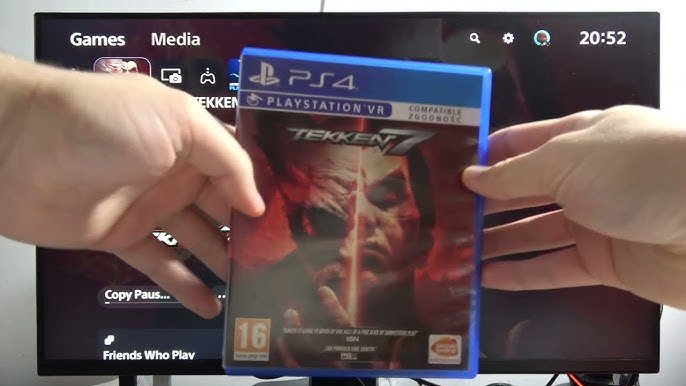
Yes, the PS5 Slim can play PS4 games.
The question on everyone’s mind, can PS5 slim play PS4 games, is finally answered here. Many people are curious if their old library of PS4 titles will be compatible with the newer console. Good news for gamers, the PS5 Slim maintains backward compatibility with a wide range of PS4 games.
This means that you can continue enjoying your collection of PS4 favorites on the sleek new console without any worries. It is a simple and easy process to start playing your favorite titles from the last generation.

Can PS5 Slim Play PS4 Games?
Let’s dive right into the big question: can the PS5 Slim play PS4 games? The answer is a resounding yes! The PlayStation 5 Slim, just like its bigger brother, the standard PS5, is designed with backward compatibility in mind. This means you can play almost all of your favorite PlayStation 4 games on the newer, slimmer console. It’s great news for gamers who want to upgrade without leaving their treasured PS4 titles behind.
Understanding Backward Compatibility
Backward compatibility is a fancy term that means a new console can play games made for an older console. Think of it like a new DVD player that can still play your old DVDs. Sony did a really good job making sure the PS5, including the Slim version, can play most PS4 games. This is a big win for gamers because it lets you keep playing the games you already own.
Why is Backward Compatibility Important?
Imagine buying a new game console, but finding that none of your old games work. That would be a bummer, right? Backward compatibility solves that problem. It means that when you upgrade to a PS5 Slim, you don’t have to leave all your PS4 games behind. You can keep playing them on your new console! This is important for a few key reasons:
- Saves You Money: You don’t have to rebuy games you already own just to play them on a new console.
- Keeps Your Collection Alive: You can continue to enjoy your favorite PS4 titles on the latest hardware.
- Smooth Transition: Upgrading to a new console is much easier when you can bring your entire game library with you.
How Does it Work?
The PS5 Slim doesn’t just magically play PS4 games. There’s some clever technology working behind the scenes. The PS5 Slim’s hardware is powerful enough to emulate the PS4’s architecture, making it possible to run those older games smoothly. It’s like having a PS4 inside your PS5. When you put a PS4 game disc into your PS5 Slim, or download a digital PS4 game you own, the console recognizes it and sets itself up to play that game correctly. This process is automatic, so you don’t have to do anything special – just start playing!
Disc vs. Digital Games
It’s worth noting that whether you own your PS4 games on physical discs or as digital downloads will slightly change how you play them on your PS5 Slim:
- Physical Disc Games: If you have a PS4 game on a disc, you just insert it into the PS5 Slim’s disc drive (if you have the disc version of the Slim) and start playing. You need to keep the disc in the console while you play.
- Digital Download Games: If you have bought digital PS4 games through the PlayStation Store, they will be tied to your account. You can download these games on your PS5 Slim and play them without needing the original disc.
Are There Any Exceptions?
While the PS5 Slim can play the vast majority of PS4 games, there are a small number of exceptions. Some PS4 games might have compatibility issues or not be supported. However, this is a tiny fraction of the entire PS4 library. Almost all PS4 games you’d want to play on the PS5 Slim will work just fine.
Game Performance Enhancements
Here’s another great piece of news: some PS4 games actually run better on the PS5 Slim than they did on the original PS4! Thanks to the PS5 Slim’s more powerful hardware, some games can load faster, run at higher resolutions (making them look sharper), or have improved frame rates (making them feel smoother). It’s like getting a free upgrade for your old games! Not every game gets this boost, but many do, giving you an even better experience than you had before.
How the PS5 Slim Enhances PS4 Games:
- Faster Loading Times: Games load significantly quicker than on a PS4, getting you into the action faster.
- Improved Frame Rates: Experience smoother gameplay with less stuttering, especially in fast-paced games.
- Higher Resolutions: Some PS4 games benefit from running at higher resolutions, making them look clearer and more detailed.
- Better Overall Performance: The PS5 Slim’s more powerful hardware results in an overall better and more responsive experience.
For many PS4 games, you will notice a definite improvement in how they play on the PS5 Slim. This adds to the value of having a PS5 Slim, as it’s not just a console for playing new games, but also a way to enjoy your old ones in a better light.
Setting Up Your PS4 Games on PS5 Slim
Getting your PS4 games up and running on your PS5 Slim is really easy. Here are the basic steps:
Using Physical Discs
- Insert the disc: Put the PS4 game disc into the disc drive of your PS5 Slim (if you have the disc version).
- Wait for the console to recognize the game: The PS5 Slim will read the disc and the game will appear on your home screen.
- Select the game: Choose the game from the home screen to start playing.
Using Digital Games
- Make sure you are signed in with the same PlayStation account: The account you used to buy your digital PS4 games is important.
- Go to the “Game Library”: You can find this option on your PS5 Slim’s home screen.
- Find your digital PS4 games: They should be listed under your purchased games.
- Download the game: Choose the game you want to play and download it to your console.
- Start playing: Once downloaded, choose the game from your home screen and start gaming.
Controller Compatibility
You can use your DualSense PS5 controller to play PS4 games on your PS5 Slim. However, you can also use your old PS4 DualShock 4 controller for playing PS4 games, giving you some flexibility. It’s good to have the choice depending on what controller you prefer. The PS4 controller will not work on PS5 games, but it will work on PS4 games.
What to keep in mind about controllers:
- PS5 DualSense: Works for both PS5 and PS4 games on your PS5 Slim.
- PS4 DualShock 4: Works for PS4 games on your PS5 Slim, but not for PS5 games.
You can use either controller, which is convenient because you might prefer one controller over the other. It’s nice to have the option!
How do Game Saves Work?
The game save data from your PS4 games also carries over to your PS5 Slim. This means you can pick up right where you left off. There are a few ways to transfer your save data:
- Cloud Saves: If you have a PlayStation Plus subscription, your save data is likely already in the cloud. Just sign in with your same account, and your PS4 game saves will appear on your PS5 Slim.
- USB Drive: You can also copy your PS4 saves to a USB drive and then transfer them to your PS5 Slim.
- Network Transfer: You can connect your PS4 and PS5 Slim to the same network and transfer save data that way.
No matter what method you choose, you can rest assured that your game progress will come along with you to the new console. You don’t have to lose all your progress and start over, which is a huge relief.
The Benefits of Playing PS4 Games on PS5 Slim
Beyond just playing your old games, there are several benefits to enjoying your PS4 titles on the PS5 Slim. Here’s a recap of the main advantages:
- Enhanced Performance: Experience smoother frame rates, faster loading times, and higher resolutions in some PS4 games.
- Access to Your Entire Library: Play nearly your entire PS4 game collection on your new console, saving time and money.
- Seamless Transition: Continue your gaming journey without having to restart or repurchase your favorite titles.
- New Gaming Experience: Enjoy your games with enhanced graphics and overall performance improvements.
The PS5 Slim is more than just a console for new games – it’s a great place to play your PS4 favorites with improvements and no loss of progress. The backward compatibility is a huge win for gamers, letting you enjoy the past and present of PlayStation all in one console.
In Conclusion
So, to circle back to our main question: yes, the PS5 Slim can play PS4 games, and it does so exceptionally well. The backward compatibility feature is one of the great perks of upgrading to the PS5 Slim. You can continue to play your extensive PS4 library, often with enhanced graphics and performance. Whether you have physical disc copies or digital downloads, the transition is simple. You can use either the DualSense or the DualShock 4 controller for your PS4 games and can transfer your saved data to ensure you continue from where you left off. With all these benefits, upgrading to a PS5 Slim allows you to bring your entire gaming history with you, enhancing your experience all around.
PS5 Slim: Can I Use PS4 Game Disc on PlayStation 5 Slim – Play PS4 Games #sonyplaystation
Final Thoughts
Yes, the PS5 Slim can play PS4 games. This backward compatibility means you can enjoy your existing PlayStation 4 library on the newer console.
The console supports the vast majority of PS4 titles. So you can seamlessly transition to the PS5 Slim. It is excellent news for players with many PS4 games they wish to play.
Therefore, if you’re wondering ‘can ps5 slim play ps4 games’, the answer is a definite yes. Your PS4 games are ready to be played on PS5 Slim without any issues.

