
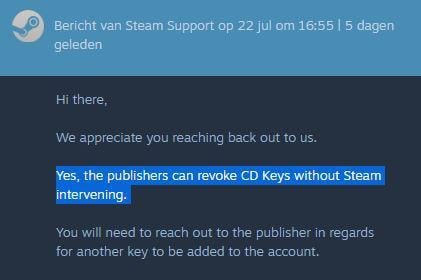
Yes, Steam can take away your games under specific circumstances, such as violating their terms of service.
Have you ever pondered the unsettling thought, “can Steam take away your games?” It’s a valid concern for any gamer who has invested time and money into their digital libraries. Thinking about losing access to your cherished collection is definitely not enjoyable.
This question arises because digital ownership differs from owning physical copies of games. We explore the conditions that might lead to Steam revoking your access and how to keep your account safe.

Can Steam Take Away Your Games? The Real Deal
Okay, let’s talk about something that might make your heart skip a beat – the possibility of losing your precious games on Steam. You’ve probably spent hours building your library, collecting titles like they’re digital gold. The thought of them vanishing is a bit scary, right? Well, the short answer is: yes, Steam can, in certain situations, take away your games. But don’t panic yet! It’s not as common as you might think, and there are usually good reasons behind it. Let’s dive deep into why and how this happens, and what you can do to protect your account.
Understanding Steam Licenses
First, it’s super important to understand that when you buy a game on Steam, you’re not actually buying a physical copy like a disc or cartridge. What you’re really getting is a license to play that game. This license is tied to your Steam account. Think of it like renting a movie from a digital store instead of owning a physical DVD. The store still owns the movie, but they give you permission to watch it. With Steam, Valve (the company behind Steam) gives you permission to play their games.
The Nature of Digital Licenses
Digital licenses are great for convenience. You can download and play games instantly. You don’t have to worry about scratched discs or losing game cartridges. But this convenience also means the game ownership is linked to Steam’s terms of service. Valve has rules, and you agree to follow them when you create an account and use Steam. These rules are there to help make sure everyone has a good experience and the game makers and store do things legally.
- You don’t own the game in the traditional sense: This means you don’t have the same rights as if you owned a physical copy. You are granted a license to use the software, not to possess it outright.
- The license is connected to your account: The game is tied to your Steam account; if you lose access to your account, you generally lose access to the games associated with it.
- Terms of Service: It’s a lengthy document, but the key takeaway is that Valve outlines what you are and aren’t permitted to do. If you breach these terms, there could be penalties.
Reasons Steam Might Revoke Access
Alright, let’s get into the nitty-gritty of why Steam might take games away. It’s not like they’re trying to steal from you; usually, it’s because of specific issues. Here are some of the common reasons:
Violating the Steam Subscriber Agreement
This is the big one. The Steam Subscriber Agreement is a long document, but it’s important. It sets out all the rules for using Steam. If you break these rules, Valve has the right to take action, including removing your games. Here are some examples of actions that would violate the agreement:
- Cheating in multiplayer games: If you use hacks or cheats to gain an unfair advantage in online games, Valve can remove your game licenses. They want to keep things fair for everyone.
- Buying games from unauthorized sellers: Steam codes or games bought from illegitimate websites can cause problems, and Valve can revoke these. You should always get your games from reputable sources.
- Account trading or selling: Steam accounts are meant for personal use only. If you sell or trade accounts, it’s a big no-no and can lead to game revocation and sometimes, permanent account bans.
- Engaging in fraud or scams: Attempting to defraud Valve, other users, or game developers can result in losing your game licenses and being kicked from Steam.
- Using third-party tools that modify game files: Using programs that alter or modify game files can be considered cheating, leading to losing game access.
Game Publisher Revocations
Sometimes it’s not Valve themselves, but the game publisher or developer that asks for a game to be removed. This usually happens for two main reasons:
- Errors with pricing: Occasionally, games get priced incorrectly by mistake. If you buy a game at a massively reduced price due to a mistake, the publisher can sometimes ask Steam to remove the incorrectly priced license and may issue a refund.
- Legal problems: If there are legal issues related to a game, such as licensing issues with music or other content in the game, then the publisher might ask Valve to remove the game.
Regional Restrictions
Certain games may have regional restrictions due to licensing deals. If you’re using a VPN to bypass these restrictions or buy a game in a region you aren’t authorized for, then it can cause a problem and games might be removed from your account. It’s always best to make sure you’re buying games from regions where you are physically present.
Account Security Compromises
If your account gets hacked, the person who got in may use your account to do things that go against the Steam rules. While Steam will work with you to recover your account, some games may be revoked because of the unauthorized actions the hacker performed, like using cheats.
- Account Phishing: Never share your Steam login information or click suspicious links, as they might be attempts to steal your account. Always ensure you are on the genuine Steam website.
- Weak Passwords: Use a strong password which is hard to guess or crack. A combination of upper and lower case letters, numbers and special characters is always recommended.
- Enable Steam Guard: Steam Guard adds an extra layer of security to your account using a mobile app or email code verification. Use this feature to protect your account from unauthorized access.
The Impact of Game Removal
Losing access to games can be frustrating. It can mean losing your progress, your items, and the time you spent building your digital collection. Here’s what can happen when your games are removed:
- Inability to Play: You won’t be able to launch or play the game. The game will disappear from your library, or it may appear grayed out.
- Loss of Saved Data: Sometimes, removing the game also means losing the saves, unless the game allows cloud saves on a platform other than Steam.
- Refunds: While Valve may issue refunds in cases of error like game price error, this is not always the case and you may not get a refund for games revoked due to your violation of rules.
How to Protect Your Steam Library
Now, for the important part: How do you keep your Steam games safe? Here are some essential steps you can take:
Stick to the Rules
The easiest way to keep your games safe is to follow the Steam Subscriber Agreement. Don’t cheat, don’t buy from unauthorized sources, and don’t try to break the rules. The agreement is there to help ensure a fair and enjoyable experience for everyone.
Buy from Legitimate Sources
Only buy Steam games or codes from trusted sources like the Steam Store, the official website of the game publisher, or reputable retailers. Avoid shady websites offering crazy deals. If something sounds too good to be true, it probably is.
Keep Your Account Secure
Protect your Steam account. Here’s what you should do:
- Strong Passwords: Make sure you use strong passwords and keep them unique to your Steam account. Avoid using passwords that you use for other accounts.
- Enable Steam Guard: Use the Steam Guard feature to have an extra layer of security for your account. It’s usually either a mobile app or an email code.
- Beware of Phishing: Be careful with the links you click. Make sure they lead you to the actual Steam site and not a fake site. Never enter your login details on a site that you are not sure of.
Keep Your Computer Safe
Also, make sure your computer is secure and clear of any virus or malware. Use reliable antivirus software. Be careful what you install and download from the internet. Malicious software can steal your account details or do other damage.
- Regular Scans: Periodically scan your system for viruses and malware.
- Trusted Downloads: Only download software from reliable sources.
Stay Informed
Keep an eye on Steam’s news and any updates from Valve. If any games are going to be removed for any reason, you will usually get a notice so you are aware.
What to do if a game is removed?
- Contact Steam Support: If you believe that your game has been revoked due to an error, then you can contact Steam Support. They can investigate and take any appropriate action.
- Review the terms of service: Go through the Steam subscriber agreement to ensure you did not violate any of their terms.
The Bottom Line
So, can Steam take away your games? Yes, it’s possible, especially if you’re breaking the rules or if there are issues from the publisher’s side. But by understanding why and how this can happen, and by taking steps to protect your account, you can enjoy your Steam library without worry. Remember to stay safe, follow the rules, and keep your account secure. This way, your digital game collection should be safe from vanishing.
How to permanently remove a game from Steam – Quick Guide
Final Thoughts
Steam’s terms allow them to revoke game access. If a publisher removes a game, you might lose it. This means ‘can steam take away your games’ is a valid concern. Account suspensions also cause game loss.
Always carefully check Steam’s policies. You must know about these possibilities. Knowing your rights helps you understand platform risks. This prevents unexpected disappointments.

