
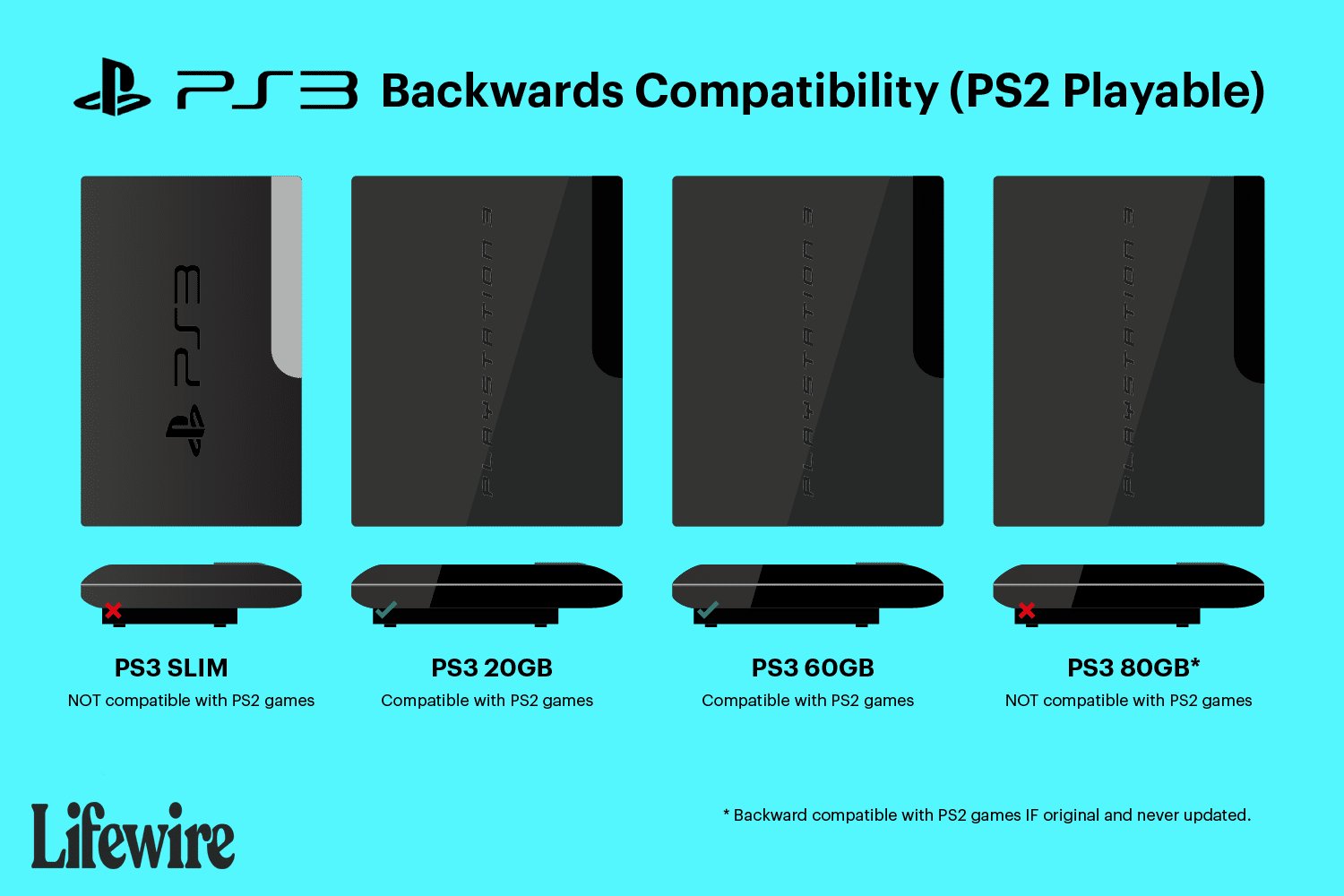
The original PlayStation 3 models could play PlayStation 2 and PlayStation 1 games, but later models removed PlayStation 2 compatibility; all PS3 consoles can play PlayStation 1 games.
A question that often pops up among gamers is, can the ps3 play ps2 and ps1 games? It’s a valid query, given the vast libraries of titles across those generations. The answer, while not entirely straightforward, is worth exploring if you have a PS3 tucked away.
Early models of the PS3 possessed the hardware to play PS2 games, offering backward compatibility. However, Sony later removed this feature, making it dependent on the specific PS3 model you have. Luckily, all PS3 consoles retain compatibility with the original PlayStation games.

Can the PS3 Play PS2 and PS1 Games? A Deep Dive
The PlayStation 3 (PS3) was a fantastic console, and many gamers wonder if it can play games from its older brothers, the PlayStation 2 (PS2) and the original PlayStation (PS1). The answer is a bit complicated, because not all PS3s are created equal when it comes to backwards compatibility. Let’s explore this topic in detail.
The Different PS3 Models and Their Backwards Compatibility
The key to understanding if a PS3 can play older games lies in the specific model you have. Sony released several versions of the PS3, and some had the hardware to play PS2 games, while others did not. Here’s a breakdown:
The Original “Fat” PS3 Models
The very first PS3 models, often called the “fat” PS3s because of their bulkier design, were the most compatible. Specifically, these were the 20GB, 60GB, and early 80GB models. These early models had actual PS2 hardware built inside of them. This allowed them to play most PS2 games using the original PS2 chip and graphics processor, which was the most accurate emulation method. This is known as “hardware emulation.” These models also play PS1 games without any problems, as this feature was built into the PS3 from day one. If you have one of these, congratulations! You have a PS3 with full backwards compatibility.
- 20GB Model: This was the least common of the backwards compatible “fat” models.
- 60GB Model: This is probably the most sought-after version for its comprehensive backwards compatibility.
- Early 80GB Models: Some of the initial 80GB “fat” models also had PS2 hardware emulation. However, this feature was removed in later versions.
The “Slim” PS3 Models
As time went on, Sony wanted to make the PS3 smaller and cheaper. So, they released the “Slim” PS3 model. Unfortunately, the slim PS3 removed the PS2 hardware compatibility. This means that it cannot play PS2 games physically through discs. However, it can still play PlayStation 1 games perfectly fine. It uses software emulation, to play PS1 games.
The “Super Slim” PS3 Models
The “Super Slim” PS3 is the last version of the console. Like the “Slim” models, these models also lack any hardware for PS2 game compatibility. It plays PS1 games, similar to slim version, using software emulation. If you own a “Slim” or “Super Slim”, then you have only access to the PS1 games compatibility and not PS2.
How To Identify Your PS3 Model
So, how can you figure out what kind of PS3 you own? It’s actually pretty simple.
- Check the model number: On the back of your PS3, you’ll see a sticker with a model number.
- CECHAxx, CECHBxx, CECHCxx and CECHExx : If your model number starts with any of these, it’s a backwards-compatible “fat” model. The “xx” will vary but those first few letters are the key.
- CECH-2xxx and CECH-3xxx series: These are the “Slim” model, and these can’t play PS2 games using hardware emulation.
- CECH-4xxx series: These are “Super Slim” models. They also do not have PS2 hardware emulation.
- Look at the design: The “fat” PS3s are noticeably larger and have a glossy finish. The slim and super slim models are much smaller, and have a matte finish.
- Check the front of the console: If your console has the “Playstation 2” logo at the front near the disc slot, then you are in luck, and your console supports hardware emulation to play PS2 games.
- Look for PS2 disc slot: A fully backwards compatible PS3 will have a disc slot with a “Playstation 2” logo on the disc tray. A “Slim” and “Super Slim” model do not have this logo on the disc tray.
Playing PS1 Games on All PS3 Models
The good news is that no matter which PS3 model you have, you can play PS1 games! All PS3 consoles use software emulation to play PS1 games perfectly. This is built into the system, and it works great. You just need to insert a PS1 disc into the PS3, and the system will recognize it. You can then start playing right away!
How PS3 Plays PS1 Games
When you put a PS1 disc into any PS3, the console reads the disc’s information and starts the built-in software emulator. This emulator acts like a PS1 inside of your PS3. It uses the PS3’s processing power to run the PS1 games, making it look and play very similar to how it would on the original PS1 console. The PS3 is very powerful, and this emulation runs pretty smoothly with no problems. This process is called “Software Emulation”.
PS2 Game Emulation on Non-Backwards Compatible PS3s
If you have “Slim” or “Super Slim” model, you may feel like you’re completely out of luck for PS2 games. However, this isn’t entirely the case. There is a way to play some PS2 games on later PS3 consoles, but its not through using a physical PS2 disc.
PlayStation Store and Digital PS2 Games
Sony does offer certain PS2 games for digital download through the PlayStation Store on the PS3. These are not running through hardware emulation but via software emulation instead. These PS2 games are optimized for the PS3 and generally run well. The catch? You can only play the ones that are available on the PlayStation Store. There are only a limited number of them. Additionally, you must purchase them again, even if you own the original physical PS2 disc of the same game. This means that you can’t play any old PS2 games you may have by using this method, and it is only limited to a small library of titles.
- How to access: You can find PS2 games on the PlayStation store. You can access PlayStation store from the XMB (XrossMediaBar) menu of your PS3.
- Game selection: The list of available PS2 titles changes from time to time. So it’s worth checking periodically for new additions.
- Cost: These digital PS2 games are available for purchase. The price usually depends on the game itself.
Software Emulation for PS2 Games
Unlike the original “fat” models which utilize hardware emulation, these PS2 games on non-backwards compatible PS3 models use software emulation. Here, the PS3 acts like a virtual PS2, and processes the game information to make it playable on the PS3. However, this method is not perfect, and only a small number of games are made available on the store.
The Benefits of Backwards Compatibility
For those with a backwards compatible PS3, the ability to play PS2 and PS1 games offers several advantages:
- Play Your Old Favorites: You can enjoy classic games from the past without needing to hook up your old consoles.
- Convenience: It keeps your gaming setup simple and clutter-free by having one console to play three generations of games.
- Value: It lets you get even more out of your PS3 by giving access to a very large library of games.
- Historical preservation: It keeps old games alive by ensuring that they can be played on newer hardware.
Potential Issues with Backwards Compatibility
While the backwards compatibility feature is great, there are some things to note.
Game Compatibility Issues
Even though the “fat” models use hardware emulation, some games may have problems. The game might have glitches, or may not work at all. The number of games that have issues are relatively small. But, it’s always a good idea to look up if a particular PS2 game works on PS3, before buying it. Usually a very small percentage of PS2 games do not work perfectly on “Fat” PS3 models. PS1 games work very well across all PS3 models.
Emulation Imperfections
Software emulation on “Slim” and “Super Slim” models for PS1 games works well, but it may not be 100% perfect, with a few graphical or audio glitches in some rare circumstances. These issues are very uncommon and most of the time, you won’t even notice them.
Disc Reading Errors
Over time, laser drives can wear out. If this happens in your PS3, then this can affect reading discs from all systems. It does not matter if its PS1, PS2 or PS3. This is a hardware problem, and not a backwards compatibility issue. The age of the hardware itself is what can lead to these problems.
Table: PS3 Model Backwards Compatibility Summary
To make it easy to understand, here’s a table summarizing the backwards compatibility of different PS3 models:
| PS3 Model | PS2 Game Compatibility (Physical Discs) | PS1 Game Compatibility | PS2 Game Emulation Type |
|---|---|---|---|
| Early “Fat” Models (20GB, 60GB, Early 80GB) | Yes (Hardware Emulation) | Yes (Software Emulation) | Hardware Emulation |
| “Slim” Models | No | Yes (Software Emulation) | Software Emulation via PlayStation Store |
| “Super Slim” Models | No | Yes (Software Emulation) | Software Emulation via PlayStation Store |
Preserving Your PS3 and Games
If you own a backwards compatible PS3, it’s important to take good care of it. Here are some tips:
- Keep it clean: Dust and dirt can cause the system to overheat. Clean it regularly with compressed air and a soft cloth.
- Proper ventilation: Make sure your PS3 has enough space around it for proper airflow. Avoid putting it in enclosed spaces.
- Store discs safely: Scratches on game discs can cause reading problems. Store your PS1, PS2 and PS3 game discs carefully when you are not using them.
The PlayStation 3’s backwards compatibility is a valuable feature for gamers who want to enjoy classic titles from the PlayStation and PlayStation 2 era. While only specific “fat” models offer full hardware-based compatibility for PS2 games, all PS3 models can play PS1 games and some PS2 games digitally. If you have a backwards compatible PS3, then cherish it! You have a great way to enjoy many great games from the past. If you have a Slim or Super Slim Model, make the best of PS1 games, and limited number of PS2 digital games.
How to tell if your PS3 is backwards Compatible
Final Thoughts
Some PlayStation 3 models offer backwards compatibility, allowing them to play PS1 games. However, only certain original PS3 units can play PS2 games; this functionality was later removed. Therefore, not all PS3 consoles provide the same experience.
Many will find that, can the ps3 play ps2 and ps1 games, it depends entirely on which specific model of the system they possess. Compatibility is not a standard feature across all generations. Knowing your specific PS3 model is must to determine its capabilities.

