
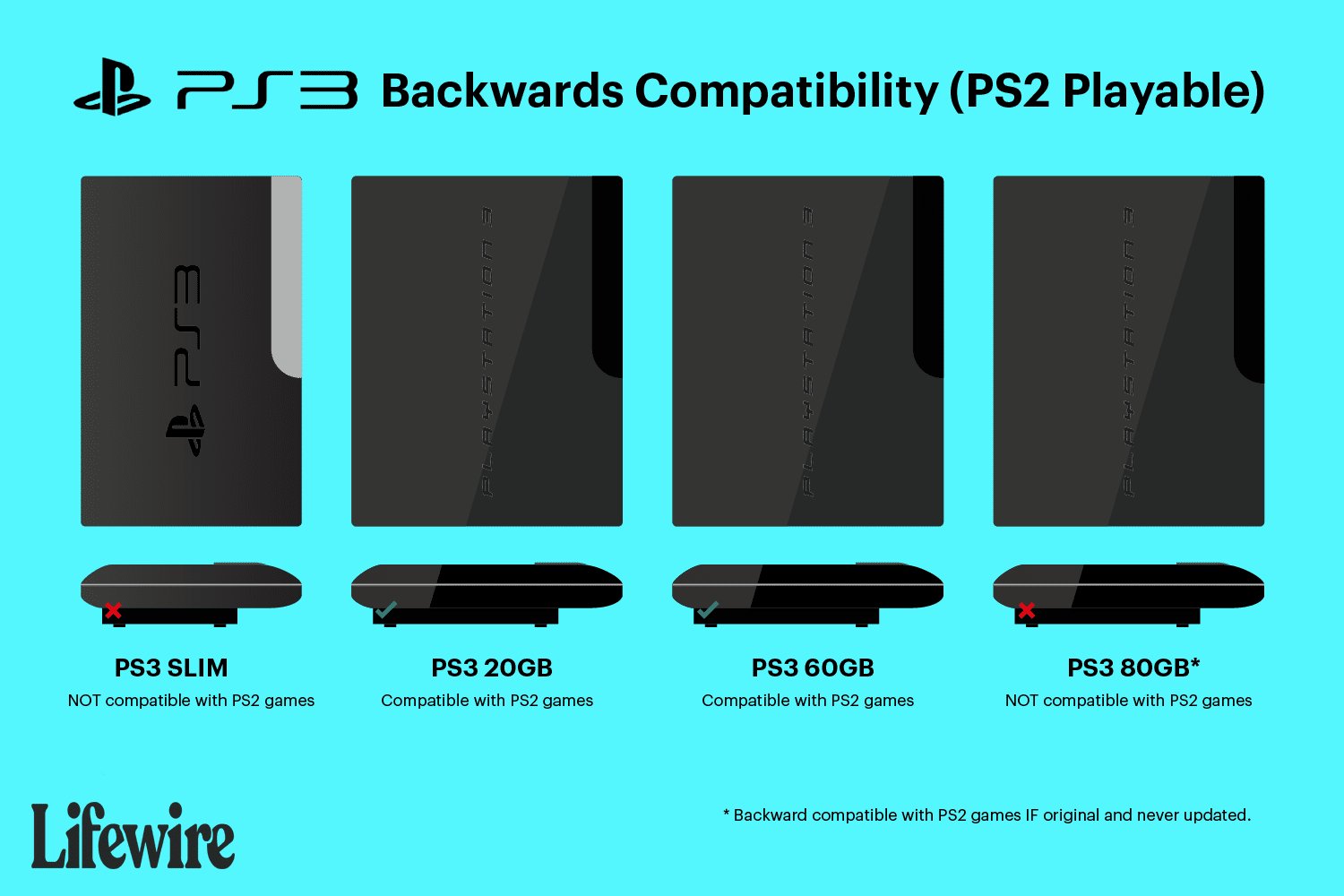
No, the PS3 Slim cannot play PS2 games.
Many gamers wonder if they can revisit their old favorites. Specifically, can the PS3 Slim play PS2 games? It’s a question with a straightforward answer.
The PS3 Slim model removed the hardware needed for backward compatibility. This means it does not have the necessary components to run PlayStation 2 discs.
So, unfortunately, if you want to play PS2 games, you’ll need to dust off your old console or explore other options.

Can the PS3 Slim Play PS2 Games?
Okay, let’s talk about the PlayStation 3 Slim and its ability to play older PlayStation 2 games. It’s a question many gamers have, especially if they have fond memories of classics like Grand Theft Auto: San Andreas, Final Fantasy X, or Metal Gear Solid 3. The short answer is: it’s complicated. Unlike some of the very first PS3 models, the PS3 Slim does not have the hardware needed to play PS2 games directly. Let’s dive into the details so you can understand exactly what this means.
The Tale of Two PS3s: Fat vs. Slim
To fully grasp why the PS3 Slim doesn’t play PS2 games, we need to go back a bit. When the original PlayStation 3 (often called the “fat” PS3) came out, some models had a special feature. These early models included actual PlayStation 2 hardware inside them! This meant they could play PS2 games with no issues. Think of it like having a PS2 built right into your PS3. These models, especially the 20GB and 60GB versions, are highly sought after by collectors because of this feature.
However, as time went on, Sony wanted to make the PlayStation 3 cheaper to manufacture and sell. To do this, they started removing some of the expensive parts. One of the major components they eliminated was the PlayStation 2 hardware. The result was the PS3 Slim, which was smaller, quieter, and used less power. But it came at a cost: it lost its ability to play PS2 games through hardware.
Why the Slim Doesn’t Have PS2 Hardware
The main reason the PS3 Slim does not have PS2 hardware is cost-cutting. Including the extra chips and components to run PS2 games added a significant amount to the manufacturing expenses of each console. By removing them, Sony could sell the PS3 at a lower price and make it more competitive in the market.
Think of it like a car. The original PS3 was like a fancy car with all the upgrades, including a built-in navigation system (the PS2 hardware). The PS3 Slim, on the other hand, is like a more basic car model. It still gets you from point A to B, it’s just missing some of the luxury features to keep the cost down.
Software Emulation: A Different Approach
So, if the PS3 Slim doesn’t have the hardware to play PS2 games, what other options exist? Sony did offer a partial solution: software emulation. Emulation is a way to make one piece of hardware act like another using software. In the case of the PS3, this means that the console uses its own processor to run software that pretends to be the PS2.
However, this emulation method is not perfect. It is not as smooth as having the original hardware. Only a limited selection of PS2 games were ever made available through emulation on the PS3, and these were generally downloadable through the PlayStation Network. This selection did not include every PS2 title, and many beloved games were unfortunately never available. Also, the performance of these emulated games sometimes wasn’t as good as playing the game on an actual PS2. You might have experienced occasional slowdown or graphical glitches with some titles. These issues happened because software emulation is very demanding for any console’s processors.
How to Tell if a PS3 Plays PS2 Games
If you are not sure if your PS3 can play PS2 games, here are a few things to look at:
- Model Number: The original “fat” PS3 models with the 20GB and 60GB hard drives (typically models CECHA and CECHB) are the ones that have the built-in PS2 hardware. You can usually find the model number on a sticker on the bottom of the console.
- Physical Appearance: The “fat” PS3 is much larger and has a more curved design compared to the slim model. The Slim is smaller and more angular.
- Game Disc Slot: If you’re able to put a PS2 game disc in your PS3 and it will play, then it’s one of the older “fat” models with the PS2 hardware. On the slim versions, PS2 discs simply won’t load.
The PS2 Classics on PSN
As we mentioned, the PS3 did have access to a limited selection of PS2 games via the PlayStation Network (PSN). These games were specially converted to work on the PS3’s system through software emulation. If you are hoping to play some classic PS2 games, you might be lucky and find that a few of them are available for download through the Playstation Network if they are available. But keep in mind that the library of emulated PS2 games is limited. Not all games are available on the store, and even those that are may not perform as well as on an actual PS2 console.
Here are a few things to know about PS2 classics on the PSN:
- Not All Games Are Available: The list of PS2 games available on PSN is relatively small, and many popular titles are missing.
- Digital Only: These games are digital downloads only. You won’t be able to play the games from a PS2 disc on your PS3 Slim, even the classic titles offered on the PSN.
- Price: PS2 games on PSN are sold at prices that are somewhat comparable to new digital games in the market.
- Performance: As noted earlier, emulated PS2 games may have some performance issues. Don’t expect a perfect experience. They may experience lower frame rates or other issues.
Playing PS2 Games: Other Options
If you have a PS3 Slim and really want to play PS2 games, don’t give up hope! Here are a couple of additional options to consider:
Using an Actual PS2 Console
The most reliable way to play your PS2 games is by using an actual PlayStation 2 console. PS2s are still easily available for sale from second-hand sellers. You could purchase an original console and all your old games to get that old-school experience. The PS2 system is designed specifically for PS2 game play, ensuring that you experience no software emulation issues. You could get that smooth and original performance.
PS2 Emulation on PC
Another alternative is to use PC emulation. There are emulators available for PC that are able to run PS2 games. This option can be a bit more technical, as it might require you to download a specific software and game files. Not every PC can emulate these games. You would need to ensure your PC hardware is compatible and powerful enough to run these games without lagging issues. While this can be a nice way to revisit old favorites, you may need to consider the technicalities involved.
The Pros and Cons of PS3 Slim Not Playing PS2 Games
Let’s weigh the advantages and disadvantages of the PS3 Slim not having built-in PS2 hardware support:
Pros:
- Lower Cost: The lack of PS2 hardware made the PS3 Slim more affordable for a wider audience.
- Smaller and Lighter: The slim model was noticeably smaller and more lightweight than the original “fat” PS3.
- Reduced Power Consumption: The PS3 Slim used less power, making it more energy-efficient.
Cons:
- No Direct PS2 Playback: PS2 game compatibility was removed, preventing users from playing their old games on the console.
- Limited Emulation: The software emulation option was only available for a small selection of games, missing many popular titles.
- Potential Performance Issues: Emulated PS2 games could have performance issues.
The PS3 Slim: A Solid Console in Its Own Right
While the inability to play PS2 games is a disappointment for some, it’s crucial to remember that the PS3 Slim is still an excellent console. It has access to a massive library of PlayStation 3 games, features Blu-ray playback, and many other online and multimedia services that the original PS3 had. It became a hit in its own right after the original model. So, even though it can’t directly play PS2 games, the PS3 Slim is still a great choice for gamers.
In short, if you were hoping to play your old PS2 game collection on your PS3 Slim, you’ll unfortunately be disappointed. While the PS3 Slim is a great console, it simply does not have the hardware needed for direct PS2 game playback. You might be able to play some games via the PlayStation Network download options, or by purchasing a separate PS2 console.
The PS3 Slim represented a move towards cheaper and more efficient console design. This meant that older compatibility had to be sacrificed. The history of consoles often has these trade-offs, where older features are removed to pave the way for cheaper and more powerful new machines.
"Can PS3 Play PS2 Games? Quick Compatibility Guide"#gaming #ps3share #retro #ps2 #snes
Final Thoughts
The PS3 Slim cannot natively play PlayStation 2 games. Sony removed the backwards compatibility feature to reduce production costs. This is a crucial point for retro gamers.
Therefore, the answer to ‘can the ps3 slim play ps2 games’ is a definite no. You will require a different PlayStation model if you want to play your PS2 library.

