
To link your Epic Games DBD account with your BHVR account, you must do it within the Dead by Daylight game itself, accessing the linking feature through the in-game settings.
Want to carry your progress across platforms? Figuring out how to link epic games dbd with bhvr account can seem tricky at first. This action allows you to keep your perks and cosmetics together. You don’t need to worry about starting from scratch on a different launcher.
The process is thankfully quite straightforward. It’s a one-time setup within the game. After that, all your progress stays synchronized. You will be able to play with your desired characters and items.

How to Link Epic Games DBD with BHVR Account
So, you’re ready to dive into the spooky world of Dead by Daylight (DBD) on Epic Games, but you want to make sure all your hard-earned progress and cool cosmetics are safe and sound with your Behaviour Interactive (BHVR) account? You’re in the right place! Linking your accounts is like making sure your toys all stay in the same toy box—easy and keeps everything organized. Let’s walk through the process step-by-step, making sure it’s clear and simple. We’ll go over why this is so important, what you need to do, and even tackle some common questions that might pop up along the way. It’s all about making your gaming experience smooth and enjoyable.
Why Link Your Accounts? The Big Picture
Before we get into the “how,” let’s talk about the “why.” You might be thinking, “Why bother linking these accounts?” Well, imagine you’ve spent hours playing Dead by Daylight, building up your favorite characters, and getting all sorts of cool outfits and perks. That’s a lot of time and effort! When you link your Epic Games account to your BHVR account, all that progress is saved. It’s like creating a backup for your gaming world.
Here’s a simple breakdown:
- Progress is Saved: All your levels, character progress, and earned items are linked to your BHVR account. This means that if you ever need to reinstall the game or play on a different device (that’s also linked to the same BHVR account), your progress will be there waiting for you.
- Cosmetics Stay Put: Those rare outfits and character add-ons? They’re also safely tucked away in your BHVR account. You won’t lose them even if you switch platforms or need to reinstall the game.
- Access Exclusive Content: Sometimes, BHVR provides special rewards or content just for players who have linked their accounts. It’s like a secret handshake for extra goodies.
- Play Anywhere (almost): If you’re someone who plays on multiple platforms, linking your BHVR account helps ensure your progress is shared where possible. Keep in mind that not all platforms support full cross-progression, but having a BHVR account makes it easier.
Essentially, linking your accounts gives you a central place for all things Dead by Daylight. It’s your gaming home base, where everything is kept safe and sound. So, it’s a good idea to take this step, and it’s a lot easier than you think. Let’s see how to do it.
Step-by-Step Guide: Linking Your Epic Games and BHVR Accounts
Okay, let’s get to the good stuff! Here’s how to link your Epic Games and BHVR accounts. Don’t worry, it’s not complicated, even if you’re not super tech-savvy.
Getting Started: What You Need
Before we start, make sure you have these things ready:
- An Epic Games Account: You’ll need an active Epic Games account where you have Dead by Daylight installed.
- A BHVR Account: If you don’t have one already, you’ll need to create one. It’s free and takes just a few minutes. You can do this on the official Dead by Daylight website.
- Internet Connection: A stable internet connection is important, especially to get through the initial connection process.
- A Few Minutes: It only takes a few minutes to link your accounts, but it’s a good idea to make sure you’re not in a hurry.
Step 1: Launching Dead by Daylight through Epic Games
First, open the Epic Games Launcher. Find Dead by Daylight in your library and click on it to start the game. This makes sure everything is launching correctly.
Step 2: The First Run and BHVR Account Prompt
When you start Dead by Daylight for the first time, or maybe after a big update, you will probably see a prompt asking you to log in or create a BHVR account. This is normal. This prompt will either be on the game’s main screen, or the game might redirect you to your web browser to get started.
If You Have a BHVR Account: If you already have a BHVR account, you will need to enter your username (or email address) and password to log in.
If You Don’t Have a BHVR Account: If you’re new to all this, or just haven’t set up a BHVR account, there will be a link or option to create a new account. Click this and follow the instructions to sign up. Usually, this involves providing an email address, making a username, and choosing a strong password.
Step 3: Confirm the Connection
After logging in (or creating a new account), BHVR might ask for your permission to link your Epic Games account. This step is important so that the two platforms can talk to each other and synchronize all your data. Carefully read the permissions request and then confirm it. This is where the magic happens. You’re actually connecting your Epic Games identity to your BHVR account. This makes it so your progress is stored in one place.
Step 4: Confirmation in Game
Once the connection is made, the game will usually confirm that you have successfully linked your accounts. It might display a welcome message or a confirmation screen within Dead by Daylight.
Step 5: Checking Your Account Settings (Optional, but Recommended)
It’s always a good idea to double-check everything after linking your accounts. Here’s how:
- In-Game Settings: Launch Dead by Daylight again, and go to your in-game settings. Look for an option related to account linking or BHVR accounts. There should be confirmation that your account is connected.
- BHVR Account Website: Go to the official BHVR account management website. Log in with your credentials. There should be an area or section that shows which platforms are connected to your account. Double-check that your Epic Games account is listed there.
And that’s it! You’ve successfully linked your Epic Games and BHVR accounts. It’s a bit like completing a simple puzzle; the pieces fit together nicely.
Troubleshooting Common Problems
Even with the best instructions, sometimes things don’t go perfectly. Let’s explore some common problems people have when linking accounts and how to handle them.
Problem 1: The Prompt Doesn’t Appear
Sometimes, after launching the game, you don’t see the prompt to link your accounts. This could be because the game already has some data saved or because something is preventing the login screen from showing up. Here are some things you can try:
Restart the Game and Epic Games Launcher: Try closing both the Epic Games Launcher and Dead by Daylight completely and then start the launcher again. Sometimes, a simple restart clears up any glitches.
Check Your Internet Connection: Make sure your internet connection is solid and stable. Sometimes, a weak connection can prevent the prompt from loading. You could try restarting your modem or router to see if that helps.
Update the Game: Check if there are any updates pending for Dead by Daylight. You might need to update the game to see the account linking options.
Clear Cache: Sometimes, your Epic Games launcher might have some old files causing issues. You can try clearing the Epic Games launcher cache. Look up how to do this based on the operating system you are using.
Contact Support: If nothing works, you might need to contact Epic Games or BHVR support. They might have specific troubleshooting steps for you to follow, or something might be going on at their end.
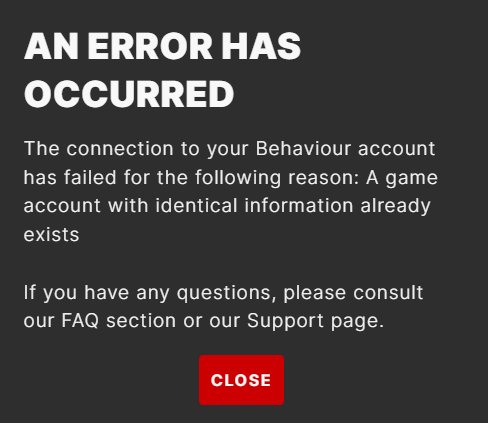
Problem 2: Account Linking Errors
Sometimes, you might get an error message when trying to link your accounts. This can be frustrating, but don’t worry, we have ideas about this, too.
Double-Check Your Login Information: Ensure your username or email address, and password are correct when logging into your BHVR account. The most common cause of an issue can be a typo.
Make Sure you are Using the Correct Account If you have multiple BHVR account, make sure you are using correct account to link with Epic games account.
Verify Email: Sometimes the linking process can fail if your email address associated with the BHVR account is not verified. Make sure you have verified your account by checking your email inbox or spam folder and clicking the link to verify the account.
Temporarily Disable VPN or Firewall: Sometimes, VPNs or firewalls can interfere with the linking process. Try disabling them temporarily and trying to link again.
Check for Server Outages: Check social media or the official Dead by Daylight forums to see if there are any server outages. If the servers are down, wait a little bit and try again later.
Contact Support: If you still have problems, contact BHVR support. They can look into your account specifically and help you with the linking process.
Problem 3: Progress Not Transferring
If you successfully link your accounts but notice that your progress isn’t showing up, it can be a little worrying. However, this is usually easy to fix.
Give it Time: Sometimes, it may take a little while for progress to sync fully. Give it some time, perhaps a few hours, before doing more troubleshooting.
Check Your Linked Accounts: Double-check the BHVR account website to ensure that your Epic Games account is properly connected. If it is not, then try linking again.
Restart the Game: Try completely closing the game and reopening. Sometimes, this process initiates the synchronization of data that is needed.
Verify your Account: If progress was not transferred after linking, ensure your email is verified. If email is not verified, the syncing process could fail.
Contact Support: If your progress is still missing, contact BHVR support for assistance. They can help to investigate and fix the problem.
Tips for a Smooth Account Linking Experience
To make the linking process as smooth as possible, remember these tips:
Be Patient: Sometimes, server issues or high traffic can cause delays. Give it a bit of time, especially if you are linking during peak playing times.
Double-Check Everything: Always ensure your login information is correct. A small typo can cause big problems.
Keep Your Information Safe: Don’t share your account details with anyone. Keep your username and password safe.
Stay Updated: Keep an eye on the official Dead by Daylight website, forums, and social media for any updates or information about account linking.
Use a Strong Password: Choose a strong, unique password for both your BHVR and Epic Games accounts.
Enable Two Factor Authentication: If available, enable two-factor authentication for an extra layer of security on your BHVR and Epic Games accounts.
Additional Considerations
Cross-Progression and its Limitations
While linking your accounts is a big step towards sharing your progress, it’s important to understand cross-progression limitations. Not all platforms completely share progress. For example, some specific cosmetic items might be exclusive to a platform, meaning you won’t see them on other linked accounts. Keep in mind that cross progression between platforms also might be added in the future. Keep an eye on the Dead by Daylight’s website to get the latest updates on cross progression options.
BHVR Account as the Central Hub
Think of your BHVR account as the main control center for your Dead by Daylight game data. When you link to platforms like Epic Games, you’re essentially connecting them to this central account. It’s really useful to maintain your game progress across the board, making sure it all stays safe, even as you use different platforms.
In conclusion, linking your Epic Games and BHVR accounts is a crucial step for any Dead by Daylight player. It keeps your progress safe, provides access to special content, and creates a central hub for all your game data. Although it might seem a bit daunting at first, following these simple steps makes the entire linking process really easy. Take the time to connect your accounts, and then you can focus on the fun – escaping killers and surviving another trial.
[Updated] DBD Cross Progressing, Account Merging Guide for Stadia, Steam, Epic
Final Thoughts
To summarize, you link your Epic Games DBD copy with a BHVR account by starting the game through Epic. It will prompt you for account linking during initial setup. This process requires you to either log into an existing BHVR account or create a new one.
Remember, successfully linking allows your game progress and purchases to carry over between platforms. ‘how to link epic games dbd with bhvr account’ is essential for this synchronization, so it is a must step.

