
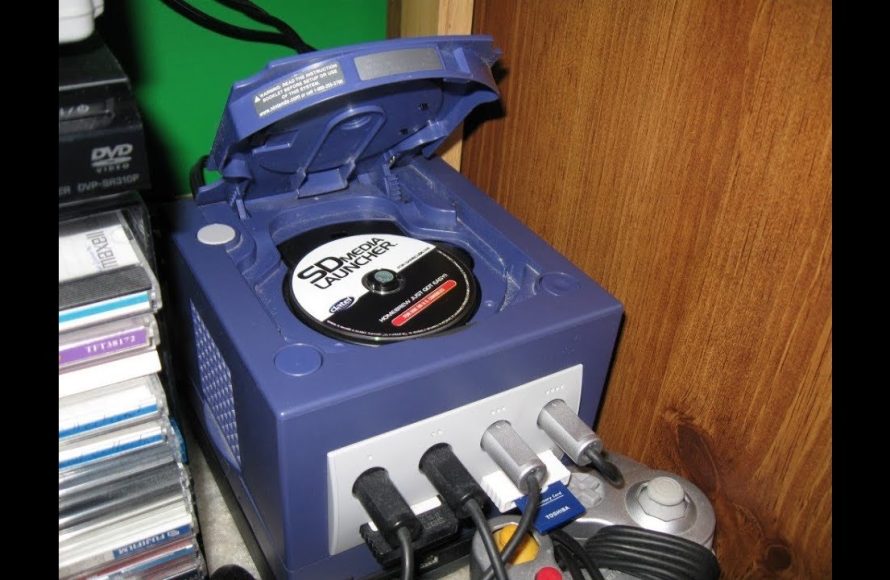
No, you cannot typically burn GameCube games onto a standard blank CD or DVD. GameCube games use a proprietary mini-DVD format and are protected by copy protection measures.
Have you ever wondered if you could create copies of your old favorites? The question “can you burn gamecube games” often pops up for those looking to preserve or share their collection. This topic involves more complexity than just copying a typical file.
The process isn’t as simple as burning music onto a disc. GameCube games use specific discs with unique characteristics. These discs and the system’s technology make it difficult to just create a working copy using consumer equipment.

Can You Burn GameCube Games? Exploring the World of GameCube Backups
Okay, let’s dive into the question many retro gamers have pondered: can you actually burn GameCube games? It’s a topic with some twists and turns, so let’s break it down nice and easy. The short answer is, yes, you could try, but it’s not as straightforward as burning music CDs. The GameCube used mini-DVDs, which are a different beast than regular CDs or DVDs. Also, there are some important things to know, like the legality and technical hurdles involved.
Understanding GameCube Discs
First things first, let’s chat about what makes GameCube discs special. Nintendo didn’t use standard DVDs like those you’d find for movies. Instead, they opted for smaller 8cm mini-DVDs. This size difference is really important. They hold about 1.4 GB of data, a good amount for GameCube games of the time. Understanding this disc difference is the first key to figuring out if you can make copies.
The Mini-DVD Difference
Why did Nintendo choose mini-DVDs? Well, they were smaller, and this probably helped to make the GameCube console itself smaller too. These smaller discs also added a level of uniqueness, almost like a tiny treasure. Now, this smaller size created a specific challenge when people wanted to burn copies. You couldn’t just grab a regular DVD burner and pop in a standard sized disc. Mini-DVDs are not universally compatible with older standard disc drives.
Why GameCube Discs Aren’t Just Simple DVDs
GameCube discs aren’t just regular DVD movies, they have special ways of storing game data. This data includes not just game files, but also specific copy protection measures. This means that you can’t just copy the data onto a blank mini-DVD, since the console has checks in place to make sure the disc it’s reading is a genuine one. Nintendo put a lot of effort into preventing you from easily making copies, to protect game developers, which means that making backups requires more than just a simple disc copy.
The Burning Process: What You’ll Need
So, if you still want to try burning a GameCube game, let’s see what you’ll need. It’s more than just a computer and a burner. The burning process is actually a bit tricky, and it needs some specific gear and steps. It’s not as simple as copy and paste.
Essential Hardware and Software
Here is a rundown of what you typically needed to burn GameCube games:
- Computer: You’d need a computer, preferably one running a Windows operating system, as that’s where most of the software was designed to work.
- DVD Burner: Not just any DVD burner would do. It had to be one that could read and write mini-DVDs. External burners were often the go-to, as many internal PC drives couldn’t handle them.
- Blank Mini-DVDs: You’d need blank mini-DVDs with a capacity of 1.4 GB. Finding these could be tricky, even back in the day.
- GameCube Homebrew Software: These programs are not official Nintendo software. They’re created by independent developers and can help the GameCube read burnt discs. Some examples include Swiss or various loaders.
- GameCube Modchip or Softmod: Here’s the big one. A regular GameCube can’t play burned discs right out of the box. To play burnt backups, you typically had to modify your GameCube with either a special chip (a modchip) that’s installed inside, or by using a method called “softmodding” which uses a exploit to run the homebrew software.
Getting the Game Image File
The next step involves getting the actual game files. People generally do this using a device called a disc ripper that is able to read and create an ISO image of the disc onto a computer. The ISO image contains everything that is on the game disc in a single, large file format. You then need to transfer this to your computer. Be very careful when doing this, since downloading copyrighted game images is generally illegal.
The Complications and Challenges
Now, it’s not all smooth sailing when you try to burn GameCube games. There are a number of snags that people run into, which means that you have to be prepared for some complications.
The Issue of Mini-DVDs
First off, mini-DVDs were always harder to find and use. Most standard DVD burners aren’t designed to handle the smaller discs, and sometimes they don’t fit properly. You’d either need a specific mini-DVD drive, or to use a workaround, such as an adapter that can help a burner handle the smaller disc. This was a hassle for many people trying to make backups of their GameCube games.
The Need for Modchips and Softmods
As we discussed, a regular GameCube isn’t designed to play burned games. To bypass this, you needed to either install a modchip, a physical modification, or use a softmod, which exploits a game or a hole in the system to load unsigned code. Modchips are sometimes complicated to install and can even damage the console if done improperly. Softmods are less risky, but often require specific versions of games or system software to function.
Legality and Ethical Considerations
There is a very important question that you also need to keep in mind: is it legal? Copying games that you don’t own is illegal and is considered as copyright infringement. It’s crucial to know the laws in your area regarding making backup copies of games. For instance, in many regions, making a copy for personal backup purposes is allowed if you own the original game, but selling or distributing those copies is illegal. You have to do your research and make sure you’re staying within the law. It’s best to consult with legal professionals if you have any concerns.
Potential Risks to Your Console
Playing burned games can sometimes put your GameCube at risk. While the game itself may not damage the system, there is a chance that a poorly created disc can cause issues with the laser reader. This is because the laser is working to read a different disc than what the system was designed for. If that happens it could stop the system from reading games properly, whether original or burned copies. The modification process itself, like installing a modchip, also carries some risk of damaging your console if not done carefully.
Why People Burned GameCube Games
Given these issues, why did people go through all this effort to burn GameCube games? There are a few main reasons, mostly based on the difficulties of dealing with retro games.
Backing Up Their Game Collection
One very popular reason was to create backups of their personal collection. Game discs can get scratched, damaged, or lost over time. For a person who owns a GameCube game, a backup disc is useful to protect their precious game investment. By having a backup, they could still enjoy their games, even if something happened to the originals.
Playing Imports and Homebrew Games
Another popular use was to play games from different regions. The GameCube, like many consoles, has regional locks which stops players from playing games from other regions on their own console. By using a modified console and backups, they were able to bypass this restriction. It also allowed the use of homebrew software, which is fan-made content like games, emulators, or utilities. This expanded the possibilities of what the GameCube could do.
Dealing with Disc Rot
Finally, disc rot is a real issue with older game discs, both CD-based and DVD-based. This is a process where the disc begins to degrade and become unreadable, either from the outside, or from the inside of the disc. Having backups was a way of protecting the original games from being lost due to disc rot. Making backups is a way to play games that otherwise wouldn’t work anymore.
Modern Alternatives to Burning Games
The world of retro gaming has grown quite a lot since the GameCube was popular. The good news is that there are many ways to play your favorite games today, some of which are far easier than burning your own discs. Modern technology has given players better and easier options.
Emulation
One great option is emulation. There are a number of great emulators for computers and even mobile devices that allow you to play GameCube games on your computer. You can load game files onto the emulator and play it on your PC without needing to own the original game or the original console. This is usually much more convenient and also allows for better graphics or faster performance depending on your machine.
USB Loaders
Another convenient way to play GameCube games without needing discs is to use a USB loader on a softmodded console. With this option, you can load all your game files onto a USB drive or hard drive, and then load them through the modified console’s software. This is much better than needing to burn games, and means you don’t have to worry about discs. This is the most common method of playing GameCube games without the use of discs.
GameCube HDMI Adapters
For people who have original GameCubes, there is a growing market for HDMI adapters for the console. These adapters bypass the old AV output of the console, and allow it to be connected to modern TVs via the HDMI format. They’re often very high quality and help improve the graphical output of the GameCube, making it look much better on modern displays. There are also some special adapters that are able to load games from the SD cards instead of the discs, which is very convenient.
A Look at the Technical Side
For those who enjoy the more technical aspects, we can take a closer look at how the burning process actually works. It involves data reading and writing processes that need to be perfect for a console to read the disc correctly. The whole process is complex and that’s why it’s very important to do everything correctly, if you decide to burn GameCube games.
The Data Transfer Process
The burning process basically copies digital information from one storage medium to another, using special burning software. The software takes the ISO image of a GameCube game, and encodes that data onto a blank mini-DVD. It also manages the laser in the burner to write data correctly on the disc. The data needs to be placed in the exact right position on the disc for the game console to be able to read it correctly. If anything is off, even slightly, the console won’t be able to read the game.
Disc Formats and Compatibility
When you’re burning a disc, you’re not just copying files. You’re writing a disc format compatible with the system’s reading mechanism. The GameCube uses a unique disc format, so the burning software must be set up to replicate that format correctly. Incorrectly burning a disc might create a disc that simply won’t work. This is often the problem when burning a disc that isn’t compatible.
In conclusion, while it is technically possible to burn GameCube games with the correct setup and knowledge, it involves a number of technical and ethical issues. The availability of emulators, USB loaders, and HDMI adapters makes it easier than ever to enjoy your favorite GameCube games without needing to burn discs. Always check the legal status of game backups in your region, and remember there are modern and easier ways to experience the GameCube experience now, compared to the past.
BURNING Gamecube Games…
Final Thoughts
So, can you burn Gamecube games? Yes, you can. You need the right equipment and software to create backups of your legally owned titles.
However, successfully playing burnt discs may require a modded console. Modding the hardware allows a console to read burned discs.
Therefore, while technically possible, burning Gamecube games involves extra steps. Remember to consider legal aspects carefully.

