
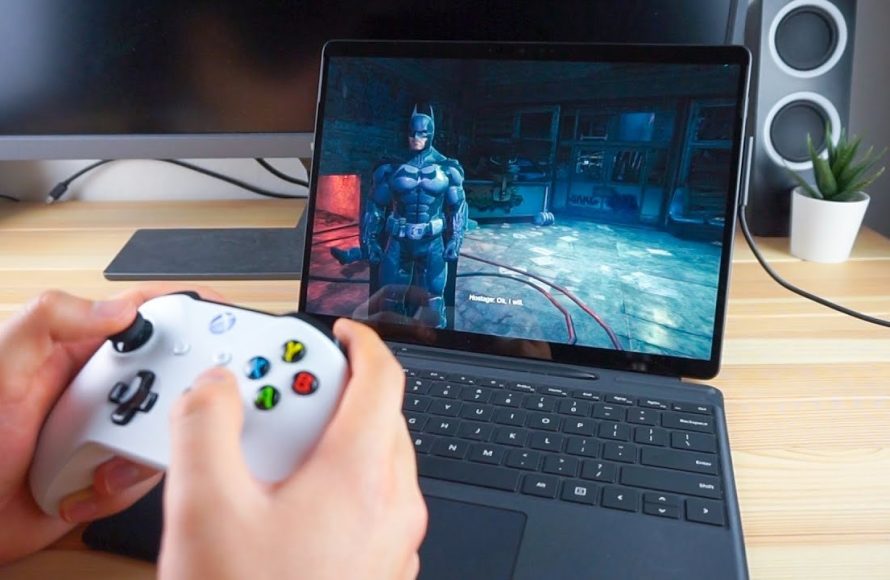
Yes, you can game on a Surface Pro, though its capabilities vary depending on the specific model and the game’s requirements.
So, can you game on a surface pro? It’s a question many ask, considering its sleek design and portability. The Surface Pro is primarily a tablet/laptop hybrid. People wonder if it can handle the demands of modern video games.
While not a dedicated gaming device, some models can run certain titles quite well. Others may struggle with more graphics-intensive games. It all depends on your expectations and the specific games you want to play.

Can You Game on a Surface Pro? Exploring Gaming Capabilities
So, you’re thinking about getting a Surface Pro and you love to game? That’s a great question! The Surface Pro isn’t designed to be a gaming powerhouse like a dedicated gaming PC, but it’s more than just a tablet. It’s a really flexible device that can do a lot, and yes, that includes some gaming. Let’s dive in and see what kind of gaming experience you can expect from a Surface Pro.
What the Surface Pro Brings to the Table
The Surface Pro is known for being a super portable 2-in-1 device. It’s thin, light, and easy to carry around. That makes it perfect for taking your work (and maybe some games) with you on the go. But it also means that it has some limitations compared to a big gaming laptop. Here’s a look at some key things that influence gaming:
- Processing Power: Inside each Surface Pro is a processor, which is like the brain of the computer. These processors are made to be power efficient so they don’t drain the battery fast. They’re good for everyday tasks, but not quite as powerful as the high-end processors you’d find in a gaming PC. This means it might struggle with the newest and most demanding games.
- Graphics: The Surface Pro uses integrated graphics, which means the graphics chip is part of the main processor. They aren’t as powerful as dedicated graphics cards that you would see in high-end gaming laptops or desktops. That means that you are limited in graphical fidelity and you might have to lower your game settings to get good performance.
- RAM: The amount of RAM is like short-term memory for your computer. The more RAM, the smoother things run, especially when you are doing a lot of things at once. Surface Pro comes in different RAM configurations, but even the highest end models are limited in comparison to gaming devices.
- Storage: Storage is where you keep your games. The Surface Pro has solid state drive (SSD) storage, which is much faster than traditional hard drives. This means games will load quickly. However, the storage might not be that big, so you might need an external hard drive if you want to keep lots of games on it.
- Screen: The Surface Pro has a high-resolution touchscreen which looks great. The screen size, though smaller than a standard gaming laptop, is still perfectly usable for many games.
Gaming Categories That Fit Well on a Surface Pro
The kinds of games that run smoothly on a Surface Pro are varied. You won’t be pushing the latest AAA titles at maximum graphics settings, but there is plenty of fun to be had! Let’s take a look at different types of games that are generally a good fit:
Casual Games
These are games that are easy to pick up and play and don’t require very powerful hardware. Think of games like:
- Puzzle Games: Many puzzle games will play wonderfully on the Surface Pro. They generally don’t need powerful graphics so things like Sudoku, Tetris-style games, or those involving strategy run great.
- Card Games: Digital card games like Hearts, Solitaire, and other simple card games run really well and they are also easy to control using the touch screen.
- Hidden Object Games: These games are often lighter on processing power, they are designed with simple graphics and they run without problems on the surface pro.
Indie Games
Many independent game developers create games that are not graphics-intensive, but that are still very fun to play. They often have creative stories and unique gameplay, and these games are perfect for Surface Pro users:
- Platformers: Games that involve jumping and running through levels, like “Hollow Knight” or “Celeste”, will run perfectly fine on a Surface Pro.
- 2D Adventure Games: Many 2D style adventure games have simple graphics, and focus more on the story.
- Simulation Games: Simple building or management games like “Stardew Valley” or “Terraria” usually have low to medium demands.
Older Titles
Older games that came out before modern, very advanced, games can run perfectly on the Surface Pro. Think of these like:
- Classic Games: Games from the 90s or 2000s that aren’t very demanding. For example, classics like “Starcraft” or “Diablo II”
- Remastered Versions: Some older games are remastered with slightly better graphics. They still don’t have heavy graphics, but look a little nicer. They can usually run perfectly on the Surface Pro.
Lightweight Online Games
Many online games are designed to be light on resources so they can play on many different kinds of computers.
- Multiplayer Online Battle Arenas (MOBAs): Games like “League of Legends” and “Dota 2” can run well on Surface Pro if you lower the settings.
- Collectible Card Games: Some online card games like “Hearthstone” are designed to be light on processing power, and will also run well on the Surface Pro.
- Browser Based Games: Most of browser games will run perfectly fine on a Surface Pro because they are typically light on processing power.
Games to Be Cautious About
Now that we’ve looked at what runs well on a Surface Pro, lets take a look at what you should avoid:
High-End AAA Games
These games are the newest and most demanding games that push the limits of computer hardware. They often require really powerful graphics cards, a lot of RAM, and powerful processors. The surface pro might struggle with games like:
- Modern First-Person Shooters: Games like “Call of Duty,” “Battlefield,” or “Cyberpunk 2077” need a lot of power and they are very graphics-intensive.
- Open World Adventures: Games with very large worlds, very detailed graphics, and complex gameplay will struggle on a surface pro.
- Racing Simulators: High detail racing games are also very demanding, so they might not play very well on a Surface Pro.
Getting the Best Performance from Your Surface Pro
Even with the limitations, you can do a few things to get the most out of your gaming experience on a Surface Pro. Here are some tips:
- Lower the Graphics Settings: Before starting a game, go to the settings menu and lower the graphical detail (like shadows, textures, and resolution). This can make a huge difference in how smoothly the game runs.
- Close Background Apps: Make sure to close any applications you’re not actively using. This will free up RAM and processing power, making it easier for the game to run.
- Keep Your Drivers Updated: Make sure you have the latest graphics drivers. This can improve the performance of your graphics. You can update these through the windows update menu.
- Plug in the Power Adapter: Games tend to use up a lot of power. When you can, make sure your Surface Pro is plugged into the wall for best performance.
- Use an External Fan: If your device gets very warm while gaming you can use an external fan. The Surface Pro devices have a tendency to get warm while you are using the processor, and an external fan can help to keep it cool.
- Consider External Graphics: If you want to do serious gaming, you can consider using an external graphics card (eGPU). This will need to be bought separately, but it can greatly improve the graphics performance of your Surface Pro.
Different Surface Pro Models and Gaming
Not all Surface Pro devices are created equal when it comes to gaming. The model and the specifications matter a lot. Let’s take a closer look:
Surface Pro 9 and Later
The Surface Pro 9 and later models often have the newest processors and the best onboard graphics the surface pro has ever had. They’ll be better at handling more modern games and can give you a slightly improved gaming performance.
- Processor: Newest generation Intel processors that provide a good boost in overall power and slightly better graphics.
- Graphics: Newer Intel Iris Xe integrated graphics will be better than previous models, but still not as good as a dedicated graphics card.
- RAM: Usually offer different RAM options that can make a difference in your experience, and make sure you have enough RAM for your game.
Older Surface Pro Models (Pro 7, Pro 6, etc.)
Older models of the Surface Pro will have older processors and less powerful integrated graphics. This means they will struggle more with newer games, and you’ll be better off sticking to the games we mentioned above in the “Gaming Categories that Fit Well” section. They are good for light gaming and older titles.
- Processor: Older generation Intel processors which are not as powerful as newer models.
- Graphics: Older Intel integrated graphics which will not perform as well when gaming compared to newer models.
Surface Pro X and Similar
The Surface Pro X and its variants used an ARM based processor. These devices aren’t generally great for gaming. They might work for casual games but will have trouble with most other games.
Cloud Gaming Services – A Game Changer?
Cloud gaming services are changing how we play games. These services run the game on a remote server, and stream the video of the game back to you. You can play demanding games without needing a very powerful computer. Here are some of the major cloud gaming services that you can use with a Surface Pro:
- Xbox Game Pass Ultimate: With Xbox Game Pass Ultimate you can play many games that are available on PC or xbox from the cloud. This is a great way to play AAA games with the Surface Pro.
- NVIDIA GeForce Now: GeForce Now allows you to play games from your own game libraries from various stores, and can let you play even the newest games on lower end hardware like the surface pro.
- Amazon Luna: Amazon Luna is another option that offers a variety of games and can work quite well on a surface pro.
The big advantage of cloud gaming is that it does not require a very powerful computer. You’ll need a good internet connection, but if you have that, cloud gaming can allow you to play even modern games on the Surface Pro. This is a great way to enjoy games that would otherwise be unplayable on the device.
Touchscreen vs. Keyboard and Mouse vs. Gamepad
The way you control games can also affect your gaming experience. Here’s a breakdown of the different methods you can use with a Surface Pro:
Touchscreen
The touchscreen on the Surface Pro is a good way to play casual and puzzle games. It makes things like simple interactions and dragging objects easy. However, precise actions like aiming can be very difficult with the touch screen.
Keyboard and Mouse
For more complex games, you can use a keyboard and mouse with the Surface Pro. This works for strategy games or any game where accuracy matters. However, it does need you to carry around external devices.
Gamepad
Using a gamepad, like an Xbox controller, can improve the experience. Many games are designed to be played with a gamepad. This is great for action, fighting, and racing games. However, you will have to bring around another device.
Is It Worth Gaming on a Surface Pro?
Ultimately, gaming on a Surface Pro can be a fun and convenient experience, but it is not going to be the same as using a gaming PC. If you are okay with playing older games, indie titles, and casual games or cloud gaming, the surface pro is a great device. However, if you plan on playing all of the latest games, and you need to run them on the highest settings, then the Surface Pro is not for you. The device is very flexible, portable, and can be a perfect device for playing some games on the go.
The Surface Pro offers a good middle ground, which makes it a very convenient choice for people who do not want to own more than one device for different purposes. It is a tablet, a laptop, and a gaming device. It might not excel at all of those, but it is definitely capable for each.
In short, yes you can absolutely game on a Surface Pro. Just be realistic about the types of games and the performance you can expect. A great device for casual gaming, older games, or for taking advantage of cloud gaming.
We Tried Gaming on The Surface Pro 11 (Windows ARM using the new snapdragon)
Final Thoughts
Ultimately, the Surface Pro offers a capable but not ideal gaming experience. The integrated graphics handle less demanding titles well. Playing graphically intensive games requires adjusting settings for acceptable performance.
So, can you game on a Surface Pro? Yes, but expect limitations. It is not a dedicated gaming machine, but a decent all-rounder.

