
No, you typically cannot game share with multiple people simultaneously; platforms usually limit game sharing to one other account.
Ever wondered if you could share your digital game library with all your friends? The question of ‘can you game share with multiple people’ comes up often among gamers looking to maximize their budget. It’s tempting to imagine a shared library, but the reality has some restrictions.
While game sharing is a great feature that many platforms have embraced, most platforms limit this to one other person to ensure fair use. This system prevents widespread access which also helps game developers to get their dues. So while sharing games is possible, it’s not designed for a large group.

Can You Game Share With Multiple People?
The idea of sharing your favorite games with friends and family is super appealing, right? Imagine letting your cousin play that new racing game you just bought, or having your sibling join you on a quest in an epic role-playing game, all without them having to buy a copy themselves! Game sharing has become a popular way to enjoy games without everyone needing to purchase the same titles. But, can you really share games with multiple people, and how does it all work? That’s what we’re going to explore in detail. It’s not as simple as lending a physical disc back in the day, so let’s dive into the world of digital game sharing!
The Basics of Game Sharing
Before we think about sharing with many people, let’s talk about how game sharing works in general. Most of today’s game sharing is digital, meaning you’re not dealing with physical game copies. Instead, you’re dealing with digital licenses, which are basically permissions to play games that are linked to an account. This is where the platform, like your console or computer, plays a big role.
How Digital Licenses Work
When you buy a game digitally, you’re not actually buying a disc; you’re buying a license to play the game. This license is tied to the account you used to purchase the game. Usually, your game is linked with your main account. But some platforms have features that let you share the license to a different account on a different device or console. This is the core of how game sharing functions. This approach makes it much easier to share games without the hassles of trading physical copies. You don’t need to worry about scratches or losing the disc!
Game Sharing on Consoles
Consoles like PlayStation, Xbox, and Nintendo Switch all have different methods for sharing games. Let’s take a look at how each platform handles it.
PlayStation Game Sharing
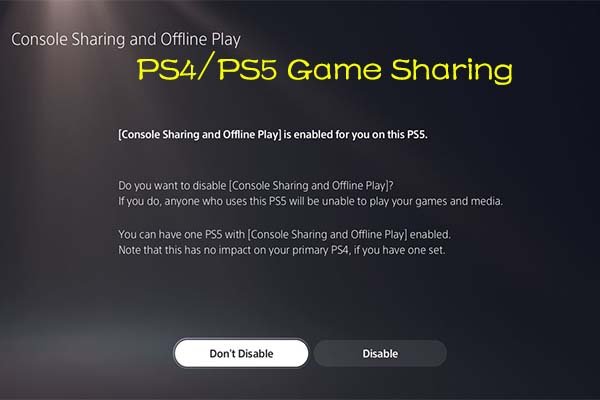
PlayStation’s game sharing feature is called “Console Sharing and Offline Play” on PS5 and “Primary PS4” on PS4. Here’s the key point: you can only share games with one other console at a time. It works like this:
- You set one console as your primary console for your account.
- Any other user on that console can play any digital game you’ve purchased on your account.
- However, your account can only be active on one console. When you are using your account on a second console other than your primary console, only your account can play those games, not any other accounts on that console.
- To play your games on a console that is not primary, you must be logged in and connected to internet.
This method is good for families living in the same house, or a friend that you trust. But, it’s not designed for sharing with multiple people on different consoles. Let’s say you have a PS5 at home and another at your friend’s house. You can set your friend’s console as your primary console, so they can play your games but only with their accounts on that console. But, your primary console will lose access to play your games with other accounts, only your account will be able to access those games on your home console. When you switch to your home console as your primary, now your home console will have full access to play those games, but your friend will have to purchase those games again in order to play it with their own accounts.
Xbox Game Sharing
Xbox has a similar system called “Home Xbox.” This feature is very similar to the PlayStation’s system:
- You designate one console as your “Home Xbox.”
- Anyone playing on your Home Xbox can play any games you’ve purchased, using their own Xbox accounts.
- If you are not playing on your Home Xbox, you still can access the games using your account, but only you can play those games on that console.
The “Home Xbox” system works the same way as PlayStation’s setup, which means that you can share your game library with other accounts on only one console. You can log in on other consoles and play with your account but only with your account on that specific console. This means that like PlayStation, Xbox is not designed to allow game sharing with multiple people on different consoles. If you want to share with more than one console, you need multiple accounts each with their own digital game licenses. So, If you have both an Xbox at home and at your friend’s, you can set your friends Xbox as your Home Xbox, so that all the accounts on their console can play your games, but your console at home will lose this ability, unless your account is logged in. So, you can still access your games from your own account, on your home console, but no other accounts will have the privilege to access those games.
Nintendo Switch Game Sharing
Nintendo’s approach to game sharing on the Switch is a bit different and more restrictive. Nintendo uses a system tied to the primary console and a user account. This is not the same as the “Home” console approach seen on other platforms, but similar:
- You designate one console as the primary console for your Nintendo Account.
- Any other user on that console can play any digital game you’ve purchased on your account.
- Your account can access games on any other Switch console, but other accounts on those consoles cannot play your digital games.
- To access your games on secondary consoles, you must always be connected to the internet.
This method is again similar to PlayStation and Xbox, in which your digital games are mainly for the accounts that are on your primary console, and your own account can use those games on other consoles, but only with your account. The Switch does not let multiple different Nintendo Accounts use your digital games on different consoles. So, you can not share your games with multiple people on different consoles.
Game Sharing on PC Platforms
On PCs, the approach to game sharing varies depending on the digital game distribution platform, such as Steam, Epic Games, and others. These platforms often have methods that let you share games, but they also have restrictions. Let’s dive in and take a look.
Steam Family Sharing
Steam has a feature called “Steam Family Sharing.” It allows you to share your game library with up to five other accounts, but there are some important things to keep in mind:
- You can share your library with up to five other Steam accounts on authorized computers.
- Your library can only be used by one person at a time.
- If you start playing a game, your family members will have a few minutes to save their game, and then they’ll be kicked out of the game.
- Not all games are eligible for Family Sharing.
Steam’s Family Sharing is good for sharing your library with a small group, like your housemates or family members. But, because only one person can use the library at a time, it’s not suitable for multiple people playing different games at the same time. If you try to play your games at the same time, it won’t work, and your friend’s game will be temporarily stopped. This is not ideal for sharing games with multiple people simultaneously.
Epic Games Store Sharing
The Epic Games Store does not have a similar official family-sharing feature like Steam. This means sharing games on this platform is generally not an officially supported process, unlike Steam which makes it easy to share your digital library with different accounts on different computers. It’s harder to share games from the Epic Games Store and usually involves you letting someone else log into your account, which is a bit more risky, and can lead to violation of Epic Games store policies. Epic doesn’t want multiple people using the same account. Therefore, official methods of sharing Epic Games Library to multiple people on different devices is not possible.
Other PC Game Platforms
Other PC game platforms like GOG, EA app (formally Origin), and Ubisoft Connect generally do not have a straightforward method for family sharing. You typically cannot share your game library among different accounts on different devices. The system is designed for a user to use their account to play their game on their computer. So, if you purchase a game on those platforms, only that account on that specific computer can access those games. Just like the Epic Games Store, sharing games on these platforms might require you to share your account, which is not ideal.
Can You Share With Multiple People? The Real Answer
Now, let’s get back to the main question: can you game share with multiple people? The short answer is: not really, not in the way you might think or hope. Let’s break it down further:
Limitations of the Systems
As we have seen, most platforms have built-in limitations, whether they are designed for only 1 console, or multiple accounts on same console, or maximum 5 users with only one user at a time. These limitations are mainly designed to prevent people from sharing their libraries with too many users, so the developers and platform can make profits, while also allowing the ease of sharing games with your family or household.
Here is a quick summary of limitations:
- One Designated Console: Platforms like PlayStation, Xbox and Nintendo Switch allows you to only designate only one console to use your digital games.
- One User at a Time: Steam’s family sharing feature allows you to share with multiple accounts, but you can only play the game on one account at a time.
- No Official Sharing: Platforms like Epic Games and others do not have official family sharing method.
Alternatives to Sharing
While directly sharing your game library with several people isn’t usually feasible, there are alternatives you might want to consider:
- Buying Multiple Copies: The obvious solution. This is not the most budget friendly option, but every person can play their copy at the same time without any issues.
- Game Pass/PS Plus: These subscription services let multiple people subscribe to the service separately, and can play many games that are offered by the service at their own will.
- Borrowing Accounts (with risks): Sharing accounts, although against terms of service, is sometimes a solution, but this is not ideal, as the user loses control of their account, and also there are risks of being banned by the platforms.
- Play Together (same console): You can play games together with the same console using split-screen or hot-seat modes. This allows different people to play the game in turns, with the same console, but it will not allow you to share it with multiple consoles.
- Play Together (online): You and your friends can play online together by purchasing a separate copy of the game.
Why Platforms Restrict Sharing?
You might be wondering why platforms put all these restrictions on game sharing. Here are some main reasons.
Preventing Piracy
One of the primary reasons is to fight piracy. If game sharing were completely free and easy, it would allow unlimited users to play the game with only one purchase. This would hurt the video game industry and would not help the developers to make profit on their games, which they need to make better games for the future. Platforms want to ensure that each copy of the game is bought, this is the easiest way to prevent unauthorized copies from spreading through sharing.
Boosting Sales
By limiting sharing options, platforms make sure that more people need to purchase the game to play it. This increases revenue for the platforms and also for game developers. This helps the game industry by ensuring they keep producing more games. If everyone could share without restrictions, the game market would face financial challenges.
Protecting Developer Interests
Game developers invest significant money and time into developing each game. They need sales to recover these costs and continue making new games. Restricting sharing helps protect their intellectual property and ensures that they get rewarded for their work. The more people purchase, the more money developers make, which is important for future games.
While the idea of sharing with many is tempting, platform restrictions are there to ensure the long-term health of the video game industry. These restrictions encourage more people to purchase games and support developers, which is good for the future of the gaming industry.
Game sharing is a cool feature that allows us to share our digital games with a trusted family member or friend, but, it’s not designed for sharing with multiple users on different devices. Therefore, it is not possible to share games with multiple people as the platforms will not allow you to do that. There are certain limitations when it comes to sharing your library, as the platforms will try to restrict unauthorized sharing of the game library. Despite this limitation, there are many different ways to enjoy games with your friends and family, such as using a subscription service or buying separate copies.
How to Link PS5 with Friends: Console Sharing & Game Share Explained!
Final Thoughts
Game sharing typically limits you to one other person. Platforms usually restrict simultaneous access from the same account. So, effectively, can you game share with multiple people? No, the setup is generally designed for a single sharing partner at a time.
Attempting to bypass these restrictions often violates terms of service. This could lead to account penalties. Therefore, sticking to the intended single-sharing model is the safest approach.

