
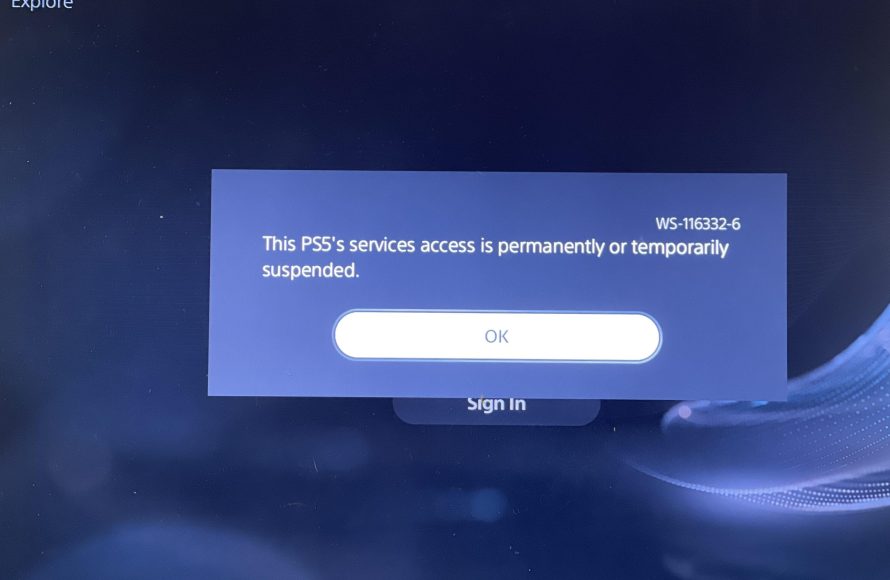
Yes, you can get banned for game sharing PS5 if you violate the terms of service.
Sharing games on your PS5 with friends sounds great, right? But is it really safe, and can you get banned for game sharing PS5? Many people enjoy this feature, yet the potential for account restrictions exists if not done according to Sony’s guidelines.
PlayStation Network has rules, and breaking them, even unintentionally, could result in a ban. It is important to understand these guidelines to avoid issues with your gaming account and keep accessing all features.

Can You Get Banned for Game Sharing PS5?
Let’s talk about game sharing on your PlayStation 5. It’s awesome being able to share your digital games with family or friends, right? It saves money and lets everyone enjoy the same adventures. But, you might be wondering: “Can sharing games on my PS5 get me in trouble?” That’s a super good question, and the answer isn’t a simple yes or no. It’s more like, “it depends.” Let’s dive deep and see what’s what with game sharing and potential bans.
How PS5 Game Sharing Actually Works
Okay, before we worry about getting banned, let’s understand how game sharing on the PS5 works. PlayStation uses something called “Console Sharing and Offline Play”. Here’s a breakdown:
Primary PS5 and Secondary PS5
Basically, your PlayStation account has a “primary” PS5. This is the console where all your games, purchases, and PlayStation Plus benefits are tied to. This primary console is usually your own personal PS5 at your home. You can activate one other PS5 as a “secondary” console. This secondary console is usually someone else’s PS5, like a friend’s or family member’s console.
When you activate a console as your primary, all other profiles on that PS5 can play games you own and share your PlayStation Plus benefits. When you’re playing on a secondary console, you can only access your games when you’re connected to the internet. It’s how PlayStation knows you’re the real account owner and not someone trying to steal your stuff.
The Sharing Process Step-by-Step
Here is the step-by-step process of how to setup the game sharing on your PS5
- Log in to the Other Person’s PS5: Use your PlayStation Network ID and password to sign in to the other console where you wish to enable the gamesharing.
- Activate Primary Console: Go to Settings, select “Users and Accounts,” then “Other,” and choose “Console Sharing and Offline Play.” You’ll need to “Enable” this feature. This makes that PS5 your primary console. Remember, this will deactivate any other console previously set to your primary
- Download the Games: Now, on the other person’s PS5 (your primary PS5), you can download any games you have bought. The games need to download completely.
- Start Playing: The other person can now play those downloaded games on their own account. And you can still play them on your secondary PS5 (the one you don’t set as primary) as long as you have an internet connection.
Remember, you can switch which PS5 is your primary device, but not too often. Sony does track how many times you do it. If they see a pattern of frequently changing primary consoles, that can look suspicious.
The Potential Problems with Game Sharing
So, game sharing seems pretty straightforward. However, some gray areas can lead to trouble. Let’s examine the things that can create problems with your game sharing.
Account Sharing vs. Game Sharing
This is a big one. There’s a difference between sharing games and sharing your account. Game sharing, as designed by Sony, lets you have games on two consoles – your own and one other. Account sharing, on the other hand, means giving your PlayStation Network login info to someone else so they can use your account on their own console. This is something that PlayStation does not allow. Giving your account information to a bunch of people goes against the user agreement. It’s like giving your house key to too many people. It can get messy and risk your account.
The Limit on Devices
You can only have one primary console at a time. If you try to set up multiple primary consoles, you’ll run into problems. Sony’s system will see this as an attempt to circumvent the rules. So that’s a big red flag. This is to make sure that you are not actually sharing your account with many people.
Selling Access to Games
Another big no-no is selling access to your games. Think of it this way: Sony is selling you the right to play a game; they are not selling you the game itself. You buy a digital license to play that game on a PlayStation console. Giving someone the license to play it on their PS5 is one thing, but selling this license to random people goes against what is allowed. This activity can get your account suspended or banned.
What Can Get You Banned?
Okay, now let’s get to the heart of the matter: what behaviors can actually get you banned from the PlayStation Network?
Excessive Primary Console Switching
As we talked about, changing your primary console too often is a clear red flag for Sony. The reason Sony allows gamesharing to begin with is to allow family members to play the games that have been bought and enjoy it together. They never intended for gamesharing to become a free-for-all method where a person is constantly changing their console so that they can give free games to many of their friends. Changing the primary console frequently means that you are most probably abusing the system and sharing your game licenses with a lot of people who don’t belong to your family. This is what Sony’s system will track, and that is a behavior that can get you banned.
Account Sharing With Multiple People
Sharing your account details with anyone outside your immediate household is a big problem. Think of it like this: you wouldn’t share your bank details with random people, would you? The same logic applies here. Giving out your PlayStation Network username and password to friends, especially multiple friends is a clear violation of PlayStation’s Terms of Service. If Sony detects this, they will most probably take action against your account.
Buying and Selling Games Licenses
Buying and selling game licenses is like selling your old car but still trying to drive it. It’s a breach of agreement. As we mentioned before, you don’t actually buy the games, you buy the license to play them. Selling the rights to someone else goes against the agreement and can create a lot of problems. The PlayStation team can take strict action on anyone who is buying or selling licenses.
Using Fake Accounts
Using fake accounts to exploit game sharing or any other system loophole is against the rule. Using fake accounts to gain an unfair advantage over other players will not be tolerated by PlayStation. That is why Sony keeps on scanning your account history to make sure you are abiding by the rules.
The Consequences of Getting Banned
So, you’ve been flagged for doing something against the rules. What happens next?
Temporary Suspensions
Usually, the first time you break the rules, you’ll get a temporary suspension. This means you can’t access your PlayStation Network account. This can last a few days, a week, or even a month. The amount of time depends on the severity of the violation. If you do it again, the penalty usually gets worse.
Permanent Bans
If you keep breaking the rules or do something super serious, Sony can permanently ban your account. This means you will lose access to all your digital games, PlayStation Plus, and everything else linked to your account. Starting over with a new account will mean you have to buy all your games again, and that is a waste of money. You wouldn’t want to lose the games that you have bought after spending money on it.
Console Bans
In rare but serious cases, PlayStation can ban your entire console. This means you can’t use any PlayStation Network features on that PS5 anymore. So, even if you create a new account, that console is essentially useless for online play. This is one of the worst penalties that Sony can impose.
How to Share Games Safely
Okay, we’ve talked about the risks. Now let’s talk about playing safe and sharing games the right way.
Share Within Your Household
The best way to share your games without any issues is to only share with people within your own household. This is how Sony intended for this system to be used. If you are a family of four, for example, you can use the game sharing feature to play games together. This will most likely not cause you any issues. Keep in mind not to change the primary console frequently.
Proper Setup
Make sure you’re using the “Console Sharing and Offline Play” feature as it’s meant to be used. Don’t share your username and password with random people, and don’t try to set up multiple primary consoles. Follow the method as it is intended to be used. That is how you can make sure that you are not breaking any rules.
Be Mindful of Your Primary Console
Only change your primary PS5 when needed. Don’t jump between consoles every day or every week, as that is what will trigger the system and create problems. You can use the method of sharing with another friend, but changing it too frequently will surely create problems for you.
Don’t Buy or Sell Accounts
Stay away from buying or selling games access or PlayStation accounts. This is a major violation of the rules, and is likely to get you banned, and even banned permanently from the PlayStation Network.
Using Discs?
If you have a PS5 that uses discs, the problem of game sharing is minimized. Because you can simply share the disc with your friend, and he or she can play it on their console using their own account. No primary or secondary console set up required.
Keeping Your Account Safe
Protecting your PlayStation account is super important, even if you’re not game sharing. Here are some tips to keep it safe:
- Use Strong Passwords: Create a password that is hard to guess. Mix uppercase, lowercase, numbers, and symbols.
- Enable Two-Factor Authentication: This adds an extra layer of security. Whenever you login from a new device, you will get a code on your mobile phone. This is a good extra layer of protection.
- Avoid Phishing Scams: Be careful of suspicious emails or messages asking for your account details. Don’t click on links from unknown sources.
- Keep Your Account Information Private: Never ever share your account information with anyone.
Sony’s Stance
Sony’s official stance on game sharing is pretty clear. They allow the “Console Sharing and Offline Play” feature for families to share games on two consoles. However, they actively monitor for any violations of their terms and conditions. So, it is always in your best interest to be within the rules, so that you do not have to face any penalty.
The Bottom Line on Game Sharing Bans
Game sharing on the PS5 can be a great way to enjoy your games with others, but it’s important to do it right. Stick to the intended use of sharing with family or close friends in your home, avoid sharing your account details, and never try to sell access to games. By playing by the rules, you can enjoy game sharing without worrying about getting banned.
The most important takeaway is to always follow Sony’s guidelines. If something seems too good to be true, like some free game sharing hack, it probably is. Stick to honest and fair game sharing, and you’ll be just fine.
Why You Can Get Your PSN Account Banned or Your PS4/PS5 Console Blocked Completely
Final Thoughts
Game sharing on PS5 can be a tempting way to save money. However, Sony’s terms of service have limitations. Accounts engaging in frequent, widespread sharing may receive penalties.
The key takeaway is that excessive sharing could flag your account. Sony monitors activity for potential abuse. So, can you get banned for game sharing ps5? Yes, it is possible if you push the system too far. Therefore, proceed with caution.

