
Unfortunately, you cannot directly gift games on the Nintendo eShop.
Wanting to surprise a friend with a new Nintendo game? Many people ask, can you gift games on nintendo eshop, because it seems like an obvious feature. You can’t directly send digital games as gifts.
It is a little frustrating because other platforms make gifting digital games very simple. Instead, you have to find different methods to share the fun. So, lets check what you can do.

Can You Gift Games on Nintendo eShop? A Deep Dive
Okay, so you’ve got a friend’s birthday coming up, or maybe you just want to be super awesome and surprise someone with a cool new game on their Nintendo Switch. You head to the Nintendo eShop, ready to spread the joy, and then… you hit a wall. The big question pops up: can you actually gift games directly through the Nintendo eShop? Let’s break down everything you need to know about gifting Nintendo games, because it’s not always as simple as pressing a button.
The Not-So-Simple Answer: Gifting Options
The truth is, directly gifting a digital game from the Nintendo eShop as easily as you might with other platforms isn’t a standard feature. You can’t just select a game and hit “Gift” to send it to your friend’s account. However, this doesn’t mean you’re out of luck! Nintendo does provide ways to gift games, they just require a little more creativity and understanding. Think of it like going on a small quest for the perfect present.
Understanding the Limitations
So, why doesn’t Nintendo have a straightforward gifting option like some other online stores? There are probably a bunch of reasons, but one key one is how Nintendo Accounts and the eShop are set up. Digital game purchases are tied directly to a user’s account, and that account’s region. This system is designed to protect against unauthorized sharing or re-selling of digital games, and it makes the simple “send this to a friend” model tricky. It would require significant changes to their current system, which would come with its own challenges. Also, you might hear something like “regional restriction” a lot when talking about digital games. It refers to the fact that your account has a designated country or region, and this can affect what you can buy and, therefore, gift. This is another reason the direct gifting is complicated, you need to ensure the gifted games match the recipient’s region. So, you cannot gift a US game to a friend with a European account and vice-versa.
The Primary Method: Nintendo eShop Gift Cards
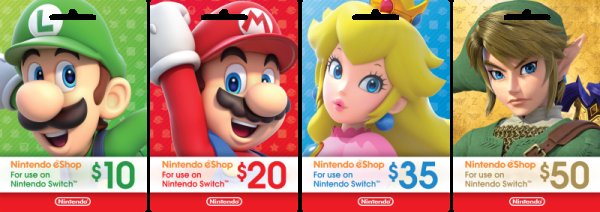
While sending a game directly isn’t an option, you can gift someone a Nintendo eShop gift card which is one of the best ways to give someone a game. It’s like giving them the money to choose their present from the eShop. These cards come in various denominations (like $10, $20, $50, etc.) and work by adding funds to a Nintendo Account’s eShop balance. Here’s how this system works:
- Purchase the Card: You can buy these cards at most major retailers, like big box stores (Walmart, Target), electronics stores (Best Buy), and game stores. You can also find them online through sites like Amazon or sometimes directly from Nintendo’s website. There are digital eShop card options as well, where the gift card is delivered to your inbox, and then you can send the gift card code to the person you want to gift.
- Redeem the Code: The recipient then uses the code on the back of the card to add the funds to their account. It’s super simple: they go to the eShop, enter the code and then the amount on the card gets added to their account balance.
- Choose Their Game: Once the funds are in their account, they are free to browse the Nintendo eShop and pick any game (or DLC!) they like.
Benefits of Using Gift Cards
Gift cards provide flexibility. It means they are the best option if you don’t know exactly which game the recipient would like, or even what game they already have. With gift cards, you’re letting them choose exactly what they want. Gift cards are also handy if you want to contribute towards a pricier game, with the recipient covering the remaining cost. If the game costs more than the gift card balance, the recipient can add the rest of the money using their debit or credit card.
Where to Buy Nintendo eShop Gift Cards
Here are some popular places you can typically find Nintendo eShop gift cards:
- Physical Retailers: Walmart, Target, Best Buy, GameStop, and other big box stores.
- Online Retailers: Amazon, BestBuy.com, or directly from Nintendo’s website (though availability may vary).
- Digital Marketplaces: Some sites offer digital codes that are delivered via email, usually very quickly.
Gifting Physical Game Copies
Another way to gift games is by purchasing a physical copy of the game. This is usually done by purchasing a physical game from a store or online, and then gifting it. Physical copies come with their own pros and cons.
Pros of Physical Copies
- The Gift Feel: There’s something nice about giving a physical present. The recipient can open the package and hold the game case. It feels more substantial than a digital code.
- Resale Potential: If the person you gift to ends up not liking the game, they can often resell or trade the physical cartridge.
- Collector’s Item: For collectors, having the box and cartridge is part of the experience.
Cons of Physical Copies
- Price: Physical game copies can sometimes be more expensive than digital downloads, especially if the game is newer or has special editions.
- Availability: Physical copies can run out, and some older titles might be hard to find. You will need to check if it’s in-stock, and the delivery time is added as well, which you won’t have for digital game.
- Shipping: If buying online, shipping costs will increase the price, and it also takes time to arrive.
The Digital Code Method (Less Common)
This method requires you to buy a digital code from online retailers and give it to your friend. It’s kind of similar to the gift card idea, but you are paying for a particular game rather than a balance.
How it Works
Some retailers may sell digital download codes for specific games. Here’s how it usually works:
- Purchase a Digital Code: You’d buy a digital code for a specific game from a retailer that offers these, instead of buying a gift card.
- Receive the Code: Usually you receive the code via email, or through your purchase history with the retailer.
- Send the Code: Forward or give this code to the person you’re gifting.
- They Redeem the Code: The person you are gifting with then goes to the eShop and uses the code to add the game to their account.
Things to Keep in Mind
- Availability: Not all retailers offer digital codes for every game. This is more common with newly released or more popular titles.
- Region Lock: Just like the eShop, digital game codes are often region-locked. Make sure you buy a code that matches the recipient’s account region.
Using Family Groups with Caution
Nintendo allows you to create family groups for Nintendo Accounts, which can help you keep track of kids accounts. If someone in your family group has funds, they can buy games for the whole group. However, this isn’t a straight gifting feature like the one you might be expecting. If one account in the family group buys the game, it is linked to their account, and they can then make the game available on other consoles that they use, but the game is still purchased and owned by the main account. It isn’t a method to directly gift games.
Tips for Gifting Successfully
When you are gifting games on Nintendo, here are a few tips:
- Know Their Region: Make sure the gift card or digital code works in the same region as their Nintendo Account (Europe, America, Japan). You should double-check if you aren’t sure about the region, since the codes are region locked, you cannot use a European code on a US account.
- Check Game Availability: Verify if the game you want to gift is on the eShop or physically available if you are buying a physical copy.
- Consider Their Preferences: What types of games does your recipient like to play? There are various genres for the Nintendo Switch, so it’s important that the person you are gifting likes the game.
- Be Mindful of the Price: Check for sales or discounts on the eShop or with physical retailers. You might want to buy a gift card that helps with a more expensive game, so you are just covering a part of the cost.
Future Possibilities
Even though direct gifting is not available at the moment, Nintendo is constantly updating their system, so there’s always the possibility they will introduce a better gifting method. For the time being, gift cards, physical copies, and (sometimes) digital codes remain the best ways to share the joy of Nintendo games with your friends and family. It will be great when we will be able to simply gift games from the eShop itself, but until that happens, the methods mentioned here are the best ways to gift.
So, while you can’t just hit a simple “gift” button on the Nintendo eShop and send a game straight to your friend, there are still great ways to surprise them with something fun. Whether you choose a gift card, a physical copy, or a digital code, there are many options to bring a smile to someone’s face. Just remember to double-check the region, and have fun gifting!
get free gold points on Nintendo E shop 
Final Thoughts
Unfortunately, the Nintendo eShop does not directly support gifting digital games. You cannot purchase a game and send it as a present to another user’s account. This is a common feature request from the community.
However, you can buy physical game cards from retailers. These cards come with download codes which can be given as gifts. These codes allow the recipient to redeem the game on their own Nintendo account. This workaround ensures someone can still receive a game as a present. Therefore, you might need to explore a physical option if you want to gift games.
So to answer the question directly, can you gift games on nintendo eshop using direct digital purchases? No. You must use other methods.

