
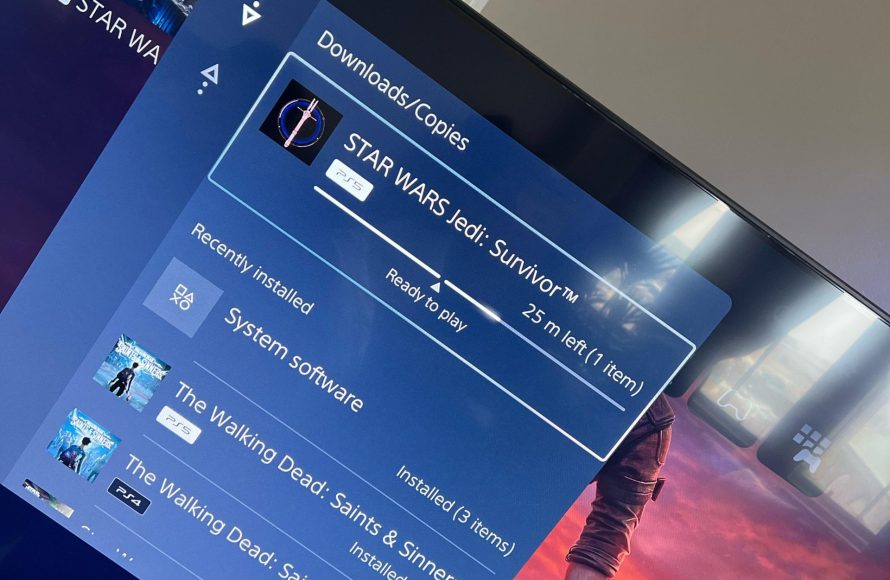
Yes, you can absolutely play a game while downloading on PS5.
Ever found yourself impatiently waiting for a new game to download on your PS5? It’s a common frustration, but the good news is you don’t have to just stare at a progress bar. So, can you play a game while downloading on ps5? The answer is a resounding yes, allowing you to enjoy other titles in your library while those new experiences are coming to your console.
This feature is great because it lets you stay engaged and entertained, instead of twiddling your thumbs. You can jump into a different game, watch videos, or even use other applications, all while the download progresses in the background. This is one of the many things that makes the PS5 user experience quite convenient.

Can You Play a Game While Downloading on PS5?
Okay, so you just got a shiny new game for your PlayStation 5 (PS5), and you’re super excited to play it! But uh oh, it’s downloading. Now, the big question pops into your head: “Can I play anything while this thing is downloading?” That’s a super common question, and the good news is, for the most part, the answer is YES! Let’s explore all the ways this works on your PS5.
How Downloading Works on PS5
Before we jump into playing games, let’s quickly chat about how downloading works on the PS5. When you download a game or an update, your PS5 is essentially pulling files from the internet and saving them to its storage. This can take a little while, especially for big games. The speed of the download depends on your internet connection speed. Think of it like filling a glass with water; the bigger the glass and the smaller the water stream (your internet), the longer it will take.
Factors Affecting Download Speed
Lots of things can make a download go faster or slower. Here are a few things that can impact download speeds:
- Your Internet Speed: The faster your internet, the faster the download. If you have a slow internet connection, downloads will take longer.
- Network Congestion: If lots of people in your home are using the internet at the same time, like watching videos or playing games, it can slow down downloads.
- PSN Server Load: Sometimes, if many people are downloading games at the same time, the PlayStation Network (PSN) servers can get busy. This can also make your downloads a bit slower.
- Other Activities on Your PS5: Even if you are not gaming, if you have other applications running in the background on your PS5, this can impact your download speed
- Wi-Fi vs. Wired Connection: A wired connection (ethernet cable) is usually faster and more reliable than a Wi-Fi connection. For the fastest downloads, use an ethernet cable.
Playing Games While Downloading: The Basics
So, here’s the main answer – Yes, you can absolutely play games while downloading on the PS5! However, there are some things you should know to make sure your gaming experience stays nice and smooth.
Playing Digital Games vs. Physical Games
The type of game you are playing can make a difference when you are downloading:
- Digital Games: If you’re playing a game that’s already fully installed on your PS5, such as a digital game you already own, playing will not be affected much while a different game is downloading. The PS5 can handle running one game while another one downloads.
- Physical Games: Games that you play from a disc generally work well while you download, because the PS5 is simply reading the data off the disc, and isn’t depending on internet data.
- Game Being Downloaded: If you’re downloading a big game, you might notice a little bit of lag or slowdown, especially in your online gameplay if you try to play online when a big file is downloading. That’s because the PS5 is using some of its power to download.
The Impact on Game Performance
While you can play during downloads, you may notice some changes in your games. It’s not always a big deal, but it’s worth being aware of:
Lag and Stuttering
If the game you’re playing needs a lot of internet, like an online multiplayer game, you might see some lag or stuttering. Lag is that annoying delay between your actions and what happens on the screen. If a very large download is going on at the same time, then your gameplay may have an increased chance of lag and stuttering.
Reduced Download Speeds
Playing a game while downloading will also impact the speed of your download. When the PS5 is playing a game, it will distribute some resources (power) to the game, and this means that downloads might go slower.
How to Minimize Impact
Here are some easy things you can try to help make downloads and gaming better:
- Pause Downloads: If you notice too much lag, you can pause the download while you play your game. After you are done playing, you can go back to the downloads section and continue the download.
- Use a Wired Connection: As we said before, using an ethernet cable for internet access will make your downloads faster and your gameplay more stable.
- Close Unnecessary Apps: Close any apps running in the background of your PS5 that you are not using. This will give the PS5 more resources to use for the game and for the download.
- Play Offline: If possible, try playing a game that does not use the internet when downloading. If you are playing in offline mode or a game with no online features, it should reduce the chance of lag.
- Prioritize Downloads: If you really need that game to download fast, you can let it finish downloading before you start playing.
Managing Downloads on Your PS5
Your PS5 has some helpful tools for managing your downloads. Here’s a look at what you can do:
Finding the Downloads Menu
To find your downloads menu, press the PlayStation button on your controller to bring up the Control Center. Then go to the “Downloads/Uploads” section. Here, you can see what’s downloading, pause downloads, and more.
What you Can Do With the Downloads Menu
- See Progress: See how much of the game has been downloaded, and how much time is left.
- Pause/Resume: Pause a download to play without lag, and resume again when you are done playing.
- Cancel Downloads: If you decide you don’t want to download something, you can cancel it from here.
Downloading Updates
Game updates are like mini-downloads that fix bugs or add new stuff to your game. You can also play games while updates download, but that can still create some lag or slowdown. Usually, these updates are much smaller than full games.
Prioritizing Game Downloads
Sometimes, the PS5 will download updates for games that you have played recently. If you want to play a specific game, you can tell the PS5 to prioritize downloading that game’s update, to ensure you can get playing as soon as possible.
When Should You Avoid Playing During Downloads?
While playing during downloads is generally okay, there are a few cases where it might be best to wait:
- Very Large Game Downloads: If you’re downloading a huge new game and want to play another game online, you may be better off letting the download finish first.
- Important Online Matches: If you’re in a super important online match, like a tournament or a ranked game, you might want to pause downloads to have the best and most smooth experience.
- When You Need Every Bit of Speed: If your internet is already a little bit slow, and you need every ounce of speed to get downloads done faster, then pausing downloads while you play is better.
- When Gameplay Performance is Critical: If you’re playing games that are extremely sensitive to lag, like a very fast-paced fighting game, then try to avoid having a download happen at the same time.
Tips for a Smooth Experience
Here are some bonus tips to keep your gaming experience great during downloads:
- Plan Ahead: Start big downloads when you’re not planning on playing right away, like overnight.
- Keep Your PS5 Updated: Make sure your PS5 has the latest system software updates to ensure it is running smoothly and efficiently. These updates may also improve the efficiency of downloads and gameplay
- Monitor Downloads: Keep an eye on your downloads to know if a game is done or nearly finished downloading, and adjust your gameplay accordingly
- Be Patient: Sometimes, downloads just take a while. Be patient and try to enjoy your games.
Playing Multiple Games: How does it work with downloads
One thing some gamers may be curious about, is if they can play multiple games at once. When a download is happening, you cannot be playing two games at the same time. The PS5 can only run one game at a time, even if the other game is simply sitting on the game menu screen. You can, however, switch between different games while another game is downloading, as long as you are only playing one of them at a time.
Future of Downloading and Gaming
As internet technology keeps on getting better, and as consoles become more and more powerful, the connection between downloading and gaming will also get better. The PS5 is already very good, but in the future, the way downloads work may get even faster and have less impact on gameplay.
So, to quickly recap, you absolutely can play games while your PS5 is downloading. It might slow things down a little bit, but you can definitely play. Use the tips in this article for the best experience, and get to gaming!
How to Download Games in Rest Mode on PS5!
Final Thoughts
Yes, you can play a game while downloading on PS5. The system allows background downloads, so your gaming session shouldn’t be interrupted. The download speed might be slightly impacted though.
Playing other titles or using apps won’t pause your current downloads. This multitasking feature is quite convenient. The main benefit is that you can continue enjoying your PS5 experience while content downloads.
Ultimately, can you play a game while downloading on ps5? The answer is a definite yes. This capability makes waiting for new content less tedious.

