
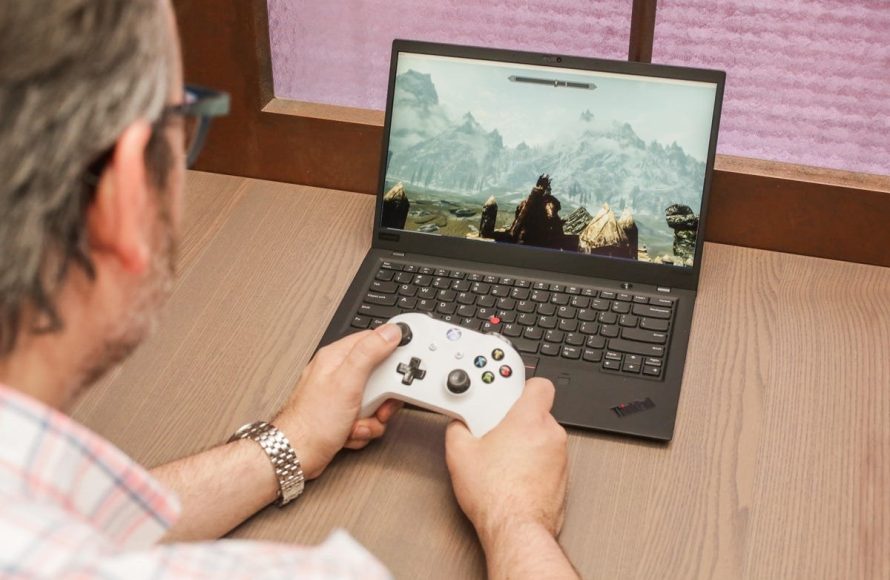
Yes, you can play computer games on a laptop, though performance varies depending on the laptop’s specifications.
Many people wonder, can you play computer games on a laptop? The short answer is a definite yes! Modern laptops come equipped with the power to run many popular titles.
Of course, not all laptops handle gaming equally well. High-end gaming laptops boast powerful graphics cards. These dedicated GPUs make the biggest difference when playing graphically demanding games.

Can You Play Computer Games on a Laptop?
Absolutely! The short answer is a big, resounding YES! You can totally play computer games on a laptop. But, just like choosing the right toy for a playtime, you need to know a few things to make sure your gaming experience is awesome. Not all laptops are created equal when it comes to gaming. Let’s dive into the exciting world of laptop gaming and see what it takes to get you playing your favorite titles.
Understanding Laptop Capabilities for Gaming
Think of your laptop like a race car. Some race cars are built for speed and can handle the most challenging tracks, while others are better suited for a leisurely drive around the neighborhood. The same goes for laptops. Their different parts contribute to how well they can run games. Let’s explore these key parts:
The Graphics Processing Unit (GPU) – The Game’s Engine
The GPU is like the engine of your race car. It’s the part of the laptop that’s responsible for creating all the amazing images you see on the screen when playing a game. A powerful GPU can render games with smooth motion, detailed textures, and vibrant colors. Without a good GPU, your game might look choppy, slow, or even not work at all.
There are two main types of GPUs:
- Integrated GPUs: These are built into the main processor of your laptop and are usually found in everyday laptops. They are good for basic tasks and some very simple games, but they don’t usually have enough power for demanding games.
- Dedicated GPUs: These are separate from the main processor and are specifically designed for handling the graphics needs of games and other visually intensive tasks. They are more powerful and are found in gaming laptops, and they also offer better performance.
When looking at laptops for gaming, you want to focus on finding one with a dedicated graphics card. Manufacturers like NVIDIA (GeForce series) and AMD (Radeon series) make popular dedicated GPUs for laptops. The higher the number in the GPU name (e.g., NVIDIA GeForce RTX 4080 is more powerful than RTX 3050), the more powerful it usually is.
Central Processing Unit (CPU) – The Brainpower
The CPU is like the brain of the laptop. It’s responsible for handling all the calculations and processing needed to run the game. It helps the game process instructions for what to do in game. A powerful CPU can handle more complex game tasks faster and smoother, while a weaker CPU can cause games to lag or freeze. For gaming, you want a CPU that has good clock speeds and a good number of cores.
Common CPU manufacturers are Intel and AMD. Look for CPUs from their i5 or Ryzen 5 series and above for better gaming performance. The newer the generation of CPU, the more efficient it typically is.
Random Access Memory (RAM) – The Working Space
RAM is like your laptop’s working desk. It’s where your laptop keeps the temporary information it needs to run programs, including games. The more RAM you have, the more things your laptop can do at the same time without slowing down. When playing games, having enough RAM can prevent stuttering and slow loading times. At least 8GB of RAM is recommended for most games, but 16GB is better and becoming more standard for higher-end gaming.
Storage – Where the Game Lives
This is where your game files, saved data, and operating system live. The type of storage can affect how fast your games load. There are two main types of storage:
- Hard Disk Drives (HDDs): These are older and use a spinning disk to store data. They have large storage capacities and are generally more affordable, but they tend to be slower in loading times.
- Solid State Drives (SSDs): These use flash memory to store data and are significantly faster than HDDs. Games load quicker, and the system as a whole feels snappier. An SSD is highly recommended for modern gaming, especially if you value speed.
For a better gaming experience, choose a laptop with an SSD. For the amount, 512GB is a decent starting point, but 1TB might be more suitable if you plan on having a lot of games installed.
The Screen – Your Window to the Game World
The screen is like the window to your games. Key things to look for are screen resolution, refresh rate and display panel type.
- Resolution: This is how many pixels the screen has and affects how detailed your game looks. A higher resolution means sharper images. Full HD (1920×1080) is a good starting point for gaming. Some laptops will go up to 2K (2560×1440) or even 4K (3840×2160) but are normally more expensive.
- Refresh Rate: This is how many times per second your screen updates the image. A higher refresh rate (e.g., 120Hz, 144Hz or above) will result in a smoother experience. For gaming, a screen with at least a 120Hz refresh rate is ideal, and some will go much higher.
- Panel Type: There are different display panel types, including IPS (In-Plane Switching), TN (Twisted Nematic), and VA (Vertical Alignment). IPS panels are generally preferred for gaming because they offer wide viewing angles and good color reproduction.
Types of Laptops for Gaming
Now that you know about different parts of the laptop, let’s look at different kinds of laptops that are available and the experience they give you:
Gaming Laptops
These laptops are designed for gamers. They have powerful dedicated GPUs, fast CPUs, lots of RAM, and speedy storage, mostly SSDs. They also usually have high-refresh-rate screens and better cooling systems. They can run the latest, most demanding games smoothly and are good for serious gamers, but they are also typically the most expensive.
Everyday Laptops
These are laptops that are made for tasks such as schoolwork, web browsing, and watching videos. They usually have integrated graphics, less RAM, and slower processors, they might not handle the gaming task smoothly. They can be used to play some older or simple games with lower graphics settings, but they aren’t ideal for the newest or graphically intensive games.
Business Laptops
These laptops are made for work-related tasks. They might have stronger CPUs and some might have dedicated GPUs, but their main focus is performance in productivity software. They usually have good keyboards, sturdy design, and focus on long battery life. Some business laptops can run games, but they might not offer a gaming experience as good as a gaming laptop.
Ultrabooks
These are thin and light laptops that prioritize portability and battery life. They usually have integrated graphics, low-power CPUs, and less RAM, making them not the best choice for heavy gaming. They can handle some older and simpler games but not the more recent demanding titles.
Here’s a table to summarize different types of laptops:
| Laptop Type | Typical GPU | Typical CPU | Typical RAM | Best For | Price |
|---|---|---|---|---|---|
| Gaming Laptop | Dedicated High-End GPU | High-End Intel Core i7/i9 or AMD Ryzen 7/9 | 16GB or more | Playing the latest games at high settings | Expensive |
| Everyday Laptop | Integrated GPU | Mid-Range Intel Core i3/i5 or AMD Ryzen 3/5 | 8GB or less | Simple games, and day to day tasks | Budget-Friendly |
| Business Laptop | Integrated or some with a Dedicated GPU | High-End Intel Core i5/i7 or AMD Ryzen 5/7 | 8GB to 16GB | Productivity tasks, some gaming possible on certain models | Mid-Range to Expensive |
| Ultrabook | Integrated GPU | Low-Power Intel Core i3/i5 or AMD Ryzen 3/5 | 8GB or less | Simple games, portable computing | Mid-Range |
Game Requirements vs. Laptop Specs
Now that you know about the parts of a laptop and different types of laptops, you need to think about how the game’s requirements meet your laptop’s ability. Every game has its own set of requirements that tell you what kind of computer it needs to run well. These are usually listed as minimum and recommended specifications.
- Minimum Specifications: This is the lowest your computer needs to meet to run the game, even if not perfectly. The game might not run that well and might have low graphics settings.
- Recommended Specifications: This is what is needed to run the game very well, with smooth performance and high graphics settings.
You should compare the requirements of the game you want to play with your laptop’s specifications. If your laptop only meets the minimum specifications, the game might still work but it might not look great or run smoothly. If it meets the recommended specifications, you should have a good gaming experience.
Adjusting Game Settings for Better Performance
If your laptop isn’t the most powerful gaming machine, don’t worry! You can adjust the game settings to make the games run better. Most games have options that allow you to change graphics settings, such as:
- Resolution: Lowering the resolution will make the game look less sharp but will increase performance.
- Texture Quality: Setting texture quality to low will decrease the quality of the image but can improve performance.
- Shadow Quality: Turning down or disabling shadows can give a major boost in performance.
- Anti-aliasing: Lowering or turning off anti-aliasing can improve the game’s performance.
- Effects: Reducing particle effects or other special effects can reduce the strain on the graphics card and improve performance.
By playing with these settings, you can find the best balance between good looks and good performance for your laptop.
Cooling and Peripherals
When you play games, your laptop may get hot. Good cooling helps your laptop run its best. Many gaming laptops have special cooling fans. You can also buy an external cooling pad to help. Also, good gaming accessories can make the gaming experience better.
- Cooling: Good cooling systems are very important for gaming laptops to prevent overheating.
- Gaming Mouse: A gaming mouse is more precise than a regular mouse and can help you control the game better.
- Gaming Keyboard: A gaming keyboard can offer better responsiveness and extra keys for easier controls in your games.
- Gaming Headset: A good headset with a microphone allows you to communicate with other players and hear the game sounds.
Can You Play Games on Any Laptop?
While you can technically play some games on pretty much any laptop, the experience can vary a lot. A simple web-based or a very old game might run on the most basic laptop. However, modern games, especially those with good graphics, require a lot more power. If your laptop doesn’t have the right power, the game can be slow, choppy, or even not work at all. Remember, a gaming laptop is specifically designed to handle these kinds of intensive tasks.
The key thing is to match the game requirements to your laptop’s capabilities. If your laptop isn’t able to play a game smoothly, try reducing the graphics settings or considering a different game that fits your system.
In short, you can indeed play computer games on a laptop! It’s all about understanding what your laptop can do, knowing the games’ requirements, and making smart choices about both games and laptop settings. Whether you’re a hardcore gamer or just want to play some casual games, a laptop can be your perfect portable gaming platform. With a little research and some adjustments, you can definitely enjoy many of your favorite games on a laptop.
Gaming Laptop vs PC
Final Thoughts
Yes, you can play computer games on a laptop. Many modern laptops handle gaming well. Laptops with dedicated graphics cards offer better performance than integrated options.
The specific gaming experience depends on your laptop’s specifications. Some gaming laptops can run demanding titles. Therefore, the answer is definitively: can you play computer games on a laptop? Yes, you can, depending on the hardware.

