
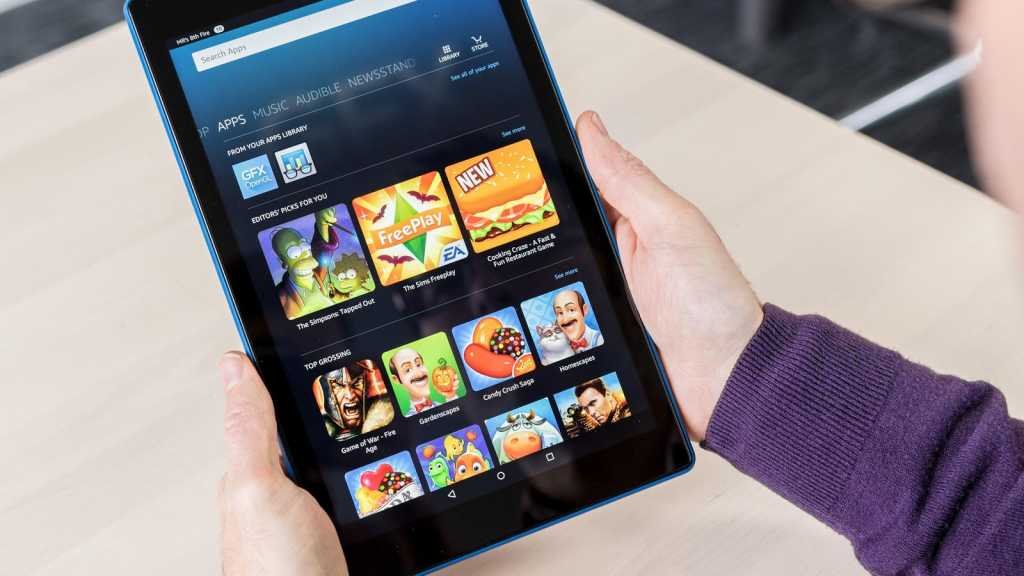
Yes, you can play games on a Fire tablet.
Thinking about getting a Fire tablet and wondering if it’s any good for gaming? Many people have this question. Can you play games on a Fire tablet? The short answer is yes, absolutely!
You’ll find a wide variety of games available through the Amazon app store. They range from simple puzzles to more complex action and strategy titles. The selection might differ slightly from other app stores, but there are still plenty of great gaming options to choose.

Can You Play Games on a Fire Tablet?
Yes, you absolutely can play games on a Fire tablet! These tablets from Amazon aren’t just for reading books and watching videos. They’re actually quite good for playing a variety of games. Let’s dive into the details and see what kind of gaming fun you can have.
What Kind of Games Can You Play?
The Fire tablet isn’t going to run the most graphics-intensive games you’d see on a super-powerful gaming computer or console, but it has a surprisingly large collection of enjoyable games. Think about fun puzzles, addictive arcade games, strategy titles, and kid-friendly adventures. Here’s a breakdown:
Casual Games
These are the games you can pick up and play for a few minutes at a time. They’re great for when you’re waiting in line or have a little free time. These are usually simple games with easy to learn controls.
- Puzzles: Think of games like Candy Crush, Sudoku, or jigsaw puzzles. They are great for exercising your brain.
- Arcade Games: These are fast-paced and action-packed. Examples include simple platformers, endless runners, and retro-style shooters.
- Card Games: Classic card games like Solitaire, Uno, and hearts are always enjoyable on a tablet.
Strategy Games
These games require more thinking and planning. They often involve managing resources, building structures, or conquering territories.
- City Builders: In these games, you build and manage your own city.
- Turn-Based Strategy: Games where players take turns making moves, usually on a grid or map.
- Real-Time Strategy: Games where you manage your resources and units in real time.
Kids Games
The Fire tablet is excellent for younger players with tons of educational and entertaining games available. These are designed to be fun and also helpful in learning.
- Educational Games: Games that teach letters, numbers, and other important skills.
- Adventure Games: Fun games that have stories to follow, often with cute characters.
- Creative Games: Games that allow kids to draw, build, and express their creativity.
Other Game Types
Beyond these core categories, you can also find a variety of other interesting games like:
- Simulation Games: These games allow you to simulate different activities, like farming or driving.
- Sports Games: Games based on real-world sports, like soccer or basketball.
- Role-Playing Games (RPGs): Games that put you in the role of a character and have you explore a story.
How to Get Games on Your Fire Tablet
Getting games on your Fire tablet is pretty easy. The main way is through the Amazon Appstore.
The Amazon Appstore
This is where you’ll find the majority of games and apps made for your Fire tablet. It’s similar to the Google Play Store on Android phones or the Apple App Store on iPhones, but it’s specific to Amazon devices. Here’s how you use it:
- Find the Appstore Icon: Look for the shopping bag icon on your home screen.
- Search for Games: Use the search bar to type the name of a game or browse through the different categories.
- Install Games: Tap the game you want, then tap the “Get” button to download and install it.
Free Games vs Paid Games
Many games on the Amazon Appstore are free to download, sometimes with in-app purchases. Other games cost a small amount to buy. Free games might show ads or allow you to buy things inside the game to make it easier or more fun. Paid games usually do not have these ads or in-app purchases, though some still might have them. You should check out these before getting any games, free or paid.
Sideloading Apps
If you’re a little more tech-savvy, you can also load apps from outside of the Amazon app store. This is called “sideloading.” It’s possible to install the Google Play Store on a Fire Tablet. This gives you a much wider selection of games. However, it’s a bit more complex and involves changing some settings on your tablet. This might also void your device’s warranty and is only recommended for experienced users.
Performance: How Well Do Games Run?
How well a game runs on your Fire tablet depends a lot on which model you have and what game you’re trying to play. Newer Fire tablets are usually faster and can handle more demanding games better than older ones. Here’s what you should know.
Tablet Models Matter
The different models of Fire tablets have different processors and amounts of memory. For example, the Fire HD 10 is more powerful than the Fire 7. The more powerful models are going to run games smoother with less lag or slowing down.
Game Graphics and Demands
Some games are designed with very detailed graphics, which take more processing power to run. These games may not play as smoothly on a less powerful tablet. Other games are designed to run well on a wide variety of devices.
Managing Performance Issues
If you’re experiencing issues with games slowing down, here are a few things you can try:
- Close Background Apps: Make sure you’re not running a lot of apps in the background, as they can take up processing power.
- Update Software: Make sure your Fire tablet’s software is up to date.
- Restart Your Tablet: Turning your tablet off and then back on can help fix problems.
- Clear Cache: You can clear the app cache for a game that is experiencing issues.
- Adjust Game Settings: If the game has graphics settings, try turning them down to low.
Specific Game Examples
Let’s take a look at some popular games you might enjoy on your Fire tablet:
Popular Free Games
- Asphalt 9: Legends: A high-speed racing game with lots of different cars and tracks. It has nice graphics.
- Angry Birds 2: The classic bird-flinging game with new levels and challenges.
- Gardenscapes: A match-3 puzzle game where you also get to restore a garden.
- Royal Match: A popular puzzle game with fun characters and a kingdom theme.
Great Paid Options
- Minecraft: A very popular game where you build things, explore, and survive.
- Stardew Valley: A charming farming game with lots to do and explore.
- Monument Valley: A beautiful puzzle game with unique optical illusions.
- Terraria: An adventure game where you explore, build, and battle.
Games for Kids
- PBS KIDS Games: Educational games based on popular shows.
- Scribblenauts Remix: A creative game where you can make almost anything by writing it in.
- Toca Boca Games: Fun digital playhouses where kids can create their own stories.
- Endless Alphabet: A very fun game for learning alphabets.
Gaming Accessories
To get even more out of gaming on your Fire tablet, you might consider some accessories:
- Bluetooth Controllers: A Bluetooth controller can make controlling games a lot more comfortable, especially for action or racing games.
- Headphones: Headphones let you play games without bothering others, and some have microphones for voice chat in games that support it.
- Tablet Stand: This lets you set up your tablet for comfortable viewing.
Is a Fire Tablet a Good Gaming Device?
Ultimately, a Fire tablet is a decent gaming device for many users, especially if you’re interested in casual games, puzzles, and games for kids. It might not be a full replacement for a dedicated gaming device like a console or gaming PC. However, for the price, it offers a good entry point to a lot of mobile games and plenty of fun.
The Fire tablet works wonderfully for casual gamers and for kids, but more dedicated gamers may prefer a device with greater power and graphics abilities. However, with many free and low-priced options, it can provide a great way to enjoy games on the go.
Install Google Play Store on Fire Tablet
Final Thoughts
Yes, you can play games on a Fire tablet. These tablets offer a decent selection of games through the Amazon Appstore. You might find many popular titles.
The gaming experience can vary based on the specific Fire tablet model. Newer models offer better performance for more demanding games.
So, absolutely, can you play games on a fire tablet. The main keyword is definitely ‘games’. It’s a good option for casual mobile gaming.

