
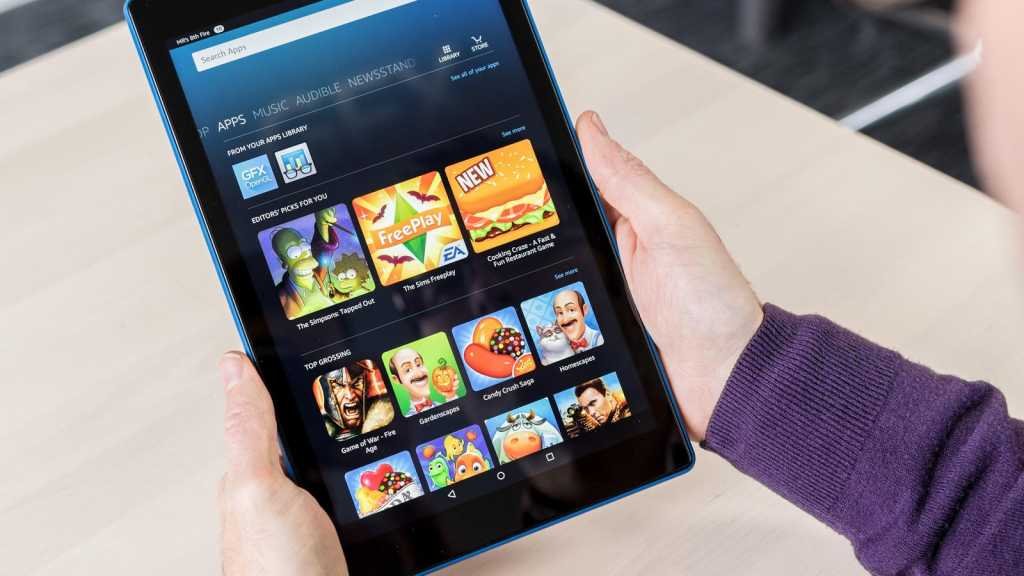
Yes, you can absolutely play games on a Fire tablet.
Thinking about picking up a Fire tablet? You might wonder, can you play games on fire tablet? The answer is definitely yes! Fire tablets provide access to a wide selection of games, from simple puzzles to more complex adventures.
These devices work well for casual gaming. There are various games available through the Amazon Appstore. You will find plenty to enjoy for kids and adults alike on a fire tablet.

Can You Play Games on Fire Tablet?
Let’s dive into the exciting world of gaming on Amazon Fire tablets! You might be wondering, “Can I really play games on these devices?” The short answer is a resounding yes! Fire tablets are designed to be versatile, and that includes having fun with games. However, it’s important to know that the experience might be a bit different than playing on a dedicated gaming console or high-end smartphone. This section will take you on a journey through the types of games you can enjoy, where to find them, and what you can expect from gaming on a Fire tablet.
What Kind of Games Can You Play?
Fire tablets can handle a wide variety of games. Think of them as a playground for different gaming styles. Here’s a breakdown of the categories you’ll find:
Casual Games
These are the games you can pick up and play quickly, perfect for short bursts of fun. They are easy to learn and don’t require a lot of strategy or complex controls. Think about games like:
- Candy Crush Saga
- Angry Birds
- Solitaire
- Puzzle games
- Simple arcade games
Casual games work great on the Fire tablet because they’re generally lightweight and don’t need a lot of processing power. You’ll find tons of these available in the Amazon Appstore.
Action and Adventure Games
For those who like a bit more excitement, there are plenty of action and adventure games available. While you won’t find the most graphic-intensive titles available on gaming consoles, you’ll find a good selection of titles that will keep you engaged. These games often feature:
- Platforming challenges
- Exploration
- Combat
- Story-driven adventures
Some popular choices might include Minecraft or certain adventure games built with the capabilities of Fire Tablets in mind. Keep in mind that extremely demanding titles may not run as smoothly on a Fire tablet as they would on a dedicated gaming device.
Educational Games
Fire tablets can also be fantastic tools for learning through play. Educational games are designed to make learning fun and engaging. These types of games can help with:
- Math skills
- Reading and language skills
- Problem-solving skills
- Science concepts
- Creativity
Many educational apps are available, often catering to specific age groups. They often use bright colors, interactive elements, and fun characters to make learning more appealing. These apps provide a valuable way for kids to learn while having fun.
Strategy and Simulation Games
If you enjoy thinking ahead and planning your moves, strategy and simulation games might be just what you need. These often involve:
- Building and managing resources
- Planning out your moves
- Making calculated decisions
- Developing long-term goals
Examples include games that let you build cities, farms, or even manage entire empires. These games are often enjoyable and are available on the Fire Tablet.
Retro Games
If you are feeling nostalgic, there are many retro games available. These games can allow you to enjoy classics from the past. You can find:
- Arcade games
- Platformers
- Puzzle classics
Some of these may be available directly through the Amazon Appstore or through emulators.
Where Do You Find Games?
The main place to get games for your Fire tablet is the Amazon Appstore. This is where you can find a wide selection of apps and games that have been specifically tested and approved for Fire tablets. It’s similar to the Google Play Store on Android devices, but it’s designed for the Amazon ecosystem.
Navigating the Amazon Appstore
The Amazon Appstore is easy to navigate. You can search for specific titles or browse through different categories. You will find:
- Free Games
- Paid Games
- Top Charts
- Specific Categories
- Deals and Discounts
Many of these games are very popular and you may have played them on other devices. The Appstore also provides ratings and reviews for you to review, before you download a game. Always pay attention to the age rating of a game to make sure its is appropriate for the person who will be playing the game.
Amazon Underground (Discontinued)
It’s important to mention that in the past, there was something called Amazon Underground, which provided free apps and games. However, Amazon Underground has since been discontinued. You won’t need to worry about this as you explore the games available on your Fire tablet today. All available games are available in the Amazon Appstore, and you can browse with no problem.
Performance and Graphics
When it comes to gaming on a Fire tablet, it’s important to keep your expectations in check. While these devices are capable of running a wide range of games, they aren’t as powerful as high-end smartphones or dedicated gaming consoles. This means you might see some differences in performance and graphics. Let’s explore this further.
Processing Power
Fire tablets use processors that are designed for everyday tasks like browsing the web, watching videos, and playing less demanding games. They often have fewer processing cores and slower clock speeds compared to more powerful devices. This means that games with complex 3D graphics, intense action, and large open worlds may not run as smoothly. You might experience some lag, stuttering, or lower frame rates, especially in demanding situations.
Graphics Capabilities
The graphics processing unit (GPU) is another factor to consider. The GPUs in Fire tablets are generally less powerful than the ones found in high-end gaming devices. Therefore, you should expect to see lower resolutions, less detailed textures, and fewer special effects in games compared to what you might see on other devices. However, many games are well optimized for Fire tablets and you can still enjoy playing them, even with the performance capabilities of the device.
Storage Space
Another thing to keep in mind is that Fire tablets have limited storage. Games can take up a lot of space, especially large, complex ones. It’s important to manage the storage on your tablet. Make sure you have enough space before downloading games. You might consider investing in an SD card, if your tablet supports external storage, to expand the storage capacity.
Game Controls
The primary way to control games on your Fire tablet is through the touchscreen. This is how the most games on Fire Tablets operate, but some games may have other features. Let’s look at the most common type of controls.
Touchscreen Controls
Most games are designed to work with touchscreen controls. This often involves tapping, swiping, and dragging your finger across the screen. For some games, there may be virtual buttons for actions like jumping, shooting, or navigating menus. Touchscreen controls are generally easy to learn and get used to. These touch screen controls are designed for the game, and will be easy to use.
External Controllers
While the touchscreen is the most common control method, some games may support the use of external game controllers. These are typically Bluetooth controllers that you can pair with your Fire tablet. Using an external controller can provide a more traditional gaming experience, especially if you are used to playing with a controller on other consoles. Check each game’s settings to see if they support external controllers. A game controller can often give you more precise control over gameplay.
Free vs. Paid Games
Just like on other platforms, games on Fire tablets can be either free or paid. You can get many great games for free, and these are often supported by in-app advertising. Let’s explore these two types of games.
Free Games
Many free games are available in the Amazon Appstore. They’re a good way to try new games without spending any money. However, free games often come with ads and might offer in-app purchases. These in-app purchases can range from cosmetic items, to items that increase game performance. It can be useful to try a free version of a game before buying it to check your interest in the game. You also might be able to play a free game with no problems.
Paid Games
Paid games typically don’t contain ads. You pay a one-time fee to get access to the entire game. These games are often more polished and offer more features. You might also find games with premium graphics, gameplay, and more. Paid games also don’t usually require in-app purchases to fully enjoy the game. The cost of paid games vary, so you can check the Amazon Appstore to determine the costs and compare them with similar titles.
Tips for a Better Gaming Experience
To get the most out of gaming on your Fire tablet, here are some helpful tips:
- Keep your tablet updated: Make sure your Fire tablet is running the latest software. Updates often include bug fixes and performance improvements that can enhance your gaming experience.
- Close unused apps: Running multiple apps in the background can slow down your tablet. Close any apps that you aren’t using to free up memory and processing power for games.
- Turn down graphics settings: If a game is running slowly, check if it has graphics settings you can adjust. Turning down the graphics can help the game run more smoothly on your device.
- Manage your storage: Regularly delete games and apps you no longer use to free up space. This prevents your device from slowing down from lack of memory.
- Use headphones or earbuds: Using headphones or earbuds can give you a more immersive gaming experience, and can make it easier to hear important sound effects in the games.
- Check game compatibility: Before downloading a game, double-check that it is compatible with your specific Fire tablet model. Not all games are optimized for all Fire tablets.
- Take breaks: Remember to take breaks from gaming, especially if you’re playing for a long time. It’s important to take time away from screens.
Gaming on the Go
One of the great things about Fire tablets is that they are portable. This means that you can enjoy gaming wherever you go. Whether you are traveling, waiting in line, or just relaxing at home, your Fire tablet can be your entertainment hub. The battery life also gives you a good amount of playing time before having to charge the device.
Parental Controls
If your Fire tablet is for a child, you may want to use parental controls. Parental controls allow you to:
- Set time limits for games and apps.
- Block certain games or apps.
- Set age restrictions on what can be downloaded.
- Monitor usage patterns.
Parental controls can help to ensure your child can enjoy games safely.
The Future of Gaming on Fire Tablets
Fire tablets are always improving with each generation. As technology evolves, Fire tablets can continue to provide a wider range of games. With more processing power and better graphics capabilities in the future, you can expect a better gaming experience. It will be exciting to see where gaming on Fire tablets goes in the years to come.
So, can you play games on Fire tablet? Absolutely! These versatile devices offer a wide selection of games, from casual puzzles to more involved adventures. While they may not match the performance of high-end gaming devices, Fire tablets are still great for fun and convenient gaming on the go. Keep these considerations in mind, and you will have a great experience.
Play all games on kindle tablet with google play #shorts
Final Thoughts
Yes, you can play games on a Fire tablet. The device supports many popular titles from the Amazon Appstore. You’ll find a variety of options, including casual games and some more involved experiences.
The gaming experience is decent for the price point. However, don’t expect the same performance as high-end dedicated gaming tablets. ‘can you play games on fire tablet’ is a frequent question, and the simple answer is yes.

