
Unfortunately, no, you cannot directly play iMessage games on an Android device.
The burning question on many minds: can you play iMessage games on android? It’s a common desire among Android users to join in on the fun with friends using Apple devices. The iMessage platform is exclusive to Apple, meaning its gaming features are not natively accessible elsewhere. This limitation is due to the closed ecosystem of Apple’s software.

Can You Play iMessage Games on Android?
Okay, let’s talk about something really fun: iMessage games! You know, those cool little games you can play right inside your text messages with your friends who have iPhones? They’re super easy and a great way to pass the time. But what if you have an Android phone? Can you join in the fun? That’s the big question we’re going to explore today. It’s a bit of a tricky situation, and we’ll break it down so it’s easy to understand.
The Apple Ecosystem and iMessage
Before we get into the nitty-gritty of playing iMessage games on Android, let’s first understand how iMessage works. iMessage is like a special club for Apple users. It’s a messaging service that only works between Apple devices like iPhones, iPads, and Macs. Think of it as a secret language that only Apple products can understand. When you send a message to another Apple user, it goes through Apple’s servers using iMessage, not regular SMS or MMS (the standard messaging used by most phones). This allows for things like blue message bubbles, read receipts, and of course, those fun iMessage games.
How iMessage Games Work
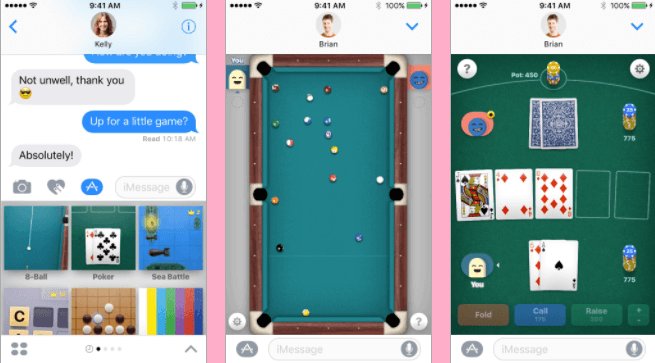
These games are not like apps you download from the Google Play Store. They are mini-programs built into the iMessage app. When an Apple user wants to play a game with someone else, they just tap the little app icon next to the text box and choose a game. The game then appears right inside the message conversation. It’s seamless and convenient – that’s why people love them! Popular games include things like chess, pool, darts, and simple puzzles. Apple adds and updates these games frequently, so there is always something new to try.
The Android Challenge: Why iMessage Games Aren’t Directly Available
Now, here’s where it gets complicated for Android users. Because iMessage is Apple’s own special messaging service, it doesn’t work on any devices not made by Apple. This means that your Android phone simply cannot “speak” the iMessage language or see those games. It’s like trying to read a book written in a language you don’t know. The iMessage games are built using Apple-specific technology. Android phones use a different system. They run on different programming languages. That’s why it’s not as simple as downloading an iMessage app for Android.
Technical Differences
The fundamental challenge is the difference in operating systems. Android devices operate on the Android OS, while Apple products run on iOS or macOS. These systems are built using different technologies and frameworks. The games use Apple’s frameworks that are not present on Android devices. It’s this difference in the fundamental architecture that prevents iMessage and its games from working on Android.
Exploring Workarounds: Can You Get Close?
Okay, so it’s clear that you can’t directly play iMessage games on Android. But, is there a way to get close? Are there any clever workarounds? While there’s no magic bullet to get the real iMessage experience on Android, some options can help you play similar types of games with your Apple-using friends.
Using Third-Party Apps for Games
The best approach is to use third-party apps that offer similar games which work across both Android and iOS devices. Here are some app categories you can explore:
- Multiplayer Game Apps: These are apps like “Words with Friends” or “QuizUp.” These apps can work on both Android and iOS and let you play games with friends. These are usually games that can be played at your own pace, rather than live, but can still be fun.
- Classic Games with Online Play: Many classic board games and card games (such as chess, checkers, or Uno) have online versions. There are lots of cross-platform apps in this category. Find one you like, and you can play with both Android and iPhone friends.
- Chat Apps With Mini Games: Some messaging apps, like WhatsApp or Telegram, include simple built-in games or bots that can be used in group chats. These are not the same as iMessage games, but they still provide a quick gaming opportunity.
Facebook Messenger Games
Facebook Messenger also has its own in-chat games system. You can invite your friends, even if they’re using iPhones, to play games directly through your Messenger conversation. These games might not be identical to the ones found in iMessage, but they can be just as enjoyable. These games often range from casual puzzles to quick action games.
Using Web Based Games
Another approach to consider is playing games that are web-based. Many free browser games are designed to be played on any device, including smartphones. While these aren’t usually designed to be directly integrated into messages, they’re very accessible. You and your friend can agree on a browser game to play together and share links within your messages.
The Limitations: What You Can’t Replicate
While these workarounds are helpful, it’s important to remember what they cannot do. The biggest limitation is that these alternatives cannot replicate the seamless experience of playing an iMessage game directly within the iMessage app. With third-party apps, you usually have to download an app, create an account, and then find your friend. And while games in messenger apps can be convenient, they are still not the same as the games designed specifically for iMessage. Also, you still will not see your friend’s iMessage game invitations inside your message app. Your options will be limited to apps that can function across multiple operating systems.
Why Seamless Integration Matters
The appeal of iMessage games is in their ease of use and accessibility. They’re integrated perfectly into the chat window. You don’t need to switch to a different app. This level of integration simply can’t be replicated in any way if you’re using an Android device.
Is There a Future For iMessage on Android?
Many Android users wonder if Apple will ever make iMessage available on Android. However, there are reasons to believe this isn’t likely. iMessage is a key part of the Apple ecosystem and a reason many users stay within the Apple product family. Making it available on Android could diminish its exclusivity and therefore hurt Apple’s unique selling point. However, some experts have speculated in the past about the possibility of Apple and Google working together to make messaging more universal, but so far nothing has come out of these discussions. For now, it seems like the dream of iMessage games on Android will remain just a dream.
The Push For Cross-Platform Messaging
In the meantime, there is a push for cross-platform messaging. The push for better interoperability between different messaging platforms could, theoretically, open the door to a solution. However, there’s no concrete plan or timeline. The focus of many is rather on improving standard messaging like RCS (Rich Communication Services), which works across both Android and iOS devices, although it still doesn’t offer the same kind of integrated gaming as iMessage.
What To Do if You Want to Game with iMessage Users
So, what should you do if you really want to play games with your friends who use iMessage? The key is communication and flexibility. It’s important to understand the limitations and work around them.
- Suggest alternative apps: Propose using a third-party app that both of you can use. Suggest options such as Words with Friends, or any of the cross-platform games mentioned earlier.
- Set up a group chat elsewhere: Use a chat app like WhatsApp or Telegram, that does support games, so both of you can play without needing to create accounts on different apps.
- Use Browser games: if a game you both like has a browser-based version, share the link and play together that way.
- Make it a shared experience: The most important thing is to have fun together. Focus on the social interaction and the joy of playing together, rather than the exact technology you are using.
Key Takeaways
Let’s recap the main points we have discussed about playing iMessage games on Android:
- iMessage is Exclusive to Apple Devices: iMessage is a messaging platform specific to the Apple ecosystem, not compatible with Android.
- Games are Integrated into iMessage: iMessage games are mini-programs directly built into the iMessage app and cannot function without it.
- Direct Access is Not Possible: Android users cannot directly access or play iMessage games on their devices.
- Workarounds Exist: Cross-platform apps, messaging apps with built-in games, and browser-based games offer ways to play similar games with your iPhone-using friends.
- Communication is Key: The best way to handle this issue is through communication with friends and finding alternative gaming options that are convenient for everyone.
While the dream of playing iMessage games natively on Android might be far-fetched, there are still many avenues available to have fun and play games with your friends, regardless of the phone they use. By exploring other apps and options, you can still enjoy similar gaming experiences and keep those social connections going. It’s about adaptation and finding the right solutions to connect and have fun with those who matter to you. Remember that the goal is to have a good time, no matter what platform you’re on. The technology should help us connect, not divide us, and with a little flexibility and creativity, it can!
How To Play iMessage Games on Android (Easy!)
Final Thoughts
iMessage games remain exclusive to Apple devices. You need an iPhone or iPad to access and play them. This is due to Apple’s ecosystem and how iMessage operates.
Unfortunately, you cannot directly participate in iMessage games on Android. The platform is not compatible. There isn’t any current method for this integration.
Therefore, the simple answer to ‘can you play imessage games on android’ is a firm no. You will require an Apple device to enjoy these games with friends.

