
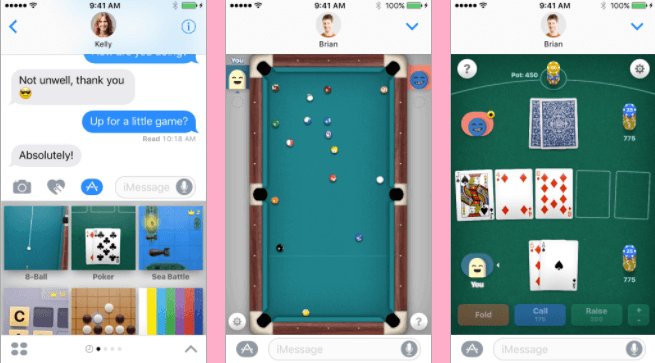
No, you cannot directly play iMessage games with Android users because iMessage is an exclusive Apple service.
Have you ever been in a group chat and seen a fun game launch, only to realize it’s an iMessage game and you’re on an Android? It’s a common frustration. The question of whether you can play iMessage games with android arises frequently. Sadly, iMessage’s gaming functionality is tied directly into the Apple ecosystem.
This exclusivity means that your Android device cannot directly access or participate in iMessage games. There isn’t a compatible app or workaround to change this. You have to look for other alternatives.

Can You Play iMessage Games with Android?
Let’s dive into a question many of you have probably pondered: can you, an Android user, join in on the fun of iMessage games? It’s a great question because iMessage, Apple’s messaging service, is super popular, and its built-in games offer a fun way to connect with friends. But what happens when you’re not on an iPhone? The answer is a little complex, so let’s break it down.
The iMessage Ecosystem: A Walled Garden
First, it’s important to understand that iMessage is designed to work primarily within Apple’s ecosystem. This means that it’s built specifically for iPhones, iPads, and Macs. Think of it like a special garden, carefully fenced off to keep everything inside. iMessage games, which are actually apps running inside the iMessage interface, are part of this walled garden.
Here’s where things get a bit tricky. iMessage games use Apple’s specific technology, which isn’t compatible with Android’s operating system. Android devices speak a different language, so to speak, and they can’t understand the way iMessage games are coded and run. This is the fundamental reason why you can’t directly install or play iMessage games on an Android phone or tablet.
Why Android Can’t Directly Access iMessage Games
Technical Differences Between iOS and Android
The core difference lies in the operating systems. iOS, used by iPhones and iPads, and Android are completely different platforms. They use different programming languages, different system architectures, and different ways of handling apps. iMessage and its games are created with iOS in mind, using Apple’s frameworks and programming tools.
Imagine trying to read a book written in Spanish when you only know English. You might see the words, but you wouldn’t understand what they mean. The same goes for Android trying to run iMessage apps. It simply can’t interpret the code correctly.
Proprietary Nature of iMessage
Apple has kept iMessage closed to other operating systems. They haven’t released an Android version of iMessage, and thus, there is no official pathway for an android user to join iMessage games. This is because keeping it an Apple-only service is part of Apple’s strategy to attract and retain customers within its ecosystem. This “closed ecosystem” is a strategic decision by Apple, influencing its hardware and software offerings.
iMessage Games Use Specific Apple APIs
Apple uses specific programming tools, known as APIs (Application Programming Interfaces) to create the games. These APIs help games communicate with iMessage and function properly. These APIs are not available to other operating systems such as Android making it difficult to run iMessage apps on other platforms.
Alternative Ways to Connect and Play with iPhone Users
While you can’t play iMessage games directly on your Android device, there are still plenty of ways to connect and play with your friends who have iPhones. It just means exploring other fun options that work for everyone. Think of it as finding a new playground for you and your friends!
Exploring Cross-Platform Mobile Games
The most straightforward way to play together is to choose games that are available on both Android and iOS platforms. Plenty of developers create games that work on both systems.
Here are some game genres you can look for and which are usually available on both platforms:
- Puzzle Games: These are often available on both platforms (e.g., Candy Crush Saga, Words With Friends).
- Multiplayer Casual Games: Games where you compete or cooperate on a simple format with your friends (e.g., Among Us, Brawl Stars, Clash Royale).
- Strategy Games: Many turn-based strategy and card games have versions available on both platforms (e.g., Hearthstone, Chess).
- Racing Games: There are various racing games that you can play with your friend irrespective of the mobile they use (e.g., Asphalt series, Mario Kart Tour)
By looking for these cross-platform options, you and your iPhone-using friends can enjoy some gaming fun without being restricted by device differences.
To find these games you can search on Google Play Store or Apple App Store, simply write ‘cross-platform games’ or search by game category ‘cross-platform puzzle games’, ‘cross-platform multiplayer games’ etc.
Using Third-Party Messaging Apps with Built-in Games
Many messaging apps offer their own set of built-in games that are playable on both Android and iOS. These are an alternative to the iMessage games. Here are some popular options:
- Facebook Messenger: Has a selection of simple, fun games to play with friends.
- WhatsApp: Allows you to share games via link or share with a group on chat.
- Telegram: Provides access to bot games, which users can play in group or one-on-one chats.
- Discord: Although primarily a communication platform for gamers, discord allows to play fun activities like ‘poker night’ and other activities.
These apps don’t rely on Apple’s platform, they are available for all smartphone platforms making it easier to play with everyone.
Utilizing Other Communication Methods for Game Setup
Even when playing on different platforms, you can still use other apps for communication while playing the games together. Use third-party apps to keep communication while playing these cross platform games.
- Voice Chat: Apps like Discord or even a simple phone call can help you coordinate and add fun to your gameplay.
- Group Messaging: Create a group in a chat app to discuss strategies and share updates.
These apps help to make the gaming experience more social and connected.
Understanding the “Green Bubble” Effect
When you communicate with iPhone users, you might see your messages displayed in a green bubble instead of the usual blue one. This happens because the messages are being sent via SMS/MMS, rather than iMessage itself. This doesn’t mean you can’t play games together, it just means you aren’t using the iMessage service.
While the green bubble might seem like a sign that you’re excluded from certain features, remember that it simply indicates the mode of communication. You can still have fun with iPhone users, it just might be by using other platforms.
Will iMessage Games Ever Be Available on Android?
As of right now, Apple hasn’t indicated any plans to make iMessage or iMessage games available on Android. This is unlikely as Apple strategically positions iMessage as a part of their ecosystem. They use iMessage as a benefit that attracts users to their platforms. While technology is always changing, it is not likely that iMessage will be available on android.
It’s also worth noting that if there were changes, they would likely come with a significant announcement from Apple, and be highly publicized within the tech world. Any information otherwise should be taken with a grain of salt, as rumors are often inaccurate.
Future of Cross-Platform Gaming
Growing Trend of Cross-Platform Play
The trend of cross-platform gaming is growing. Developers recognize that having their games playable on both Android and iOS expands their potential player base and it’s good for gamers. This is very positive for everyone, making it easier for friends to play together regardless of what device they have.
Potential for New Technologies
The world of technology is always changing. New tools are created every day which could help with cross-platform integration in the future. Cloud gaming is one area that is particularly interesting since it may be able to deliver games to any device using the internet. These are exciting possibilities for the future of cross-platform gaming. However, at the moment they are not here, and don’t provide access to iMessage games on Android
For now, cross-platform games, and alternate communication platforms, offer the most feasible way to enjoy games with friends.
So, while you might not be able to directly join your iPhone-toting buddies on their iMessage game adventures, don’t let that stop you. With many cross-platform games, third-party messaging apps, and the power of creativity, there are so many ways to get everyone together for some gaming fun. Embrace the alternatives and make sure to have fun.
How To Play iMessage Games on Android (Easy!)
Final Thoughts
Unfortunately, you cannot directly play iMessage games with Android users. Apple’s iMessage games function within their proprietary ecosystem. This exclusivity restricts cross-platform play with devices outside of Apple’s.
Android users must explore alternative gaming options. Many fantastic multiplayer games are available on the Google Play Store and are suitable for friends on both systems. Consider searching for apps with crossplay functionality if you must play together.

