
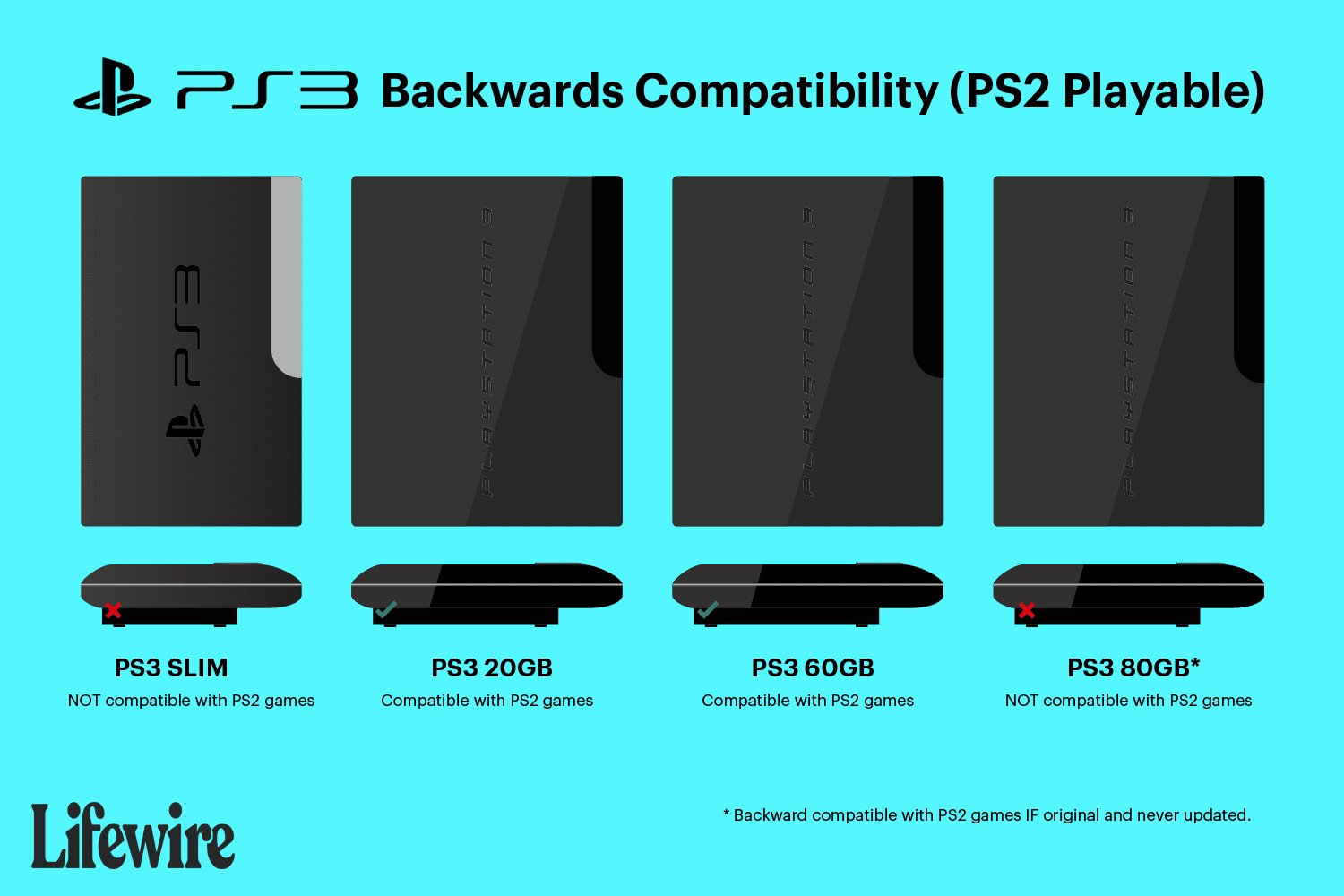
Unfortunately, not all PlayStation 3 models can play PlayStation 2 games. Only certain early versions of the PS3 have backward compatibility for PS2 titles.
The burning question for many retro gamers is: can you play PlayStation 2 games on a PlayStation 3? It’s a topic that sparks nostalgia and frustration in equal measure. Some may have hoped for a simple answer, but the reality involves a bit of hardware history.
The truth is, the ability to play those cherished PS2 classics varies between different models of the PS3 console. This lack of complete compatibility can be a source of confusion for many.

Can You Play PlayStation 2 Games on a PlayStation 3?
Let’s dive into the world of PlayStation gaming and tackle a question that many gamers have: “Can you play PlayStation 2 games on a PlayStation 3?” The answer, unfortunately, isn’t a simple yes or no. It’s a bit more complicated than that, and it depends on which PlayStation 3 model you have. Let’s explore this in detail.
The Backwards Compatibility Puzzle
Not all PlayStation 3 consoles are created equal when it comes to playing older PS2 games. The ability of a console to play games from older systems is called “backwards compatibility.” Sony, the maker of PlayStation, initially included this feature in some of the early PS3 models, but not all. This decision was influenced by various factors, including cost and manufacturing considerations. So, let’s break down which PS3 consoles can play PS2 games and which ones can’t.
The Original Fat PS3: The Champions of Backwards Compatibility
The first generation of PlayStation 3 consoles, often called the “fat” models due to their larger size, are the ones that can play PS2 games. These were the first PS3s to come out, and they had a special hardware component built in that allowed them to read and play PlayStation 2 game discs. Think of it like they had a mini PlayStation 2 inside! These consoles are easily recognizable due to their chrome trim, four USB ports on the front, and a shiny black finish. Specifically, the 20GB and 60GB models were the ones with full hardware-based backwards compatibility.
How Did Hardware Backwards Compatibility Work?
These early fat PS3 models included the actual processor (called the “Emotion Engine”) and graphics chip from the PlayStation 2. This means that they weren’t just trying to make the games run on PS3 hardware, they were essentially using the PS2’s own “brain” to play the games. This is why these consoles could play PS2 games almost perfectly without any major problems. It was like having a PlayStation 2 and a PlayStation 3 in one machine.
The Later Fat PS3: A Shift in Direction
Sony later revised the original “fat” PS3, making changes to reduce costs. The 80GB version of the fat PS3 console initially launched with PS2 hardware, but it was later replaced with a software-based emulation for PlayStation 2 game support, which was not as perfect as the earlier systems. This meant the later 80GB and all subsequent fat models lost complete hardware-based backward compatibility.
Emulation: A Software Solution
Emulation means that instead of using the PS2’s actual hardware, the PS3 tries to recreate the PS2’s systems using software. Think of it like learning to speak a different language. While the PS3 could “speak” the PS2 language via the emulator, it wasn’t always perfect. Some games might have had minor graphical glitches, sound issues, or might not have played at all. The change to emulation was largely driven by the increasing cost of including separate PS2 hardware inside the PS3.
The Slim and Super Slim PS3: No PS2 Playback
The PS3 “slim” and “super slim” models that came after the original fat consoles, do not have any form of backwards compatibility with PlayStation 2 games. Sony completely removed the hardware of PS2, and they even removed the emulator too, which means that there is no way for these newer PS3 models to play PlayStation 2 games, no matter what. These models focused on being smaller, cheaper, and more energy-efficient. If you own a slim or super slim PS3, you can only play PS3 games on it.
Identifying Your PS3 Model
So, how do you know if your PS3 can play PS2 games? Here are some ways to check:
Look at the model number: The original fat PS3 consoles with full PS2 compatibility have model numbers beginning with “CECHA” or “CECHB” (20GB and 60GB respectively). If your PS3 model number starts with “CECHC” or “CECHE,” it may have some hardware emulation, but full backwards compatibility was eliminated in later fat PS3 models starting with “CECHG”. PS3 Slim and super slim models do not have any backwards compatibility at all.
The look of the console: Original “fat” PS3s are larger, heavier and have a glossy black finish with chrome accents. Slim and super slim models are much smaller, lighter, and have a matte finish.
Check online: You can search the model number of your PS3 online (usually found on a sticker at the back of the console) to find out if it is a backwards-compatible model.
Let’s create a table to better visualize this:
| PS3 Model Type | Model Number Prefix | PS2 Playback | Notes |
| ——————— | ——————- | ———— | ———————————————————————————– |
| Original “Fat” | CECHA, CECHB | Hardware | Full backwards compatibility with PS2 games. |
| Original “Fat” | CECHC, CECHE | Emulation | Partial backwards compatibility, some games may have issues. |
| Original “Fat” | CECHG and later | No | No backwards compatibility at all. |
| “Slim” PS3 | CECH-2000 series and up | No | No backwards compatibility with PS2 games. |
| “Super Slim” PS3 | CECH-4000 series and up | No | No backwards compatibility with PS2 games. |
Why Did Sony Remove Backwards Compatibility?
There were several reasons why Sony decided to remove full backwards compatibility from later PS3 models:
Cost: Including the PS2’s hardware in the PS3 made the console more expensive to produce. Sony wanted to make the console more affordable.
Complexity: The hardware of PS2 was complicated, and it was difficult to include and maintain it within the PS3.
Focus on PS3 Games: Sony wanted people to play the newer PlayStation 3 games, which was their new primary product line. Removing the capability of playing old generation games encouraged people to buy new games.
Emulation Improvement: Sony believed that the software-based emulation could eventually get better and run PS2 games well enough.
Playing PS2 Classics on the PS3 Store
While the later PS3 models cannot play PS2 discs, there is another option available to play some of those older gems, it’s through PlayStation Network. Sony released some PlayStation 2 games as downloadable titles on the PlayStation Store. These are called “PS2 Classics.” These digital versions can be purchased and played directly from your PS3’s hard drive, regardless of which model you own.
Limitations of PS2 Classics
It is important to note that not every PS2 game is available as a PS2 Classic on the PlayStation Store. Only a limited selection is available, and you might not find your personal favorites among the offerings. Additionally, these PS2 classic games aren’t always exactly the same as they were on the PS2. Some might have minor visual differences or even slightly altered gameplay.
What If I Can’t Play PS2 Games on my PS3?
If you find that your PS3 model is not compatible with PS2 games, don’t worry, here are a few options for you:
Keep an Old PS2: If you really want to play your old PS2 games, the best option may be to simply hold on to your old PlayStation 2 console and play the games on the original hardware.
Consider a PS2 Emulator on a PC: There are some PC programs that can emulate the PlayStation 2 and let you play those older games on your computer. However, you need a decently powered PC to get smooth gameplay and you have to legally own copies of the PS2 games to play them in emulator.
Look for Remastered Versions: Some popular PlayStation 2 games have been remastered for the PS3 and even the PS4 or PS5. These newer versions offer better graphics and even gameplay improvements.
Explore PS Now or PlayStation Plus Premium: Sony offers these services through which you can play some old PlayStation games via streaming or download, this includes some PlayStation 2 games. It is important to note that you need a fast and reliable internet connection to play games through cloud streaming services, and not all PS2 games are available.
Factors to Consider When Choosing a PS3 for PS2 Games
If you are looking to buy a PS3 specifically to play PS2 games, it is important to keep the following in mind:
Original Fat PS3s are getting old: The original PS3s are now quite old, and their hardware may be reaching the end of its lifespan. Finding a working system might be harder and you have to check very well if the console is fully functioning. They also might have problems with overheating and loud fans.
Condition is important: If you do decide to buy a fat PS3 with PS2 capabilities, be sure to inspect the console carefully. Make sure that the disc drive works properly, that the fan isn’t too loud, and that the console isn’t overheating.
Software updates may affect emulation: While some PS2 games work through emulation on specific fat PS3 models, later software updates from Sony may affect their performance.
The Legacy of Backwards Compatibility
The story of PS2 backwards compatibility on the PS3 is a fascinating case study in how companies balance cost, technology, and consumer demand. While it’s unfortunate that not all PS3s can play PS2 games, Sony did attempt to offer a solution through emulation and the PS2 Classics service on the PlayStation Network. The most important thing is to understand your specific console model and what it can and cannot do.
The ability to play older games on newer consoles is something that many gamers still value greatly, it helps preserve gaming history, allow new players to experience classic games, and help fans revisit the games that they already loved. While the PlayStation 3’s implementation of backwards compatibility was not universal, it remains an important chapter in the history of gaming.
So, whether you are a seasoned retro gamer or someone who wants to check out some old classics, hopefully, this article has helped you to understand if you can play PlayStation 2 games on your PlayStation 3. Make sure you check your model number and, if you can’t play the games directly, there are still other options available to you.
Can my PlayStation 3 run a PlayStation 2 game!? Watch this video to find out!
Final Thoughts
Ultimately, some PlayStation 3 models can play PlayStation 2 games natively, but not all. This backward compatibility is a must for certain gamers. The original fat PS3 models mostly offer this function.
Later slim and super slim PS3 versions removed the PS2 hardware. Therefore, ‘can you play playstation 2 games on a playstation 3’ depends entirely on which PS3 model you own. Check your console’s specs.

