
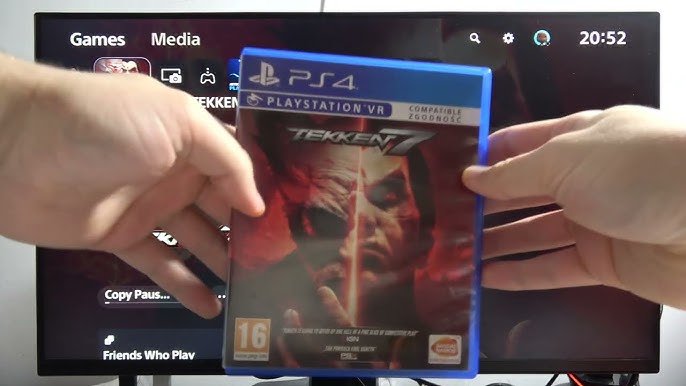
Yes, you can play PS4 games on the PS5 Slim.
So, you’ve got your hands on the sleek new PS5 Slim, and you’re wondering if it’ll play your old favorites. It’s a common question since we all have those treasured PS4 titles. The good news is, backward compatibility is a feature Sony kept for this new console iteration.
Therefore, can you play PS4 games on PS5 Slim? Absolutely! You can dive back into your PS4 library without any trouble. Just pop in your disc, or download them from the PlayStation Store if they are digital and start playing.

Can You Play PS4 Games on PS5 Slim? A Deep Dive
So, you’ve got your shiny new PlayStation 5 Slim, and you’re wondering what to do with all those awesome PlayStation 4 games you have. Maybe you’ve built up a huge collection over the years, or there are some classics you just can’t let go of. Good news! The PlayStation 5 Slim is designed to play many of your old PS4 games. This means you don’t need to keep your old console around to enjoy all those adventures and challenges. Let’s explore how this works and what you need to know.
The Magic of Backward Compatibility
The best news is that the PS5 Slim has something called “backward compatibility.” Think of it like a time machine for video games. It lets you play games from an older system on a newer one. In this case, the PS5 Slim is designed to play the vast majority of PS4 games. Sony worked hard to make sure that most of your PS4 library is ready to go on the new hardware. This feature is a big deal because it means you’re not losing access to all the fun you had with your PS4.
Why is Backwards Compatibility Important?
- Saves Space: You don’t need to have two consoles hooked up to your TV.
- Saves Money: You don’t need to buy a game again just because you got a new console.
- Keeps Games Alive: Games you love can be played even as new consoles come out.
- Continues Play: Keep going with your saved games.
How to Play Your PS4 Games on PS5 Slim
Playing your PS4 games on your PS5 Slim is quite simple. There are two main ways to do this. Let’s break them down:
Using Physical Discs
If you have physical copies of your PS4 games (the ones on discs), here’s what you do:
- Turn on your PS5 Slim: Make sure your console is powered on and ready to go.
- Insert the Disc: Carefully put the PS4 game disc into the disc drive of your PS5 Slim.
- Wait for the Game to Install: The PS5 Slim will then install the game data. This will only happen the first time you use a new disc.
- Start Playing: Once installed, the game will be ready to play. Just select the game icon on your PlayStation’s home screen and jump into the action.
It’s as easy as that! Just like playing a game on your old PS4.
Using Digital Games
If your PS4 games are digital (you downloaded them from the PlayStation Store), playing them on the PS5 Slim is even simpler:
- Use the Same Account: Make sure you’re signed in with the same PlayStation Network account you used to buy the digital PS4 games. This is very important.
- Go to Your Game Library: Look for your game library on the PS5 Slim’s menu. It’s usually a list of all your purchased games.
- Find Your PS4 Games: You’ll see a list of all the games linked to your account, including your PS4 titles.
- Download the Game: Select the PS4 game you want to play and download it to your PS5 Slim. This step might take a little while, depending on your internet speed and the game’s size.
- Start Playing: Once the download is done, you can start playing!
Again, it’s a very straightforward process.
Are All PS4 Games Playable?
While most PS4 games work perfectly on the PS5 Slim, there’s a small number that don’t. Sony says that the vast majority of PS4 games are playable. But it’s worth noting that there are some minor exceptions. Usually, these are very old or less common titles. Generally, if you have a game from the last few years of the PS4’s life, it’s very likely to work on the PS5 Slim.
How to Check if a Game is Compatible
If you are unsure about a particular game, it’s easy to check:
- The PlayStation Website: You can check Sony’s official PlayStation website. Look for their list of compatible PS4 games or use the search tool to see if a specific title is confirmed to work.
- Online Forums: Other players may have already tested the game. Check gaming forums, like Reddit, or even specific fan pages for the game.
- Retailer Websites: Retailer websites often include compatibility information on their product pages.
Benefits of Playing PS4 Games on PS5 Slim
It’s not just about being able to play your old games. There are actually some good reasons why playing PS4 games on the PS5 Slim is a good idea:
- Faster Loading Times: The PS5 Slim has a faster storage drive. This means that your PS4 games will often load much faster than they did on the PS4. That annoying wait time before a game starts will become a thing of the past.
- Improved Performance: Some PS4 games can get a performance boost on the PS5 Slim, like smoother frame rates. Some games may even look slightly better thanks to the PS5 Slim’s more powerful hardware.
- No Need for Two Consoles: You don’t need to keep both your PS4 and PS5 hooked up at the same time. It saves you space and cable clutter.
- Continue Saves: Keep playing from where you left off on your PS4. Your save files work on the PS5. This lets you keep your game progress.
Understanding Game Enhancements
It’s important to know that while many PS4 games will run better on the PS5 Slim, not all games will get the same treatment. Some games might get a big performance increase, while others will simply run as they did on the PS4. Here’s what can happen:
Possible Improvements
- Higher Frame Rates: Some games can run at a higher frame rate on the PS5 Slim. This makes the game look smoother and more fluid, especially in fast-paced action.
- Faster Load Times: The PS5 Slim has a very fast storage drive. This means that games will load very quickly compared to the PS4.
- Minor Graphical Enhancements: A few games may have small improvements in visual quality. You might see more details in the environments.
What to Expect
- Not a Full Remaster: The PS5 Slim doesn’t make PS4 games look like native PS5 games. You’ll notice the games still feel like PS4 games.
- Varied Results: How well a PS4 game performs on the PS5 Slim can vary. Some games will get a big boost, while others will be very similar to their performance on the PS4.
- Compatibility Remains the Same: Games that did not have significant graphical issues on the PS4, will not have the issue on PS5.
Using Your PS4 Accessories
It’s useful to know that your PS4 accessories will still work on your PS5 Slim, but there are some things to keep in mind.
DualShock 4 Controller
You can use your old DualShock 4 controller to play PS4 games on the PS5 Slim. This is great if you want to use your favorite controller or if you are playing with friends. However, the DualShock 4 controller will not work with PS5-specific games.
Other Accessories
Other PS4 accessories such as licensed racing wheels, flight sticks, or headsets should be compatible with PS4 games played on your PS5 Slim. Always check the specific accessory’s compatibility first. Often, the manufacturer will have information on their website about using their accessories on different platforms.
Important Note
Keep in mind, that the new DualSense controller that comes with the PS5 Slim might be needed to play some PS5-specific games. While the DualSense controller is backward compatible with PS4 games, the DualShock 4 is not forward compatible with PS5 games. It’s good to keep these details in mind.
PlayStation Plus and PS4 Games
If you’re a PlayStation Plus subscriber, you might be wondering how that fits into playing PS4 games on the PS5 Slim.
PlayStation Plus Games
If you have claimed free PS4 games through PlayStation Plus, they will be available to download and play on your PS5 Slim. Just use the same PlayStation account, go to your library, and find your PS Plus games. You’ll need an active PlayStation Plus subscription to play them.
Game Streaming
PlayStation Plus Premium also offers the ability to stream some PS4 games through the cloud. This means you can play them on your PS5 Slim without needing to download them to your console. If this sounds appealing, you will want to check out the different subscription plans to learn more.
Game Saves and Transfer
Moving from the PS4 to the PS5 Slim is a major upgrade, but don’t worry about your precious game progress. It’s usually straightforward to transfer your saved game data.
Cloud Saves
If you have a PlayStation Plus subscription, your game saves may already be stored in the cloud. In most cases, the PS5 Slim will automatically download these save files when you start a PS4 game. You can use the cloud saves to keep your progress going from where you stopped in your PS4 console. It helps avoid having to start from the beginning.
USB Transfers
If you don’t have PlayStation Plus or your saves aren’t in the cloud, you can use a USB drive. To do this, you copy your save files from your PS4 to the USB drive, and then from the USB drive to your PS5 Slim. Most games can transfer using USB drive.
Note: Save transferring method varies depending on the game. Please refer to the game’s setting or manual on how to save the game and load it.
Troubleshooting Common Issues
Even though it’s usually very easy, sometimes you can run into small problems. Here are a few common issues and how to solve them:
Game Not Showing Up
If your digital game isn’t showing up, be sure you are signed in with the right PlayStation account. If you share accounts with family members, the game might be on a different account. Also, be sure you are connected to the internet so your console can check your library for all the games you own.
Game Disc Not Reading
If your PS4 disc isn’t reading, check the disc for any scratches, smudges or damage. Also, make sure you insert the disc with the label facing upwards. If this is not the problem, sometimes restarting the console can help.
Game Freezing or Crashing
If your game is freezing or crashing, this could be a problem with the game itself. Try closing the game and restarting it. You might want to make sure the console’s software is updated to the latest version. Sometimes updates have fixes that can help.
Getting Help
If these troubleshooting steps don’t work, try checking the Sony support website. There is an online guide that provides all kind of helps and solutions. For example you can search for the specific issue. Also, there are plenty of community forums where other users share their experience and ways to solve many common problems.
In short, your PS4 games will feel right at home on the PS5 Slim. It’s a great way to keep your game library alive while you enjoy the benefits of the new console!
So, now you know that playing PS4 games on your PS5 Slim is not only possible, but also pretty easy and gives you benefits like faster loading times and sometimes even better performance. With a few simple steps you can jump into your old favorites, revisit old challenges, and continue adventures. It keeps the memories of the PS4 era alive on your new PS5 Slim.
PS5 Slim: Can I Use PS4 Game Disc on PlayStation 5 Slim – Play PS4 Games #sonyplaystation
Final Thoughts
Yes, you can play ps4 games on ps5 slim. The new console maintains backward compatibility. This means most of your existing ps4 titles will function perfectly.
Enjoy your previous game library with improved loading times. The enhanced performance of the ps5 slim provides a better experience. So, ‘can you play ps4 games on ps5 slim?’ The answer is a definite yes.

