
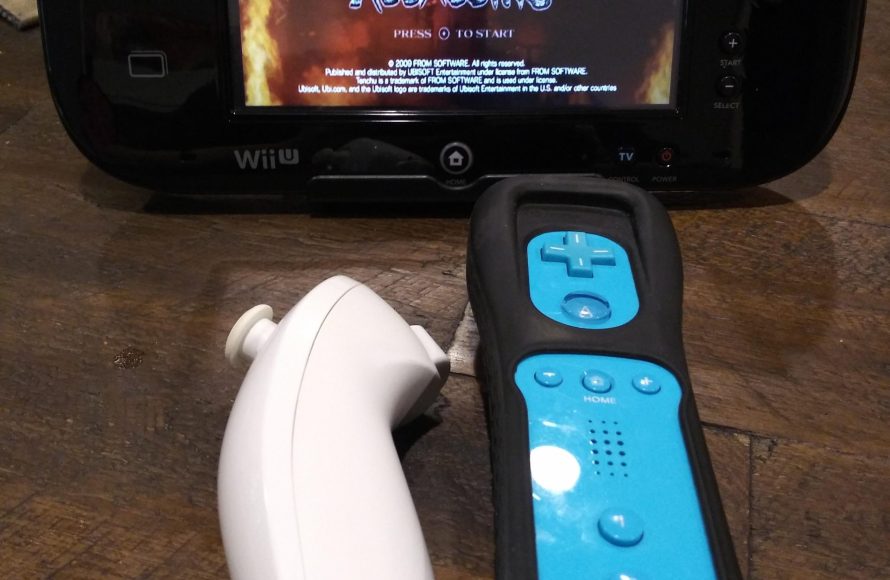
Yes, you can play Wii games on the Wii U using the Wii Remote (and compatible Classic Controller or Nunchuk), but the Wii U GamePad or Pro Controller will not work for Wii games.
So, you’ve got a Wii U and a stack of beloved Wii games, and naturally you’re wondering, can you play Wii games on Wii U controller? It’s a common question among Nintendo fans making the jump to newer hardware. This article will clarify how you can revisit those classic titles you adore.
It’s important to note that although your Wii U can play Wii titles, it does not support the Wii U’s gamepad or pro controller when running those older games. You’ll need your Wii Remote to get the job done.

Can You Play Wii Games on Wii U Controller?
The question of whether you can use a Wii U controller to play Wii games is a common one, and it’s a great question to ask if you’re a fan of both consoles! The short answer is yes, and no, it’s a bit more complicated. The Wii U has a neat feature that allows it to play almost all Wii games, but it doesn’t use the Wii U GamePad to do this. Instead, you need to use the traditional controllers that were designed for the original Wii. Let’s break down why and how this works.
Understanding Wii and Wii U Compatibility
First, it’s important to know that the Wii U is built to be backwards compatible with the Wii. This means that the Wii U console can actually play most Wii game discs. It’s like having a Wii built into your Wii U! When you play a Wii game on a Wii U, it essentially switches into “Wii Mode,” running the older console’s software. Because of this, the way you interact with Wii games changes significantly.
Why the Wii U GamePad Isn’t Used for Wii Games
The Wii U GamePad is a fantastic controller, with its touchscreen, built-in microphone, and motion sensors. However, when the Wii U goes into Wii Mode, it completely ignores the GamePad. The reason is simply because the original Wii didn’t have a GamePad. Wii games were created to be used with the Wii Remote (often called a Wiimote) and other Wii accessories like the Nunchuk, Classic Controller, and Wii Balance Board. These controllers communicate using a different technology and work in a different way than the Wii U GamePad.
What Controllers Do Work with Wii Games on Wii U?
So, if you can’t use the GamePad for Wii games, what can you use? The answer is all the original Wii controllers and some of the accessories:
- Wii Remote (Wiimote): The main controller for the Wii. You will need at least one to play most Wii games on a Wii U.
- Nunchuk: This controller plugs into the Wiimote and adds an analog stick and extra buttons. Many Wii games require the Nunchuk for full functionality.
- Wii Classic Controller: This controller is shaped like a traditional game controller and works best with many classic-style Wii games and virtual console titles.
- Wii Classic Controller Pro: A revised version of the Classic Controller, offering more comfortable grips and slightly improved button layout.
- Wii Balance Board: This accessory is used with games like Wii Fit. If you have a balance board, you can still use it with Wii Fit games on your Wii U.
These are the main controllers you’ll need to play Wii games on a Wii U. It’s essential to have them on hand if you plan to dive into your old Wii game collection. Think of it like using a different set of tools for a different job.
How to Actually Play Wii Games on the Wii U
Now that you know what controllers you need, let’s discuss the process of playing a Wii game on the Wii U. Here are the steps:
- Insert the Wii Game Disc: Put the Wii game disc into the Wii U disc drive. The console will recognize it as a Wii game.
- Navigate to the Wii Menu: On the Wii U’s main menu, you’ll see an option that says “Wii Menu”. Select this option to transition to the Wii interface.
- Prepare Your Wii Controllers: Make sure your Wiimotes have batteries and are synchronized with the Wii U. You will usually sync them pressing the red sync button on the Wii U and on the Wiimote, and this is done with the system in the Wii menu screen. You may need a Wii Remote if you have a newer Wii U that doesn’t have the controller sync ports.
- Start the Game: Once the Wii menu appears and your controller works, select the disc channel and start the game. The Wii U GamePad will be completely inactive during this process, and the main gaming display will be on your TV.
The entire experience in this mode will be just like using an original Wii console. The Wii U’s advanced features and the Wii U GamePad are not part of the equation when playing Wii games.
Using Wii Peripherals with Wii Games on Wii U
Just as you can use Wii controllers, most Wii peripherals also work with Wii games on the Wii U. These include:
- Wii Zapper: If you loved using the Zapper with games like Link’s Crossbow Training or shooting games, you can use it on the Wii U when playing the Wii versions of those games.
- Wii Wheel: The Wii Wheel, designed for racing games like Mario Kart Wii, also works as normal.
- Guitar Hero Controllers: Guitar and drum controllers for games like Guitar Hero and Rock Band on Wii are compatible with the same Wii game versions played on the Wii U.
- Other Special Controllers: Special controllers designed for other Wii games are generally compatible when playing the Wii versions on the Wii U, assuming you had the Wii remote synced.
Basically, if it worked on the Wii, it should work on the Wii U when playing a Wii game. If you’re a dedicated Wii gamer and invested in various controllers, you won’t lose any of that investment just because you have upgraded to a Wii U. This is one of the many great things about the Wii U’s backwards compatibility.
What Happens to Save Data?
Another common question is about save data. When you play Wii games on a Wii U, your Wii save data is not directly accessible from the Wii U’s main menu. Instead, your Wii game saves remain in Wii Mode. This means that all your saved game data, downloaded content, and settings stay separate from your Wii U data. It is similar to having two completely separate systems. For example, you can access the Wii settings, or change a game save, only while in the Wii menu mode.
Moving Data Between Wii and Wii U
If you have an original Wii, you can also transfer your saved game data from your old Wii console to the Wii U. This process is a bit involved and requires using a specific tool available in the Wii Menu on the Wii U. If you’re not starting from scratch, transferring save data might be something you want to look into.
Why Not Use the GamePad?
You may still be wondering why the Wii U GamePad isn’t compatible. It all comes down to how the Wii games were designed. They were not built with the GamePad in mind, so there are no systems inside the Wii games that recognize the specific input that the GamePad provides. The same way a game made for the playstation can’t be played on an xbox console, the game’s program simply does not have code to understand the commands sent from the xbox’s controller. The Wii system is running in a separated mode on the Wii U, and in this mode, there is no GamePad support programmed.
Technical Differences
The Wii and the Wii U use different technologies for their controllers. The Wii Remote utilizes an infrared (IR) sensor bar to track movement and positioning, and there are different chips that interpret the infrared data sent by the wiimote. The Wii U GamePad relies on a totally different set of technologies like the built-in gyroscope, accelerometer and touch sensors for input. Because the Wii games are not coded to make use of these kinds of technologies, it is impossible to use it.
Can I play digital Wii games on Wii U?
Yes, the Wii U can play digital Wii games that were originally purchased from the Wii Shop Channel. Just like with physical Wii games, you’ll access them from within the Wii Menu on your Wii U. The same controller restrictions apply, so you’ll need a Wiimote and other compatible Wii controllers to enjoy your digital Wii games. These games will be stored on the Wii U’s internal memory or an external USB storage device. You can access them as you would a disc-based game through the “Wii Menu” option on the Wii U system’s main screen.
A Quick Recap
To summarize, while the Wii U can play Wii games, you cannot use the Wii U GamePad to play them. You need the original Wii controllers, and the console will enter the Wii menu mode when a Wii game is launched. The Wii U has separate modes for the games of each console. It is similar to having both a Wii and a Wii U, with both connected to the same screen. As long as you have the right equipment, you can enjoy all your favorite Wii games on your Wii U.
Ultimately, even though you can’t use the Wii U GamePad for Wii games, the fact that the Wii U is backwards compatible is a great feature. It lets you replay the games you love without having to dust off the original Wii console, provided you have the correct wiimote peripherals.
How to Play Wii Games On Your Wii U Gamepad
Final Thoughts
No, you cannot directly play Wii games using the Wii U GamePad. The Wii U controller is primarily for Wii U software. You will need a Wii Remote and a Nunchuk or Classic Controller to play Wii games on a Wii U.
The Wii U does have backwards compatibility, enabling you to play Wii titles. Remember the key is using correct controllers. Therefore, can you play wii games on wii u controller? The answer is no; it is not possible.

