
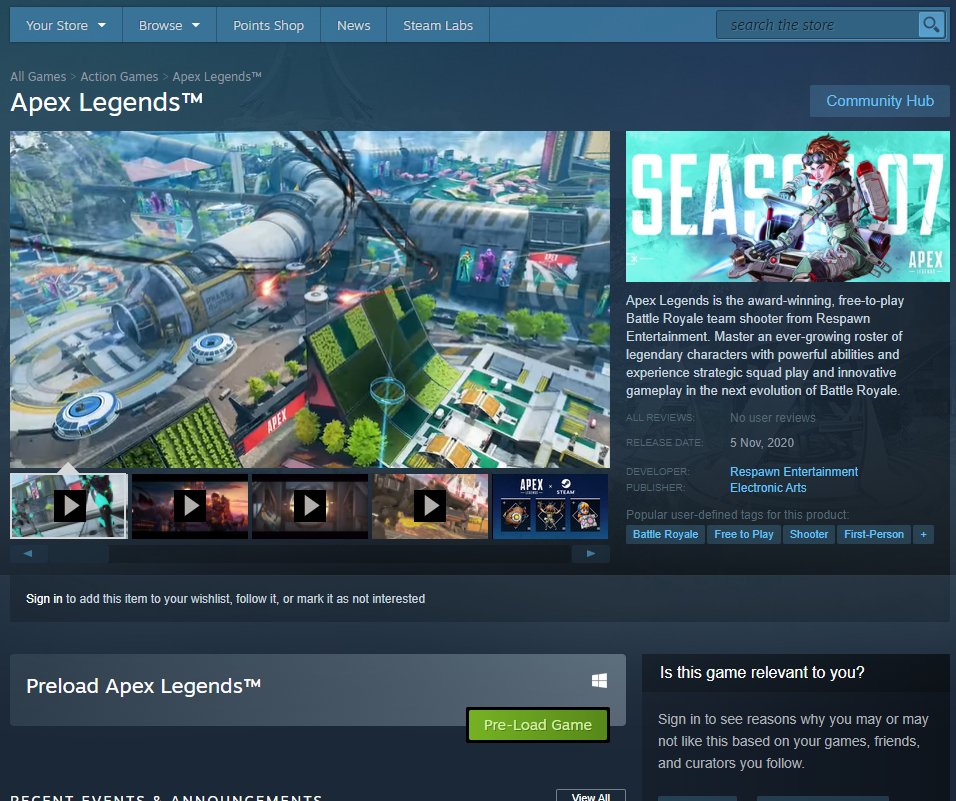
Yes, you can preload games on Steam, allowing you to download the game files before the official release date.
Eagerly anticipating a game’s release? The question, “can you preload games on steam,” is a common one for gamers. It’s great to know you don’t have to wait to start your gaming adventure, you can get a head start.
Preloading on Steam allows players to download the game data in advance. This ensures when the release time arrives, you can play immediately. It’s a fantastic feature that saves time.

Can You Preload Games on Steam? A Deep Dive
So, you’re excited about a new game coming out on Steam? You’ve probably wondered, “Can I get a head start and download it before it’s officially released?” The answer is usually yes! It’s called preloading, and it’s a fantastic way to jump right into the action as soon as the game goes live. Let’s break down exactly how it works, what to expect, and why it’s so useful.
What is Preloading on Steam?
Preloading is like getting a sneak peek at a game’s files before they’re playable. When a developer allows preloading, you can download most of the game’s data onto your computer before the release day. This means that when the clock strikes release time, you’ll only need to download a small update to unlock the game. You won’t have to wait hours for the entire game to download, which can be a real pain, especially if you have a slower internet connection or if the game is very big.
Why Preload Games on Steam?
Imagine waking up on launch day, eager to play the newest game you’ve been waiting for. Without preloading, you might face a long download queue, with potentially millions of other gamers trying to grab the game at the same time. This can cause slow download speeds and frustrating delays. Preloading helps you avoid this mess. Here are the main reasons why preloading is awesome:
- Play on Time: You can start playing the game right when it launches instead of spending your precious gaming time waiting for a download.
- Save Time: Downloading a huge game can take a very long time, especially if you don’t have a super-fast internet connection. Preloading does a significant portion of this ahead of time.
- Reduce Server Stress: When everyone tries to download the game at once, it can put a lot of strain on Steam’s servers. Preloading helps to distribute the downloads, leading to a smoother experience for everyone.
How Does Preloading Actually Work?
When you preload a game on Steam, you’re not getting a playable version right away. Instead, Steam downloads an encrypted (scrambled) version of the game files. This means you can’t just crack the game open and start playing before the release date, the data isn’t usable without that final piece. On the actual release date, Steam then downloads a small update that contains the key to unscramble the game, allowing it to work. This update is usually much smaller and quicker to get than the whole game.
The Encryption Process Explained
Think of it like a locked treasure chest. The game data is the treasure, and the initial pre-load download is the locked chest. You get the chest early, but it is useless until you get the key. The small update Steam does on release day is the key, and only once you have the key can you actually get to your treasure (aka, play the game).
Steam’s Handling of Preload Files
Steam stores the preloaded files in a temporary folder, separate from your normal game library files. They are usually under your Steam directory, in a folder named ‘depotcache’ or something similar. Once the game is released and the small update hits, Steam will verify the preload and then move the unscrambled files into your regular games folder. This entire process is automated and requires no special action from you.
Which Games Offer Preloading?
Not every game on Steam offers preloading. It is completely up to the game’s developers and publishers whether or not they want to allow preloading. Generally, big AAA games are more likely to offer preloading than smaller indie games. If the developers are anticipating a huge number of downloads, they might allow preload to make it a smoother launch day for everyone. You’ll often see preloading available for highly anticipated titles that have a big fan base.
How to Find Out if a Game Offers Preloading
The easiest way to know if a game offers preloading is to check the game’s page on Steam. Here’s where you usually find that information:
- The Store Page: Look for a pre-load notice or a message in the game description, right before the game’s release date. It might say something like “Pre-load available now!” or “Downloadable before release.”
- Community Discussions: The Steam forums or community discussions for the game will usually include news if preloading is planned. Other gamers will probably ask the same question if you miss it on the main store page.
- Steam News: Keep an eye on the official Steam news feed for announcements. Usually, they will post about the availability of pre-load for certain games
Step-by-Step Guide to Preloading on Steam
Preloading on Steam is usually straightforward. Here’s a step-by-step guide to get you started:
Step 1: Find the Game and Pre-Purchase
First, go to the Steam Store and find the game you are interested in preloading. Usually, you have to buy the game first. Look for the purchase button that says “Pre-Purchase.” Click the button and complete the transaction.
Step 2: Check for Preload Availability
After you have pre-purchased the game, make sure to check if preloading is available. Look for that notification on the game’s store page. Often, this happens a few days before the official release date.
Step 3: Start the Download
If preloading is available, the game should appear in your Steam Library, just like any other game. You can click the download or install button as usual. This will begin downloading the encrypted files.
Step 4: Wait for Release Day
After the download is finished, you just need to wait for the game to be officially released. Usually, Steam will handle the rest, automatically unlocking the game once the clock strikes the release time and the final encryption key is distributed through Steam.
Step 5: Start Playing
Once the game is released, you should be able to start playing without any extra long downloads. Steam will do a small final download and make the game fully playable.
Troubleshooting Common Preload Issues
Sometimes, things don’t go exactly as planned. Here are some common issues people have with preloading and how to fix them:
Not seeing the preload option
If you don’t see a preload button, make sure:
- You’ve pre-purchased the game. You have to actually buy the game for preloading to appear
- The preload period has started. Preloading might not become available until a few days before the release date. Check the game’s Steam page for this information.
- Your Steam client is up to date. Restart your Steam client and make sure it has the most recent updates.
Slow download speeds during preload
If your preload download is slow:
- Make sure no other big downloads are happening at the same time. Pause any other active downloads.
- Try restarting your router and modem.
- Make sure you are close to your Wi-Fi router for a stronger connection.
- You can try switching the Steam download server to another region in the Steam settings.
Issues with unlocking the game after release
If your game doesn’t unlock on the release date:
- Try restarting the Steam client. This forces Steam to refresh and see the release of the game
- Verify the game files in Steam. This might fix small file problems.
- Make sure the game’s release time has actually passed. Sometimes it will release at a specific time like midnight or another global time.
Benefits for Developers and Publishers
Preloading isn’t just good for players. It can also help developers and publishers, by leading to much smoother launch days for their games. This can have these benefits:
- Reduced Server Load: By distributing downloads over a longer time, they can reduce the strain on their servers on launch day, preventing outages.
- Happier Players: Faster and smoother launch day means less frustration and happier customers.
- Positive Feedback: A smooth launch tends to lead to better feedback and reviews, which helps a game be more successful.
Considerations Before Preloading
Before jumping into preloading, keep these things in mind:
Hard Drive Space
Preloading takes up a lot of space on your hard drive. Make sure you have enough space for the entire game, plus extra space for the installation.
Download Time
Even though you’re doing it early, downloading the game can still take a long time, depending on your internet speed. Start preloading early, and don’t wait for the last minute.
Steam Updates
Make sure your Steam client is updated. An old Steam version can cause problems with preloading and even prevent the game from unlocking when it is time to launch.
Preloading and Internet Speed
Your internet speed will directly impact how fast you can preload a game on Steam. If you have a fast internet connection, preloading is a breeze. With a slow internet connection, you should start preloading as early as possible so you are ready on launch day. Let’s discuss how different internet speeds might affect your experience with preloading.
Fast Internet Speeds
If you have a fast internet connection, you probably won’t have much to worry about. Preloading a game will be pretty quick. It also means that the final unlocking download on release day will be super fast. You will likely be able to play the game right when it launches.
Slow Internet Speeds
With a slow connection, it can take a significant amount of time to download the preloaded files. You will definitely want to start as early as possible. Keep in mind that other things on your internet connection can slow down the download time, so it is important that nothing else is downloading or using bandwidth on your network while you are preloading a game.
Strategies for Slower Connections
- Start as Early as Possible: Don’t wait until the last minute to preload your game.
- Pause Other Downloads: Do not download anything else while preloading a large game, as it will slow down both downloads.
- Optimize your Wi-Fi connection: If you are using Wi-Fi, make sure you are close to the router, and there is a good connection.
- Consider a Wired Connection: Using a wired connection to your computer is better for download speeds than a Wi-Fi connection.
Preloading on Other Platforms
Preloading isn’t exclusive to Steam. Other platforms also offer preloading for games. This might be handled a little differently, but the concept is similar. Here are a few other gaming platforms that allow users to preload games:
Playstation and Xbox
Both Playstation and Xbox consoles typically have preloading options for many big games. This is usually done through their respective online stores, just like Steam. The process is often very similar, you will pre-purchase the game, and download the encrypted files early.
Epic Games Store
Epic Games also uses a similar process where you can pre-load games onto your computer before the release date. This is handled in the same way as Steam, where you can download the files early, before they are unlocked on the official release day.
GOG
GOG allows you to download games early using their GOG Galaxy platform. If you prefer not using a platform, you can directly download their installers early, and keep them on your computer until the actual release date, where you can then launch the game.
The Future of Preloading
As games get bigger and file sizes increase, preloading becomes even more important. It ensures everyone can have the smoothest launch day possible. We can expect preloading to stay around for the foreseeable future.
Faster Download Technology
As internet technology improves with things like better fiber optic connections, the download speed for games is expected to become much faster. This means less time spent waiting for downloads and more time playing. Faster downloads in the future might even mean that preloading isn’t as necessary for those with the best internet.
Advanced Data Compression
Developers also may start using better data compression techniques, which will make the files sizes of games smaller and reduce the amount of time it takes to download a game, which means that preloading will be faster and easier.
AI-Powered Downloads
AI may also be incorporated into download tools, which will optimize data transfer for downloads. This means that preloading will be much faster for everyone, and less stress on the developers’ servers on launch day.
Preloading has become a standard thing that many players expect. It gives you the possibility to jump right in when a new game is released. With the continuous improvement of technology and data transmission speeds, preloading will probably get even better in the future. It’s something that will continue to be a very important part of the gaming world. So next time you are super excited about a new game, be sure to check if you can preload the game on Steam, and you’ll be ready to play as soon as it goes live!
STEAM – Should you PRE-LOAD or just DOWNLOAD?
Final Thoughts
Yes, you can preload games on Steam. This feature allows you to download game files before the official release date. You can then play immediately when the game launches.
Preloading saves time and ensures you don’t have to wait to play. The preloading option appears on the game’s Steam page, if available.
So, if you were wondering, “can you preload games on steam,” the answer is definitely yes. It’s a great way to get playing quickly on launch day.

