
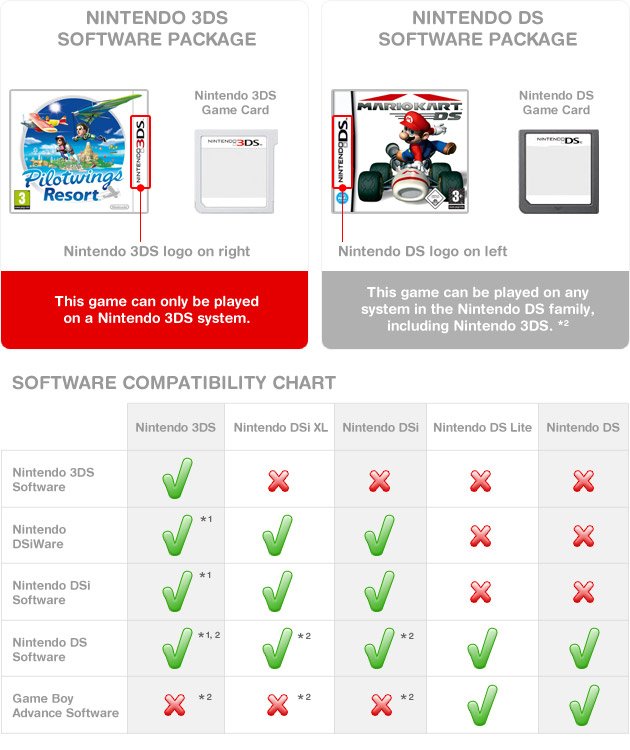
Yes, you can put DS games in a 3DS. The 3DS console is backwards compatible with Nintendo DS cartridges.
Ever wondered if your old Nintendo DS collection will still be playable? The question of can you put ds games in a 3ds often comes up when thinking about upgrading consoles. Good news for gamers who love retro fun.
The 3DS system has a feature that allows you to play your beloved DS titles. This means you don’t need to keep both consoles around. You can enjoy older games on your newer handheld device.

Can You Put DS Games in a 3DS? Exploring Compatibility
So, you’ve got a shiny Nintendo 3DS and a pile of classic Nintendo DS games gathering dust? You might be wondering, “Can I play my old DS games on this new 3DS?” The short answer is a big YES! The Nintendo 3DS was cleverly designed to be backward compatible, meaning it can play games from its predecessor, the Nintendo DS. However, it’s not quite as simple as just popping a DS cartridge into your 3DS. Let’s dive deeper into how this compatibility works, any potential limitations, and everything else you need to know about playing your favorite DS titles on your 3DS.
Understanding Backward Compatibility
The concept of backward compatibility is all about allowing newer consoles to play games from older systems. It’s like having a universal remote for your gaming library! The Nintendo 3DS has this feature, specifically designed to support most of the vast catalog of Nintendo DS games. This means you can enjoy many of the classics you loved on your old DS, right on your 3DS, without needing to keep both consoles around. It’s a great way to revisit beloved games and maybe even discover titles you missed the first time around. This feature was a major plus for many gamers when the 3DS launched, letting them transition to the new handheld without losing access to their games.
How to Play DS Games on a 3DS
Playing DS games on your 3DS is a very straightforward process. The 3DS has a cartridge slot at the top, same as the DS. Just follow these simple steps:
- Locate the game card slot on your 3DS. It’s usually at the top of the system.
- Take your Nintendo DS game card.
- Carefully insert the Nintendo DS game card into the slot. Make sure the label is facing the correct way (usually upwards).
- Power on your 3DS.
- The game should appear on the HOME menu. Select the game icon to start playing.
It’s really as simple as that. Once the game loads, you’ll be able to play it just like you did on your original DS.
Potential Differences and Considerations
While your DS games will play on the 3DS, there might be a few small differences you notice:
- Screen Resolution: DS games were made for a lower-resolution screen. On a 3DS, the game will not have the upscaled resolution, so the image might look a little less sharp or have black bars around the edges. It’s still perfectly playable but don’t expect a visual upgrade.
- Dual Screen Setup: The DS relied heavily on its dual-screen setup. The 3DS also has two screens, so this is not an issue for DS games. In DS games, the top screen was usually the primary display while the bottom touchscreen was used for controls and menus. The 3DS mimics this setup perfectly when you play DS games.
- Touchscreen Functionality: The touchscreen functionality will remain the same, so any games that use the touchscreen will work exactly as they did on the DS. This includes stylus-based games, which means you can still enjoy games like “Brain Age” and other titles that heavily rely on touch input.
- 3D Feature: You won’t get any 3D effects when playing DS games. The 3D functionality is specific to 3DS games only. While the 3DS is capable of displaying graphics in 3D, this feature is not used when running older DS titles.
- Microphone: Some DS games use the microphone. The 3DS has a microphone and it works with those old DS games that need it.
Specific DS Game Examples
Let’s look at a few popular DS games to understand how they work on the 3DS:
-
Pokémon Games: Titles like “Pokémon Diamond,” “Pearl,” “Platinum,” “HeartGold,” and “SoulSilver” play seamlessly on the 3DS. Trading and battling with other DS players works the same way as it did on the original DS. You can even transfer your old Pokémon to newer games, which is a great way to revisit those adventures.
-
The Legend of Zelda: “The Legend of Zelda: Phantom Hourglass” and “Spirit Tracks” are fully compatible with the 3DS. The gameplay and touchscreen controls remain intact, offering the same experience as the DS.
-
Mario Games: Games like “New Super Mario Bros.” and “Mario Kart DS” run perfectly on the 3DS. These titles are incredibly popular, and enjoying them on the 3DS offers the same fun experience.
-
Brain Age: These games utilize the touchscreen and microphone, and they will work perfectly on the 3DS just like they did on the DS.
Are There Any DS Games That Won’t Work?
While the vast majority of DS games are compatible with the 3DS, there are a few exceptions. Generally, these are very rare, and it’s unlikely you’ll come across them. The vast majority of DS games will play without a problem on your 3DS. You’ll find that any game you remember playing on the DS will almost certainly work just fine on your 3DS.
Advantages of Playing DS Games on a 3DS
While you can play DS games on a regular DS, using a 3DS has some advantages:
- One Console, Many Games: You can play both 3DS and DS games on a single device, reducing clutter.
- Better Screen: Even though the resolution is not upgraded, the 3DS screen is usually brighter and clearer than the original DS screens. This can make playing your older games a more enjoyable experience.
- Portability: The 3DS is compact and easy to carry around, meaning you can enjoy a large library of games anywhere.
Different 3DS Models and DS Compatibility
All models of the Nintendo 3DS, including the original 3DS, the 3DS XL, the 2DS, and the New 3DS, are all compatible with DS games. The size of the screen is the main difference between these models. But that doesn’t change how well your old DS games will play on each. The main thing to keep in mind is that every version of the 3DS family can play DS games. This is a very convenient thing that Nintendo did, keeping its fans in mind.
Playing DS Games on a 2DS
The 2DS, the entry-level handheld in the 3DS family, plays DS games perfectly. It lacks the 3D screen feature of the 3DS, but it still has two screens, making it a great choice for playing DS titles. All the touchscreen functions and game mechanics will work without any issues. The 2DS was designed to be more affordable but can still play all your old DS games.
The Nintendo DSi and DS Games on 3DS
The Nintendo DSi was a revision of the original DS, featuring a camera and the ability to download games from the DSiWare shop. Games from the DSiWare shop will not transfer or appear on the 3DS. DSi Enhanced cartridges will work just fine on 3DS. So the games you had physically on the cartridges will work. You will not have access to your DSiWare games.
A Look at the DS Cartridge Slot
The Nintendo DS game slot on the 3DS is at the top of the handheld. The slot accepts DS game cards without any problem. This is the same slot you will use for your old DS cartridges. It is very easy to put the game in, just be sure it is facing the correct way.
Digital DS Games on the 3DS?
It’s important to understand that you can’t buy or download digital versions of DS games on your 3DS. If you purchased DSiWare games on your old DSi, you won’t be able to transfer these to your 3DS. DS games are played on your 3DS via physical game cartridges only. If you want to play a DS game you don’t already have, you will need to buy a physical copy.
Why is DS Compatibility Important?
The decision to make the 3DS backward compatible with DS games was very important for several reasons:
- Large Game Library: The DS had a huge library of games, so offering this compatibility ensured that owners of the 3DS had a vast catalog of games available right from the beginning. This offered a good value to the early adopters of the system.
- Value and Replayability: It allowed players to continue enjoying their old games on a new system, extending the life of their game collection and investment. It gives people a good reason to upgrade without having to give up playing their older favorites.
- Ease of Transition: It made it easier for players to move from a DS to a 3DS without losing access to their favorite games. This made the upgrade process very smooth for existing Nintendo gamers.
- Introducing New Players: It allowed new players to the 3DS to see and experience the older DS games. This can introduce players to some awesome games they may have missed.
Troubleshooting
Sometimes, you might encounter problems when trying to play a DS game on your 3DS. Here are a few common issues and what to do about them:
- Game Not Reading: If your 3DS doesn’t recognize the DS game, first make sure the cartridge is clean and free of any debris. Try to gently clean the gold pins with a microfiber cloth. If that doesn’t work, try the cartridge in another 3DS or DS to see if the problem is with the game or the console itself.
- Game Freezing: If the game freezes while playing, it could be a problem with the cartridge or the system. Try cleaning the cartridge and restart your system. If that doesn’t work, it could also be a sign that the game card is damaged.
The Legacy of DS Games on the 3DS
The ability to play DS games on the 3DS is more than just a technical feature. It’s a way to connect to gaming’s history. It lets players revisit old favorites, share these games with a new generation, and keep the memory of the DS alive.
So, to reiterate, the answer to “can you put DS games in a 3DS” is a resounding YES. The Nintendo 3DS offers excellent backward compatibility, allowing you to enjoy the extensive library of Nintendo DS games on a newer system. While there might be slight visual differences, the overall experience is nearly identical to playing on an original DS. This feature makes the 3DS a versatile handheld device, giving players access to a massive collection of games from different eras.
DS Games on a 3DS?!?
Final Thoughts
Absolutely, you can put ds games in a 3ds. The 3DS console is backward compatible, allowing you to enjoy your entire library of DS titles. This feature is important for many players who have an existing collection.
It simply works by inserting your DS game cartridge into the 3DS’s slot. This compatibility ensures you do not have to purchase all new titles again. Enjoy playing many of your games on a single device.

