
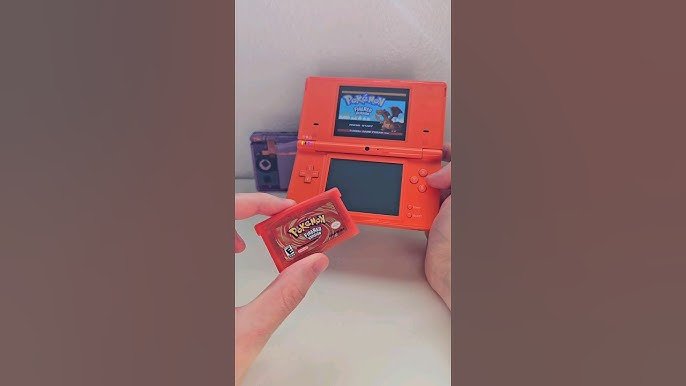
Yes, the original Nintendo DS and Nintendo DS Lite do play Game Boy Advance (GBA) games.
Ever wondered if your old Nintendo DS could handle your cherished Game Boy Advance titles? Many people ask “does nintendo ds play gba games” because they have a stack of old cartridges. The good news is, the original DS and the DS Lite have a special slot just for GBA games.
These older models make it super easy to revisit those classic titles. So dig out those old cartridges and enjoy gaming!

Does Nintendo DS Play GBA Games? The Definitive Guide
Okay, so you’ve got your trusty Nintendo DS, maybe a classic DS or a sleek DS Lite, and you’re wondering: can this awesome handheld play those cool Game Boy Advance (GBA) games you remember? It’s a fantastic question and one that many people have! The answer, while mostly yes, has a few interesting details. Let’s dive into everything you need to know about playing GBA games on the Nintendo DS family.
The Nintendo DS and GBA Compatibility: A Closer Look
The Nintendo DS, when it first came out, was a pretty big deal. Not only did it introduce the dual-screen experience (a touch screen to boot!), it also included something that made many gamers incredibly happy: the ability to play Game Boy Advance games! This backward compatibility was a huge win, allowing players to carry their entire library of games with them.
But here’s the thing: not all DS models can play GBA games. It’s crucial to know which DS systems have the hardware to support the older cartridges. Let’s break it down.
Which Nintendo DS Models Play GBA Games?
The Original Nintendo DS (often called the “phat” DS): Yes! This is the first model of the DS, the one that came before the DS Lite. This chunky handheld has a dedicated GBA cartridge slot, allowing you to play your GBA games without any extra accessories.
The Nintendo DS Lite: Absolutely! The DS Lite, known for its slimmer design and brighter screens, also includes that essential GBA cartridge slot. So, yes, you can play your GBA games on the DS Lite too.
Nintendo DSi: Nope. Unfortunately, the DSi and DSi XL models do not have a GBA cartridge slot. Nintendo removed this feature to save space and reduce costs. This means you cannot directly play GBA games on these models.
Nintendo 3DS Family: Sadly, No. This includes the 3DS, 3DS XL, 2DS, and 2DS XL. Just like the DSi, these consoles lack the physical GBA cartridge slot, hence, they are not compatible with GBA games physically.
So, in short, if you have an original Nintendo DS or a DS Lite, you’re in luck for native GBA game play! if you have a Nintendo DSi, DSi XL or any Nintendo 3DS handheld, then you cannot play GBA games on those consoles natively.
The GBA Cartridge Slot: Where the Magic Happens
Let’s talk a little more about that GBA cartridge slot. This physical slot, typically found on the bottom of the original DS and DS Lite systems, is the key to playing your GBA games. You simply slide your GBA cartridge into this slot, just like you would a regular DS game into the top slot.
It’s important to note the DS console will not read and play any GBA games through the top DS slot, this slot is for DS games only.
Why Was GBA Compatibility Included?
There were several reasons why Nintendo decided to include GBA compatibility on early DS models:
Backwards Compatibility: It provided a great value to customers, because they could enjoy existing Game Boy Advance library of games on the latest handheld.
Transition Period: At the time, the Game Boy Advance was still extremely popular. By including GBA support, Nintendo gave gamers an easy way to transition into the DS era without feeling like their old games were now useless.
Larger Game Library: It instantly expanded the number of games players could enjoy on their new console.
Fan Appreciation: It was a great way for Nintendo to show appreciation to their fans and their continued support throughout the years.
How to Play GBA Games on Your Compatible DS
Playing GBA games on your original DS or DS Lite is pretty simple:
1. Turn off your DS: Always a good practice before swapping out game cartridges.
2. Locate the GBA Cartridge Slot: This slot is on the bottom of the console.
3. Insert the GBA Cartridge: Gently slide your GBA game into the slot until it clicks into place.
4. Turn on your DS: Now power up your system.
5. Select the GBA Game: The DS should automatically recognize the GBA game, and it will appear on the bottom screen when the console is powered on. Simply tap the GBA icon on the bottom screen or touch screen to begin playing the game!
6. Enjoy Your Game!: Now you can get into your old favorite GBA titles.
GBA Games on Nintendo DS: Important Things to Keep in Mind
Only One GBA Game at a Time: You can only have one GBA game inserted at a time. The console is not designed to recognize multiple GBA games at once.
No DS Features: When playing a GBA game, you won’t be able to use any of the Nintendo DS’s features, such as the top screen, touch screen, or wireless communication. The game plays as if you were on a GBA system.
No DS Cartridges at Same Time: You can’t play a GBA game and a DS game simultaneously. You can only play a DS or a GBA game each time but not both together.
GBA Hardware is being used: It uses the internal GBA hardware. The GBA games are being run using the built in GBA hardware of the DS or DS Lite consoles, so it is not software emulated.
GBA Titles and the Nintendo DS Experience
Let’s get into some of the awesome GBA games you could play on your DS or DS Lite. Remember those classics like:
The Legend of Zelda: The Minish Cap
Metroid Fusion
Pokemon Ruby, Sapphire, and Emerald
Fire Emblem: Sacred Stones
Mario & Luigi: Superstar Saga
Advance Wars
Final Fantasy Tactics Advance
Golden Sun
Castlevania: Aria of Sorrow
Mega Man Zero series
These are just a few examples of the fantastic titles in the GBA library that you can enjoy on a compatible DS system. It’s like having two handheld consoles in one!
Comparing GBA Game Play on the DS vs. the Original GBA
While playing GBA games on a DS is awesome, there are some small differences to keep in mind:
Screen Size and Resolution
Original GBA: The screen is smaller.
Nintendo DS/DS Lite: Both systems typically have a slightly bigger screen when playing GBA games, which can improve the viewing experience. Note that the GBA games are not upscaled on the DS, therefore the screen would be smaller and surrounded by black bars.
Sound Quality
Original GBA: The original GBA had its own specific sound output, and some players might prefer the audio nuances of the original.
Nintendo DS/DS Lite: The sound is reproduced faithfully. Some might prefer the slight differences in sound produced by the DS compared to the original GBA, but it’s still very similar.
Portability and Convenience
Original GBA: A dedicated console for GBA games.
Nintendo DS/DS Lite: A single device for both DS and GBA games is really convenient, allowing players to carry fewer devices.
What if you Don’t Have a GBA Compatible DS?
If you have a DSi or a 3DS family system, and you want to play GBA games, things can get a bit tricky. Because, as mentioned before, these handhelds do not have a GBA cartridge slot. Here are the primary options:
1. Acquire a Compatible Console: The most straightforward method. If you want to play GBA games on a DS console with the cartridges, you will need to get an original DS or a DS Lite, since only these DS models have that GBA cartridge slot built in.
2. Emulation: On non-Nintendo devices like computers, tablets, or phones, there are a variety of emulators that can play GBA ROM files. However, it’s important to understand the legality of downloading and using ROM files. You should only consider doing it if you own a physical copy of the game that you have made backup for personal use.
3. Nintendo Switch Online: Nintendo Switch Online’s Expansion Pack service has included Game Boy Advance library in the service. If you are subscribed to that service, you will be able to play a growing library of GBA games on your Nintendo Switch console.
4. Modding: In certain communities that love tinkering with consoles, there exist methods of modding your 3DS, which enables you to play GBA ROMs using custom softwares and applications installed on your 3DS console. But this is not as straightforward, and it also voids warranty for the device, plus the possibility of damaging your console in the process is still present.
5. Virtual Console: Nintendo had Virtual Console on the eShop service on 3DS and Wii U, but this has now been discontinued. It had a number of Game Boy Advance games, but those are not easily accessible now.
Final Thoughts on GBA Gaming on Nintendo DS
The ability to play GBA games on the original Nintendo DS and DS Lite was a fantastic addition. It not only gave players a huge game library to enjoy, but it also made the transition to the dual-screen experience much smoother and convenient. The backwards compatibility with the GBA games on early Nintendo DS consoles is a strong testament to how Nintendo cares about their customers, and giving them more value for their money. Whether you’re revisiting old classics or exploring GBA titles for the first time, the Nintendo DS (or DS Lite) is a fantastic device to experience those games. If you own a DSi or any console from the Nintendo 3DS family, and want to play your GBA cartridges, then you would need an old original DS or DS Lite for it. If you are wondering about other ways, those options are also discussed in this article.
Nintendo DS Game Boy Slot
Final Thoughts
Yes, the original Nintendo DS models possess a Game Boy Advance cartridge slot. This allows users to directly play GBA games. You must remember, however, that the DS Lite and later DS iterations also have this capability.
Therefore, if you’re wondering “does nintendo ds play gba games,” the answer is definitively yes, for the original and DS Lite systems. This feature makes those consoles a great option for enjoying both DS and GBA libraries.

