
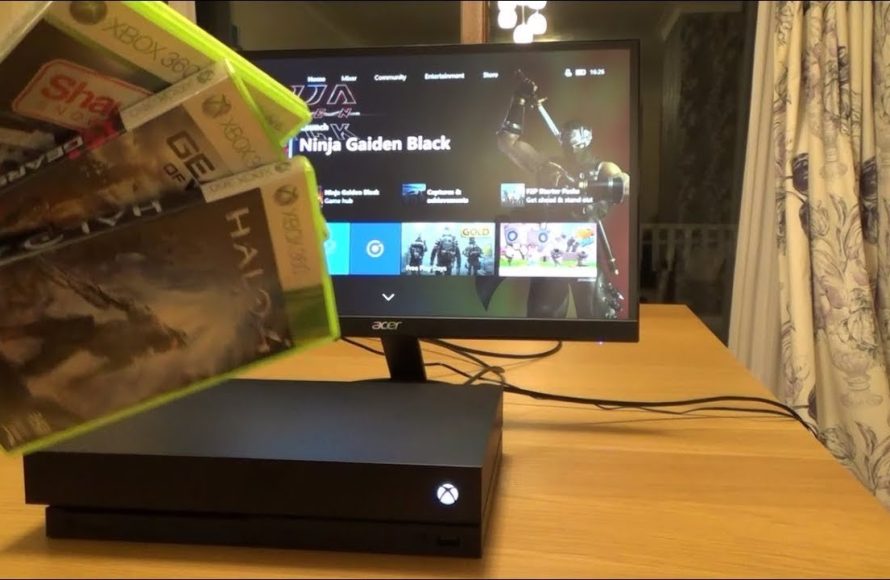
Unfortunately, you cannot directly use most Xbox 360 game discs on an Xbox One.
Ever wondered, can you use Xbox 360 game discs on Xbox One? Many gamers have faced this question. It’s a common query for those upgrading their consoles, hoping their old library moves with them. The answer isn’t a simple yes or no.
While Xbox One does offer backward compatibility, it’s not universal. Only a select list of Xbox 360 games are playable through this feature, and you’d need a digital download, not the physical disc. So, managing expectations about your 360 collection when moving to Xbox One is important.

Can You Use Xbox 360 Game Discs on Xbox One?
So, you’ve got a pile of awesome Xbox 360 games and a shiny new Xbox One. You might be wondering if you can just pop those old discs into your new console and start playing. It’s a great question, and the answer isn’t a simple yes or no. Let’s dig into the details about Xbox 360 games on Xbox One.
The Magic of Backwards Compatibility
The key here is something called “backwards compatibility.” This fancy term means that your Xbox One can play some, but not all, games from older Xbox consoles. It’s like your video game console has a special ability to understand and run games made for a different system. Microsoft made this feature so gamers could enjoy some of their favorite older games on the newer hardware, and it’s super helpful when you have a collection of games from different generations.
How Does Backwards Compatibility Work?
Imagine your Xbox One as a translator. It doesn’t just directly play an Xbox 360 disc. Instead, it uses special software that acts like a “middleman”. This software translates the game’s code, written for the Xbox 360, into instructions that the Xbox One can understand. This is why not every Xbox 360 game will work on your Xbox One, as the translator needs to be made for each game individually.
Microsoft specifically picked certain games that would run well on the Xbox One to add to the backward compatibility library. They had to test each game, and sometimes they might have to tweak it to work properly on the Xbox One. It’s quite a complex job, but it helps us play some of our old favorites on modern consoles.
What Happens When a Game Isn’t Backwards Compatible?
If you put an Xbox 360 game disc into your Xbox One that isn’t backwards compatible, your Xbox One probably won’t know what to do. It might just tell you it can’t read the disc, or suggest you need to download the correct version of the game, if available. It’s like trying to put a key into the wrong lock—it just won’t work!
Finding Out Which Xbox 360 Games Work
So, how do you know which Xbox 360 games will actually play on your Xbox One? You can’t just guess! Luckily, Microsoft keeps a list. It’s a bit like having a cheat sheet to tell you which games are compatible. Let’s explore ways to find this important information.
The Official Xbox Backward Compatibility List
The best place to check is the official list that Microsoft provides. You can find it on the Xbox website, and it is usually updated regularly. This list shows all the Xbox 360 games that are backwards compatible with the Xbox One, and it usually tells you if they’re also available through Xbox Game Pass or other means. You can find this list by simply searching ‘Xbox backward compatible games’ on any search engine. This is probably the most reliable place to get your answers from. The list keeps getting longer with additions over time.
Checking the Xbox Store
Another good idea is to look in the Xbox Store on your console or on the Xbox website. If an Xbox 360 game is backwards compatible, it often shows up for purchase or download on the store. If you see it there for the Xbox One, it’s a good indication that it will work! If you can’t find it on the store, then you’ll likely need to use your disc to play. Make sure to check if it is also a digital version of the game so you don’t buy it twice.
Using the Xbox App or Mobile Website
You can also use the Xbox app on your phone or the Xbox website on your computer. By logging into your Xbox account, you can see what games are compatible. This can be really useful if you want to look up games quickly without having to turn on your console. You can use your phone’s search functionality to find specific games and see if they appear for the Xbox One.
What About Digital Xbox 360 Games?
It’s not just about the game discs. If you bought any Xbox 360 games digitally, linked to your Xbox account, there’s a good chance you can download and play them on your Xbox One! This is super convenient, as you don’t have to worry about finding the old game discs. It’s like your games are traveling with you from one Xbox generation to the next.
Redownloading Digital Games
When you sign into your Xbox One with the same Xbox account you used on your Xbox 360, compatible games should show up in your “Ready to Install” list. You can usually find this list in your games and apps section. Just choose your game, press the Install button, and your Xbox One will do the rest! If you can’t find the game, make sure you are logged in with the same Xbox account you bought the digital game with.
Xbox Game Pass and Xbox 360 Titles
Microsoft sometimes includes some Xbox 360 games in their Xbox Game Pass subscription. If a backwards-compatible game is in Game Pass, it means you can play it on your Xbox One as part of your subscription, without owning a physical disc or buying the game. Check to see if your favorite old titles are in the Game Pass library, this could save you time and money looking for discs.
The Limitations of Backwards Compatibility
Even though backwards compatibility is awesome, there are still some things you should be aware of. It’s not a perfect system, and sometimes there are things that will get in the way of using Xbox 360 games on your Xbox One. Let’s take a look at these limits.
Not All Games Are Supported
As we’ve mentioned, the biggest limitation is that not every single Xbox 360 game works on Xbox One. The library of backwards compatible games is quite large, but it still doesn’t include every game from the Xbox 360’s library. This means that some of your favorite games may not be available. This can be frustrating, but it is how the system works, as the game has to be specifically prepared for this feature.
Some Games May Have Issues
Even some games that are backward compatible may not run exactly as they did on the Xbox 360. There might be small differences in performance or visual appearance. These are generally not major issues, but it’s something to keep in mind. Sometimes glitches that were present in the original game might still appear when playing on the newer system, although most of the time the games are stable. Microsoft continues to update and improve backward compatibility games for Xbox One.
The Original Disc is Required (Sometimes)
For disc based games, you often need to have the original Xbox 360 disc to play the game on your Xbox One. You use the disc for confirmation of ownership, then the game installs on your system. This may mean you need to keep hold of all those old games just to play them on your console. Remember if you have the digital version you don’t need to have the disc.
Saving Progress from Xbox 360
If you are looking to continue playing an old Xbox 360 game, you may want to use your old saves. In order to do that, you must ensure you have backed up your saved data to the cloud and that your Xbox One has synced your game save to the cloud. Once you are logged into the same account, you can usually continue your saved game. You will need to have access to an internet connection and an active Xbox Live account to enable this feature.
Xbox Series X|S and Backwards Compatibility
If you are reading this and also own an Xbox Series X or Xbox Series S console, you can use all of the games you used on your Xbox One. All the Xbox One games have been added to the backwards compatibility list for this console generation as well. You can enjoy the benefits of your previous consoles and their games on your current gen system. So if you are thinking of upgrading to the current gen consoles, you can play all your previous games as well.
Summary
- Backwards compatibility lets you play some older Xbox 360 games on your Xbox One.
- Not every Xbox 360 game works on the Xbox One.
- Check the official Xbox compatibility list to see if your games are compatible.
- You can play compatible digital Xbox 360 games if they are linked to your account.
- You usually need the original disc or digital license to play the game.
While not every single Xbox 360 game will work, many popular and well-liked titles are available to play on the Xbox One. Backwards compatibility allows us to enjoy our classic games on modern consoles. This feature ensures gamers can re-experience old favorites and share them with new generations of gamers. Always check the official list before trying your old discs. You can often find other ways to play the game such as through game pass or by downloading the digital version.
How to transfer Xbox 360 games to Xbox One
Final Thoughts
In short, you cannot directly use every Xbox 360 game disc on the Xbox One. Microsoft implemented a backward compatibility program, making select 360 games playable. This program does not include all titles.
The list of compatible games continues to grow, but it’s not a comprehensive one. Therefore, checking the official list beforehand is a must. Confirming if your specific game is supported is crucial before inserting the disc.
To conclude, can you use xbox 360 game discs on xbox one? The answer is sometimes, depending on if it’s backward compatible.

