
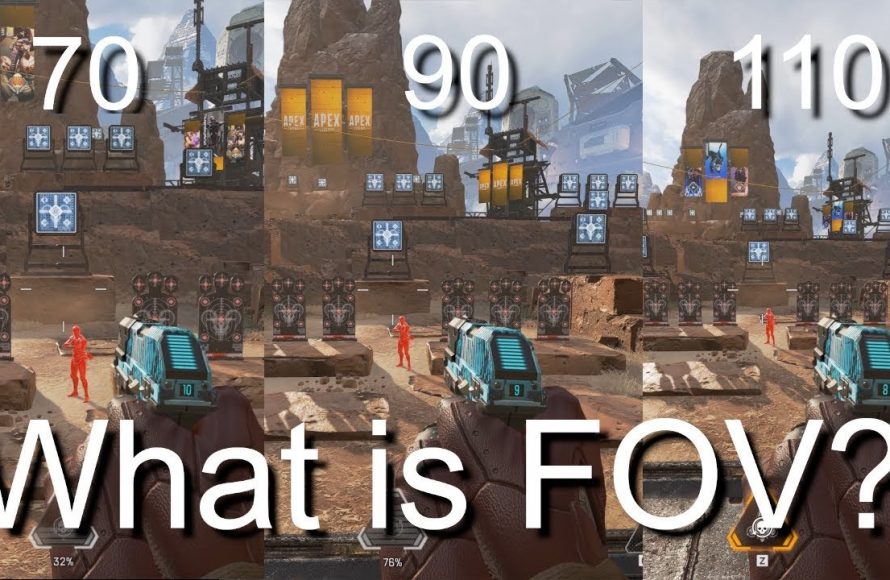
FOV in games, or field of view, refers to the extent of the observable game world displayed on your screen at any given time.
Ever wondered why your friend sees more of the game world than you do? Well, that’s likely due to their field of view settings. Specifically, what is fov in games? It is a crucial setting that impacts your gameplay experience significantly.
A narrow FOV can feel constricting and claustrophobic. In contrast, a wide FOV provides a more expansive view of your surroundings, potentially improving awareness. Players often adjust this setting to find their preferred level of visibility.

What is FOV in Games?
Okay, let’s talk about something really important in video games: Field of View, or FOV. Imagine you’re looking through a window. A small window shows you only a little bit of the world outside, right? A big window lets you see much more. In video games, FOV is kind of like that window. It decides how much of the game world you can see at once on your screen. It’s like your character’s “eyesight” in the game.
Understanding the Basics of FOV
The Field of View in games is measured in degrees. Think of it like making a circle, where 360 degrees is the complete circle around you. The FOV value tells you how wide the cone of vision is. The larger the FOV number, the more you can see on your screen. A small FOV number shows a narrow view, like looking through a telescope. A wide FOV gives you a broader view of the action. This might sound simple, but it has a huge impact on how you play!
Horizontal and Vertical FOV
When people talk about FOV, they’re often talking about the horizontal field of view. This is how much you can see from left to right. But there’s also vertical FOV which covers how much you see up and down. In many games, when you adjust the horizontal FOV, the vertical FOV usually adjusts automatically to keep the image in proportion. However, some games may allow you to customize both horizontal and vertical FOVs independently. Understanding that these dimensions are important can help you optimize your experience. For most users, focusing on horizontal FOV is sufficient.
Why is FOV Important?
You might be thinking, “Okay, cool, but why should I care?” Well, FOV impacts lots of things in a game. Let’s look at some of the reasons why it’s so important:
- Immersion: A good FOV can make you feel more like you’re actually in the game. If your FOV is too small, it feels like you’re looking through a tunnel. Adjusting your FOV can make the environment feel more spacious and immersive.
- Awareness: A wider FOV lets you see more of what’s happening around you. This is especially helpful in games where you need to be aware of enemies or your surroundings. Being able to spot threats coming from the side or behind gives you a better chance of winning.
- Comfort: A poor FOV can actually make you feel dizzy or nauseous. This is especially true for people who are more sensitive to motion. Adjusting the FOV can be a game-changer for your comfort levels and allowing you to play longer.
- Performance: While increasing FOV means you see more, it also means your computer has to render more. If your system isn’t very powerful, using a very high FOV might cause your game to run slower. It’s a balance to find what gives you good visibility and doesn’t hurt your performance.
How FOV Affects Gameplay
Let’s dive deeper into how different FOV settings can affect the way you play various games.
Low FOV
A low FOV, like 60 or 70 degrees, gives you a very narrow view. It’s like having tunnel vision. You’ll feel like the objects in front of you are zoomed in. This can be good for focusing on the action in front of you, but it also means you might miss things happening to your sides.
- Pros: Focuses on what’s directly in front, potentially making distant targets appear larger.
- Cons: Limited peripheral vision, you will have a harder time tracking enemies. Can cause motion sickness in some people. Makes the game feel claustrophobic and reduces immersion.
- Best for: Older games that do not support high FOV options.
Medium FOV
A medium FOV, like 90 degrees, is a good middle ground. It provides a view that feels more natural. It is a common setting for many games and a great starting point. You get decent peripheral vision without too much distortion.
- Pros: Good balance between awareness and focus. Comfortable for most users.
- Cons: Might not provide as much peripheral vision as desired in some scenarios.
- Best for: Most general gaming, good starting point.
High FOV
A high FOV, like 110 degrees or more, gives you a wide, panoramic view. You can see a lot more of the world at once. It’s like having really great peripheral vision. This can be very helpful in fast-paced games where you need to be aware of everything around you.
- Pros: Increased situational awareness, ability to see more enemies or objects. Can make the game feel more immersive and open.
- Cons: Can cause distortion at the edges of the screen (especially at very high FOVs). It may take getting used to. It may impact your performance, since it requires the computer to process more at the same time.
- Best for: Competitive games that require maximum awareness.
How to Adjust FOV in Games
So, how do you change the FOV in a game? The process is usually quite simple.
Finding the FOV Setting
Most games have an FOV option in their settings menus. It is often found in the “graphics” or “video” settings. Look for something like “Field of View” or “FOV slider”. The specific place where the option is can vary from game to game. If you can’t find it in video settings, search in the game’s controls or advanced settings section.
Using the FOV Slider
Once you find the FOV setting, you’ll usually see a slider. You can move it left or right to make the FOV smaller or larger. Some games will show the FOV value as a number (e.g., 90, 100, 110). Try different settings and see how they feel. You might need to experiment to find what works best for you.
Tips for Choosing the Right FOV
Here are some tips that can help you choose an appropriate FOV for your gaming style:
- Start with the default: When you first play a game, start with the default FOV setting. Play for a little while to see if it feels comfortable.
- Consider your game type: For games that are fast paced or require quick reactions and spatial awareness (like first-person shooters) a higher FOV is often best. Slower and more cinematic games might be fine with a lower FOV.
- Test different settings: Don’t be afraid to experiment! Change the FOV a little at a time and play a bit at each setting. See what feels most natural to you.
- Pay attention to motion sickness: If you feel dizzy or nauseous, try lowering the FOV. A lower FOV can reduce motion sickness for some people.
- Consider your computer’s performance: If you have an older or less powerful computer, a higher FOV may cause the game to run slower. You may need to find a balance between a good FOV and the game’s performance.
FOV in Different Game Genres
The ideal FOV can actually change depending on the genre of the game you’re playing.
First-Person Shooters (FPS)
In FPS games, a wider FOV is often preferred by many gamers. It allows you to see more of the battlefield and spot enemies that might be flanking you. A high FOV in FPS games usually gives you a competitive edge. If your computer can handle the performance cost, using a high FOV around 100 to 120 can be beneficial in an FPS setting.
Role-Playing Games (RPGs)
RPGs, especially those with large open worlds, can benefit from a wider FOV. A wider view can make the world feel more expansive, immersive, and can help you take in more of the beautiful environments. However, because RPGs are typically less focused on fast-paced combat, a more moderate FOV, something like 90 to 100 degrees, can work well.
Racing Games
In racing games, FOV is still important because it affects how you see the track. A wider FOV allows you to see more of the surrounding environment, including other cars, which helps with making smart choices and planning your move. Finding the perfect FOV that fits your personal style of play and comfort is the most important. Most people use something between 60-90 degrees, as lower values usually focus too much on the immediate road ahead and higher values tend to introduce distortion.
Strategy Games
Strategy games, which often have top-down perspectives, don’t usually have adjustable FOV settings, since they already show a wide view of the game board. However, the concept of FOV can still apply when you are controlling individual units or squads. If the game offers a camera zoom, this is like FOV control. The wider view allows you to strategize more easily.
The Science Behind FOV
Beyond gaming, the concept of Field of View is actually a scientific term. Human beings have a certain amount of natural FOV, though it is somewhat different for everyone. What we see also depends on if we are using both eyes or a single eye, as well as what our attention is focused on. In games, a FOV that is too low can cause tunnel vision and can be very fatiguing because our brain is constantly trying to compensate for that. That’s one of the reasons why gaming with a very small FOV can sometimes lead to discomfort, nausea or dizziness for some people. A FOV that is more in line with what our brain perceives as natural can be much more comfortable. The ideal FOV setting is still very subjective and depends on a person’s viewing environment, game settings, and even how they are set up in front of their monitor.
Advanced FOV Concepts
There are some other advanced things to think about related to FOV. When you start getting more into the nitty gritty of FOV, these are the kinds of factors you might start considering:
Monitor Size and Distance
The size of your monitor and how far away you sit from it can affect what feels like a comfortable FOV. If you have a small monitor and sit close to it, you might need a lower FOV so that you aren’t getting an image that is too wide for your eyes to take in. If you have a big monitor and sit further away, a wider FOV can feel more immersive. There is no single value that is the right one. It just depends on your particular setup, but the general concept of FOV still applies.
Aspect Ratio
Aspect ratio is the shape of your screen – whether it’s a standard 16:9 widescreen or an ultrawide 21:9. These different shapes can change how FOV is perceived. Because ultrawide monitors provide more width, they often need a slightly wider FOV to appear visually correct. In some cases, a game may not have the proper aspect ratio support. Therefore, your FOV may appear distorted.
FOV Scaled/Independent
Some games may have an option to choose how FOV scales, either horizontally or vertically. Some other games are configured so that an FOV increase is automatically scaled so that both horizontal and vertical fields of view increase evenly. For most users, there is usually no difference, but in some niche scenarios, independent scaling might give you a slight advantage.
FOV and Motion Sickness
A major issue many gamers run into is motion sickness. This is the feeling of nausea that can occur when playing video games, particularly first-person games. A low FOV can contribute to motion sickness because it creates a more restrictive, tunnel-vision-like view. This can confuse your inner ear, since what you see on the screen doesn’t match what your body is physically feeling. A high FOV can sometimes also cause nausea, especially for people who are sensitive to visual distortion. The right FOV can greatly reduce the chance of motion sickness, allowing you to play longer and more comfortably. Typically, experimenting with a variety of different FOV settings is the first step to resolving this issue.
It’s important to note that there are other causes for motion sickness, such as screen shaking, frame rates and other factors. A single adjustment in FOV won’t solve every single issue. If you do experience motion sickness when playing games, it is always best to consult a doctor first.
In the end, understanding FOV is not just about making your game look good, but about making your gameplay experience more enjoyable and more successful. Spend some time to see what works for you and your system, and you’ll see improvements in your games.
Field of View (FoV) in Video Games as Fast As Possible
Final Thoughts
Field of view, or FOV, dictates how much of the game world you see on screen. A higher FOV shows more, like having a wide-angle view. A lower FOV feels more zoomed in, similar to a tight lens.
Adjusting FOV impacts your gaming experience significantly. You can perceive movement and space differently depending on the FOV. Ultimately, understanding what is fov in games allows you to customize your view for comfort and performance.

