
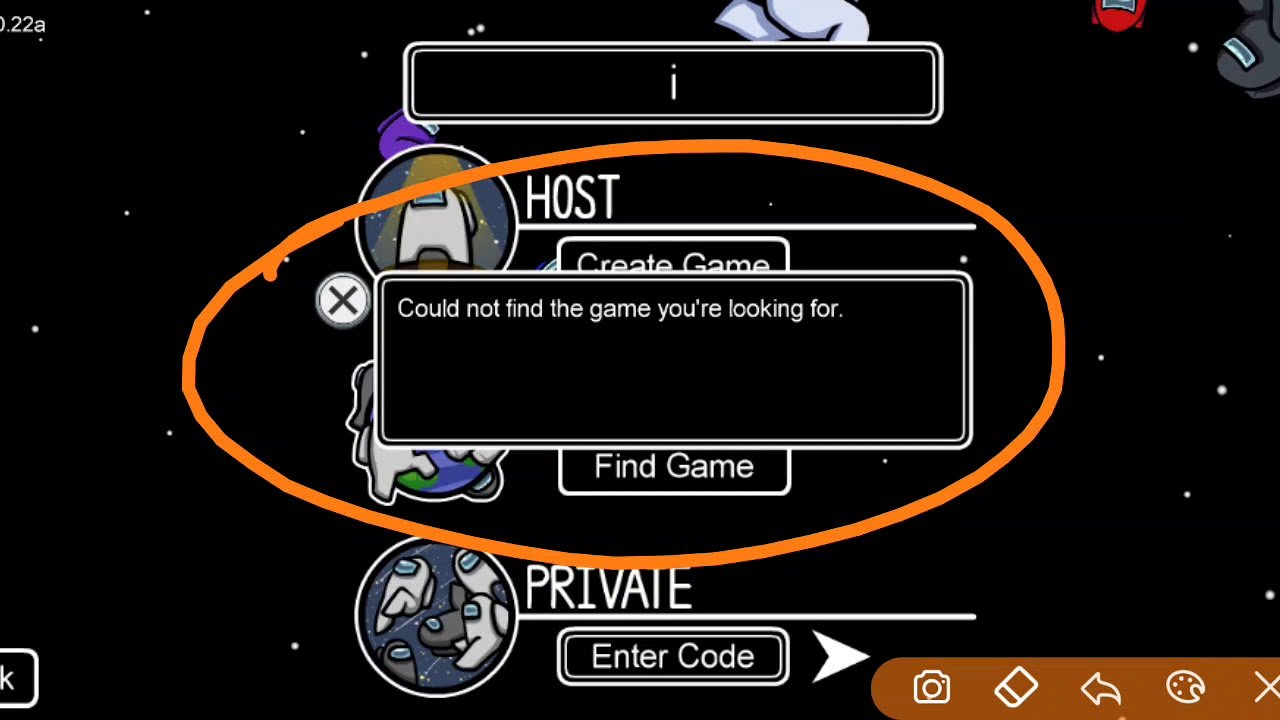
If you couldn’t find the game you’re looking for in Among Us, verify that you are using the correct game code and ensure the game is not already full.
Frustrating, right? You’re all set for a thrilling game of deception and deduction, but you couldn’t find the game you’re looking for among us. It’s a common issue, often stemming from a few simple factors.
Sometimes, it is just a case of a typo in the game code or accidentally joining a full lobby. Let’s explore some quick fixes to get you back into the action and finding your crewmates.

Couldn’t Find the Game You’re Looking For Among Us?
It’s super frustrating when you’re all geared up to play Among Us, but you just can’t seem to find the game you’re looking for! Whether you’re trying to join your friend’s lobby or just want to hop into a random match, sometimes the search doesn’t go as planned. Let’s dive into why this happens and how you can fix it, so you can get back to being a sneaky Impostor or a clever Crewmate!
Common Reasons Why You Can’t Find Your Game
There are a few usual suspects when it comes to not being able to find a game in Among Us. Let’s take a look at each one and what might be causing your problem:
Incorrect Game Code
This is one of the most common reasons! If you’re trying to join a specific game, like your friend’s, you need to enter the game code exactly right. Even a single letter or number wrong can prevent you from finding the game. Game codes in Among Us are case-sensitive, meaning uppercase and lowercase letters matter. So, if the code is “ABCDE,” entering “abcde” won’t work. It’s important to double-check the code your friend gave you or try again.
- Double-check: Always look carefully at the code. Sometimes it’s easy to mix up similar-looking letters or numbers (like ‘1’ and ‘I’, or ‘0’ and ‘O’).
- Ask Again: If you are still struggling to get in, ask your friend to send the code again, either verbally or in a message.
- Copy & Paste: When possible, copy and paste the code to avoid any typos. This is especially helpful for longer codes.
The Game is Full
Among Us has a limit on how many players can join a game. If the lobby you’re trying to join is already full, you won’t be able to find it in the search. Among us games can have a limited number of players (typically, it can be from 4 to 15 players depending on the version or server), so if the game is already filled, you might not be able to join. When a game is full, it typically won’t show up in the available game list either.
This is especially common with popular public lobbies. You’ll have to try joining at a different time or ask your friend to make a new lobby.
Server Region Problems
Among Us has different servers around the world (like North America, Europe, and Asia). You and your friends need to be on the same server to play together. If you’re on the North America server and your friend is on the European server, you won’t be able to find their game in the lobby list even if you have the correct code. Check the server settings, usually on the start screen, and make sure everyone is on the same server. You can find that in the bottom right of your screen when you log into the Among Us game. If one of your friend is in Europe and you are in North America, that can be a possible reason why you can’t find the game.
- Verify Your Region: Both you and your friend need to go into the settings on the main menu and pick the same server location.
- Changing Servers: You can change servers on the menu before you join or create a game.
- Try Different Servers: If you suspect your friends might be on a different server, you could try switching to see if their game shows up.
Private Games
If the game you’re trying to join is set to “Private,” it won’t appear in the public list. You can only join private games by using the exact game code. If your friends set the lobby to private to avoid random people from joining, this is the reason why you cannot see the game. So the solution is ask your friend about that.
Game Glitches or Bugs
Sometimes, the game itself can have small glitches or bugs. This could affect the server list and make it difficult to see or find the game. While Among Us is usually pretty good, glitches can happen. Sometimes, restarting the game can help, as this can refresh your connection to the servers. If you are still struggling to see the game you are looking for, a more permanent solution to game glitches is to reinstall the game on your device. By doing so, all the old files which might have bugs are removed, and a fresh and new copy of Among Us game gets re-installed.
Troubleshooting Steps
If you’ve tried the above steps and still can’t find your friend’s lobby or a match, don’t worry! Here’s a checklist of things to try:
Restart the Game
Sometimes, a simple restart is all it takes. Closing the Among Us app completely and opening it again can fix minor glitches or connectivity problems. It’s like giving the game a fresh start.
Check Your Internet Connection
A bad internet connection can cause issues with finding games. Make sure you’re connected to a stable Wi-Fi network or have a good mobile data signal. If your Wi-Fi is unstable, try restarting your router. Check your other devices on the same connection. Are they also slow or having trouble? This can be a good way to check if the issue is just with Among Us, or your whole internet connection.
Some other things to check on your connection:
- Speed Test: Run a speed test to make sure your internet is working correctly. Look online on Google for speed testing.
- Move Closer to Router: If you’re using Wi-Fi, moving closer to your router can improve signal strength.
- Restart your router: Sometimes, restarting your router can help with network issues.
Verify Game Version
Make sure that you and your friend are using the same version of the game. If your friends’ game is updated, and you are using an old version of the game, it can also create issues with joining the game. To solve this issue, make sure both you and your friends game are up to date.
Ask Your Friend to Make a New Game
If you’re still having problems, ask your friend to create a new lobby. Sometimes, a lobby can have issues that prevent others from joining. So creating a new lobby, and generating a new code might solve this issue.
Contact Among Us Support
If all else fails, it might be a more serious issue that needs the help of the developers. On the official Innersloth Website, they have a support page where you can submit a support ticket or look at any known issues, which might help you to troubleshoot the problem. This method is best used when you have tried all the common fixes but still can’t find the game you are looking for.
How To Avoid Not Finding Games in the Future
Preventing this problem from happening again can save you from future frustration. Here are some good steps to follow:
Communication is Key
Make sure that you are clearly communicating with your friends or other players about the game code and settings. If something is still not working, then try to re-check the codes.
- Take a Screenshot: If your friend sends the code in chat or some other way, try taking a screenshot so you have a reference and do not make any mistake while typing the code
- Chat before game: Chat with your friend before creating a game, so you can ensure that both of you are on the same server.
Use a Voice Chat
Using voice chat can help when communicating the game code. This is because some letters and numbers may look similar, and voice chat can be more efficient than text chat.
Always Double-check Everything
Always double-check everything before you try to join or create a game. Always make sure that your codes, servers, and the game version are correct.
- Confirm Code: Make sure that all the codes are correctly entered, by double-checking them.
- Server Check: Always verify that you and your friend are on the same server.
- Version Confirmation: Verify that both you and your friends are using the latest version of Among Us.
Understanding Server Regions
As mentioned previously, Among Us uses different servers based on regions. Here’s a bit more about why this is important:
Why Servers Matter
Servers are basically like the meeting places for all the players. They help the game run smoothly and connect everyone who wants to play. If your friends are playing on a different server, then you can not join the same lobby. Therefore, it’s very important to be on the same server as your friends.
Here’s an example:
- Imagine you’re in New York and your friend is in London. If you’re both on the North America server, the game connects you faster and more smoothly than if you’re on different servers.
Common Server Locations
Here are some of the common regions that are available in the Among Us game:
- North America: This is the server for players in the United States, Canada, and Mexico.
- Europe: Players in Europe play on this server
- Asia: This is the server for players in countries such as India, China, Japan, and South Korea.
It’s not always about your physical location but more about what server you have selected, so make sure it’s set to the correct place.
Additional Tips for Finding Games
If you’re still having trouble, here are some additional tricks:
Play During Peak Hours
During peak hours more people are playing online, therefore, it is easier to find a game, and might be faster than other times of the day. Play around times of the day when others are active.
Try Random Public Lobbies
If you do not mind playing with random players, try joining random public lobbies. Go to the “Public” option on the main screen and try different lobbies in the lobby list.
Be Patient
Sometimes, you just need to be patient. Try different times or try different methods described above. It can take a few tries to join a game, but do not get frustrated and just keep trying.
Finding the game you’re looking for in Among Us shouldn’t be a chore. Hopefully, with these tips and tricks, you’ll be able to troubleshoot and get back to playing. Remember to communicate with your friends, double-check those codes, and make sure your server locations are set up correctly. By following these simple steps you can help in making your Among Us gaming experience fun and free of problems!
How To Fix Could Not Find The Game You're Looking For Among Us 2024
Final Thoughts
If you explored every corner and still couldnt find the game youre looking for among us, dont give up. There are other fun multiplayer options that you might really enjoy. Exploring various gaming platforms gives you a chance to stumble on unexpected hidden gems.
Sometimes, finding what you exactly want takes a little more digging. The search must continue! Its okay if Among Us isn’t your ideal fit. Ultimately, player happiness is the important goal when enjoying games.

